00196806-02_IM_EDM_1_10_en.pdf - 第14页
EDM V1.10 / Installation Manual 07/2011 Edition 4.1.2 EDM Line Server Minimum Requirements Hardware Intel Pentium 4 1 GB RAM Network connection Operating system Windows 2003 Server (SP 2), Windows XP Professional SP3 (32…
EDM V1.10 / Installation Manual 07/2011 Edition
4 Installation
4.1 Requirements
4.1.1 EDM Master Server
Minimum Requirements
Hardware Intel Pentium 4.3 GHz
2 GB RAM
1 GB hard disk storage capacity
Network connection
Operating system Windows 2003 Server (SP2), Windows XP Professional SP3
(32-bit), Windows Vista SP2, Windows 7, Windows 2008 Server
(preferably 64-bit)
MSMQ runtime must be installed
SIPLACE Pro Version 9.3 Server installation
Microsoft SQL Server Preferably: SQL Server 2008, SQL Server 2008 Express Edition
Supported: SQL2000 SP 4, MSDE 2000 SP4, SQL Server 2005
SP3, SQL Server 2005 Express SP3
.NET Framework Microsoft .NET 3.5 SP 1
Table 4-1: EDM Master Server software requirements
CAUTION
Manually created maintenance jobs can be lost if SQL Server is updated.
13

EDM V1.10 / Installation Manual 07/2011 Edition
4.1.2 EDM Line Server
Minimum Requirements
Hardware Intel Pentium 4
1 GB RAM
Network connection
Operating system Windows 2003 Server (SP2), Windows XP Professional SP3
(32-bit), Windows Vista SP2, Windows 7
MSMQ runtime must be installed
SIPLACE Pro Version 9.3, complete installation
Microsoft SQL Server Preferably: SQL Server 2008, SQL Server 2008 Express Edition
Supported: SQL2000 SP 4, MSDE 2000 SP4, SQL Server 2005
SP3, SQL Server 2005 Express SP3
.NET Framework Microsoft .NET 3.5 SP 1
Table 4-2: EDM Line Server software requirements
4.1.3 Clearing Pool / Data Transfer Manager
Minimum Requirements
Hardware Intel Celeron 1.7 GHz
512 MB RAM
Network connection
Operating system Windows 2003 Server (SP2), Windows XP Professional SP3
(32-bit), Windows Vista SP2, Windows 7
MSMQ runtime must be installed
SIPLACE Pro SIPLACE Pro Desk 9.3
Table 4-3: Clearing Pool software requirements
CAUTION
Before installing a Clearing Pool on your local PC that has access to a remote EDM
master you must install SIPLACE Pro Desk on your local system. The local SIPLACE
Pro Desk installation must also have access to the remote EDM Master.
Push mode will also not work properly if this local installation does not access the
SIPLACE Pro server of the configured EDM Master.
14
EDM V1.10 / Installation Manual 07/2011 Edition
4.2 Folder structure
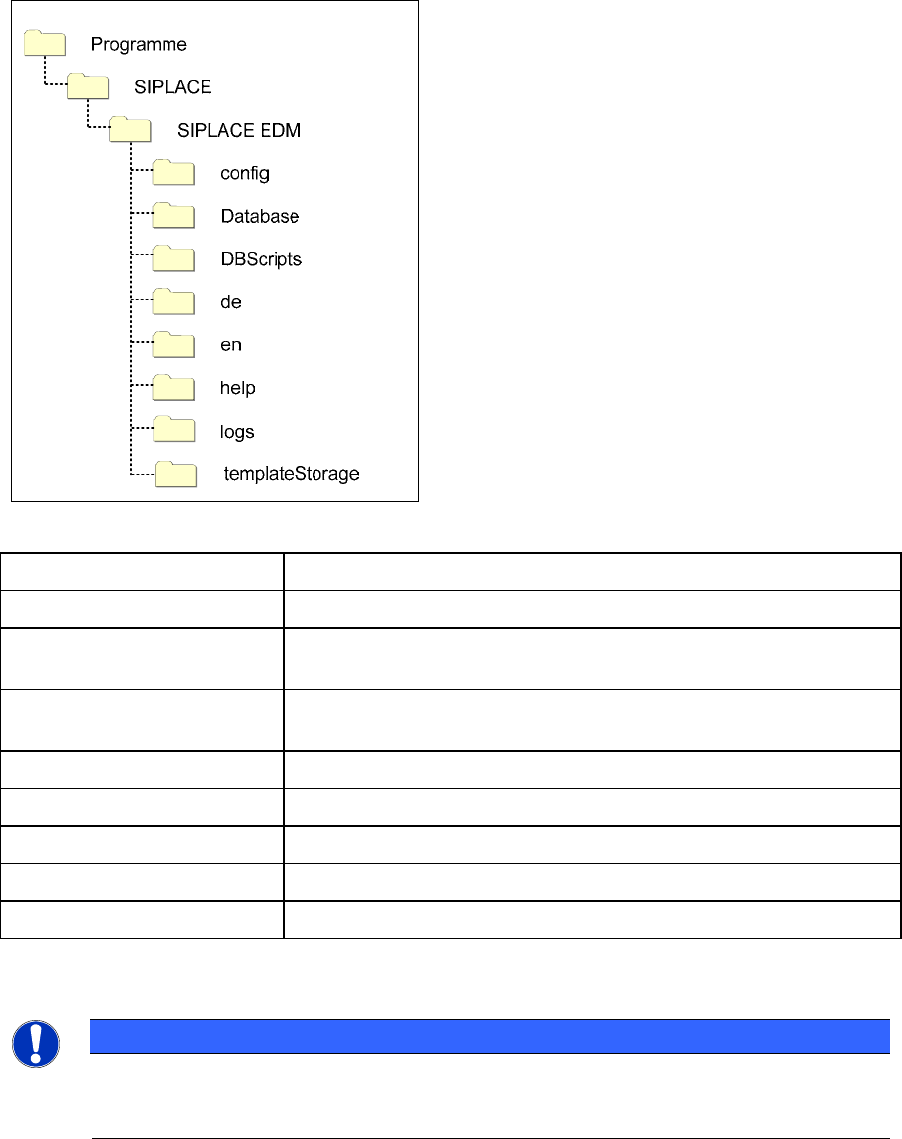
In the following, the folder structure created by the default installation is illustrated.
Figure 4-1: Folder structure of the default installation
Folder Contents
SIPLACE EDM Applications and libraries
config Application configuration, client workflow configuration, filter
configuration, email configuration and logging configuration
Database Database for change notifications and Clearing Pool (Master
Server only )
DBScripts Scripts to create and access the database (Master Server only)
de, en, … Language-dependent resources
help Online documentation
logs Log files (for debugging among other things)
templateStorage Storage location for application templates
Table 4-4: Folders of the default installation
NOTICE
Under Windows Vista, Windows Server 2008 and more recent systems, the
templateStorage and logs folders are located under
%ProgramData%\SIPLACE\SIPLACE EDM.
15