00196806-02_IM_EDM_1_10_en.pdf - 第57页
EDM V1.10 / Installation Manual 07/2011 Edition 5.4.4 Automatic rejection of the changes It is possible to bypass the Clearing Pool and automatically reject objects cha nged on the lines without the data preparation engi…
EDM V1.10 / Installation Manual 07/2011 Edition
5.4.2.3 General distribution list
The general distribution list reacts to notifications from all lines simultaneously, but is otherwise the
same as normal distribution lists.
5.4.3 Direct import of changed objects to the master database
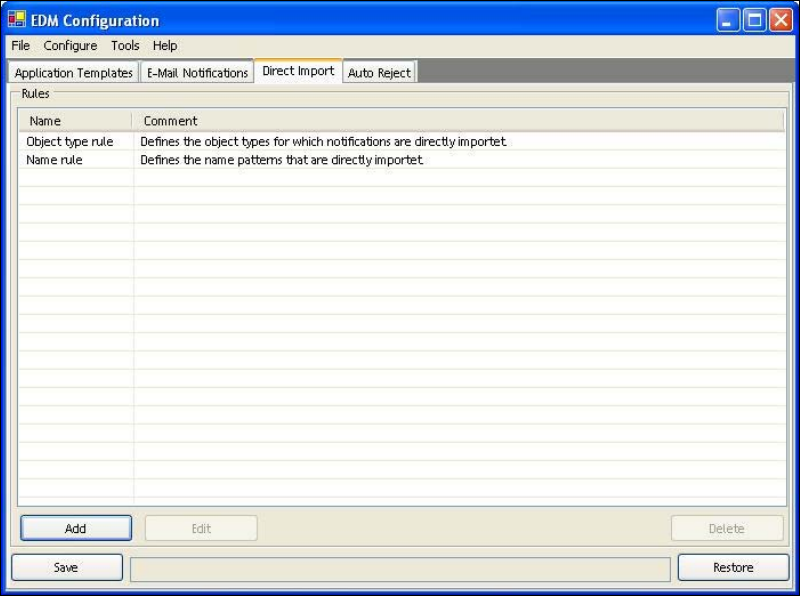
It is possible to bypass the Clearing Pool and import objects changed on the lines directly into the
master database without the data preparation engineer inspecting the data.
Figure 5-7: Configuration of notifications to be imported directly
Configuration is performed in the same way as for filter configuration (see section 5.5 Filter
configuration), but is carried out on the master. The configuration options, however, only allow
identification of the data using the:
● object type
● name of the changed object.
This restriction is implemented using regular expressions.
The configuration is stored in the ClearingPoolImportFilterConfig.xml file in the config folder.
56
EDM V1.10 / Installation Manual 07/2011 Edition
5.4.4 Automatic rejection of the changes
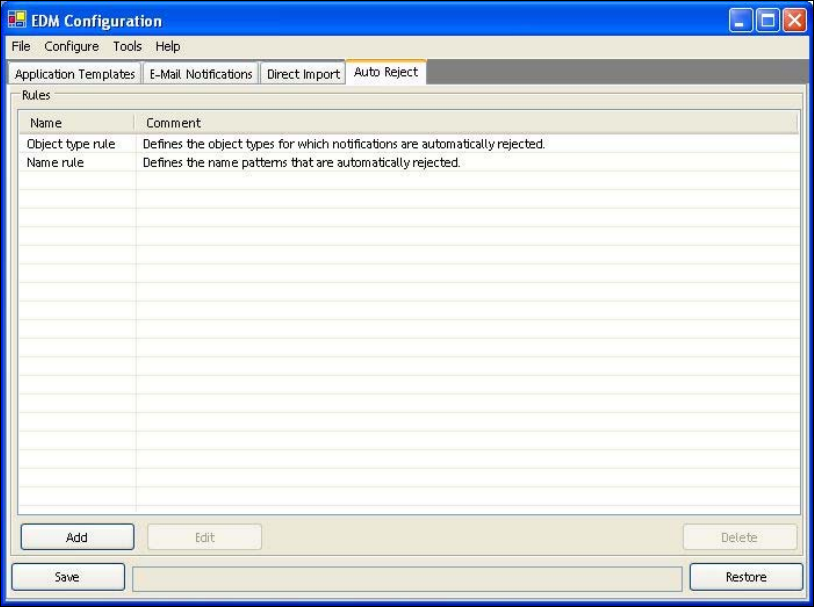
It is possible to bypass the Clearing Pool and automatically reject objects changed on the lines
without the data preparation engineer inspecting the data. The changes are rejected without being
saved.
Figure 5-8: Configuration of notifications to be rejected automatically
Configuration is performed in the same way as for filter configuration (see 5.5 Filter configuration),
but is carried out on the master. The configuration options, however, only allow identification of the
data using the:
● object type
● name of the changed object.
This restriction is implemented using regular expressions.
The configuration is stored in the ClearingPoolRejectFilterConfig.xml file in the config folder.
57

EDM V1.10 / Installation Manual 07/2011 Edition
5.5 Filter configuration
It is not always desirable to inform the data preparation engineer about a data change on a Line
Server, for example when a re-optimization is being performed on the line. In this case, a number
of internal SIPLACE Pro objects (for example HeadSteps, i.e. individual process steps for a head)
are changed, and these changes would then need to be commented accordingly by the user and
put in the Clearing Pool, but they do not contain any information. Furthermore, there are customer
processes that imply a selection of change notifications, for example when just the pure product
data (board, components, etc.) are centrally administered and the process-specific data are
recreated on each line. In such a scenario, only changes to the product data are of interest, and
changes to the jobs and recipes are not.
The NotificationFilterConfig.xml file found in the configuration folder is intended to take these
circumstances into account. In the file, you specify the object types and objects for which no
change notifications are to be sent to the Master Server. The file only affects a Line Server.
Change notifications can be filtered using a combination of:
● object type
● sub-object type
● individual properties of objects/sub-objects
● type of change to the object
● name of the changed object.
This restriction is implemented using regular expressions.
In the standard installation, a filter configuration is created that captures all irrelevant changes
made during optimization. Changes to NotificationFilterConfig.xml should only be made on the
basis of these default settings.
CAUTION
This part of the system is highly sensitive. In extreme cases, incorrect settings can lead
to the loss of important changes or, on the other hand, the data preparation engineer can
be "bombarded" by notifications regarding irrelevant changes.
58