00196806-02_IM_EDM_1_10_en.pdf - 第61页
EDM V1.10 / Installation Manual 07/2011 Edition 5.6 Handling incoming change notifications 5.6.1 Saving the changed objects in the Clearing Pool This is the default handling method for in coming ch ange notifications. It…
EDM V1.10 / Installation Manual 07/2011 Edition
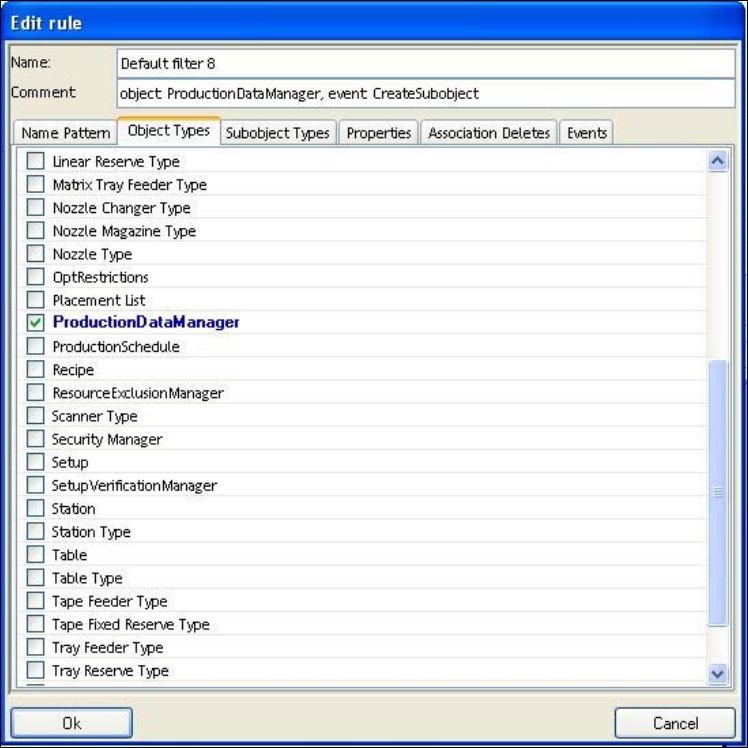
Figure 5-10: Configuration of a single rule
Every condition checks a subset of the properties of the notification. This set is ANDed, i.e. only
when all the properties checked by the condition have the values specified in the condition, the
notification is rejected by this condition.
The following properties can be assessed by a condition:
● Name (regular expression)
● Object type
● Sub-object type
● Property of object or sub-object
● Deletion of sub-objects of a particular object (association delete)
● Type of notification
● SIPLACE user and Windows user
There is a separate tab for each of these properties. If no value is selected in any of the tabs, this
property is not checked. If one or more values are selected, the value of the property in the
notification must match one of the values for the notification to be filtered.
60
EDM V1.10 / Installation Manual 07/2011 Edition
5.6 Handling incoming change notifications
5.6.1 Saving the changed objects in the Clearing Pool
This is the default handling method for incoming change notifications. It is used for changes to all
objects which
● were not imported directly into the master database as described in section 5.4.3.
● were not rejected automatically as described in section 5.4.4.
● have conflicting settings as described in the sections 5.4.3 and 5.4.4.
● could not be imported directly as described in section 5.4.3 due to SIPLACE Pro version
conflicts or other problems.
A notification is sent for all the alternatives as per the email configuration settings.
5.6.2 Direct import of changed objects to the master database
For configuration see section 5.4.3 Direct import of changed objects to the master database.
5.6.3 Automatic rejection of the changes
For configuration see 5.4.4 Automatic rejection of the changes.
61
EDM V1.10 / Installation Manual 07/2011 Edition
6 Default configuration
6.1 EDM.config
You will find more details under [EDM installation folder]\config\EDM.config.
6.2 clientWorkflow.xml
You will find more details under [EDM installation folder]\config\clientWorkflow.xml.
62