00196806-02_IM_EDM_1_10_en.pdf - 第8页
EDM V1.10 / Installation Manual 07/2011 Edition 2 System components 2.1 Overview The Engineering Data Manager com prises two ma jor units: the EDM Maste r Server and the EDM Line Server. Figure 2-1 shows the internal str…
EDM V1.10 / Installation Manual 07/2011 Edition
1 Introduction
The goal of this document is to provide the consultants who will be setting up SIPLACE EDM
systems at the customers with a guide detailing the technical aspects involved in such an
installation.
7
EDM V1.10 / Installation Manual 07/2011 Edition
2 System components
2.1 Overview
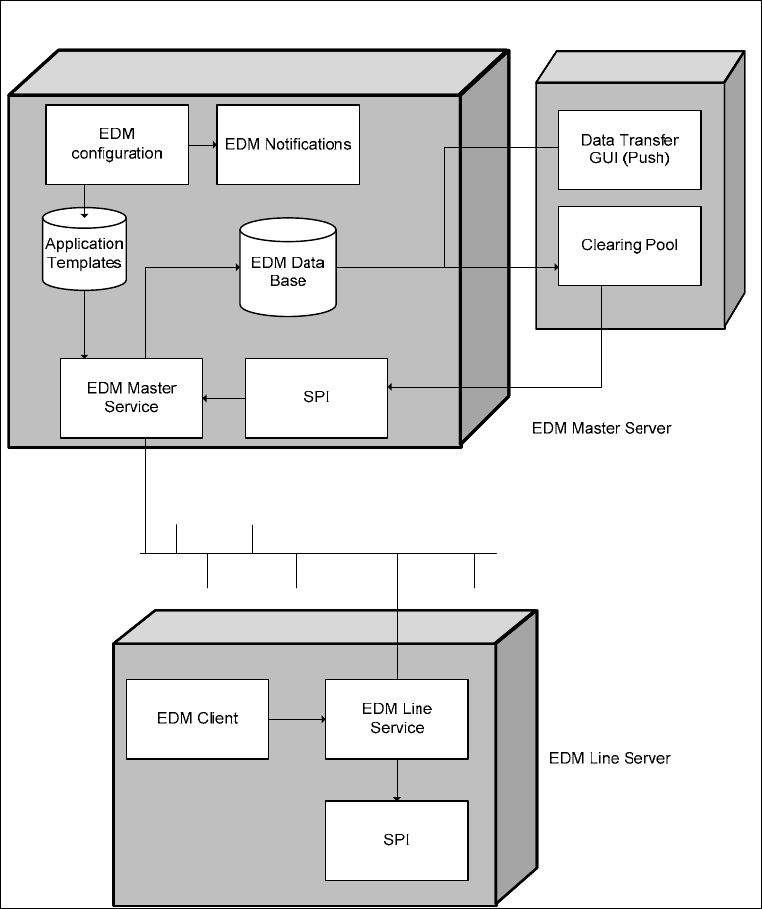
The Engineering Data Manager comprises two major units: the EDM Master Server and the EDM
Line Server. Figure 2-1 shows the internal structure of the application components and the
communication between the individual system components.
Figure 2-1: Structure of the EDM system
The following sections deal with the system components, their function and their communication
channels in more detail.
8
EDM V1.10 / Installation Manual 07/2011 Edition
2.2 EDM Master Server
The EDM master service is the server component of EDM. It replies to queries from EDM line
services and distributes the data in the central SIPLACE Pro database among the lines. In return, it
accepts change notifications and collects them in the Clearing Pool database.
The EDM master service is implemented as a Windows service that starts automatically when the
system is started.
2.3 EDM Client
The EDM Client enables user interaction on the line. It implements the customer workflow for the
distribution of data from a central database. The workflow can be customized to match customer
needs (see section 5.2.4 Configuring push mode). The workflow to be performed here is to be
obtained from the customer, discussed with the customer, and customized for technical or
efficiency reasons if necessary before installing the EDM system.
2.4 EDM Clearing Pool
The EDM Clearing Pool is the tool used by the data preparation engineer to examine the change
notifications from each of the lines in terms of their relevance and, if necessary, integrate them into
the SIPLACE Pro master database. With the functionality already available in SIPLACE Pro,
individual objects of a certain type (components, component shapes, fiducial types, boards and
placement lists) can be compared attribute-by-attribute, and changes can be applied at this low
level. The EDM Clearing Pool can be installed independently of the EDM master service on a
separate workstation computer.
2.5 EDM Data Transfer Manager
The data preparation engineer controls the push mode functions using the EDM Data Transfer GUI
(see section 3.3 Push mode). Here, the objects to be sent are selected and sent to the relevant
lines, a status display shows the progress of the data transferred in this way, informs the user that
the push operation was successful and warns of any problems.
The EDM Data Transfer Manager is always installed in combination with the EDM Clearing Pool.
2.6 EDM notifications
The EDM Service converts the change notifications received from the lines into a human-readable
form and distributes these to the appropriate locations. The type of messages sent and the
recipients of the messages can be configured. This will be explained in more detail later on (see
section 5.4 EDM configuration and section 5.5 Filter configuration).
9