Host Computer System.pdf - 第24页
AVK3 HOST COMPUTER SYSTEM 2.1 Downloadi ng NC Data D77HEC-52- 010-A0 2.1- 1 2.1. Dow nloading NC Dat a D77HEC - 52-010-A 0 2.1. 1 Downloading NC Data From A VK3, when the host comput er sends C0 comm and to AVK3 , the AV…

AVK3
HOST COMPUTER SYSTEM
2. DOWNLOADING PROGRAM
D77HEC-52-000-A0
2-2
D77HEC-52-000-A0
2. DOWNLOADING PROGRAM
AVK3
HOST COMPUTER SYSTEM
2.1 Downloading NC Data
D77HEC-52-010-A0
2.1-1
2.1. Downloading NC Data
D77HEC-52-010-A0
2.1.1 Downloading NC Data
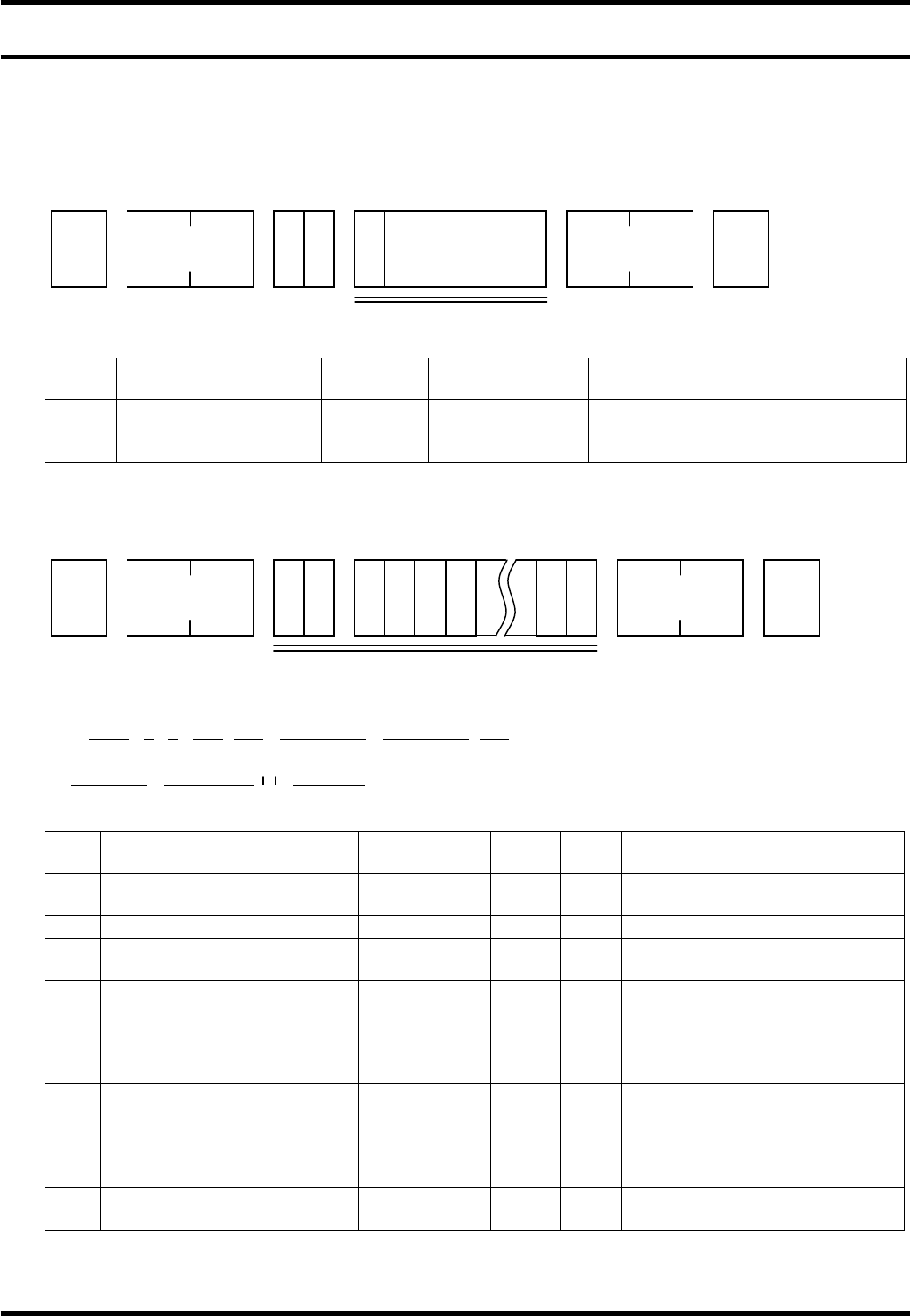
From AVK3, when the host computer sends C0 command to AVK3, the AVK3 goes into receiving mode, and
as a result, can read the data (C0 command is used) sent to it.
Data details
No. Data name
Max.
digits
Input range Remarks
1 Program control No. 15
‘0’ to ‘9’
‘A’ to ‘Z’
Special character
Can be omitted.
It is necessary to include the first
character.
When the machine receives the C0 command, the A0 command is returned as acknowledgment.
The host computer receives this A0 command, and using D command (Data transfer command) sends
leading block (one block) of NC data (N0001 or N1) to the AVK3.
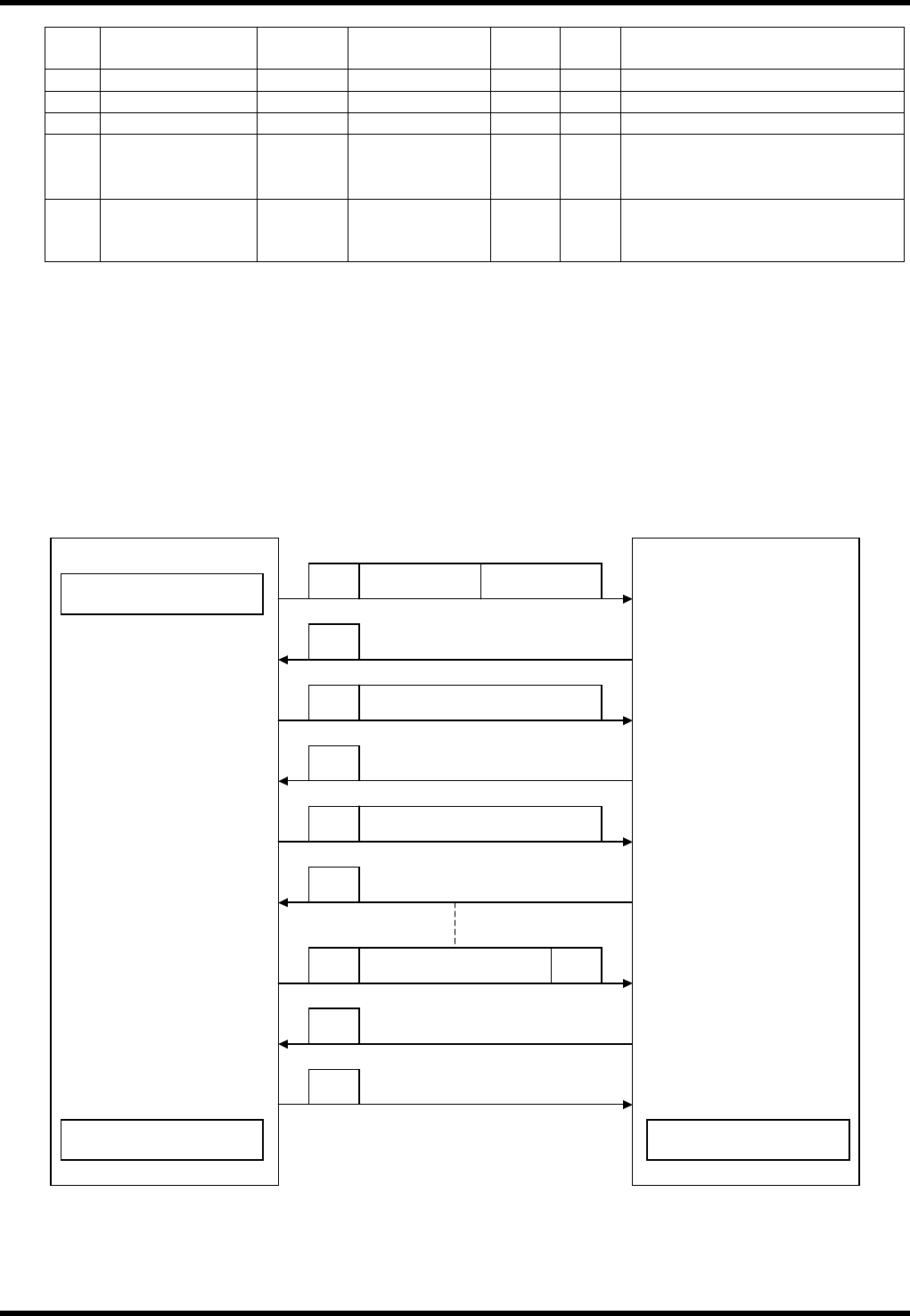
1) – 1
D0Nnnnn / nGnMnnnTnnnX (±) nnnnnnY (±) nnnnnnZnnn
1 2 3 4 5 6 7 8
V (±) nnnnn
W (±) nnnnn C∗∗∗∗∗∗∗∗
9 10 11
No. Data name
Max.
digits
Input range
Sup-
press
Vari-
able
Remarks
1 Program No. 4 0001 to 2000
×
Stores in order of receipt
irrespective of the block No.
2 Skip command 1 0 to 9
×
/7 is unconditional skip.
3
Origin return
command
1 0 to 3
×
The block except for ‘0’ will be
ignored.
4 Insert command 3 001 to 999
Ignores M0T0.
Data unable to convert will
become M0 and error is
returned.
== See conversion chart.
5
Correct and
rotate command
3 001 to 999
Ignores M0T0.
Data unable to convert will
become T0 and error is
returned.
== See conversion chart.
6 X-coordinate 7
± 0 to ±
999999
Max. digit includes ±.
1
STX
C 0
No. of
characters
ETX
Check sum
P
Program name
Up to 15 characters
(Can be omitted)
STX
D 0
No. of
characters
ETX
Check sum
N 1 G 1 Z 2
1) -1
AVK3
HOST COMPUTER SYSTEM
2.1 Downloading NC Data
D77HEC-52-010-A0
2.1-2
No. Data name
Max.
digits
Input range
Sup-
press
Vari-
able
Remarks
7 Y-coordinate 7
± 0 to ± 999999
Max. digit includes ±.
8 Z axis No. 3 0 to 121 Z121 is a jumper.
9 V data 6 + 0 to + 999999 Not used
10
Insertion pitch
data
6 + 0 to + 999999
± is for matching format.
Usually only + direction.
Max. digit includes ±.
11 Circuit No. 8
‘0’ to ‘9’
‘A’ to ‘Z’
×
Be sure to make the digits
fixed.
Fill with space if not necessary.
=REMARKS=
If exceeding the max. digit number, the data of the max. digits from the head becomes valid.
S & R data continues M90X at the beginning. If it appears on the way, it will cause an error.
If ‘∗’ character is found in one message, it becomes EOP.
If a character cannot be judged, the following numeric values will also be ignored.
If a space appears, the characters thereafter will be ignored excluding the circuit Nos.
Protocol
Start of download
Host computer
Requests next data.
AVK3
D 0 NC data
A 0
C0P
Control No.:
3 digits
Program name (Up
to 12 characters)
D 0
NC data
Transfers NC data.
A 0
Transfers NC data.
Requests next data.
Transfers EOP data.
A 0
D 0 Block No.
∗
A 2
End of transmission
End of reception
A 0
Creates a directory.
Stores the received NC
data in RAM.
Stores the received NC
data in RAM.