Host Computer System.pdf - 第64页
AVK3 HOST COMPUTER SYSTEM 3.4 Upl oading Indivi dual Machine Dat a D77HEC-53- 050-A0 3.4- 3 1) -6 D0RS Fn 1 2 No. Data name Max. digit s Input r ange Sup- press Fi x Remarks 1 Ins erti on e rror non-cl ear comm and 2 ×…
AVK3
HOST COMPUTER SYSTEM
3.4 Uploading Individual Machine Data
D77HEC-53-050-A0
3.4-2
1) -2
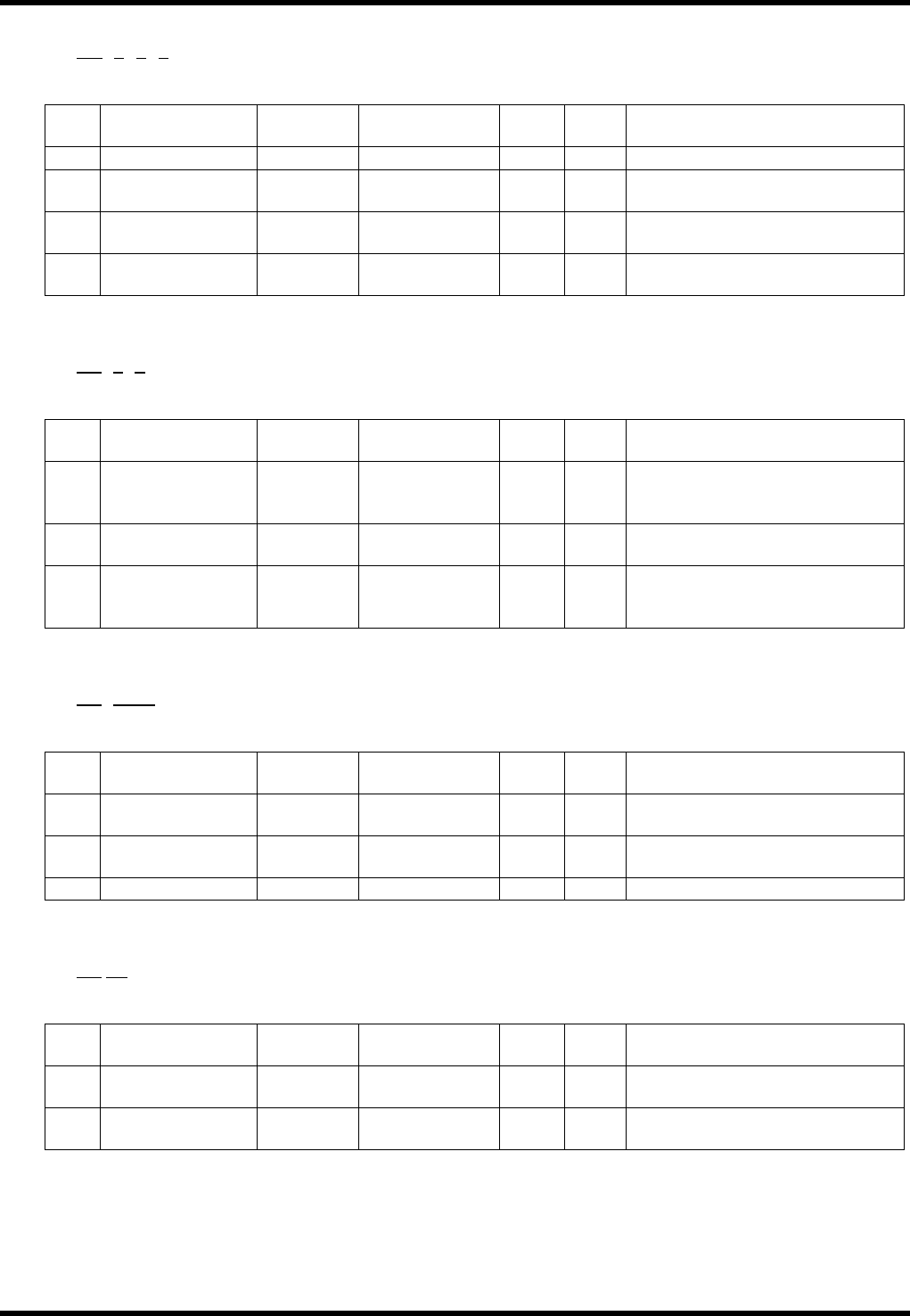
D0AGAnBnCn
1 2 3 4
No. Data name
Max.
digits
Output range
Sup-
press
Fix Remarks
1 Aging command 2
×
Output command for the aging
2 Aging mode 1 0 to 1
×
Aging mode
0 = Valid, 1 = Invalid
3 Anvil short 1 0 to 1
×
Anvil short
0 = Valid, 1 = Invalid
4 Parts detection 1 0 to 1
×
Parts detection
0 = Valid, 1 = Invalid
1) -3
D0PRAnBn
1 2 3
No. Data name
Max.
digits
Output range
Sup-
press
Fix Remarks
1
Parts remove
support
command
2
×
Output command for the parts
remove support
2
Parts remove
support
1 0 to 1
×
Parts remove support
0 = Valid, 1 = Invalid
3 Support position 1 0 to 1
×
Support position
0 = Bottom of camera,
1 = Table origin
1) -4
D0ECAnBnn
1 2 3
No. Data name
Max.
digits
Input range
Sup-
press
Fix Remarks
1
Parts exhaust
retry command
2
×
Command for the parts
exhaust retry
2 Retry setting 1 0 to 1
×
Retry setting
0 = Invalid, 1 = Valid
3 Retry count 2 0 to 99
×
Retry count
1) -5
D0ER Fn
1 2
No. Data name
Max.
digits
Input range
Sup-
press
Fix Remarks
1
EOP recovery
command
2
×
Command for the EOP
recovery
2
EOP recovery
setting
1 0 to 1
×
EOP recovery
0 = Invalid, 1 = Valid
AVK3
HOST COMPUTER SYSTEM
3.4 Uploading Individual Machine Data
D77HEC-53-050-A0
3.4-3
1) -6
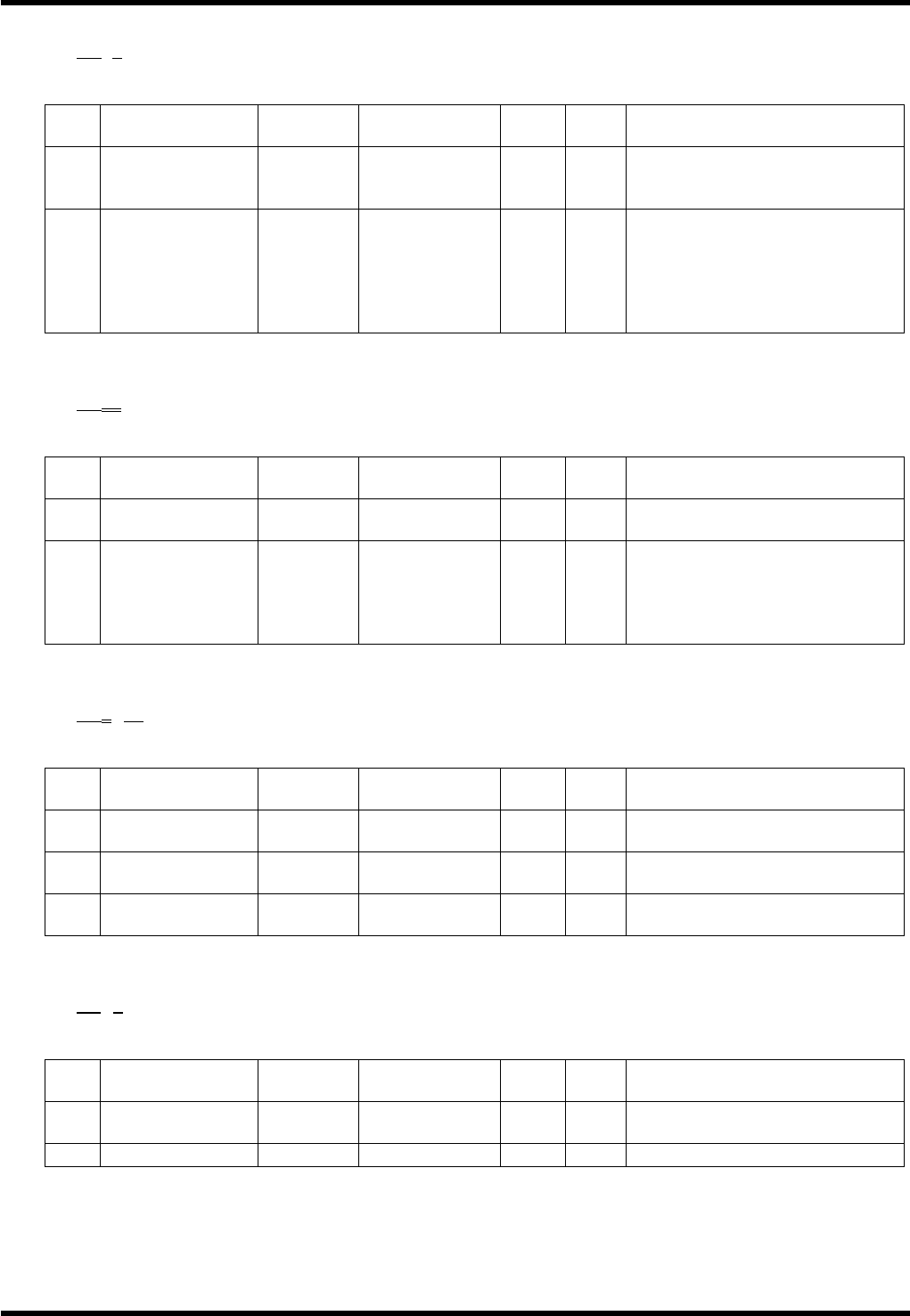
D0RSFn
1 2
No. Data name
Max.
digits
Input range
Sup-
press
Fix Remarks
1
Insertion error
non-clear
command
2
×
Command for the insertion
error non-clearing
2
Insertion error
non-clear
setting
1 0 to 1
×
Insertion error non-clear
setting
0 = Can be cleared with
“RESET”.
1 = Cannot be cleared with
“RESET”.
1) -7
D0RPnn
1 2
No. Data name
Max.
digits
Output range
Sup-
press
Fix Remarks
1
Command by
production count
2
×
Output command for the set
data by production count
2 Count 2 0 to 99
×
Setting by count
0 = Only once at the beginning
of model changeover
1 = Every time
2 = Every two boards
1) -8
D0ARnRnn
1 2 3
No. Data name
Max.
digits
Input range
Sup-
press
Fix Remarks
1
Command by
production count
2
×
Output command for the
automatic recovery
2 Count 1 0 to 1
×
Recovery setting
0 = Valid, 1 = Invalid
3
Command by
production count
2 0 to 99
×
Recovery count
1) -9
D0DTDn
1 2
No. Data name
Max.
digits
Input range
Sup-
press
Fix Remarks
1
Data type
command
2
×
Output command for the data
type
2 Data type 1 0 to 1
×
0 = ABS, 1 = INC
AVK3
HOST COMPUTER SYSTEM
3.4 Uploading Individual Machine Data
D77HEC-53-050-A0
3.4-4
1) -10
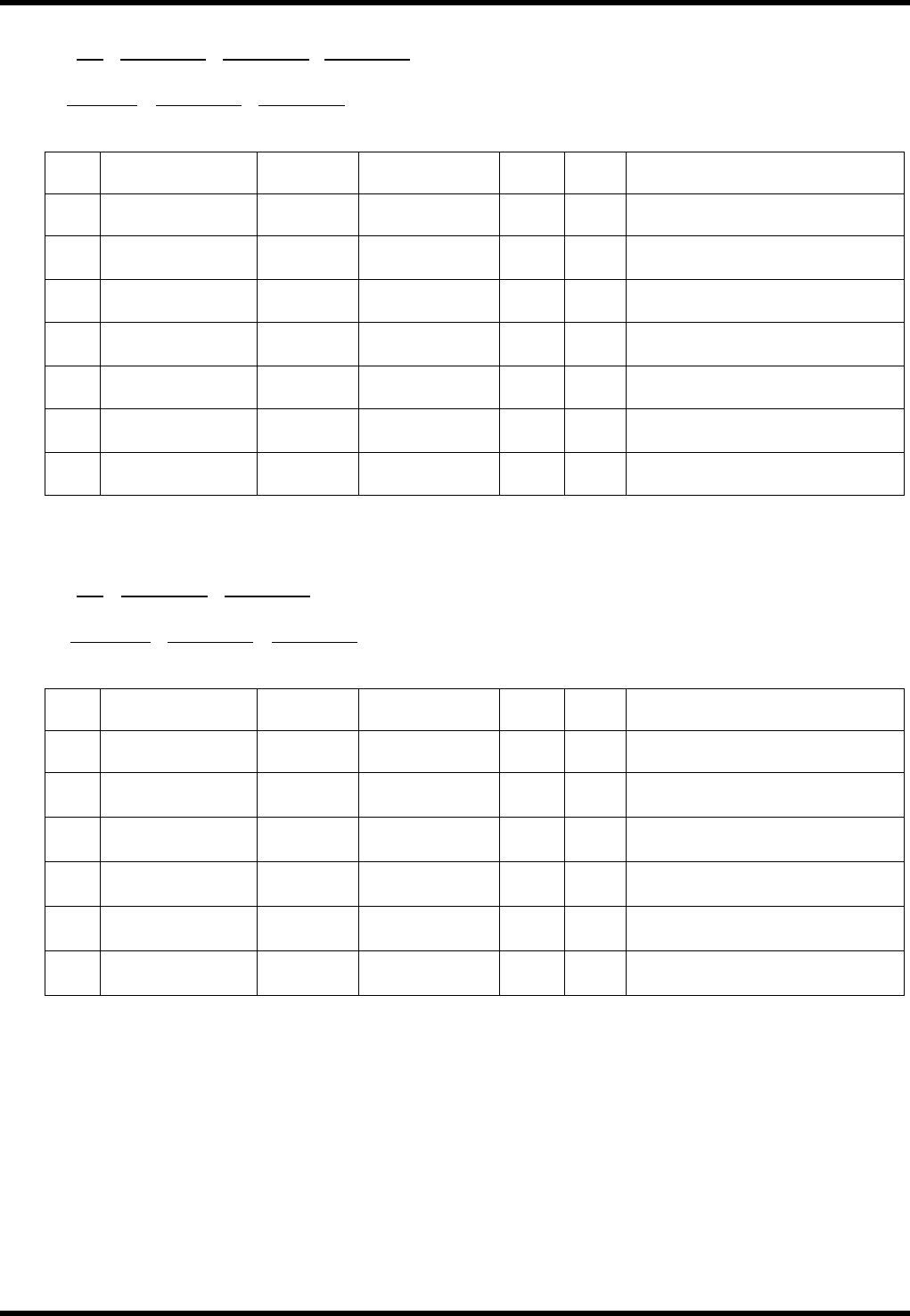
D0MAX (±) nnnnnnY (±) nnnnnnL (±) nnnnnn
1 2 3 4
R(±)nnnnn
H (±) nnnnnnA (±) nnnnnn
5 6 7
No. Data name
Max.
digits
Input range
Sup-
press
Fix Remarks
1
Machine offset 1
command
2
×
Output command for the
machine offset 1
2 X offset 7
-999999 to
+999999
×
Max. digit includes ±.
1 / 100 mm
3 Y offset 7
-999999 to
+999999
×
Max. digit includes ±.
1 / 100 mm
4 ZL offset 7
-999999 to
+999999
×
Max. digit includes ±.
1 / 100 mm
5 ZR offset 7
-999999 to
+999999
×
Max. digit includes ±.
1 / 100 mm
6 WH offset 7
-999999 to
+999999
×
Max. digit includes ±.
1 / 100 mm
7 WA offset 7
-999999 to
+999999
×
Max. digit includes ±.
1 / 100 mm
1) -11
D0MBH (±) nnnnnnA (±) nnnnnn
1 2 3
T (±)nnnnnn
V (±) nnnnnnU (±) nnnnnn
4 5 6
No. Data name
Max.
digits
Input range
Sup-
press
Fix Remarks
1
Machine offset 2
command
2
×
Output command for the
machine offset 2
2
θH offset
7
-999999 to
+999999
×
Max. digit includes ±.
1 / 100°
3
θA offset
7
-999999 to
+999999
×
Max. digit includes ±.
1 / 100°
4 T offset 7
-999999 to
+999999
×
Max. digit includes ±.
1 / 100°
5 V offset 7
-999999 to
+999999
×
Max. digit includes ±.
1 / 100°
6 U offset 7
-999999 to
+999999
×
Max. digit includes ±.
1 / 100°