EdisonStandardOwnersManual-RevA-20170818B.pdf - 第130页
P RINTER O PERATIONS Edison Printer User Manual (Part Number 1023838) 130 Rev. A Copyright © 2017 ITW EAE All rights reserved. No part of the contents of thi s manual may be reproduced, copied or transmitted in any form …
Edison Printer User Manual (Part Number 1023838) PRINTER OPERATIONS
Rev. A 129
Copyright © 2017 ITW EAE
All rights reserved. No part of the contents of this manual may be reproduced, copied or transmitted in any form or by any
means including graphic, electronic, or mechanical methods or photocopying, recording, or information storage and
retrieval systems without the written permission of ITW EAE, unless for purchaser's personal use.
5.8. Replenish the Stencil Cleaner
Replenish the stencil cleaner by adding solvent and/or wiper paper when instructed through low
level alerts.
5.8.1. Adding Solvent
Add solvent when the solvent system is empty, including no solvent in the solvent lines or in the
solvent bath reservoir at the wiper assembly. While adding solvent, it is critical to determine that
solvent is making its way through the system by observing
that solvent is visible at the solvent bath reservoir when the
line is primed.
1. Navigate to Utilities, select Wiper > Prime Solvent
2. Follow the onscreen directions.
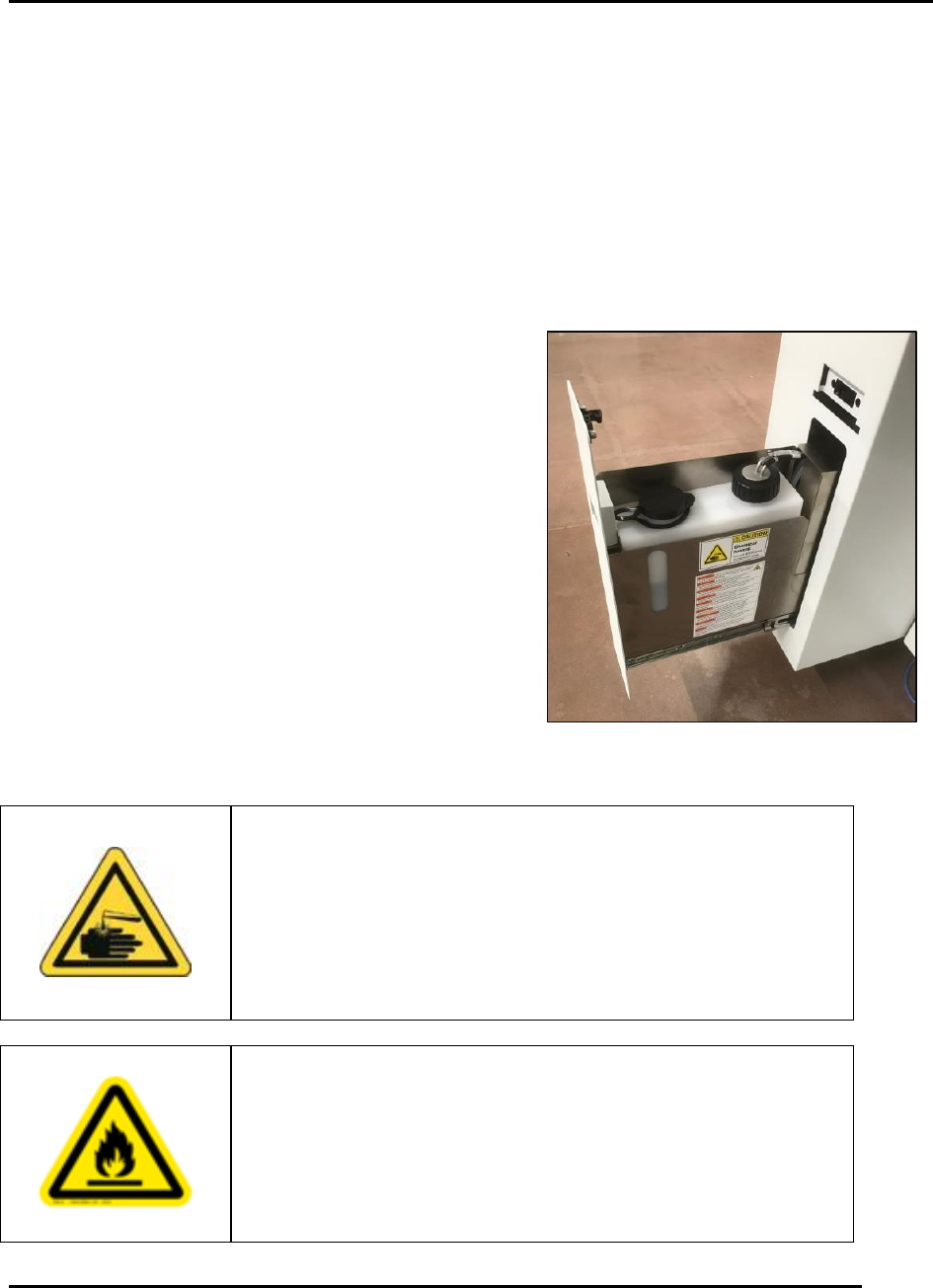
3. Access the solvent tank by opening the lower left
drawer at the front of the printer (Figure 132).
Caution!
Solvent may cause skin irritation or eye injury. Always wear
protective gloves and safety glasses when handling solvent,
and be careful not to spill the solvent when filling the solvent
tank. Review solvent’s Safety Data Sheet before use. Failure to
comply may result in personal injury and/or damage to the
environment.
Warning!
Isopropyl alcohol is extremely flammable and must not be used
in your solvent system. Use ONLY approved solvents. Failure
to comply could result in personal injury and equipment
damage. Contact ITW EAE for a current list of approved
solvents.
Figure 132. Solvent Reservoir.
PRINTER OPERATIONS Edison Printer User Manual (Part Number 1023838)
130 Rev. A
Copyright © 2017 ITW EAE
All rights reserved. No part of the contents of this manual may be reproduced, copied or transmitted in any form or by any
means including graphic, electronic, or mechanical methods or photocopying, recording, or information storage and
retrieval systems without the written permission of ITW EAE, unless for purchaser's personal use.
4. Remove the solvent tank fill cover, then insert a funnel and add solvent as required.
5. Remove the funnel and replace the cover.
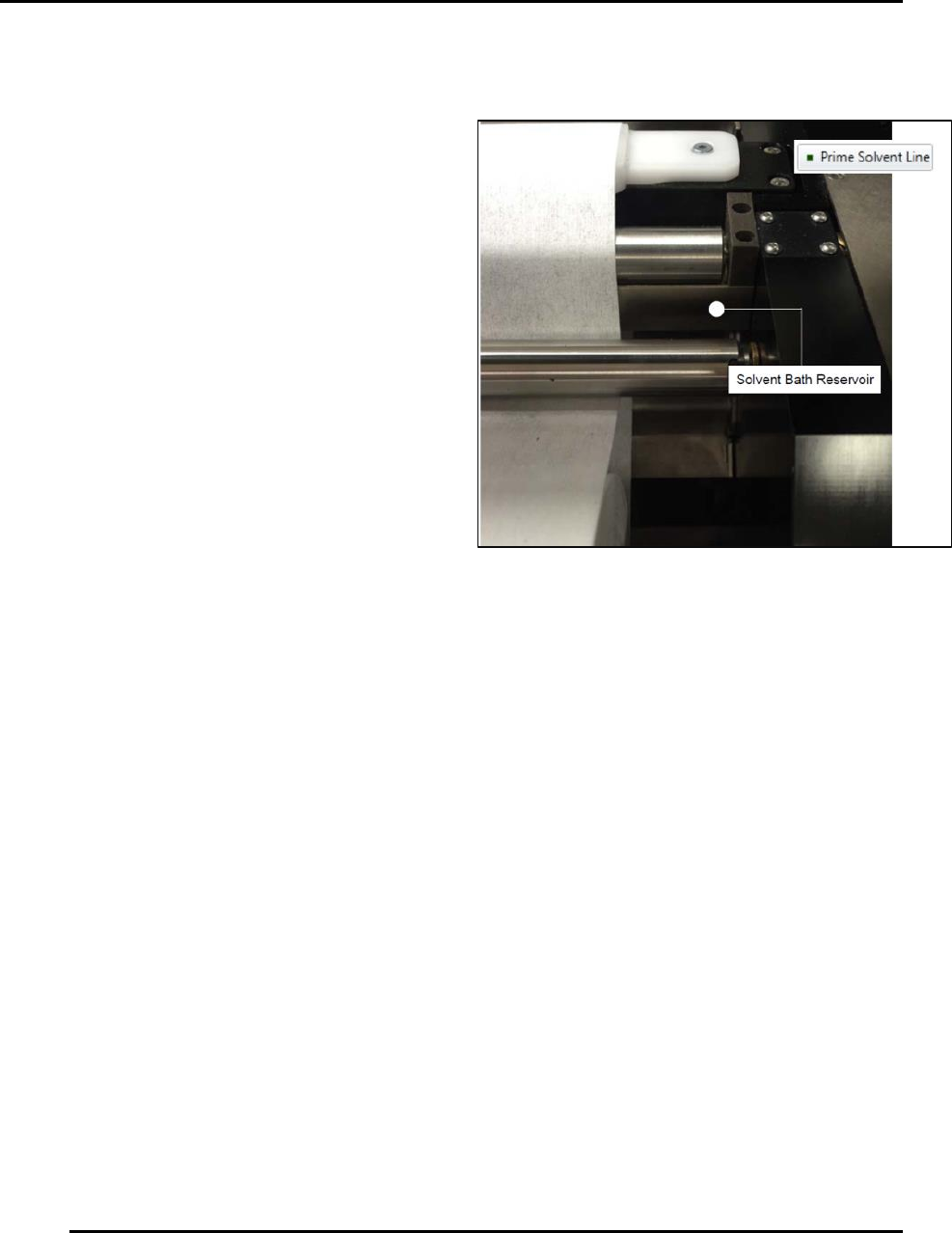
6. Click and hold Prime Solvent Line (on-
screen button) until you see solvent
feeding into the solvent bath reservoir
(Figure 133).
7. Close the front lower left drawer and
click Finish.
Figure 133. Hold Prime Solvent Line until solvent feeds
into solvent bath reservoir.
Edison Printer User Manual (Part Number 1023838) MAINTENANCE
Rev. A 131
Copyright © 2017 ITW EAE
All rights reserved. No part of the contents of this manual may be reproduced, copied or transmitted in any form or by any
means including graphic, electronic, or mechanical methods or photocopying, recording, or information storage and
retrieval systems without the written permission of ITW EAE, unless for purchaser's personal use.
6. Maintenance
Carefully follow the established Lock Out Tag Out policies of
your company in all cases.
6.1. Preventive Maintenance Guidelines and Timing
Routine preventive maintenance is critical to ensuring your printer performs at its optimum level:
Maintain critical process instruments in a calibrated state
Keep the equipment clean and make repairs to the unit immediately
Maintenance delays may be costly in added expense for labor and materials in addition to
loss of production
Generate historical data and trends to determine the frequency of preventive maintenance
activities
Environmental factors such as ambient temperatures and air quality can cause a variation
in the required frequency of preventative maintenance
Take caution when opening electrical enclosures and junction boxes.
Refer to the Preventive Maintenance Guidelines (Table 17) for initial preventive maintenance
frequencies
Danger!
Electrical panels contain high voltage. Disconnect and lock out
the power supply before working inside any electrical panels.
Failure to lock out the power supply can result in injury or death.