00191297-02.pdf - 第283页
User Manual S-23 HM 6 Vision functions Software Vers ion SR.405.xx 05/99 Iss ue 6.6 Test Component 281 Measurement 6 If the inner lead tips are ma pped be tter than the outer t ips, for exampl e, if a shin y lead is bent…
6 Vision functions User Manual S-23 HM
6.6 Test Component Software Version SR.405.xx 05/99 Issue
280
Measuring times can be reduced by lowering the resolution in the measuring or integration direc-
tion. However, you must ensure that the structure to be analyzed has a sufficient number of pixels.
Otherwise, the measuring quality will be compromised. We recommend to choose a very high or
high resolution. 6
6.6.4.18 ‘Corner’ measuring mode
Click on the ‘Setting’ field in the ‘Corner’ measuring mode to call up the Corner measuring mode
menu. 6
6
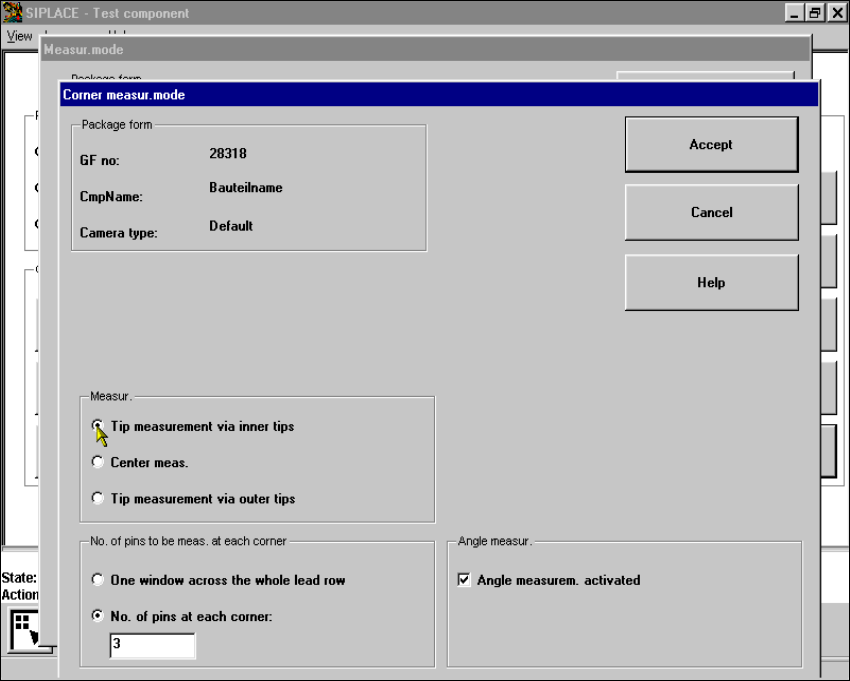
Fig. 6.6 - 39 Measuring mode option, Corner measuring mode menu
This menu is used to 6
– specify the lead measuring method.
– select the number of leads to be measured at each corner.
– switch the angle measurement on or off.

User Manual S-23 HM 6 Vision functions
Software Version SR.405.xx 05/99 Issue 6.6 Test Component
281
Measurement 6
If the inner lead tips are mapped better than the outer tips, for example, if a shiny lead is bent up-
wards slightly, you can select one of the following options: 6
– measuring the tips via the inner tips of the leads, for bases, for example
– center of the lead, center measurement, for PLCC, SOI, for example
– measuring the tips via the outer tips of the leads, for QFP, SOT, SO, for example
Number of leads to be measured at each corner 6
If the lead does no longer stand out well from the background, in the case of white plugs, for ex-
ample, use this option to specify the number of leads to be measured. However, to do this, the
component must be fully described in the line computer (FDC). 6
NOTE 6
This value should only be modified for special components and plugs. Deactivate lead measure-
ment for white plugs. 6
Angle measurement 6
For single-row components, the angle of rotation is not calculated correctly. Consequently it is bet-
ter to access calculation of the angle of rotation in Row measuring mode. Switch off the angle
measurement in this option. 6
6 Vision functions User Manual S-23 HM
6.6 Test Component Software Version SR.405.xx 05/99 Issue
282
6.6.4.19 ‘Lead’ measuring mode
Click on the ‘Setting’ field in the ‘Lead’ measuring mode to call up the Lead measuring mode
menu. 6
6
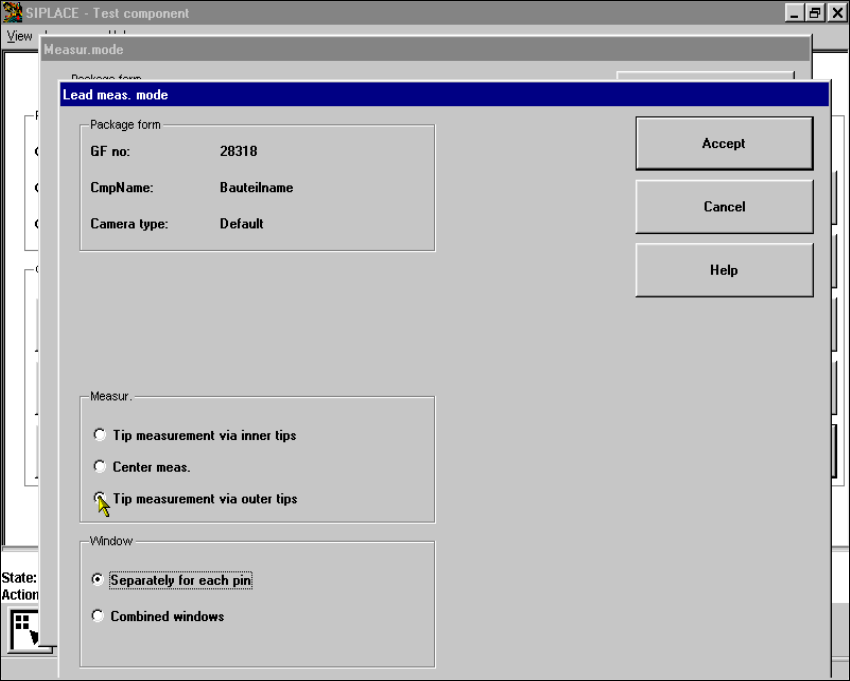
Fig. 6.6 - 40 Measuring mode option, Lead measuring mode menu
This menu is used to 6
– specify the lead measuring method.
– to select the windows separately for each lead or a combined window for every lead to be mea-
sured.
Measurement 6
If the inner lead tips are mapped better than the outer tips, for example if a shiny lead is bent up-
wards slightly, you can select one of the following options: 6
– measuring the tips via the inner tips of the leads, for bases, for example
– center of the lead, center measurement, for PLCC, SOJ, for example
– measuring the tips via the outer tips of the leads, for QFP, SOT, SO, for example