3OM-1064-001.pdf - 第46页
Tg0248-PM-ER 3. T rouble Shooting after Error Display 0005-002 2-6 3. T rouble Shooting after Error Display [Error Indication Examples] Section A: Shows an ERROR message. Section B: Shows the ERROR description. Section C…
0005-002 2-5 Tg0248-PM-ER
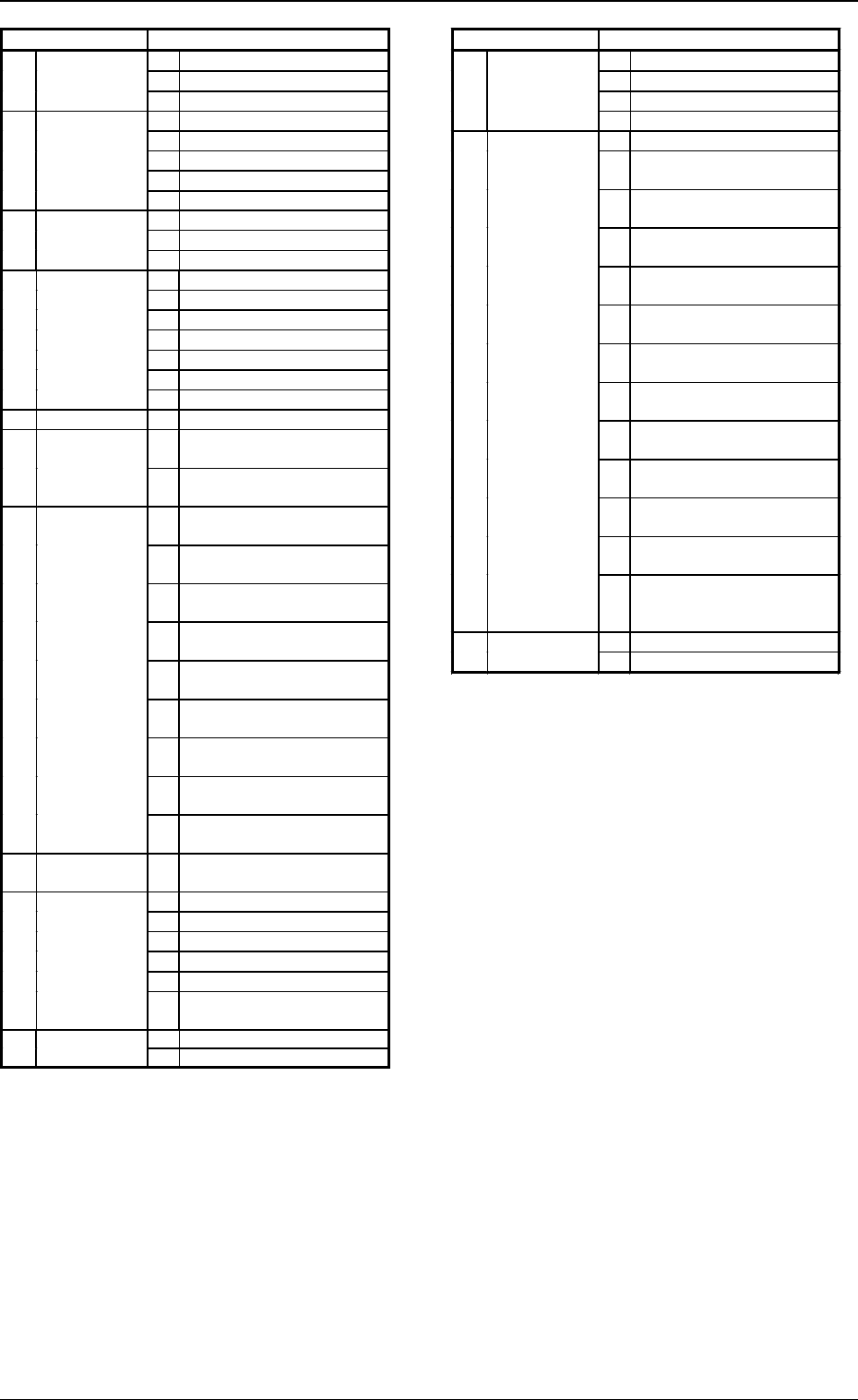
2. Error Messages
Main Section Error Messages A
01H TFB2-AXIS ORIGIN
02H TFB2-AXIS TIMING
23H
FEEDER BASE4
03H SEND CYLINDER
01H LOAD POWER SHUT-OFF
02H BEAM-A POWER SHUT-OFF
03H BEAM-B POWER SHUT-OFF
04H INTERLOCK
60H
SAFETY DEVICE
05H SAFETY CIRCUIT
01H PLACEMENT NOZZLE
02H
INSIDE RECOGNITION XXXXXXXX
61H DATA
03H
COMPONENT RECOGNITION DATA
02H L-CONVEYOR OVERTIME
03H P-CONVEYOR OVERTIME
04H R-CONVEYOR OVERTIME
05H ER-CONVEYOR OVER TIME
07H
L-CONVEYOR P.C.B. DETECTION
08H
P-CONVEYOR P.C.B. DETECTION
62H CONVEYOR
09H
R-CONVEYOR P.C.B. DETECTION
63H
SELF DIAGNOSTICS
01H CONTROL BOARD
65H
RECOG
COMMUNICATION
01H
RECOG. COMMUNICATION
XXXXXXXX
02H
LIGHTING CONTROL BOARD
COMMUNICATION XXXXXXXX
66H
P.E.C.
RECOGNITION
01H
P.E.C. MARK #1 (GLOBAL)
XXXXXXXX
02H
P.E.C. MARK #2 (GLOBAL)
XXXXXXXX
03H
P.E.C. MARK #3 (GLOBAL)
XXXXXXXX
04H
P.E.C. MARK #1 (IMAGE)
XXXXXXXX
05H
P.E.C. MARK #2 (IMAGE)
XXXXXXXX
06H
P.E.C. MARK #1 (LOCAL)
XXXXXXXX
07H
P.E.C. MARK #2 (LOCAL)
XXXXXXXX
08H
P.E.C. MARK #3 (LOCAL)
XXXXXXXX
09H
P.E.C. MARK #4 (LOCAL)
XXXXXXXX
67H COMPONENT
RECOGNITION
01H
COMPONENT RECOGNITION
XXXXXXXX
68H 01H CMPNT MISSING(SENSOR)
02H VACUUM SENSOR ERROR
03H CMPNT MISSING(RECOG)
04H CMPNT RECOG ERROR
05H SHORTAGE OF CMPNT
PICK-UP ERROR
07H
SHORTAGE OF COMP.
㧔
ALTN FDR
㧕
01H NOZZLE ATTACH69H
NOZZLE
CHANGE
02H NOZZLE STORE
Main Section Error Messages A
01H ILLEAGAL OPERATION
02H FEEDER NOT READY
03H NO CONTINUOUS STARTING
6CH OTHERES
04H INTERNAL DATA ERROR
01H JIG COMPONENT
02H TEACH P.E.C. CAMERA
OFFSET XXXXXXXX
03H TEACH BEAM
OFFSET XXXXXXXX
04H TEACH COMP. CAMR. MAG.
XXXXXXXX
05H TEACH COMP. CAMR.
OFFSET XXXXXXXX
06H TEACH HEAD ROTATION
CTR XXXXXXXX
07H TEACH HEAD OFFSET
XXXXXXXX
08H HEAD ROTATION OFFSET
XXXXXXXX
09H TEACH CAMERA
REFERENCE GAIN/LEVEL
0AH
TEACH CAMERA SHUTTER
SPEED
0BH
TEACH COMP.RECOG.
BRIGHTNESS
0CH
OFFSET TEACHING
BRIGHTNESS
6DH TEACHING
0DH
TEACH HD. OFS.
(GET BOTH IMAGE)
XXXXXXXX
01H COMPONENT REJECT CUP [A]6EH COMPONENT
REJECT
02H COMPONENT REJECT CUP [B]
Tg0248-PM-ER
3. Trouble Shooting after Error Display
0005-002 2-6
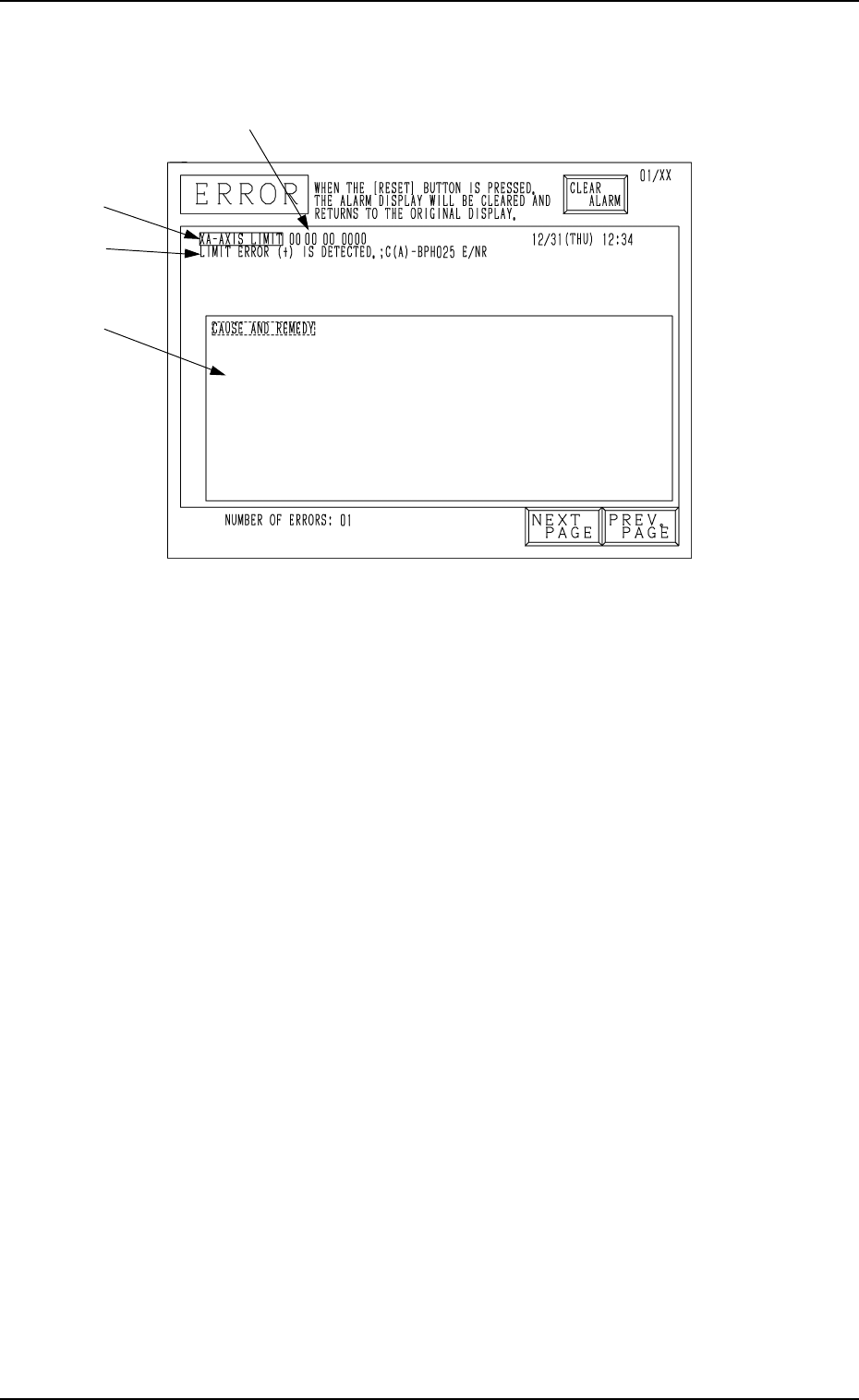
3. Trouble Shooting after Error Display
[Error Indication Examples]
Section A: Shows an ERROR message.
Section B: Shows the ERROR description.
Section C: Indicates the Cause and Remedy of Error
(There are some errors for which the indication may not be dis-
played).
Section D: Shows an error code consisting of 6 digits.
A
B
C
Fig. 2.3
D
Tg0248-PM-ER
3. Trouble Shooting after Error Display
0005-002 2-7
Check “Section D Indication” (error code), “Section A Indication”, “Section
B Indication” and “Section C Indication” at the ERROR display: remedy the
device by referring to the following trouble shooting guide.
(Cause 1) Motor encoder section may be defective.
(Cause 2) Encoder cable may be broken.
(Reset Procedure in the case of Causes 1 and 2)
Reset Procedure
(1) Turn off the power and check for loose connections between the sections of the motor and
signal cable.
(2) Re-start.
(3) If the device can’t be reset even after the above check, contact our service personnel because
the signal cable may be broken or the motor may be defective.
Error Code Display A Display B
(Cause 1) The sensor may be defective.
(NEXT PAGE)
0D 01 01 BPC-AXIS ORIGIN ENCORDER ORIGIN WAS NOT DETECTED.
0D 01 02 BPC-AXIS ORIGIN ORIGIN (SLIDE) WAS NOT DETECTED.
;BPH163 E / R
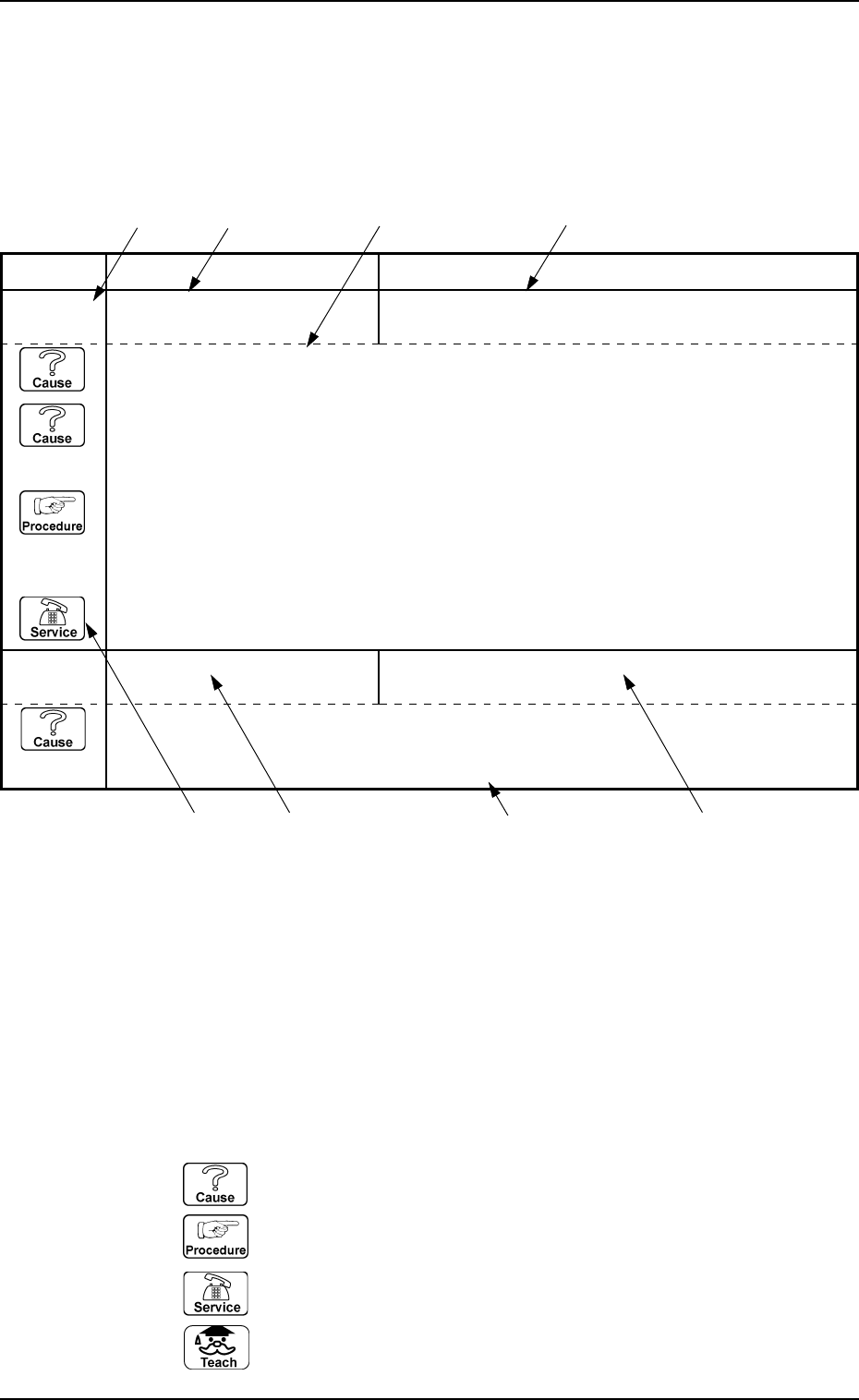
*1: Shows an ERROR code.
The description is shown according to the order of the code No.
*2: Shows the description of “Section A Indication” for the ERROR code.
*3: Shows the description of “Section B Indication” for the ERROR code.
*4: Shows the “Cause” and “Remedy” for the ERROR code.
Note: The description might be different from that in the “CAUSE AND REM-
EDY” section on the error display.
*5: When the description is continued on to the next page, “NEXT PAGE” is
shown.
*6: Icons
: Indicates the cause of the error.
: Indicates the work procedure.
: Contact our service personnel.
: Shows the teaching function.
*1 *2 *4 *3
*2
*6
*5
*3
Indication Example