CM88Maintenace2x.PDF.pdf - 第12页
Page 2-12 3Y3C-E-MMD02-A01-01 Items of Machine Parameter 2-1-7 Status Indicator This parameter enables to set indicator and buzzer under various states. The display is arranged as the normal status (from the No. 1), the …

Page 2-11
MACHINE PARAMETER
2
3Y3C-E-MMD02-A01-01
Line number
The number (01 to FE) particular to the line given to the mounter line which is managed on
PT100 which is connected with this mounter.
Mach number
The number given to each mounter. This is the individual number (01 to FE) in the same
line. The upper host always has “00.”
Net mask
The mask to be used with the IP address together, to use the network separately.
Port number
The number to determine the type of the network by TCP/IP. As a rule, use number 20001.
Gateway
The IP address of the relay for connecting the PT100 on other network with this mounter.
Connect time out
The time-out time from the network command by this mounter to be connected to PT100.
Response time out
The time-out time from connecting the network to the response returned.
Packet sending time out
The time-out time per packet for sending the file as machine data.
Packet receiving time out
The time-out time per packet for receiving the file as machine data.
Network version
PC port version in using PC board, and network system version in not using PC board.
Change
Moving the cursor to the item to change and pressing Change display the keyboard and
change the setting.
Load , Save
You can save/load the set data to/from a floppy disk (2DD).
Before using the floppy disk, format it by the file operation.
∗ Consult with the network manager of the manufacturer for the contents on this screen.
Items of Machine Parameter
Page 2-12
3Y3C-E-MMD02-A01-01
Items of Machine Parameter
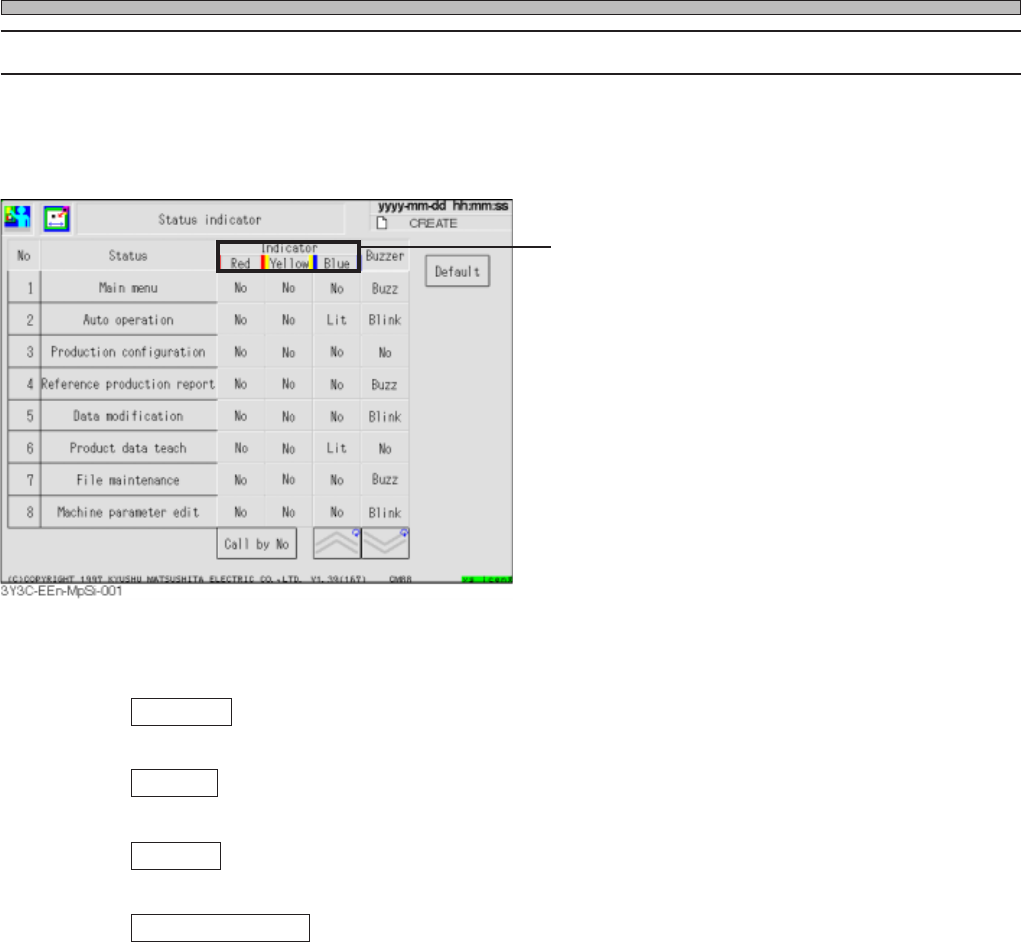
2-1-7 Status Indicator
This parameter enables to set indicator and buzzer under various states.
The display is arranged as the normal status (from the No. 1), the single/cycle stop error (from the
No. 27), and the emergency stop error (from the No. 53).
Press the button for the item to change under the optional status to change the setting.
Indicator
Indicator is set. No, Lit and Blink change in this order.
Buzzer
Buzzer is set. Buzz, Blink, and No change in turn.
Default
Pressing this initiates all setting to our standard.
Inspection by No.
Item of selected No. is displayed at the first of the figure.
Items of Machine Parameter
∗ As for CM88S-MU, [Yellow], [White], and
[Green] are displayed.
Page 2-13
MACHINE PARAMETER
2
3Y3C-E-MMD02-A01-01
Items of Machine Parameter
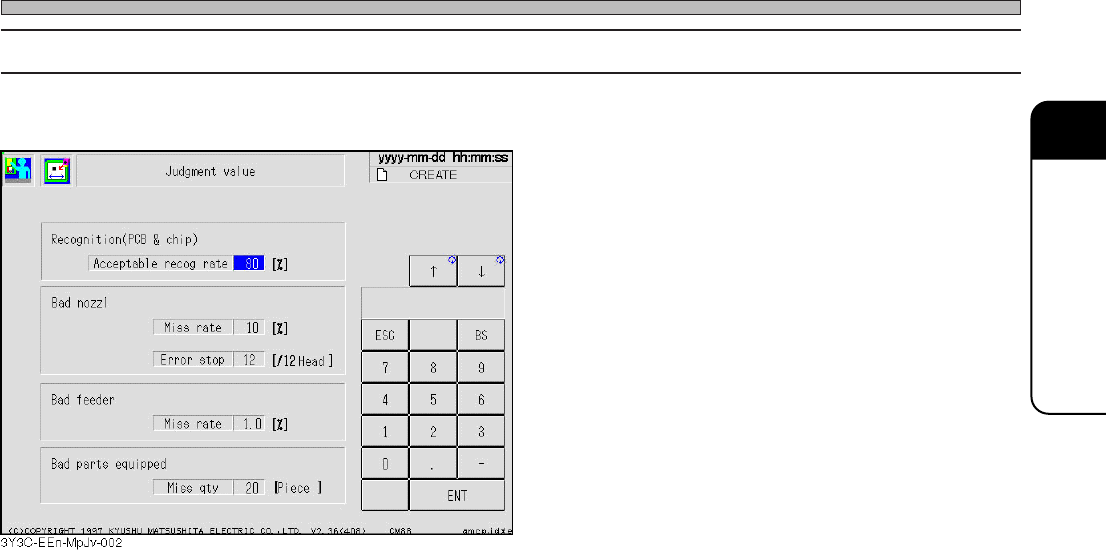
2-1-8 Judgment Value
Each judgment value during operation is set by this parameter.
Acceptable recog rate
The value to judge the error in the board recognition and chip recognition.
When the answer is below the set value, it is judged to be a recognition error.
Bad nozzle Miss rate
If either of the chip pickup fault, chip recognition fault or non-level chip is over the set value, that
nozzle is judged bad.
Bad nozzle Error stop
When bad nozzles among the same type are over the set number, machine stops as an error.
Bad feeder Miss rate
Fault rate for each tape feeder (sum of chip pickup fault, chip recognition fault, and non-level
chip) is over the set value, machine stops as an error.
Bad parts equipped Miss qty
Setting the miss quantity (except 0) carries out the pickup and sending within the range of the
specified miss quantity, and automatically sends the first parts to the pickup position, even when
the first pickup parts are not normally sent to the position for supplying the parts. (As for this
operation, the pickup quantity and miss quantity are not counted.) If the parts cannot be picked
up when the specified missing quantity is over, the machine stops as an error.