CM88Maintenace2x.PDF.pdf - 第80页
Page 3-52 3Y3C-E-MMD03-A04-02 3-5 The Input and Output Check of Machine 3-5-1 Input Check after Error The trouble in the sensor can be thought as one reason to make errors. This section describes checking the proper inpu…
Page 3-51
SOLUTIONS FOR ERROR
3
semaneludoM .oN semaN skrameR
ydobniaM
211LVnepopmalchtdiwdraoB
311LVpmalcYdraoB
411LVpmalcZdraoB
511LVpuredlohdraoB
611LVnwodredlohdraoB
emarfelohwC/M.B
212LVnoissimrepdeefepaT
312LVnoissimrepdeefepatevisehdAnoitpO
712LVnoissimrepwolB
022LVnoissimreppukciP
122LVnoissimrepelzzondnetxE
222LVnoissimrepnielzzoN
322LVtibihorptucepaT
422LVnoissimreptnuoM
522LVecnalabeuqroT
622LVreppotsecnereferthgiRnoitpO
722LVreppotsecnerefertfeL
3Y3C-E-MMD03-A04-02
3Y3C-100TE
Load List
Solenoid List (VL)
Page 3-52
3Y3C-E-MMD03-A04-02
3-5 The Input and Output Check of Machine
3-5-1 Input Check after Error
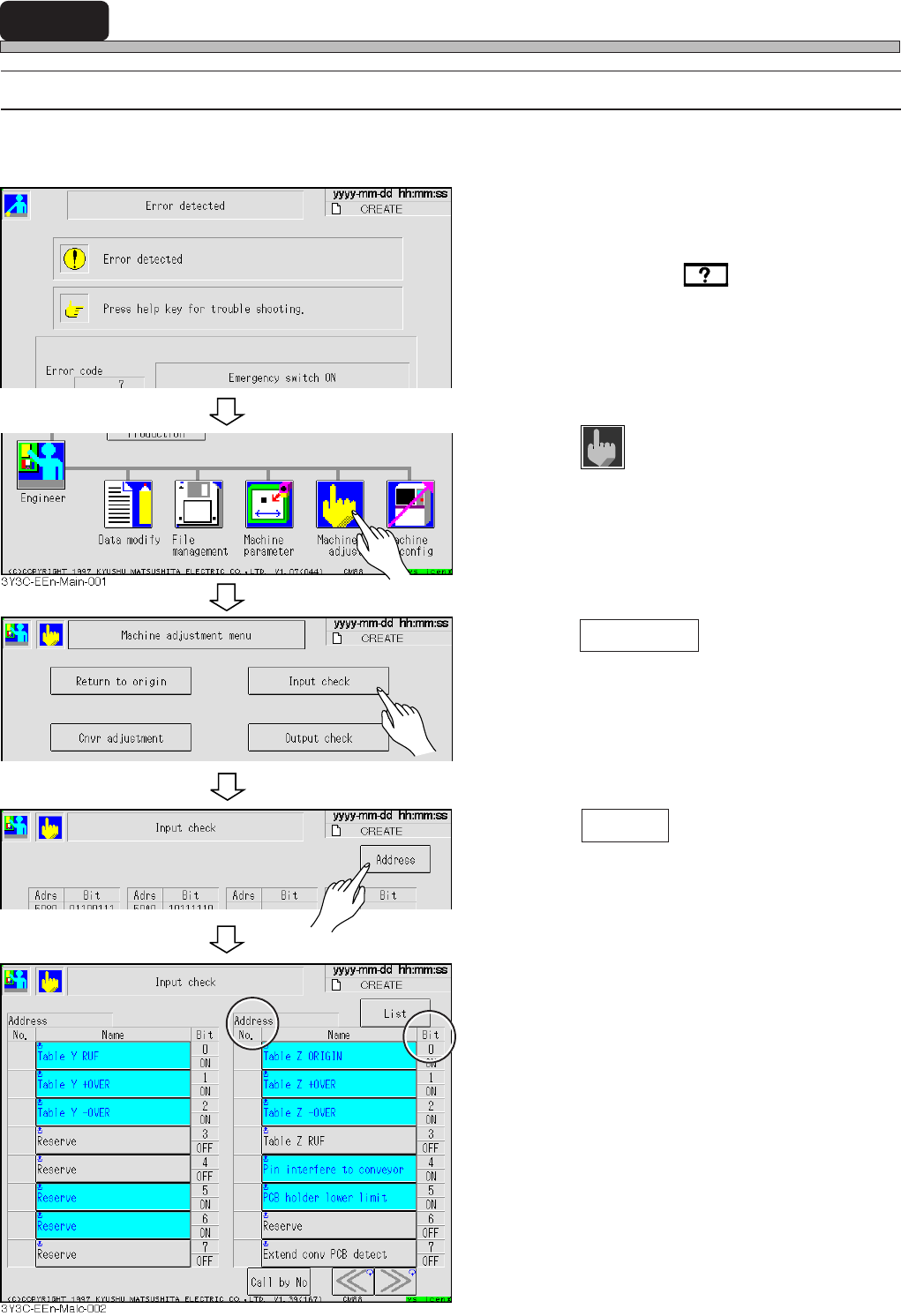
The trouble in the sensor can be thought as one reason to make errors.
This section describes checking the proper input state (ON and OFF) of the sensor related to that error.
1. Check the error message.
• Check solutions by on the touch panel or
in the error message list in the maintenance
manual.
2. Return to the main menu.
3. Press
Machine
adjust
.
• The machine adjustment screen appears.
4. Press Input check .
• The list screen of input check appears.
5. Press Address .
• The address screen of input check appears.
6. Check that the bit (....H : Bit.) of ad-
dress described in the solutions is
proper (ON and OFF).
• If the input state of sensor is not proper, the
trouble or disconnection can be thought. Make
contact with us for changing.
3Y3C-EOp-Er-001
3Y3C-EEn-Ma-001
3Y3C-EEn-Malc-001
Page 3-53
SOLUTIONS FOR ERROR
3
3Y3C-E-MMD03-A04-00
The Input and Output Check of Machine
3-5-2 Output Check after Error
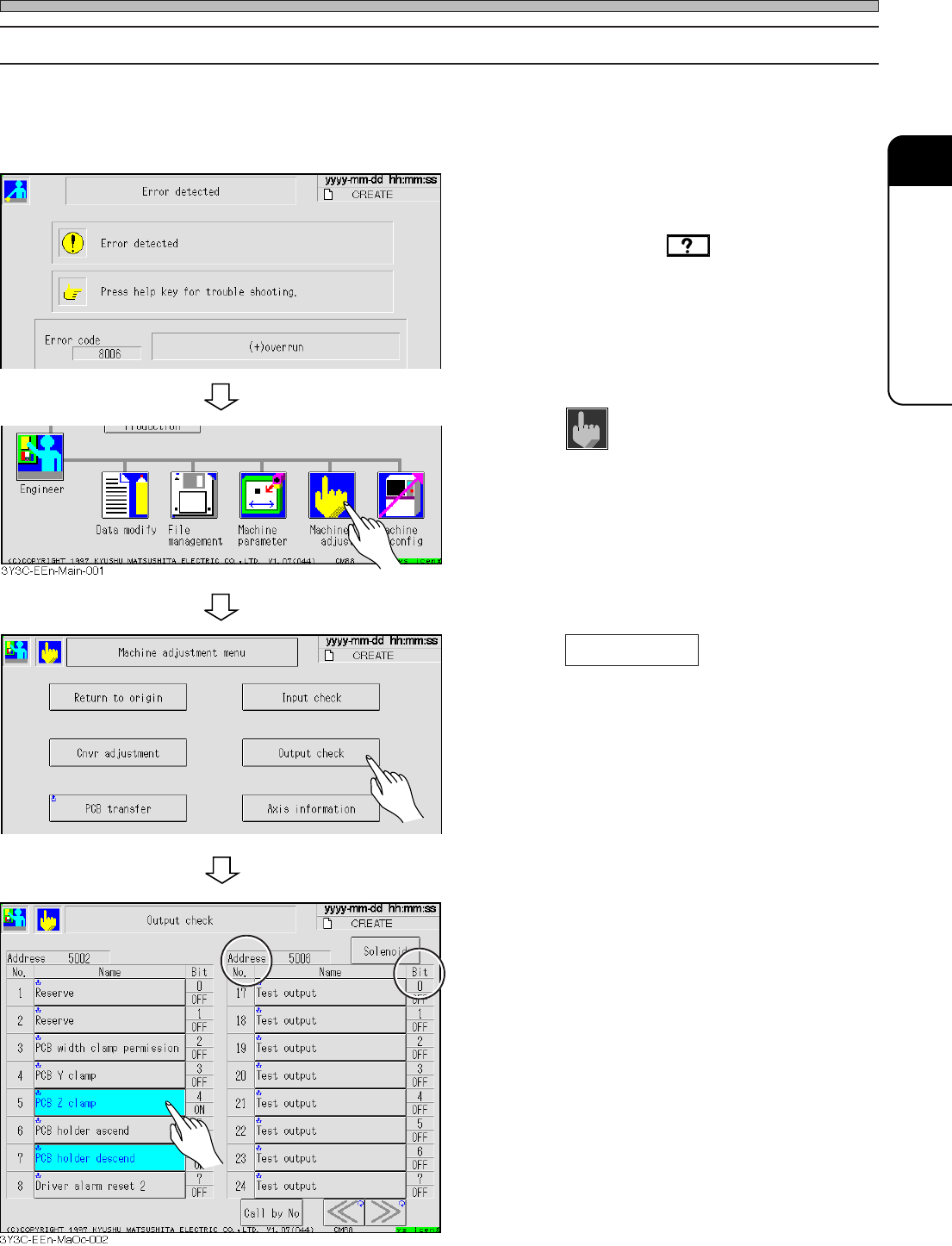
The trouble in the movable part can be thought as one reason to make errors.
This section describes checking that the movable part related to that error moves (move and stop)
properly.
1. Check the error message.
• Check solutions by on the touch panel or
in the error message list in the maintenance
manual.
2. Return to the main menu.
3. Press
Machine
adjust
.
• The machine adjustment screen appears.
4. Press Output check .
• The list screen of output check appears.
5. Press the bit of address described in
the solutions.
• The address screen of input check appears.
If the input state of sensor is not proper, the
trouble or disconnection can be thought. Make
contact with us for changing.
3Y3C-EOp-Er-003
3Y3C-EEn-Ma-001