CM88Maintenace2x.PDF.pdf - 第14页
Page 2-14 3Y3C-E-MMD02-A01-02 Items of Machine P arameter 2-1-9 Optional Setting This is the parameter to set the condition of system mo v ement. These can be changed when you are in engineer mode or when the machine par…
Page 2-13
MACHINE PARAMETER
2
3Y3C-E-MMD02-A01-01
Items of Machine Parameter
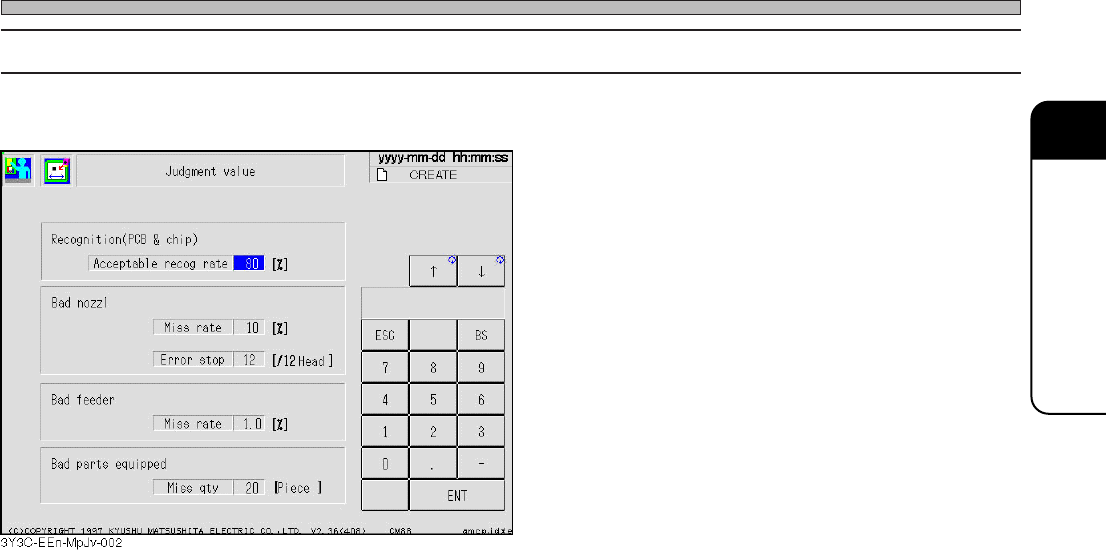
2-1-8 Judgment Value
Each judgment value during operation is set by this parameter.
Acceptable recog rate
The value to judge the error in the board recognition and chip recognition.
When the answer is below the set value, it is judged to be a recognition error.
Bad nozzle Miss rate
If either of the chip pickup fault, chip recognition fault or non-level chip is over the set value, that
nozzle is judged bad.
Bad nozzle Error stop
When bad nozzles among the same type are over the set number, machine stops as an error.
Bad feeder Miss rate
Fault rate for each tape feeder (sum of chip pickup fault, chip recognition fault, and non-level
chip) is over the set value, machine stops as an error.
Bad parts equipped Miss qty
Setting the miss quantity (except 0) carries out the pickup and sending within the range of the
specified miss quantity, and automatically sends the first parts to the pickup position, even when
the first pickup parts are not normally sent to the position for supplying the parts. (As for this
operation, the pickup quantity and miss quantity are not counted.) If the parts cannot be picked
up when the specified missing quantity is over, the machine stops as an error.
Page 2-14
3Y3C-E-MMD02-A01-02
Items of Machine Parameter
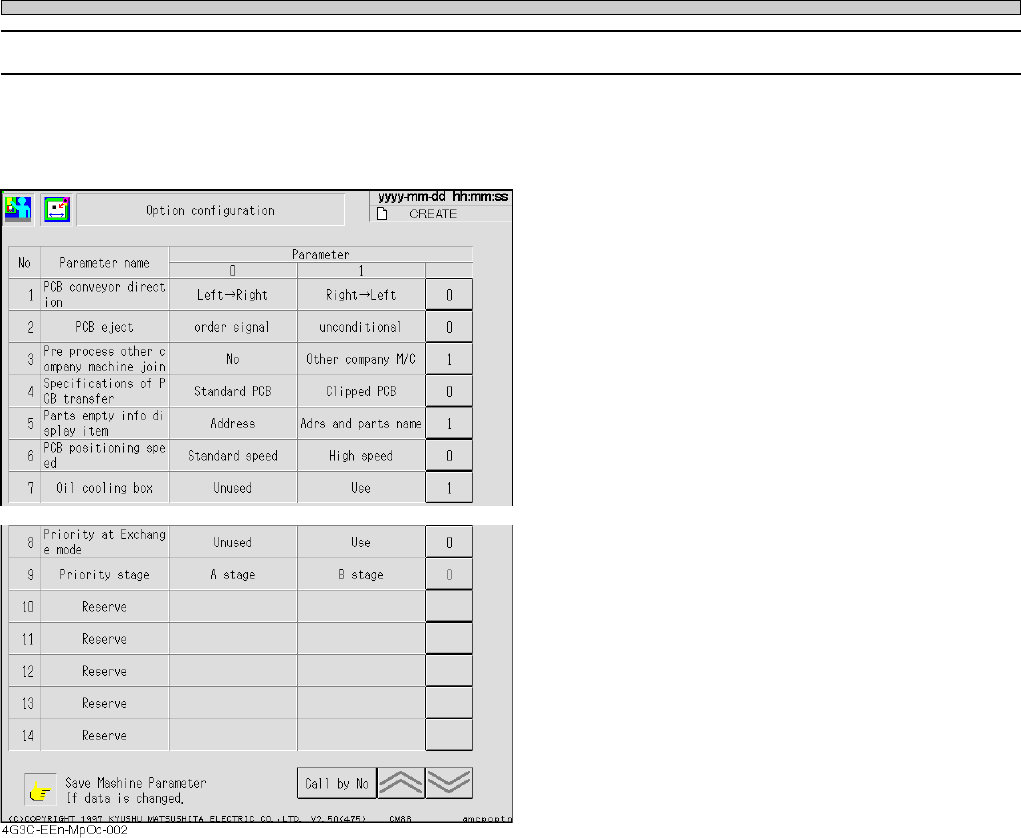
2-1-9 Optional Setting
This is the parameter to set the condition of system movement.
These can be changed when you are in engineer mode or when the machine parameters are
opened to an operator by customizing.
∗ The functions “PCB positioning speed” and “Oil cooling box” can be set by CM88S only.
PCB conveyor direction
Usually, board flow direction is fixed. But it is changeable on the machine with optional specifica-
tions which is applicable for both flows.
PCB eject
When transferring the board to the post-station, setting of the flow without condition or the flow
after receiving the demanding signal can be selected. If the process is in the line, usually set
“order signal.”
Pre process other company machine joint
The timing to turn off the board requirement signal for the pre-process machine can be set.
“No” : (By our specifications) When the transfer board comes to the front
conveyor stop position, the board requirement signal is turned OFF.
“Other company machine”: (By special specifications) When the transfer board shields the
entrance sensor of front conveyor, the board requirement signal is
turned OFF.
4G3C-EEn-MpOc-001

Page 2-15
MACHINE PARAMETER
2
3Y3C-E-MMD02-A01-03
Items of Machine Parameter
Specifications of PCB transfer
Producing the clipped board at standard board transfer may make an transfer error.
Here you can set the specifications of PCB transfer (“Standard PCB” or “Clipped PCB”) to pro-
duce.
Part empty info display item
When the parts are used up, you can set to change the part empty info display item (“Address” or
“Adrs and parts name”).
PCB positioning speed (Can be set by CM88S only.)
The board transfer-in time when the board is transferred from the front conveyor to the holder can
be shortened.
When the PCB positioning speed is set to “High speed”, the board transfer-in time will be short-
ened by about 500 ms compared with “Standard speed”.
However, the impact to the board will be strong compared with “Standard speed”, so make sure
there is no problem for production when using this function.
When the pin reference is used, the PCB positioning is carried out by the way of the “Standard
speed” to prevent the pin insertion error, even if the PCB positioning speed is set to “High speed”.
Oil cooling box (Can be set by CM88S only.)
Whether to use the oil cooling box can be set.
As for CM88S, when the connected oil cooling box breaks down, production cannot be started.
(Self-diagnosis error occurs.)
In such a case, by setting the oil cooling box to “Unused”, production can be performed tempo-
rarily. (Normally, set it to “Use”.)
Priority at Exchange mode
The pick-up stage can be specified by priority.
Set whether to use the exchange mode priority function in exchange mode.
When “Use” is selected, the chips on the priority stage are picked up as long as they can be
picked up (as long as they have not run out).
Priority stage
When the exchange mode priority function is set to “Use”, set the priority stage.
This priority stage can be changed only when the exchange mode priority function is set to “Use”.