CM88Maintenace2x.PDF.pdf - 第54页
Page 3-26 3Y3C-E-MMD03-A03-01 Check and Solutions CM88S-M/M1, CM88C-D C N 0 1 C N 2 5 C N 0 0 C N 1 3 C N 2 0 C N 5 1 C N 2 7 C N 5 S W 1 C N 4 C N 1 9 C N 2 3 C N 2 4 C N 5 0 C N 2 6 C N 1 4 C N 2 8 C N 2 9 C N 3 0 C N …
Page 3-25
SOLUTIONS FOR ERROR
3
3Y3C-E-MMD03-A03-01
Check and Solutions
3-2-22 CPU Power Supply Fault
PRU Power Supply Fault
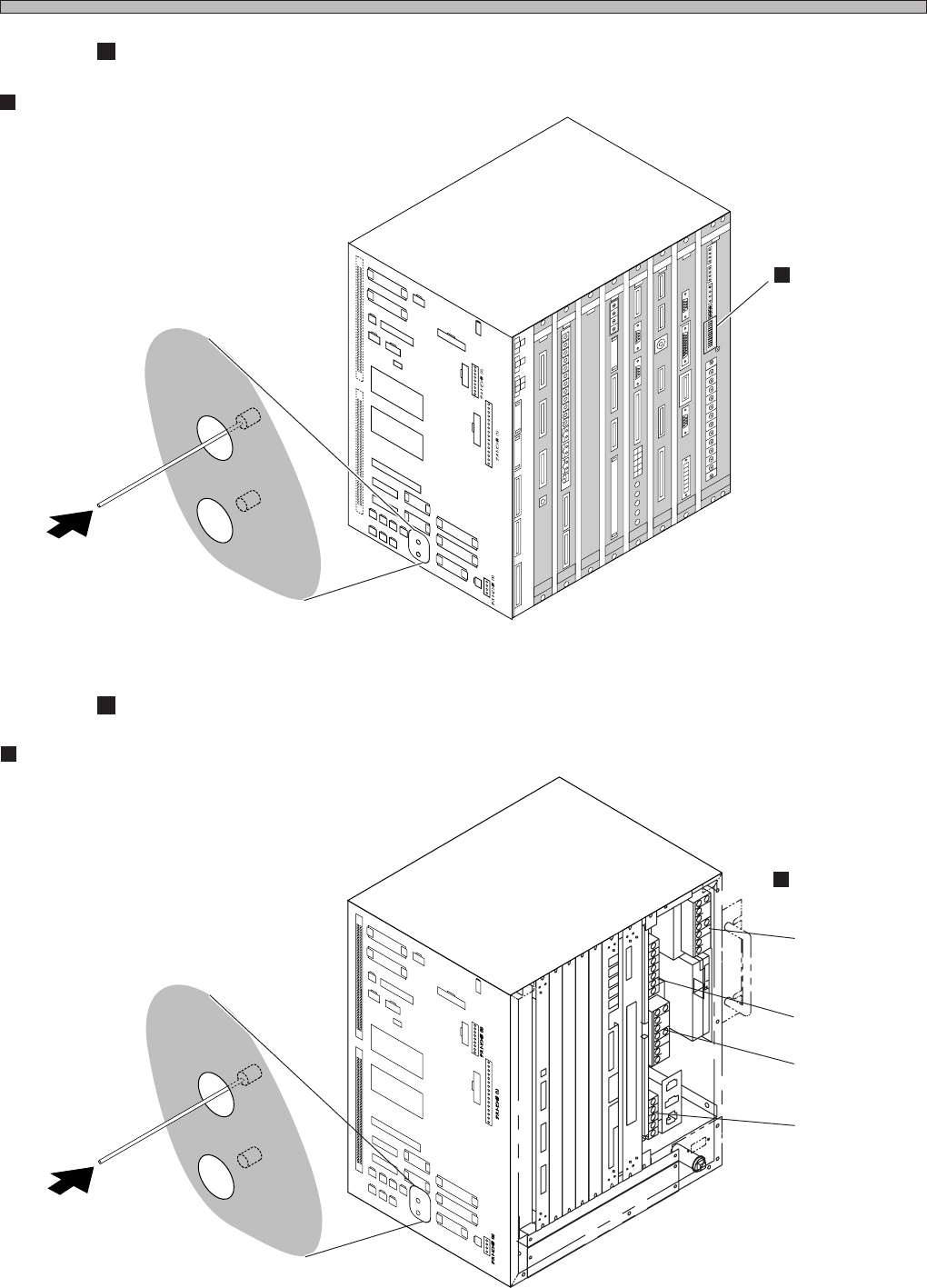
1. Checking the voltage of checking pin
CM88S-M/M1, CM88C-D
If following voltage cannot be measured between checking pins of power board at the CPU box,
the board may have a trouble. Make contact with us for changing.
Between GND3 pin and + 24V pin : + 24V
Between GND2 pin and + 12V pin : + 12V
Between GND2 pin and – 12V pin : – 12V
Between GND1 pin and + 5VC pin : + 5V
CM88S-MU
If following voltage cannot be measured between terminals of the power supply for specified
voltage at the CPU box, the board may have trouble.
P100E-24 : + 24V
P50E-12 : + 12V
P15E-12 : + 12V
P100E-5 : + 5V
2. Canceling the tripped circuit protector
Note) Even if the trouble is not confirmed at the cure 1, carry out the cure 2.
If the circuit protector reset switch at the left side of CPU BOX protrudes by a few millimeters, it is
tripped out. To reset, press it with a pen, etc. with a fine point.
If the upper circuit protector is tripped out, the output system of solenoid, etc. may be in trouble. If
the lower one is tripped out, the input system of sensor, etc. may be in trouble. Check which one is
tripped out, then make contact with us.
Page 3-26
3Y3C-E-MMD03-A03-01
Check and Solutions
CM88S-M/M1, CM88C-D
C
N
0
1
C
N
2
5
C
N
0
0
C
N
1
3
C
N
2
0
C
N
5
1
C
N
2
7
C
N
5
S
W
1
C
N
4
C
N
1
9
C
N
2
3
C
N
2
4
C
N
5
0
C
N
2
6
C
N
1
4
C
N
2
8
C
N
2
9
C
N
3
0
C
N
3
1
C
N
3
2
C
N
3
3
C
N
3
4
N
R
1
N
R
2
C
N
1
8
C
N
8
C
N
7
C
N
T
E
S
T
3
C
N
T
E
S
T
4
CNTEST 1
CNTEST 2
CN2
CN1
CN21
CN22CN17
CN11
CN12
CN9
CN10
CN15
CN1
CN2
CN3
OPT1OPT2OPT3OPT4OPT5
OPT6OPT7
CN1
CN2
CN3
CN1
CN2
CN3
CN4
CN4
CN2
CN1
CN3
CN5
CN
10
CN
9
CN
7
CN
6
CN1CN2
CN3
CN4
CN5
CN6
CN2
CN3
CN4
CN5
CN
8
NC
GND1
12V
GND2
GND1
+5V
+24V
-12V
+12V
+5V
GND3
+24V
-12V
+12V
GND2
GND1
+5VC
NC
GND3
+24V
-12V
GND2
+12V
GND1
+5V
NC
L
N
FG
EC55C
A
N
FM
0C
K
C
M
M
7CA
M
CM
AE
R
PR
M
7EQ
E
LLZEA
SC
M
W
EE
PU
02E
1
GND
+5V
NC
GND1
GND
+5V
Circuit protector
Upper (NR2) : DC24V (Output system)
Lower (NR1) : DC12V (Input system)
3Y3C-109E
3Y3C-110E
Checking pin
Board (PU02E1)
Circuit protector
Upper (NR2) : DC24V (Output system)
Lower (NR1) : DC12V (Input system)
4G3C-002E
3Y3C-110E
Power supply for
specified voltage
C
N
0
1
CN01
C
N
2
5
CN25
C
N
0
0
CN00
C
N
1
3
CN13
C
N
2
0
CN20
C
N
5
1
CN51
C
N
2
7
CN27
C
N
5
CN5
S
W
1
SW1
C
N
4
CN4
C
N
1
9
CN19
C
N
2
3
CN23
C
N
2
4
CN24
C
N
5
0
CN50
C
N
2
6
CN26
C
N
1
4
CN14
C
N
2
8
CN28
C
N
2
9
CN29
C
N
3
0
CN30
C
N
3
1
CN31
C
N
3
2
CN32
C
N
3
3
CN33
C
N
3
4
CN34
N
R
1
NR1
N
R
2
NR2
C
N
1
8
CN18
C
N
8
CN8
C
N
7
CN7
C
N
CN
T
E
S
T
3
TEST 3
C
N
T
E
S
T
4
CNTEST 4
CNTEST 1
CNTEST 1
CNTEST 2
CNTEST 2
CN2
CN2
CN1
CN1
P100E-24
P50E-12
P100E-5
P15E-12
CM88S-MU
Page 3-27
SOLUTIONS FOR ERROR
3
3Y3C-E-MMD03-A03-01
Check and Solutions
3-2-23 Head Number Mismatch
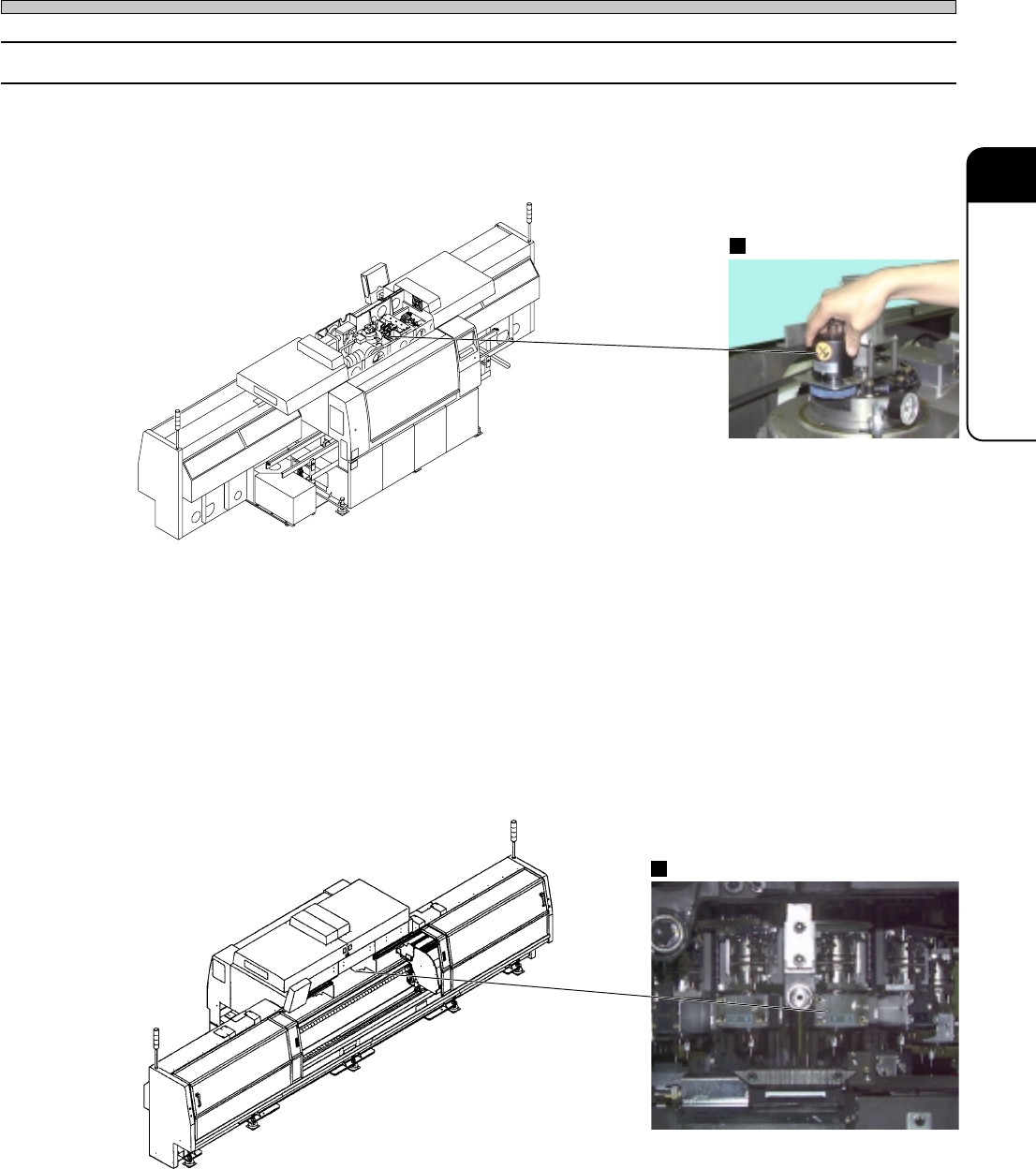
1. Checking the state of head recognition encoder
Check for looseness of fixing the head recognition encoder as follows.
If looseness is found, make contact with us for changing them.
Encoder
Pickup head No.
2. Checking the state of head recognition encoder by the axis information
Display the “Axis information” screen after “Machine adjust.”
Check “Pickup head No. ∗ ∗” (the No. in the software) displayed at the lower right on the screen
and actual pickup head No. (the No. of head recognition encoder). If values are not the same one,
the encoder may have trouble. Make contact with us for changing.
4G3C-AD01
3Y3C-093P
3Y3C-AI01
3Y3C-094P