00195094-0202-MM-D3_EN.pdf - 第26页
6 Weekly maintenance jobs SIPLACE D3 08/2008 US Edition 26 . 6

SIPLACE D3 6 Weekly maintenance jobs
08/2008 US Edition
25
6
6
You will need for the weekly maintenance jobs: 6
– Vacuum cleaner (with appropriate nozzle)
– Waste bin
–Brush
– Scissors
– Lint-free cloths
– Ethyl alcohol
– Set of cleaned ceramic nozzles
or
new plastic nozzles
6
6
There must be no PCBs in the machine during the following maintenance steps. 6
6
: Press the Stop button.
: Open the protective cover.
6
Push the gantry carefully and gently using the handle of the C&P20 head or the bracket of the X-
axis head plate (not the end buffers). 6
6
: Push the gantry over the component table. This will stop it outside your working area.
6
Vacuum the PCB conveyor / lifting table 6
a Use the vacuum cleaner to remove all loose components on and around the PCB conveyor
and th
e lifting table.
Loose components on the PCB conveyor could cause faults. 6
6
6
6
Clean the X/Y scales (as required) 6
6
Always use soft cloths and minimal pressure to clean the scale rods. 6
6
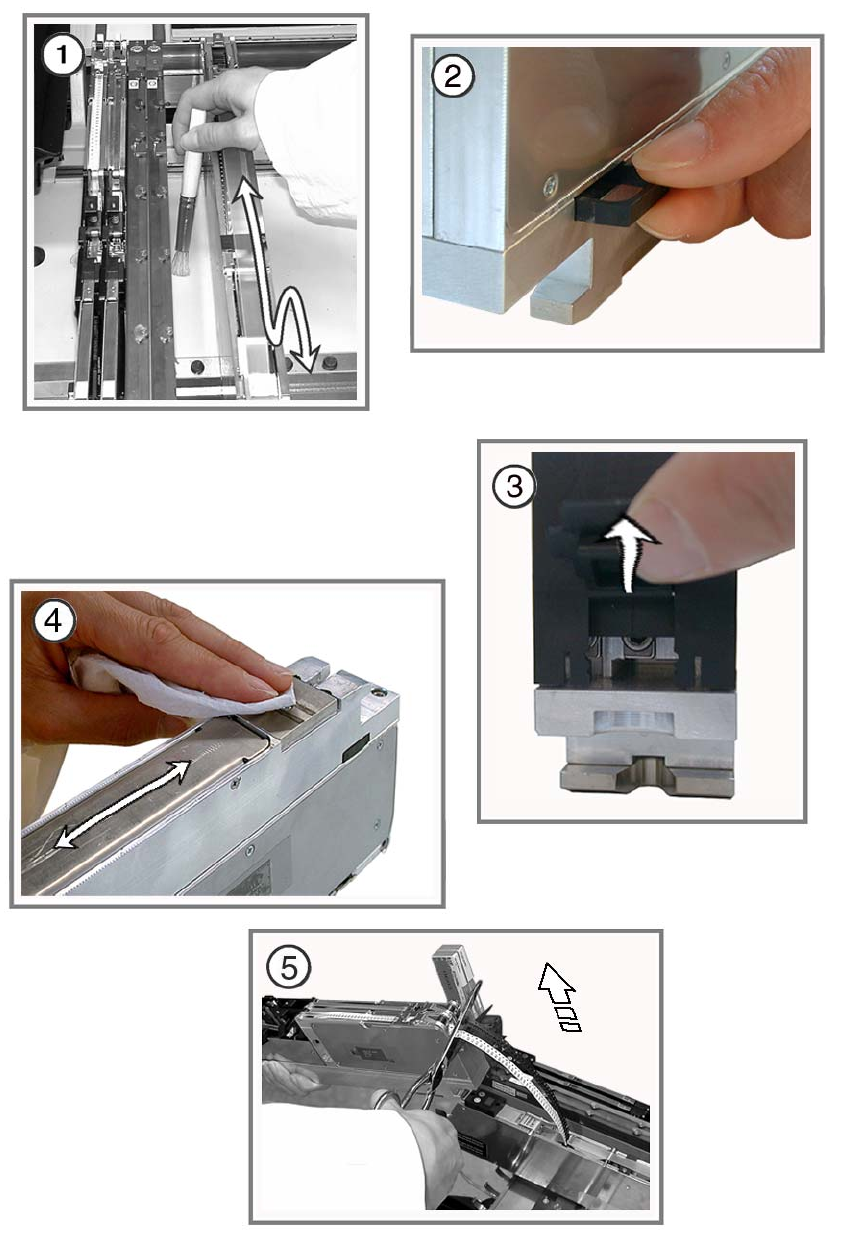
s Clean the incremental scales of the X and Y axes using a lint-free cloth moistened with ethyl
alcohol.
6
Dirty scale rods cause counting errors on the X and Y axes, and thus to machine stoppages. 6
6
6 Weekly maintenance jobs SIPLACE D3
08/2008 US Edition
26
. 6

SIPLACE D3 6 Weekly maintenance jobs
08/2008 US Edition
27
Empty the component drawer or flap of the 8 mm S feeder modules 6
: Unplug the 8 mm S feeder and lift it off the component table.
6
a Remove loose components from the changeover table with a brush or using the vacuum
cleaner.
s Empty the compo
nent drawer of the 2x8 mm S feeder module (if present).
d Open the flap of the 3x8 mm S feeder module (if present) and remove the components.
6
f Wipe the base of the feeder module to remove any dirt.
6
g Cut off the used tape so that it is flush with the feeder.
: Return the feeder modules to their original (correct) locations.
6
Make sure that the feeder is seated firmly on the component table and is inserted at the right po-
sition. 6
6
6
6
: Close the protective cover.
: Repeat these tasks for the other locations.
6
6