3OM-1751-002w_G5S.pdf - 第68页
3OM-1751 1-14 1303-001 4.1 "NOZ. CHNG." Window The nozzle attachment and housing can be performed manually. [1] [2] [4] [5] [3] F3A14 [1] Head Sel When a button is pressed, the corresponding head is selected as…
3OM-1751
1-131303-001
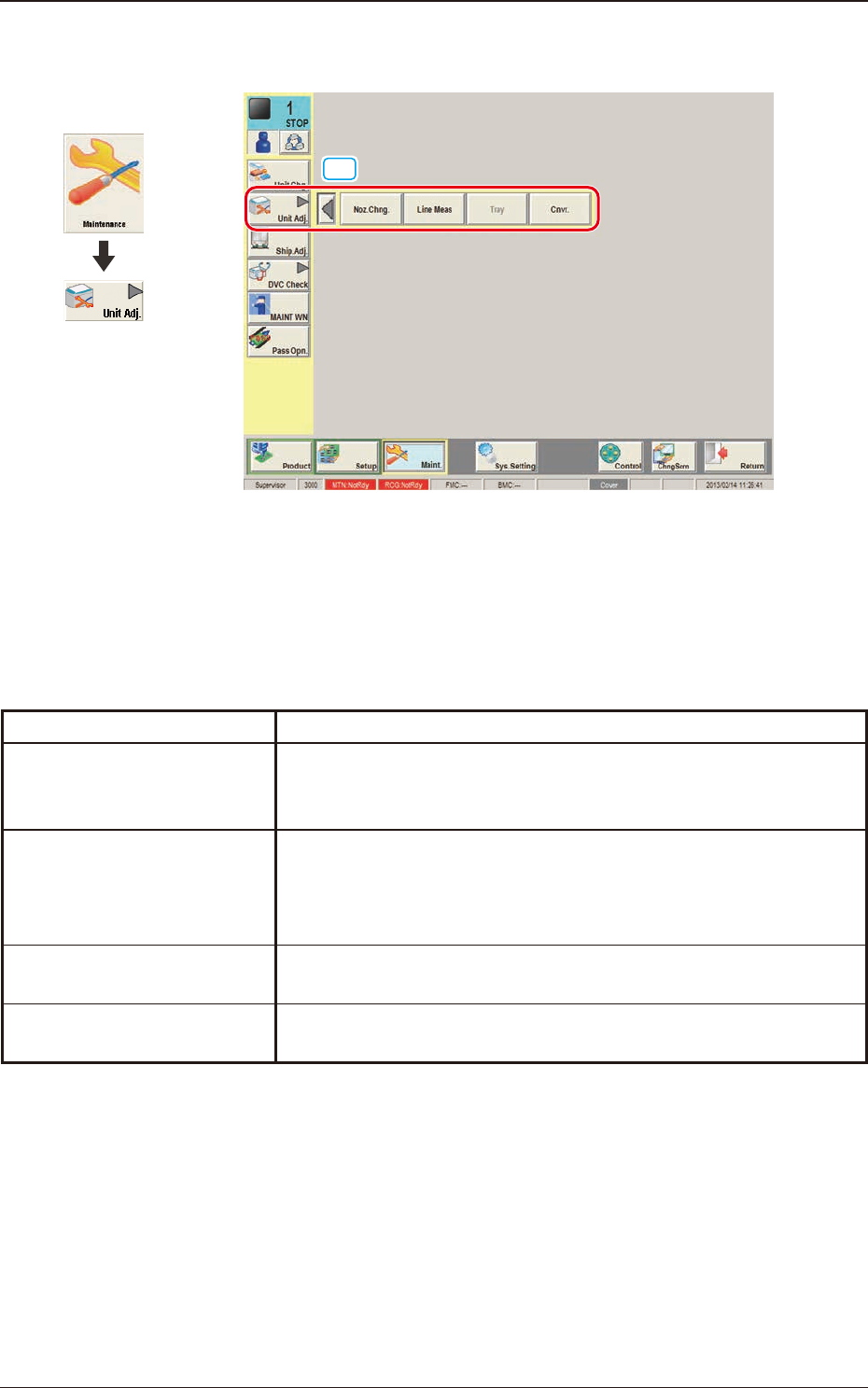
4. "Unit Adj." Submenu
[1]
F3A13
[1] "Unit Adj." submenu
The following buttons are arranged on this submenu bar and can be used
to display the operation windows for execution of each unit adjustment
function.
Function Selection Buttons Description
Noz Chng.
When pressed, this button opens the "NOZ. CHNG." window,
enabling you to manually perform a cycle of the vacuum nozzle
attachment and storage operation.
Line Meas
When pressed, this button opens the "LINE MEAS" window, enabling
you to view and record the changes in E/NR traces (expressed by a
chart or using numerical values) of the linear measure sensors on each
placement head. "E/NR" stands for "Light Emitted and Not Received".
Tray
This button is used when the tray feeder (option) is to be adjusted.
Cnvr.
This button is used for the adjustment operation for the conveyor
width overall setup or manual setup.
T3A1
Graphic
Development
4. "Unit Adj." Submenu
3OM-1751
1-141303-001
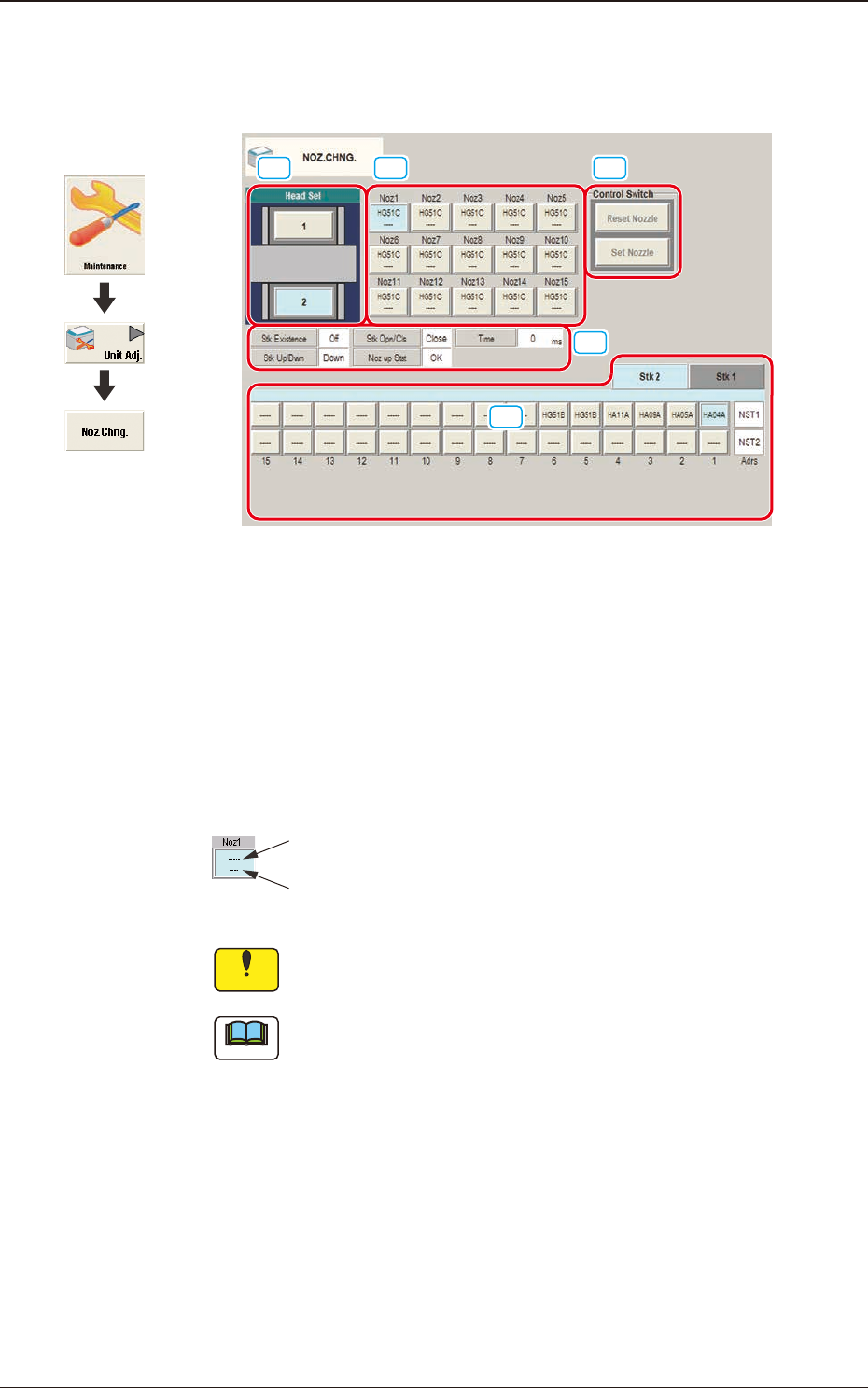
4.1 "NOZ. CHNG." Window
The nozzle attachment and housing can be performed manually.
[1] [2] [4]
[5]
[3]
F3A14
[1] Head Sel
When a button is pressed, the corresponding head is selected as an object one
for nozzle change operation.
[2] Nozzle Allocation No. Selection Buttons
When a button is pressed, the corresponding nozzle to be changed is selected.
The background color of the button turns light blue.
ID of Attached Vacuum Nozzle
Nozzle Stocker Address
(Home Address for Attached Nozzle)
Notice
No nozzles can be allocated to both sides of the middle-size odd
shaped nozzle if attached.
Note
The indications in the window vary depending on the selected head.
[3] Status Indication
Displayed is the condition of the currently selected head.
Graphic
Development
4.1 "NOZ. CHNG." Window
3OM-1751
1-151303-001
[4] "Control Switch" Group Box
The following operation buttons are arranged.
When the [START] button on the operation panel is pressed in 10 seconds
after the each operation button, the selected action takes place.
[Reset Nozzle] Button
When selected, this button stores the specied nozzle in the nozzle
stocker.
When this button is pressed, the background color turns green, indicating
that the head selection button is set active.
[Set Nozzle] Button
When selected, this button picks up the selected nozzle from the nozzle
stocker and attaches it to the specied nozzle No. position.
When this button is pressed, the background color turns green, indicating
that the head and nozzle (nozzle stocker) selection buttons are set active.
[5] Nozzle Stocker tab
Using this tab, the nozzle stocker to be opened or closed and the nozzle
housed in the nozzle stocker, are designated.
Selecting the nozzle stocker using the nozzle stocker select tab and pressing
the button for an appropriate nozzle, designates the nozzle to be used.
Note
For the stocker for which the skip has been set, a message is displayed and
the stocker can not be operated.
4.1 "NOZ. CHNG." Window