3OM-1751-002w_G5S.pdf - 第84页
3OM-1751 1-30 1303-001 Button Name Teaching Outline NL-Axis Org Master Noz Lv When this button is pressed, the teaching operations for avoiding the impact given to the component in the NL-axis rotation, and for the maste…
3OM-1751
1-291303-001
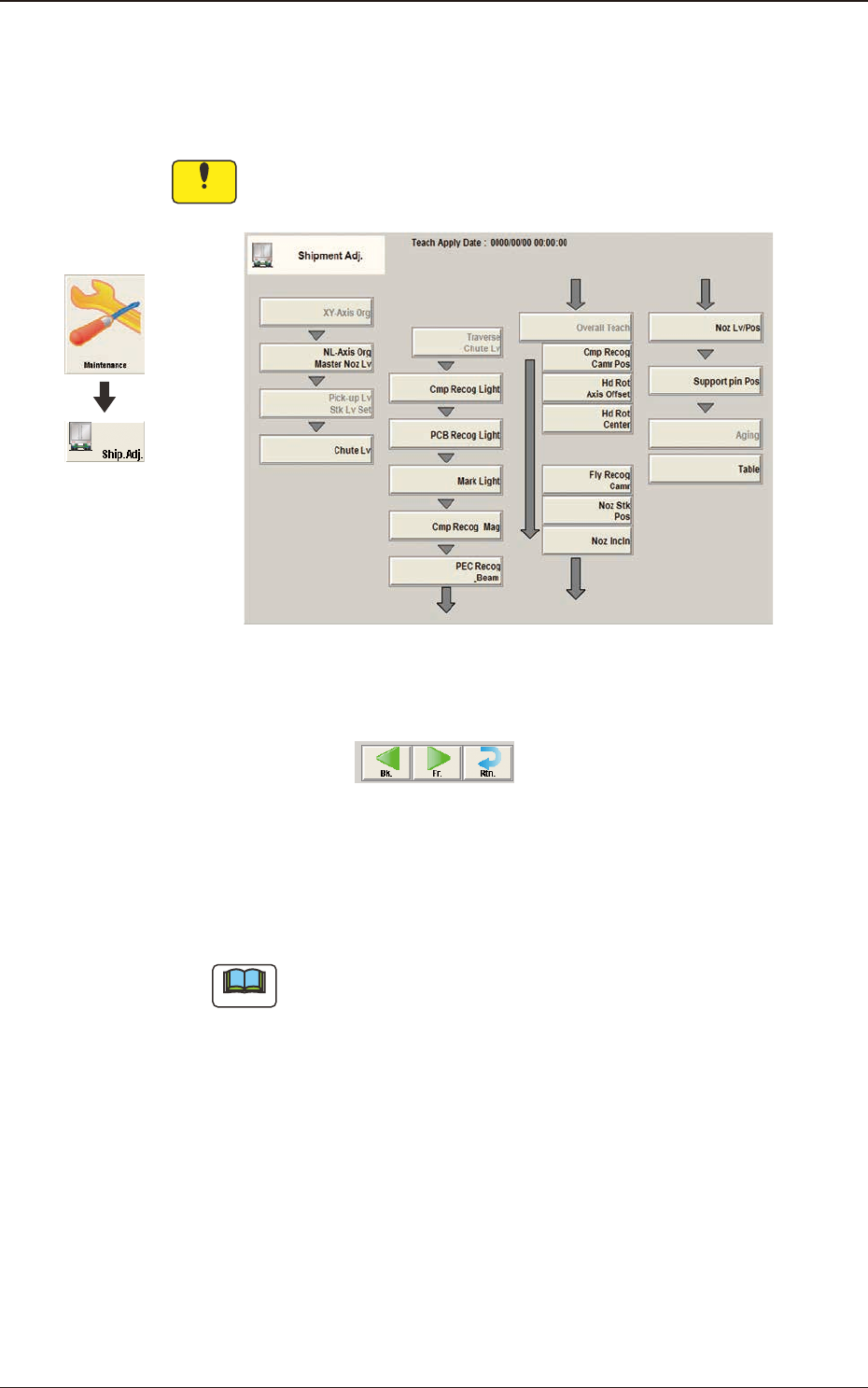
5. "Shipment Adj." Window
In this window, the teaching operations to be performed when the machine is
shipped from the factory, are summarized.
Notice
In normal cases, it is not required to perform this teaching operation
because the offsets are factory-adjusted upon shipment of the machine.
F3A22
Common Operation Description
F3A23
[Bk.] Button
When this button is pressed, the window for the current items is changed to
the one for the previous Shipment Adjustment items.
Note
As there is no previous items for the "XY-Axis Org" window, this button is
not display in the "XY-Axis Org" window.
[Fr.] Button
When this button is pressed, the window for the current items is changed to
the one for the next Shipment Adjustment items.
[Rtn.] Button
When this button is pressed, the window is changed to the one for the
shipping adjustment initial display window.
Graphic
Development
5. "Shipment Adj." Window
3OM-1751
1-301303-001
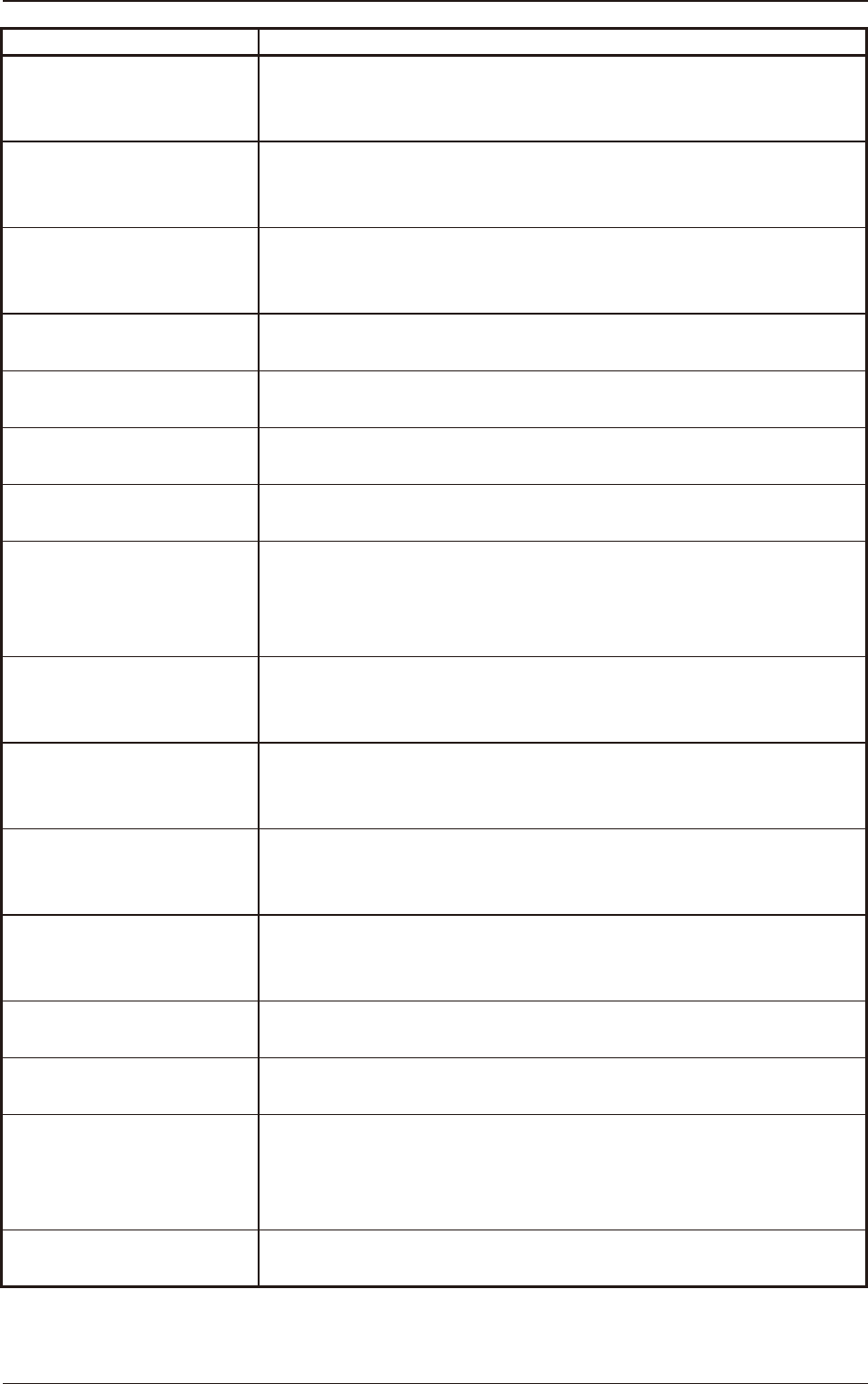
Button Name Teaching Outline
NL-Axis Org Master Noz Lv
When this button is pressed, the teaching operations for avoiding the impact
given to the component in the NL-axis rotation, and for the master nozzle
lower surface level reference position, are performed.
Pick-up Lv Stk Lv Set
When this button is pressed, the automatic entry of numerical values into
the offset data box is enabled by means of entering the data obtained in the
measurement with the jig placed, in this data box.
Chute Lv
When this button is pressed, the head up/down offset is calculated
automatically by means of teaching the chute level when the head is
changed.
Cmp Recog Light
The corresponding window enables the operator to perform the teaching
operation for the lighting for the component recognition camera.
PCB Recog Light
The corresponding window enables the operator to perform the teaching
operation for the lighting for the PCB recognition camera.
Mark Light
The corresponding window enables the operator to perform the teaching
operation for the Mark Light.
Cmp Recog Mag
The corresponding window enables the operator to perform the teaching
operation on the magnication of the PEC recognition camera.
PEC Recog_Beam
When this button is pressed, the teaching operation for the PEC recognition
camera offsets (Magnications X (Horizontal), Y (Vertical) and Z (Angle)
and the beam offsets (Beam X (Horizontal), Beam Y (Vertical), Beam
Angle X and Beam Angle Y) are performed.
Cmp Recog Camr Pos
When this button is pressed, the teaching operations for the component
recognition camera position (X (Horizontal), Y (Vertical) and Z (Angle)
are performed.
Hd Rot Axis Offset
When this button is pressed, the teaching for the designed distance from
the locating position reference to the camera center based on the placement
position reference, is performed.
Hd Rot Center
When this button is pressed, the teaching is performed to correct the
deviation of the head rotation center from the PEC recognition camera
center reference value using the jig component.
Fly Recog Camr
(Base Mark Position)
When this button is pressed, the image capture timing is taught after nding
the deviation of component recognition camera position in stopped image
shooting, from the position in fry recognition image capturing.
Noz Stk Pos
When this button is pressed, the teaching is performed for keeping the
nozzle stocker position (machine coordinate reference).
Noz Incln
When this button is pressed, the teaching for the offset data to collect the
head/nozzle inclination is performed.
Noz Lv/Pos.
When this button is pressed, the teaching operations are performed for the
nozzle lower surface level for the normally attached nozzle and for the
deviation of the head rotation center to the nozzle end position to the head
from the reference values.
Support pin Pos
The corresponding window enables the operator to perform the teaching
operation for the PCB support pin position (X-axis, Y-axis).
T3A4
5. "Shipment Adj." Window
3OM-1751
1-31
Notice
•
The teaching operation might affect the component placement
accuracy. Therefore, consult with out marketing department or sales
agent.
•
Some operations require special jigs (options).
Consult our marketing department or sales agency before
performing any teaching operations.
•
Follow the teaching procedures in the specied order. Otherwise,
some trouble (such as inaccurate component placement, frequent
mechanical errors, etc.) will arise.
•
Before performing any teaching operation, conrm that the
component recognition offset jig, the jig setting position, and the
back light stage (teaching plate) are not nicked and stained.
1303-001
5. "Shipment Adj." Window