xp141-241-341-5.0E.pdf - 第113页
FK-9F98- 29 XP Series Training Text for Service Engineers Edition 5.0 XP241 – Chapter 4 Loader Adjustment Page 1 of 12 Fuji Machine Mfg. Co., Ltd. Okazaki. SMT Equipment Quality Assurance Dept. 4 – 1 CS Section Chapter 4…

C
C
h
h
a
a
p
p
t
t
e
e
r
r
4
4
L
L
o
o
a
a
d
d
e
e
r
r
A
A
d
d
j
j
u
u
s
s
t
t
m
m
e
e
n
n
t
t
FK-9F98-29 XP Series Training Text for Service Engineers
Edition 5.0 XP241 – Chapter 4 Loader Adjustment Page 1 of 12
Fuji Machine Mfg. Co., Ltd. Okazaki.
SMT Equipment Quality Assurance Dept.
4 – 1 CS Section
Chapter 4: Loader Adjustment
4.1 Measuring the Flatness of the Lifter Plate
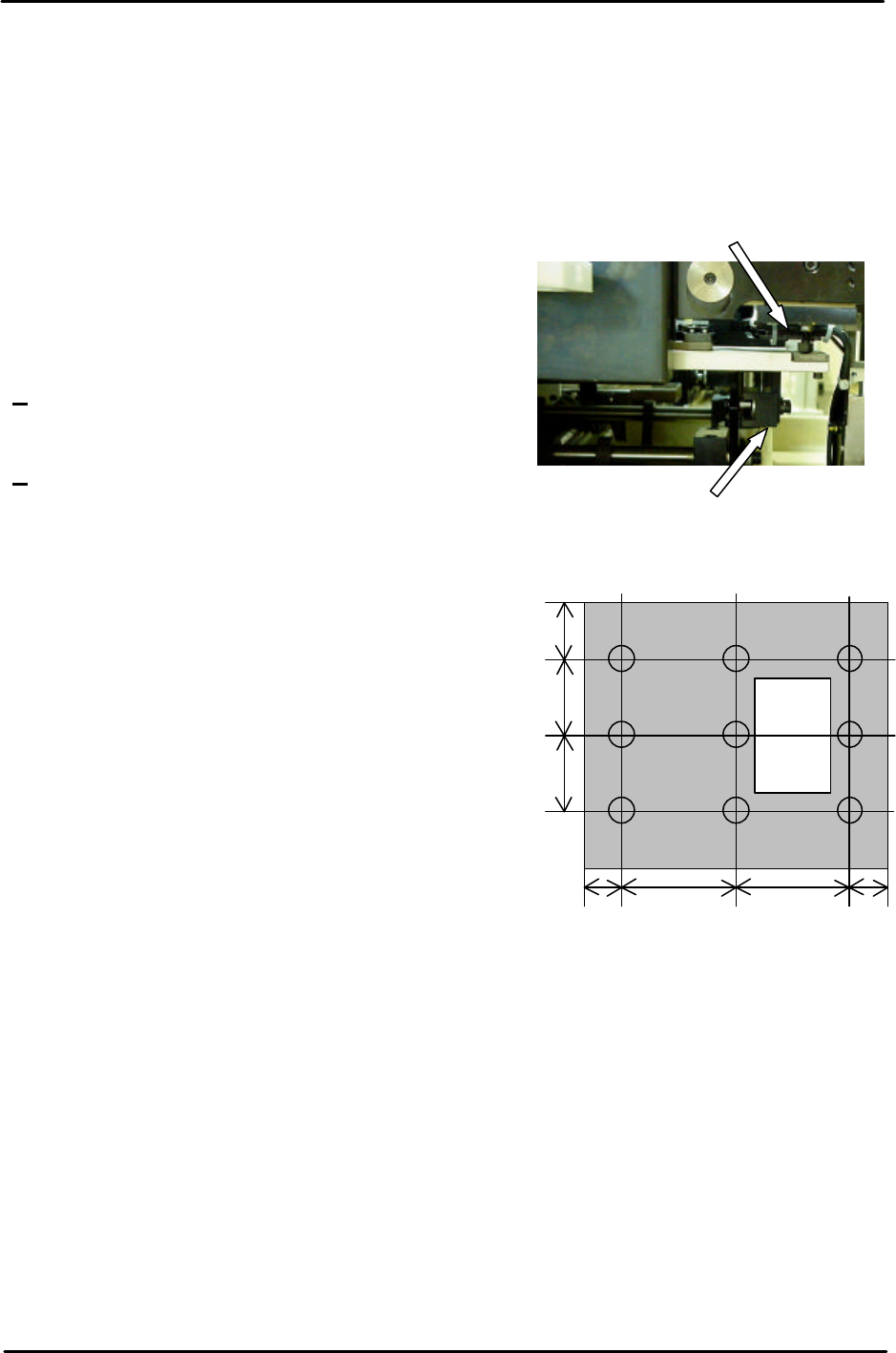
• Measuring equipment: standard lever type dial gauge (0.01mm).
1. Adjust the conveyor to its maximum width
(356mm), and then remove the back-up plate.
Note: Do not use the conveyor auto width
changer, as this is not adjusted yet.
2. Loosen the lock nuts on the clamper height
adjustment bolts.
3. Raise the main lifter.
Note: There should be some clearance between the
lifter plate and clamper height adjustment bolts. If there is no clearance between them screw
the clamper height adjustment bolts in to achieve clearance.
4. Attach the dial gauge to the placing head (an
extension bar is necessary).
Measure the Four Corners of the table
(Points: A, C, G, and I); ensure each value is
0. If the table is not flat, re-adjust it using the
four height adjustment bolts.
5. After ensuring the four-corners of the table are
flat, measure the surface of the table at the
nine positions shown in the diagram. Any
deviation should be within 0.10mm. If the
values are out of tolerance please contact
FUJI.
4.2 Measuring the Flatness and Parallelism of the Fixed Rail
Parallelism of the Fixed Rail
• Measuring equipment: standard lever type dial gauge (0.01mm).
1. Attach the dial guage to the placing head (an extension bar is necesarry).
2. Set the dial gauge to the reference side of the conveyor.
3. Set the dial gage to “0”. Measure the parallelism of the fixed rail.
4. Record your measurements on the adjustments check sheet:
Height adjustment bolt
Clamper height adjustment bolt
I H G
F E D
C B A
180 180 5050
80
110
110
FK-9F98-29 XP Series Training Text for Service Engineers
Edition 5.0 XP241 – Chapter 4 Loader Adjustment Page 2 of 12
Fuji Machine Mfg. Co., Ltd. Okazaki.
SMT Equipment Quality Assurance Dept.
4 – 2 CS Section
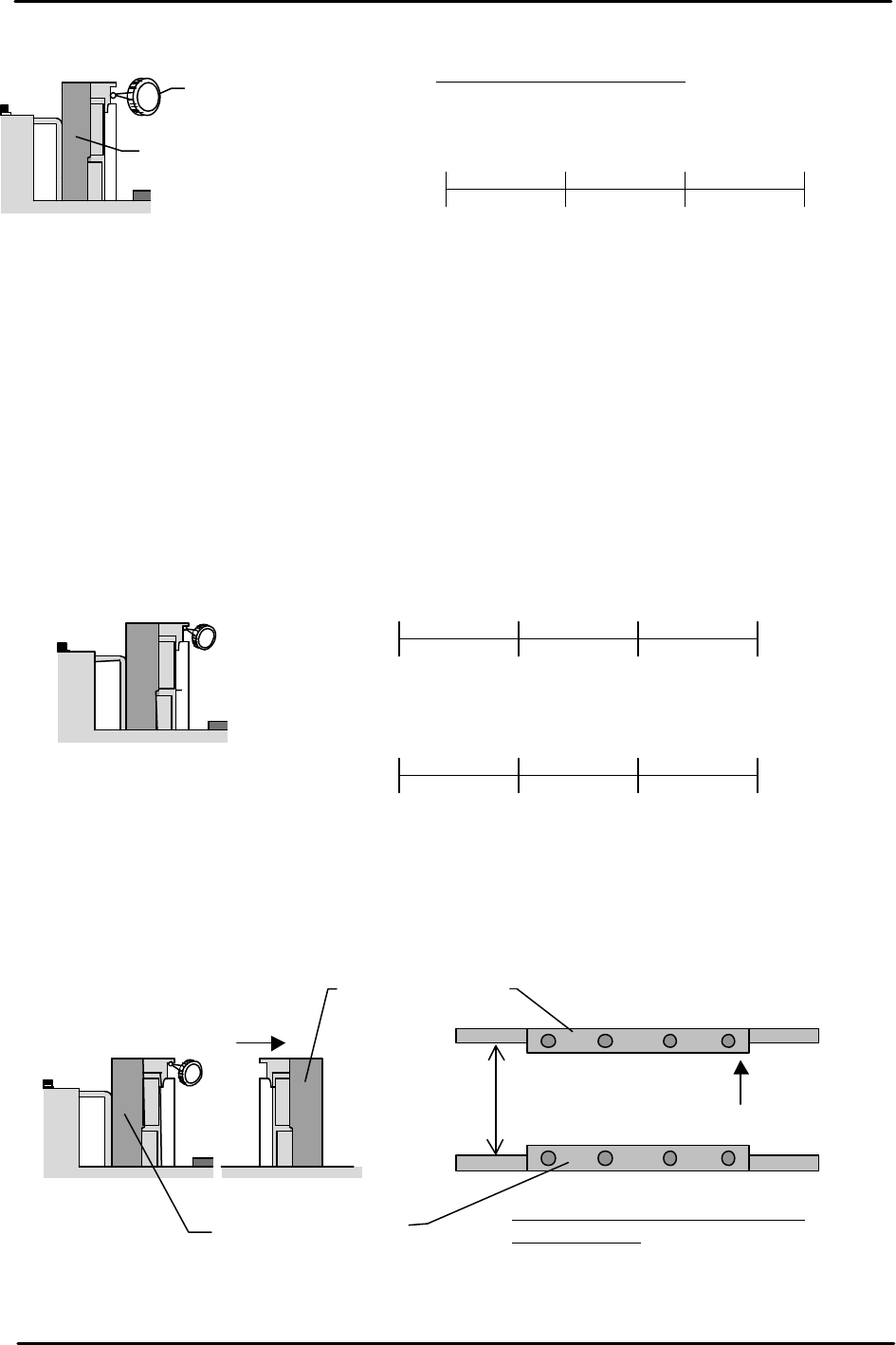
Fixed Rail Flatness Measurement
Note: Do not use the conveyor auto width changer, as this is not adjusted yet.
1. Adjust the conveyor width to 200mm.
2. Set the dial gauge on the underside of the board clamper at the fixed rail side. Measure the
flatness and record the measurements on the adjustment check sheet.
3. Measure the flatness of the underside of the board clamper at the adjustable rail side.
4. Set the dial gage on the fixed rail to “0”, and measure the difference between the fixed rail
and the adjustable rail. Add the difference to the flatness value of the adjustable rail side
measured in step 3. If the values are out of tolerance please contact FUJI.
Dial Gauge
Reference side of the
Conveyor
Viewed from the right side
of the machine
0450 300 150
( ) ( ) ( ) 0
(mm)
(mm)
Tolerance: ±0.05 / 450 mm
Reference side of the
conveyor
Viewed from the right
side of the machine
(mm)
0
450 300 150
( ) ( ) ( )
0
0450 300 150
( ) ( ) ( ) ( )
(mm)
(mm)
(mm)
Reference Conveyor
Viewed from the right
side of the machine
Movable conveyor
200mm
Tolerance: whole deviation to be
within 0.20mm