xp141-241-341-5.0E.pdf - 第13页
FK-9F98- 29 XP Series Training Text for Service Engineers Edition 5.0 XP141 – Chapter 1 Initial Adjustment Page 3 of 6 Fuji Machine Mfg. Co., Ltd.Okazaki SMT Equipment Quality Assurance Dept. 1 – 3 CS Section 1.3 Lubrica…
FK-9F98-29 XP Series Training Text for Service Engineers
Edition 5.0 XP141 – Chapter 1 Initial Adjustment Page 2 of 6
Fuji Machine Mfg. Co., Ltd.Okazaki
SMT Equipment Quality Assurance Dept.
1 – 2 CS Section
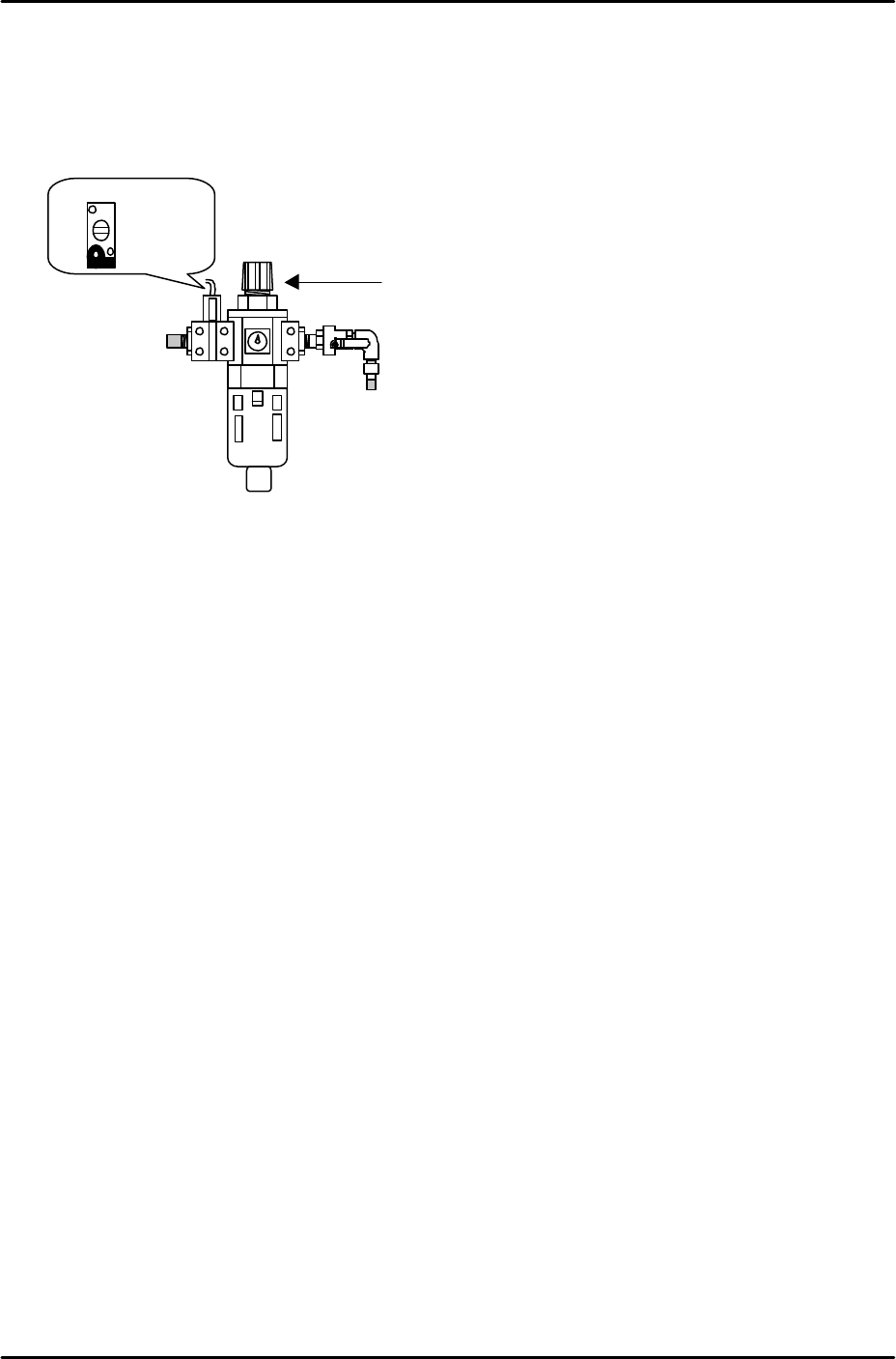
Air hose connection
1. Connect the hose to the air inlet at the machine.
2. Pull up on the regulator knob to release the lock.
3. Turn the regulator knob until the pressure level indicated at the regulator shows 0.5Mpa
(5kgf/cm2).
4. Push down the regulator knob to lock it.
5. Adjust the screw on the vacuum sensor so that the 200-volt power supply to the servos
cuts out when the air pressure drops to 0.4Mpa and below.
6. Select [Maintenance A] – [I/O Check] – [Y016 VacuumPump] – [ON] and confirm that the
vacuum pump dial shows negative pressure.
7. If the dial indicates that the vacuum pump is rotating in the wrong direction the power
cable connection is probably reversed.
8. In this case turn the machine power OFF, trip the breaker and disconnect the power cable
from the mains socket.
9. Check that the power supply connection is correct, and then confirm the power cable is
not reverse phased.
Vacuum Sensor
Regulator Knob
FK-9F98-29 XP Series Training Text for Service Engineers
Edition 5.0 XP141 – Chapter 1 Initial Adjustment Page 3 of 6
Fuji Machine Mfg. Co., Ltd.Okazaki
SMT Equipment Quality Assurance Dept.
1 – 3 CS Section
1.3 Lubrication
1. Apply lubricants to the following areas:
Lubrication points Lubrication Type
Y-axis ball screw Daphne Eponex No.2
Z-axis ball screw Daphne Eponex No.2
Spline Shaft Daphne Eponex No.2
Theta and R axes gears Daphne Eponex No.2
Conveyor ball screw Daphne Eponex No.2
Conveyor LM rail Daphne Eponex No.2
Sliding parts of lifter plate link arm Daphne Eponex No.2
Sliding parts of cutter link arm Daphne Eponex No.2
Cutter LM rail Daphne Eponex No.2
F and G axes cams Daphne Eponex No.2
Nozzle Pistons AFC Grease
Spool Axes AFC Grease
Conveyor Chain Biral T and D
Note: Apply anticorrosion spray to the machine base, brackets, and other metal surfaces, to prevent
rust.
Note: Do not over apply lubricant to the ball screws, helical gears, LM guide rails, or other parts of the
machine that rotate or move at high velocity. Over lubrication may result in the lubricant being flung
around the machine and interfering with the sensors, vision processing, and other aspects of the
machine operation.
Note: If any of the spool axes (vacuum and air blow pins) need removing the pins should be pulled
out from the top of the revolver. Previously they could be removed from the bottom of the revolver,
however an O-ring has been added to prevent the pins from slipping down erroneously, making it
necessary to remove the pins from the top. In order to facilitate this the vacuum and air blow pins are
now designed in two pieces so that the stopper at the bottom of the pins can be unscrewed. Before
replacing any pins in the revolver apply a thin layer of AFC grease. When attaching the stopper to the
pin, Loctite adhesive should be applied to the screw thread.
1.4 Belt tension measurement
1. Equipment: belt tension meter (U-505).
2. Press the emergency stop button to cut the 200-volt power supply to the servos and then
bring the Y and Z axes to the minus mechanical stoppers.
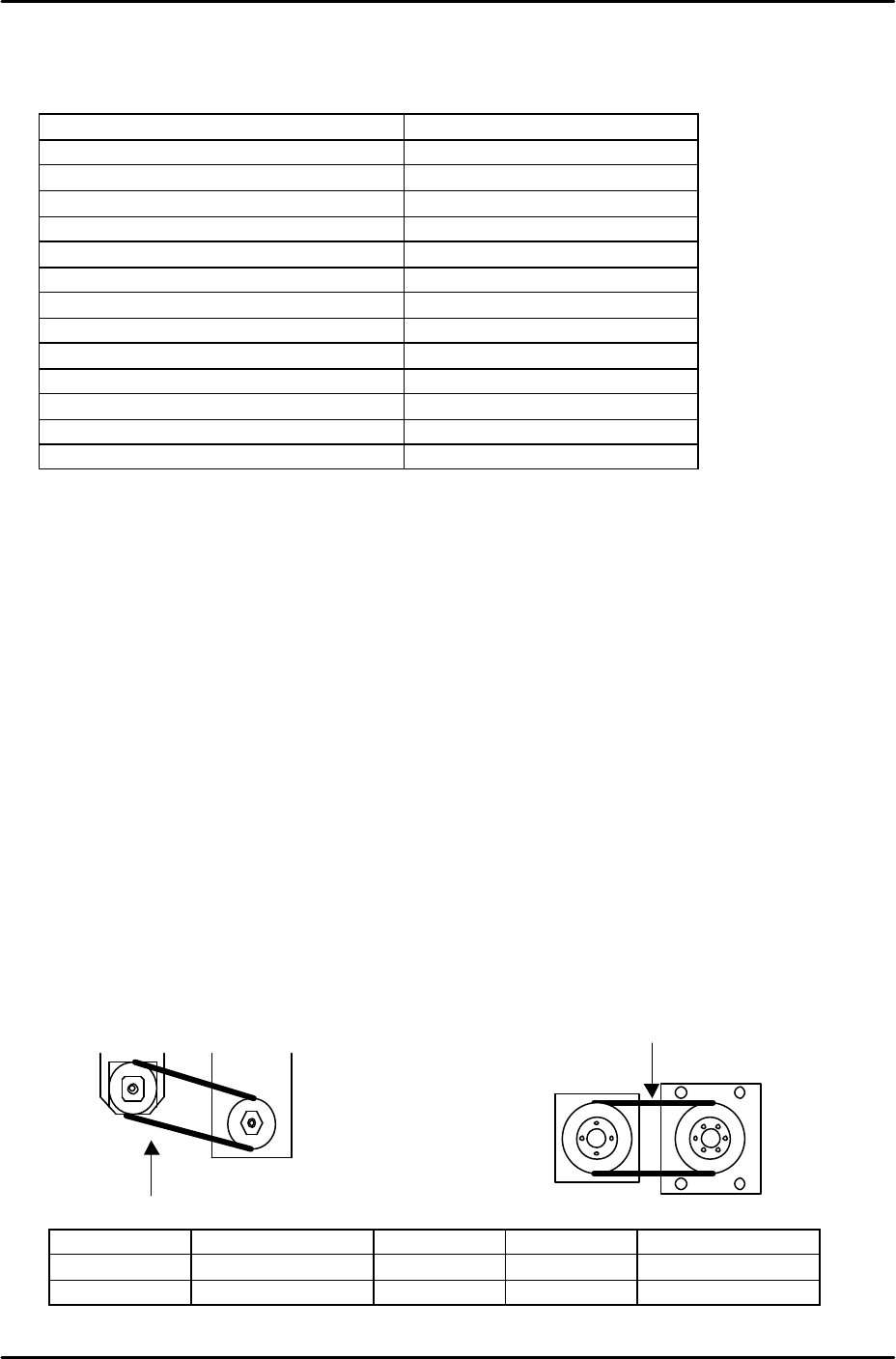
3. Refer to the following illustrations and check that the tension of each belt is within the
appropriate range:
Belt unit weight Belt width Belt span Frequency range
Y axis
0.4 gf/mm 15mm 130mm 165 –183 Hz
Z axis
0.2 gf/mm 8mm 110mm 204 – 226Hz
Y measuring
point
Z measuring
point

FK-9F98-29 XP Series Training Text for Service Engineers
Edition 5.0 XP141 – Chapter 1 Initial Adjustment Page 4 of 6
Fuji Machine Mfg. Co., Ltd.Okazaki
SMT Equipment Quality Assurance Dept.
1 – 4 CS Section
1.5 Computer Connection
MCS/X
1. Connect the LAN cable to the PC.
2. Remove the bottom left cover at the front of the machine, and connect the LAN cable to
the dedicated LAN port.
3. At the PC select [Start] – [Programs] – [MCSX] – [MCSX].
4. Click on the [File Manager] tab to bring up the "File Exchange" window.
5. To add a line, click on [Add Line], then enter a new line name, and click on [OK].
6. To add a machine, click on [Add M/C]:
Line Name: Choose an available line.
Machine nick name: For example XP241A
Machine type: Input the machine type.
IP Address: Input an IP address.
When finished click on [OK].
7. At the machine select [Maintenance B] – [Start Up Settings]:
Target: Input the "Machine nick name" registered in MCSX.
Ethernet Address: Input the same IP address as the one registered in MCSX.
Subnet Mask: If necessary input the subnet mask.
8. Click on the [Update] tab to save the new settings, then reboot the machine in order for
them to take effect.
9. Finally confirm that the PC and machine are communicating.
F4G
1. At the PC select [Start] – [Programs] – [Windows NT Explorer] – [Winnt] – [System
32] – [drivers] – [etc] – [Hosts] and open the hosts file with notepad, a text file similar to
the one below will then open:
127.0.0.1 localhost
192.168.33.190 italy
192.168.39.2 pascal
192.168.39.10 uk
192.168.33.154 XP241A
Make a new entry, and in the first column input the machine's IP address, then a "host
name" in the next column. Close and save the file.
2. Select [Start] – [Programs] – [F4G] – [F4G] – [Line Config] and a text file will open. In
the MC Name column input the same host name as that registered in the hosts file, then
in the HOSTNAME column also input the same host name as that registered in the hosts
file, in this case XP241A. Under the MCTYPE column input the machine type, for