Infinity EX Camera System Module.pdf - 第20页
INFINITY EX CAME RA SY STEM MO DULE ADJUS TMEN TS AND SE TTINGS 17.2 0 Technical Reference Manual Chapter Issue 3 Jan 04 ADJUSTMEN TS AND SE TTINGS X Camera Home Positioning W ARNING BO ARD CLAMPS. EXTREME CARE MUST BE E…
INFINITY
EX
CAMERA SYSTEM MODULE
POSITIONING
Chapter Issue 3 Jan 04 Technical Reference Manual 17.19
POSITIONING
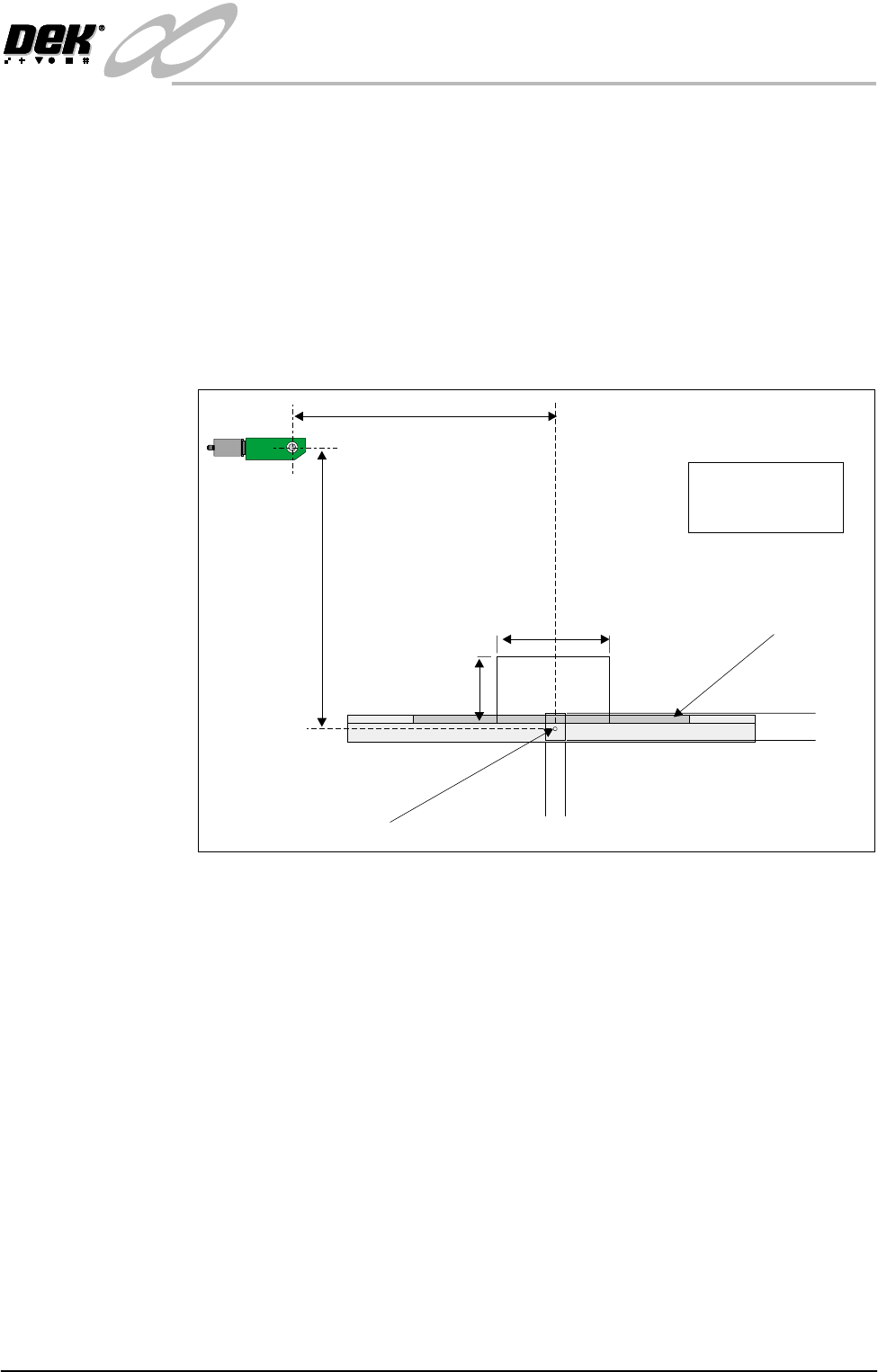
Camera Reference
Position
A white dot is located centrally on the front rail and 10mm back from the board
edge, this is the camera reference position.
The camera is driven to the reference position which is stored in the config.cfg
file as a dimension relative to the home position.
It must lie within the X and Y limits as shown on the Camera Reference Position
Figure below, otherwise the position is not saved.
All camera positions, board stop, fiducials, screen cleaner pick-up are calculated
relative to this point.
Figure 17-8 Camera Reference Position
X Reference
Optic Centre at Home
Y Reference
200mm
100mm
560mm
590mm
320mm 340mm
X Limits
Board Clamp
Front Rail
Reference Position
Y Limits
PULNIX
TM-6EX
Eg.
X = 335mm
Y = 572mm
INFINITY
EX
CAMERA SYSTEM MODULE
ADJUSTMENTS AND SETTINGS
17.20 Technical Reference Manual Chapter Issue 3 Jan 04
ADJUSTMENTS AND SETTINGS
X Camera Home Positioning
WARNING
BOARD CLAMPS. EXTREME CARE MUST BE EXERCISED WHEN
WORKING IN THE TOOLING AREA OF THE MACHINE TO AVOID
INJURY. THE FOILS ON THE FRONT AND REAR BOARD CLAMPS
ARE VERY SHARP.
1. In Camera Diagnostics select the following parameters in sequence:
a. Home Camera X Axis
b. Home Camera Y Axis
c. Drive to Reference Position
d. Home Camera X Axis (only)
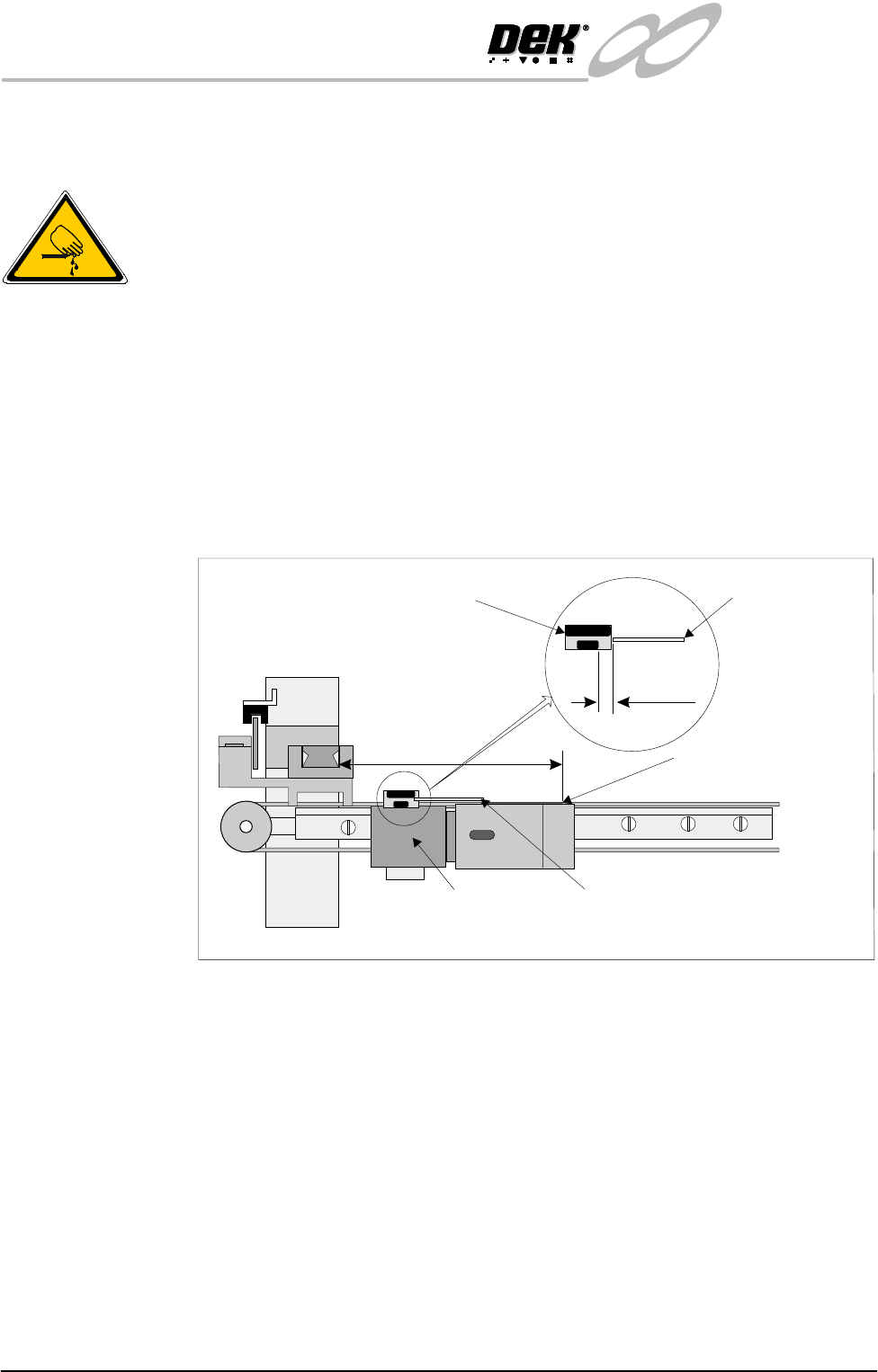
2. Measure the home position (H). This is the distance in millimetres from the
board stop assembly to the inside edge of the Y axis rail.
3. Adjust the camera drive belt for a home position of between 134mm -
139mm. If required, apply a correction to the setting as described in the
remaining procedures.
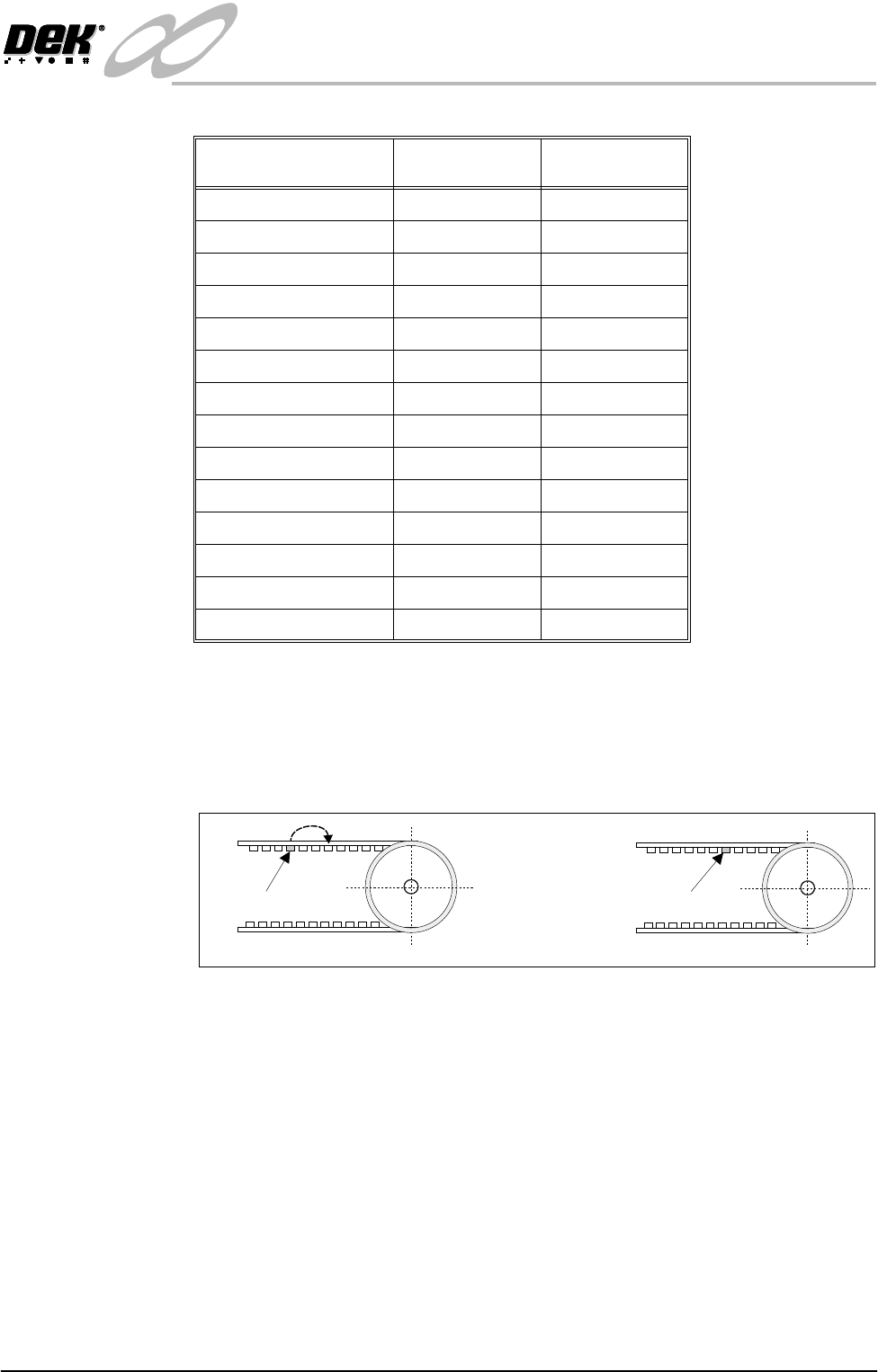
4. The table shows measured values of H between 128mm and 158mm. Move
the drive belt either to the left or the right by the number of teeth indicated
(as viewed from the front of the machine).
For example: If a home position setting of 144mm -146mm is measured, the
belt therefore has to be moved to the right by 3 teeth.
View From Front of Machine
Vane
Camera
Board Stop Assembly
H
1mm-2mm
X Axis Home Sensor
Carriage Vane
INFINITY
EX
CAMERA SYSTEM MODULE
ADJUSTMENTS AND SETTINGS
Chapter Issue 3 Jan 04 Technical Reference Manual 17.21
5. Release the X direction left hand pulley by slackening the sliding member
screws. Remove the belt from the pulley.
6. Position the drive belt 3 teeth to the right in order to reset the home position
from the 144mm - 146mm example to the required setting of 134mm -
139mm.
7. Carefully refit and tension the belt (X Axis Timing Belt Replacement
Procedure refers). Tighten the belt tensioning member and motor screws.
8. Home the Camera X Axis only. Confirm the home position setting is
correct. Set the vane 1mm to 2mm beyond the sensor (as shown in Step 2
figure).
9. Carry out the following checks:
a. Home Camera Axis X and Y
b. Camera Reference Position
c. Calibrate Vision
Home Position (H) Number of Belt
Teeth
Move Belt to the:
128mm - 130mm 3 Left
130mm - 132mm 5 Left
132mm - 134mm 4 Right
134mm - 139mm --
139mm - 140mm 2 Left
140mm - 142mm 4 Left
142mm - 144mm 6 Right
144mm - 146mm 3 Right
146mm - 148mm 1 Right
148mm - 150mm 1 Left
150mm - 152mm 3 Left
152mm - 154mm 5 Left
154mm - 156mm 4 Right
156mm - 158mm 2 Right
New Position
View on Front of Machine
Original Position