Infinity EX Camera System Module.pdf - 第36页
INFINITY EX CAME RA SY STEM MO DULE REP LAC EMEN T PR OCE DURE S 17.3 6 Technical Reference Manual Chapter Issue 3 Jan 04 X Axis Ti ming Belt W ARNING BO ARD CLAMPS. EXTREME CARE MUST BE EXERCISED WHEN WORK ING IN THE T …

INFINITY
EX
CAMERA SYSTEM MODULE
REPLACEMENT PROCEDURES
Chapter Issue 3 Jan 04 Technical Reference Manual 17.35
Gold Camera
WARNING
BOARD CLAMPS. EXTREME CARE MUST BE EXERCISED WHEN
WORKING IN THE TOOLING AREA OF THE MACHINE TO AVOID
INJURY. THE FOILS ON THE FRONT AND REAR BOARD CLAMPS
ARE VERY SHARP.
Preparation 1. Switch on machine power, raise the printhead, insert the head prop and
switch off machine power.
2. To gain access to the camera for removal, move the camera forward and
central over the table by manually moving the camera carriage.
Removal 1. Remove the following connectors from the gold camera unit:
• Camera 1 - 10SK17
• Camera 2 - 10SK18
• Camera Lighting - 10SK13
2. Unscrew the Camera grub screw and slide the camera to the left to allow
removal from the camera mount.
Fitment 1. Slide the camera and optics unit into position in the dovetail ensuring that
the end of the camera mount butts against the right hand side of the dovetail
and secure camera grub screw.
2. Connect the following connectors to the gold camera unit:
• Camera 1 - 10SK17
• Camera 2 - 10SK18
• Camera Lighting - 10SK13
3. Cable-tie the cables back to prevent any chaffing on the board clamps or
transport rails.
Checks and Tests 1. Carry out Setting Camera Type.
2. Carry out the Vision Height.
3. Re-teach the Camera Reference Position.
4. Carry out the Board Stop X Offset Calibration.
5. Carry out the Vision Calibration.
6. Carry out the Calibrate Offset Calibration.
INFINITY
EX
CAMERA SYSTEM MODULE
REPLACEMENT PROCEDURES
17.36 Technical Reference Manual Chapter Issue 3 Jan 04
X Axis Timing Belt
WARNING
BOARD CLAMPS. EXTREME CARE MUST BE EXERCISED WHEN
WORKING IN THE TOOLING AREA OF THE MACHINE TO AVOID
INJURY. THE FOILS ON THE FRONT AND REAR BOARD CLAMPS
ARE VERY SHARP.
1. Home the camera X and Y axes.
2. Power down the machine. Remove the left and right side panels and raise
the printhead covers.
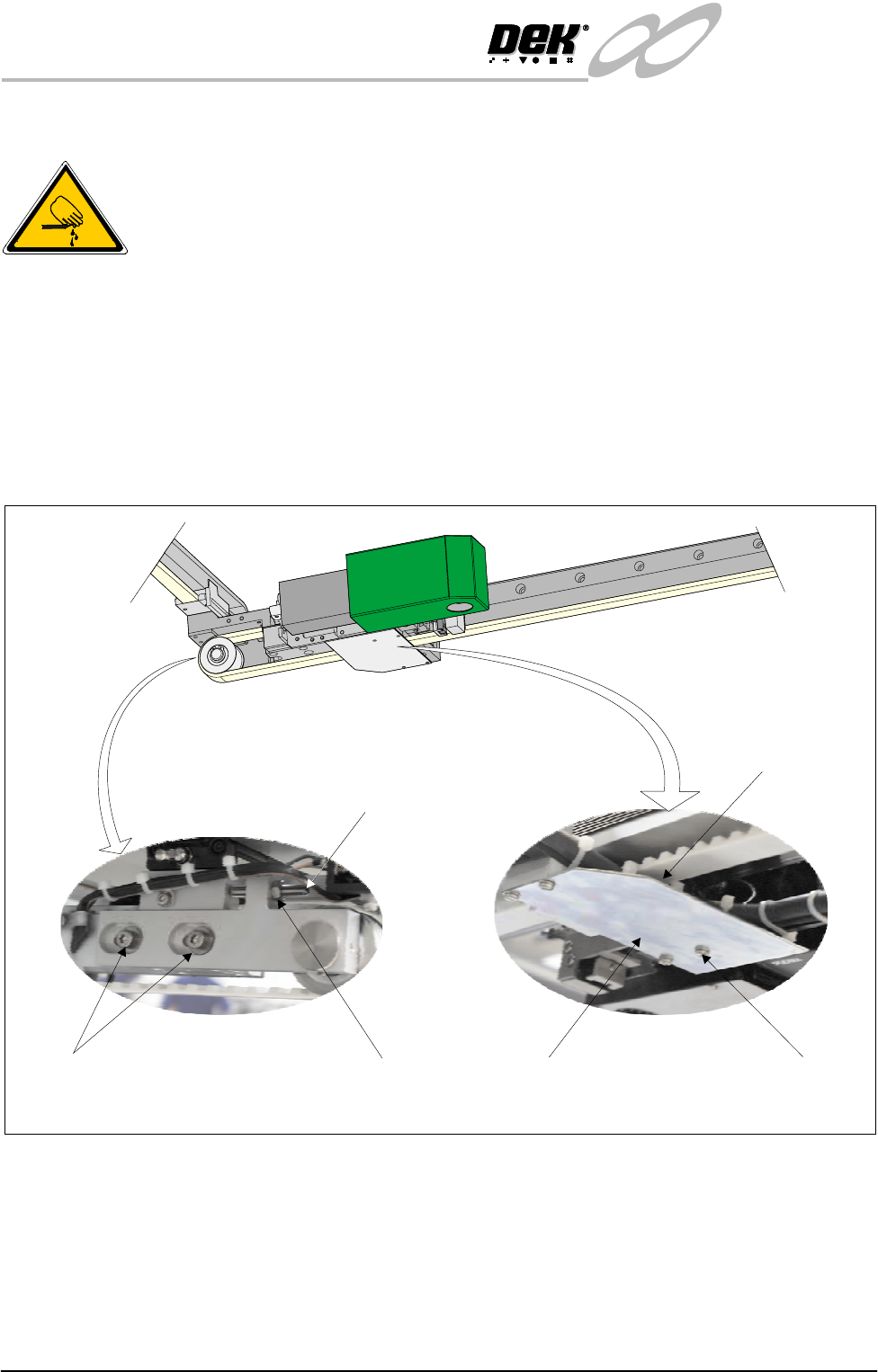
3. Slacken the tension fixing grubscrew securing locknut at the left hand end of
the camera carriage. Loosen the grubscrew.
4. Loosen the belt tensioner securing screws and slide the tensioner inwards to
release tension on the camera belt.
5. Unscrew the four pan head ribbon plate securing screws and remove the
ribbon plate.
NOTE
Take note of the routing of the camera belt before removing it.
6. Slacken the belt clamp securing screws sufficiently to remove the camera
belt.
View on Rear of Camera Carriage
Tension Fixing
Grubscrew
Grubscrew LocknutSecuring Screws
Securing Screws
(In 4 Positions)
Ribbon Plate
View on Underside of Camera
View on Camera Carriage
Belt Clamp
(Beneath Ribbon Plate)
INFINITY
EX
CAMERA SYSTEM MODULE
REPLACEMENT PROCEDURES
Chapter Issue 3 Jan 04 Technical Reference Manual 17.37
7. Engage the first two teeth of the replacement belt into the right hand side of
the belt clamp.
8. Route the belt anti-clockwise along the underside of the camera carriage,
around the X axis camera motor pulley, returning along the top of the camera
carriage, through the belt tensioner block to the belt clamp.
9. Engage the last two teeth of the replacement belt into the belt clamp. Tighten
the clamp screws sufficiently to allow belt movement. Align both ends of
the belt centrally in the clamp.
10.Manually centralize the camera assembly on the camera carriage.
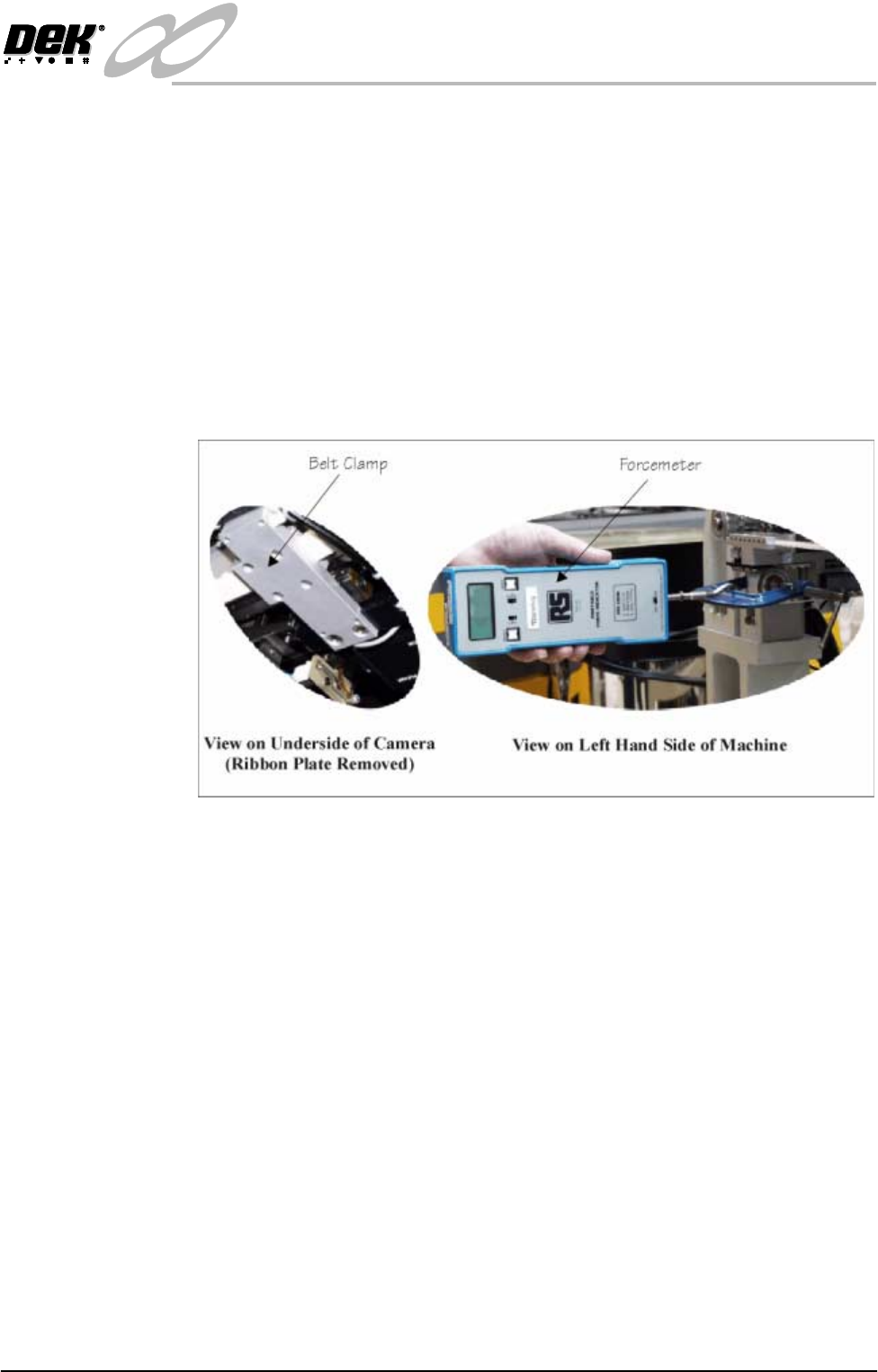
11. Fit a small G clamp across the pulley and tensioner block. Hook a forcemeter
on the G clamp and apply a horizontal force of 15 kg to the belt. Maintaining
this force, tighten the tensioner securing screws.
12.Remove the forcemeter and G clamp.
13.Remove the belt clamp securing screws one at a time, apply a suitable
locking compound and fully tighten. Ensure an equal amount of thread is
protruding through the top side of the drag chain bracket.
14.Tighten the tension fixing grubscrew until it contacts the tensioner block.
Lock the grubscrew with the locknut.
15.Refit the ribbon plate and secure with the pan head screws.
16.Refit removed machine panels. Power up the machine and carry out the
following checks:
a. Home Camera Axes X and Y.
b. Camera Reference Position.
c. Calibrate Vision.