Infinity EX Camera System Module.pdf - 第28页
INFINITY EX CAME RA SY STEM MO DULE ADJUS TMEN TS AND SE TTINGS 17.2 8 Technical Reference Manual Chapter Issue 3 Jan 04 Board Stop In Senso r The Board Stop In Sensor is mounted on the camera carriage and ha s an LED mo…
INFINITY
EX
CAMERA SYSTEM MODULE
ADJUSTMENTS AND SETTINGS
Chapter Issue 3 Jan 04 Technical Reference Manual 17.27
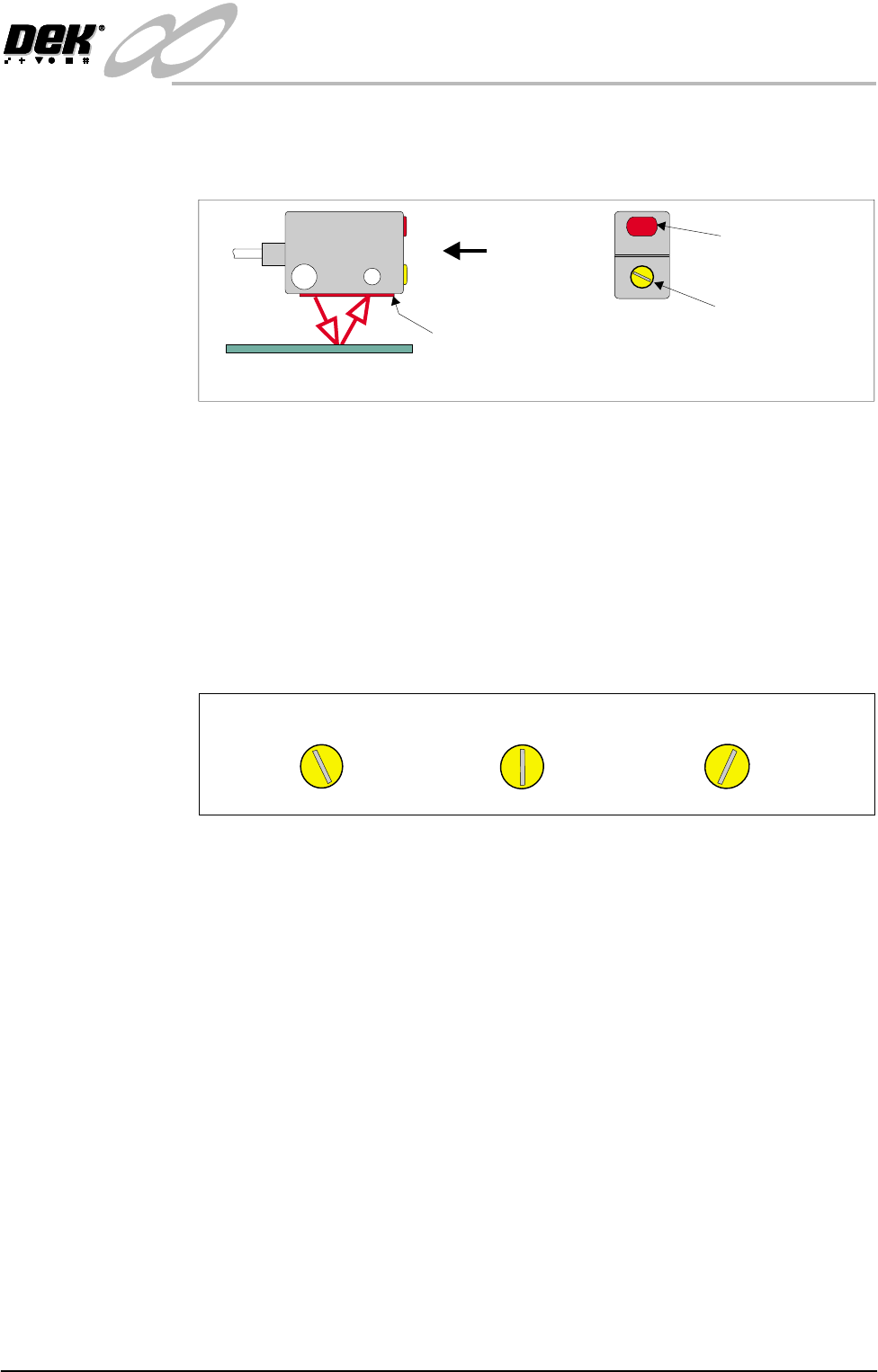
9. If the red LED on the sensor is illuminated, turn the sensitivity/focal length
adjustment anti-clockwise using a plastic trimmer tool until the LED extin-
guishes (or the LED is flickering).
10.Turn the sensitivity/focal length adjustment very slowly in a clockwise
direction until the instant the LED is fully illuminated (the LED may flicker
before fully illuminating).
11.Turn the control in a clockwise direction approximately 10 to 20 degrees
beyond the point at which the LED illuminated.
NOTE
Turning the control more than 10 to 20 degrees beyond the point at which
the LED first illuminated may cause the sensor to detect the tooling whilst
printing using thin boards.
12.Remove the test board from the machine. Remove the head prop and lower
the printhead.
13.Select the System button. Exit from diagnostics, the machine initializes.
View on Arrow A
Sensitivity/Focal
Length Adjustment
Red LED
(Target Detected)
Background Suppressed Opto
Emitter/Receiver
A
NOTE
The final set position can be at any angle.
Final Set Position
LED IlluminatedLED Not Illuminated
INFINITY
EX
CAMERA SYSTEM MODULE
ADJUSTMENTS AND SETTINGS
17.28 Technical Reference Manual Chapter Issue 3 Jan 04
Board Stop In
Sensor
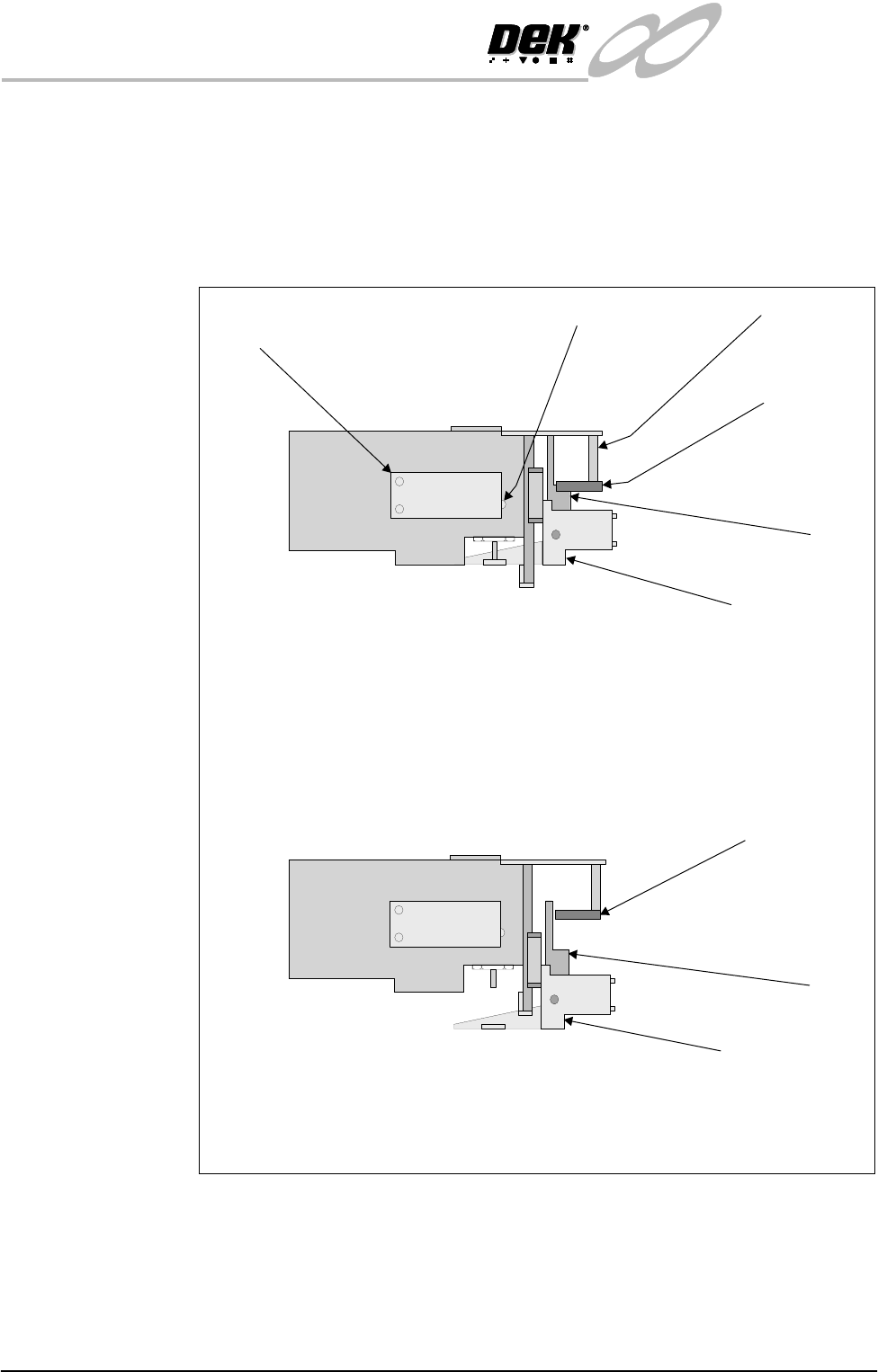
The Board Stop In Sensor is mounted on the camera carriage and has an LED
mounted in its body which illuminates when the beam is broken.
When the board stop is home (raised) the LED is on as the beam is broken by
the vane. The only adjustment is on the opto pillars which must be set to enable
the beam of the opto to look through the slot of the vane giving definite up/down
detection.
Figure 17-9 Board Stop In Sensor
Board Stop In
Sensor
Vane
Board Stop (In
lowered position)
(Camera removed for clarity)
View on Board Sensors From Front of Machine
Board At Stop Sensor
(Downward looking)
LED's
Board Stop (In
raised position)
Board Stop
In Sensor
Vane
Opto Pillars
(Camera removed for clarity)
View on Board Sensors From Front of Machine
INFINITY
EX
CAMERA SYSTEM MODULE
ADJUSTMENTS AND SETTINGS
Chapter Issue 3 Jan 04 Technical Reference Manual 17.29
Vision Height NOTE
Ensure the board file used has the correct board thickness value. Check rail /
camera X motor bracket clearance. Remember that the vision height may be
higher if a thinner board is used.
1. Ensure a stencil is fitted to the machine.
2. Place the board on the rails and slide to a central position.
3. In Camera Axes Diagnostics module, select Home Camera X Axis and
press Run Diagnost on the menu bar.
4. Select Home Camera Y Axis and press Run Diagnost button.
5. In Rising Table Diagnostics module, select Home Rising Table.
6. Select Raise Table To Vision Height and press Run Diagnost button.
7. Select Drive Table Using Jog Buttons and press Run Diagnost button.
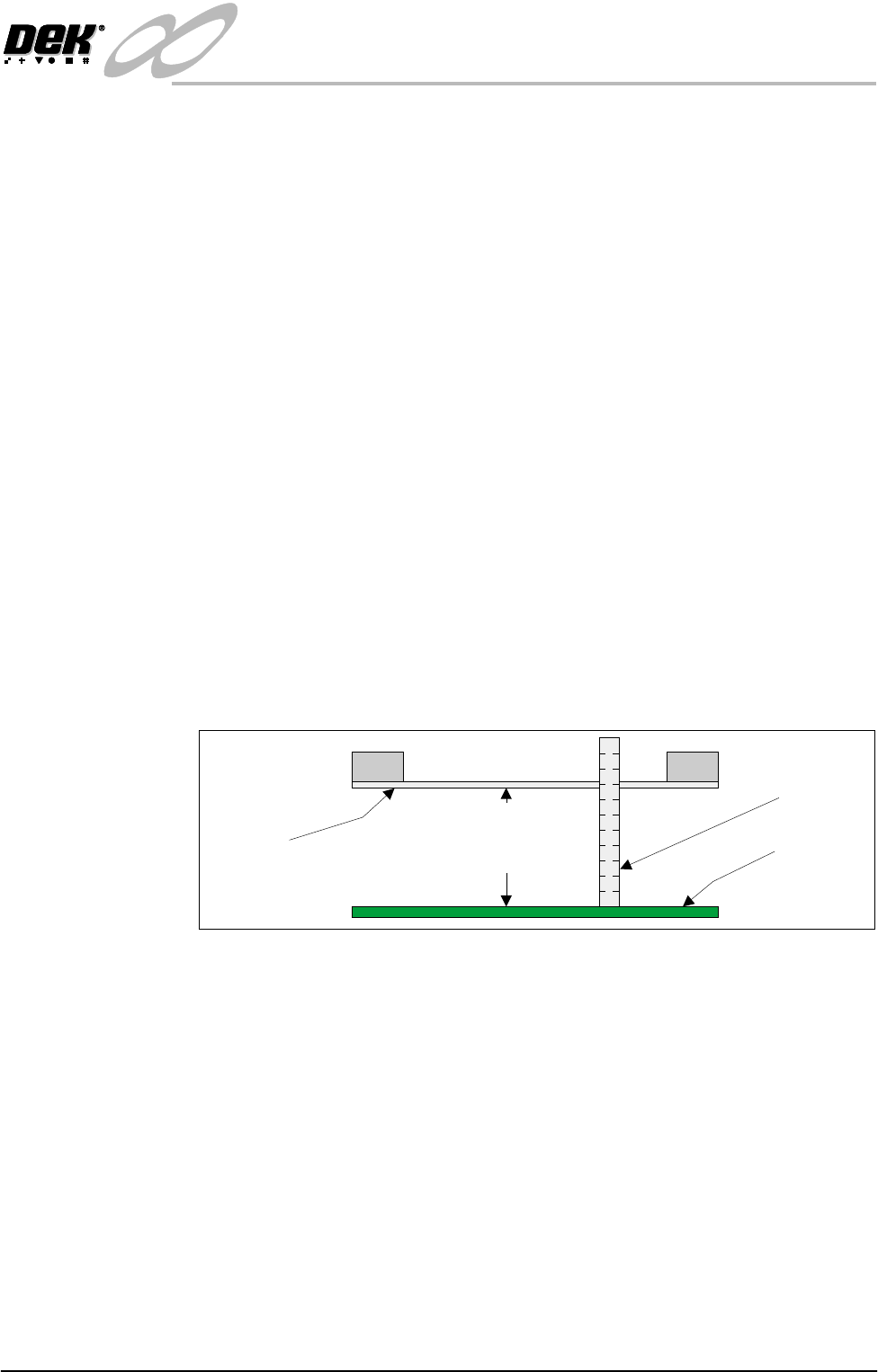
8. Using jog buttons drive the rising table to achieve a vision height of 78mm
-0.0mm/+ 0.2mm, (ie the height cannot be less than 78.0mm).
CAUTION
VISION HEIGHT. The rising table must not be jogged up higher than
the specified dimension, ie less than 78.0mm - 0.2mm, camera damage
may occur.
NOTE
The right jog button drives the rising table up, the left jog button drives the
rising table down.
9. Select Set Reference Vision Height and press Run Diagnost button. The
message ‘This Will Alter The Printer Configuration File - Please Con-
firm’ is displayed.
10.Select Confirm.
11.Select Home Rising Table and press Run Diagnost button. The rising table
homes and the board clamps release.
NOTE
If the vision height has been adjusted a vision calibration and an offset
calibration must be carried out.
Vision Height (Carrier Handling Option)
CAUTION
CARRIER HANDLING OPTION - VISION HEIGHT. Before Vision
Height is calibrated care must be taken not to allow the camera to achieve
its fiducial position or camera damage may occur. This is due to the
Top of Board
Metric Rule
Underside
of Stencil
Critical Dimension
78.0mm
(- 0.0mm +0.2mm)