Infinity EX Camera System Module.pdf - 第43页
INFINITY EX CAME RA SYSTE M MODULE REPLACEMENT PROC EDURES Chapter Issue 3 J an 04 Technical Reference Manual 17.43 4. Remo v e the Y transfer timi ng belt an d discard. NO TE Ensur e the r eplac ement tr ansfer timing b…
INFINITY
EX
CAMERA SYSTEM MODULE
REPLACEMENT PROCEDURES
17.42 Technical Reference Manual Chapter Issue 3 Jan 04
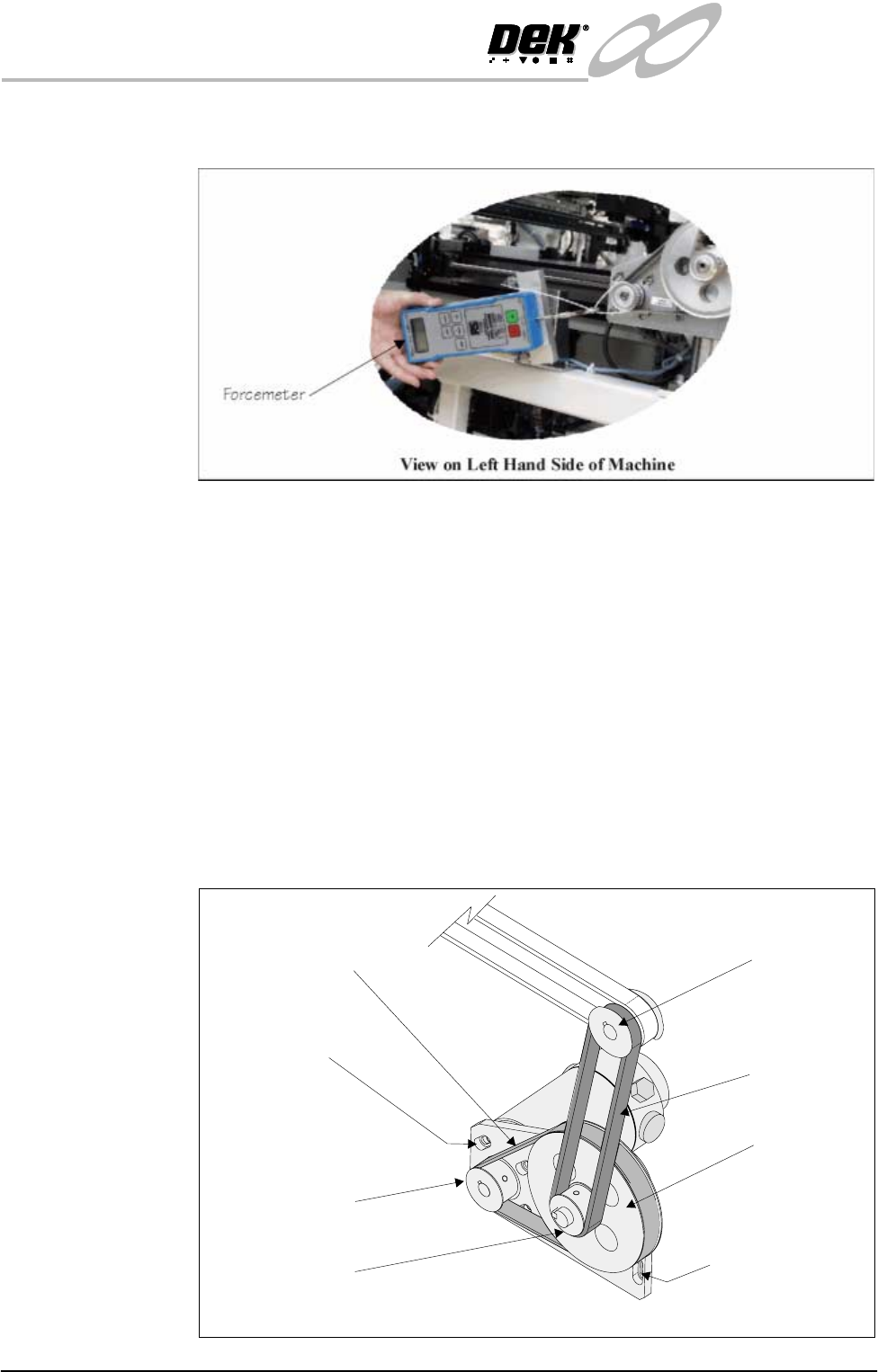
8. Using a suitable cable tie, engage a forcemeter with the motor drive pulley.
Apply a force of 10kg in the same plane as the motor securing screws.
9. Maintaining this force, tighten the four motor securing screws.
10.Replace the left hand machine side panel.
11.Power up and initialize the machine. Carry out the following checks:
a. Camera X Home Positioning.
b. Camera Y Home Positioning.
Left Hand Y Transfer Timing Belt
1. Ensure the machine is powered down.
2. Remove the left hand machine side panel.
3. Loosen the four motor mounting plate securing screws, slide the mounting
plate towards the top of the machine releasing tension on the transfer timing
belt.
Camera Y Motor
Securing Screws
(In 4 Positions)
Motor Mounting Plate
Securing Screws
(In 4 Positions)
View on Left Hand Camera Y Axis Belt
Y Transfer
Timing Belt
Timing Pulley
Y Gear Pulley
Y Motor Timing Belt
Y Motor Drive Pulley
Y Drive Shaft Pulley
INFINITY
EX
CAMERA SYSTEM MODULE
REPLACEMENT PROCEDURES
Chapter Issue 3 Jan 04 Technical Reference Manual 17.43
4. Remove the Y transfer timing belt and discard.
NOTE
Ensure the replacement transfer timing belt is identical to the discarded belt.
5. Route the replacement belt around the timing pulley and the drive shaft
pulley.
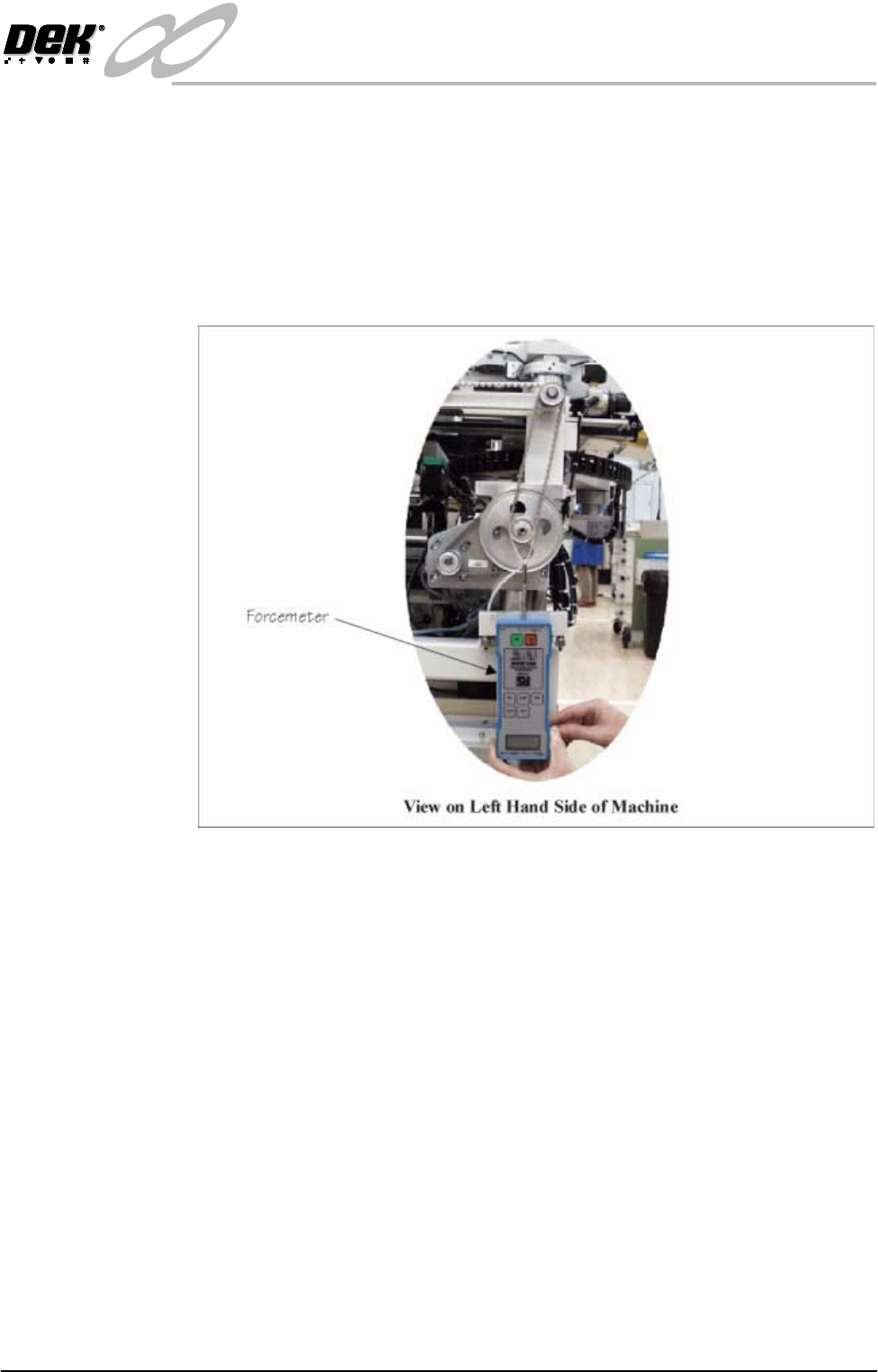
6. Using a suitable cable tie, engage a forcemeter with the drive shaft pulley.
Apply a vertical downward force of 11kg.
7. Maintaining this force, tighten the four motor mounting plate securing
screws.
8. Replace the left hand machine side panel.
9. Power up and initialize the machine. Carry out the following checks:
a. Camera X Home Positioning.
b. Camera Y Home Positioning.
Remote Board Stop to Camera Board Stop
Preparation Carry out Removing the Remote Board Stop, Rising Table Module Chapter,
Replacement Procedures refers.
External Services 1. With the machine switched off and the pneumatic supply disconnected,
remove the machine rear cover.
2. Remove the machine left hand side cover.

INFINITY
EX
CAMERA SYSTEM MODULE
REPLACEMENT PROCEDURES
17.44 Technical Reference Manual Chapter Issue 3 Jan 04
3. At the board stop solenoid, on the left hand end of the pneumatic manifold:
a. Remove the pipe from the in-line flow controller fitted to the front/*rear
port. The pipe is either marked Remote/B/Stop Up - RH or Remote/B/
Stop Up - LH.
b. Remove the pipe from the in-line flow controller self-sealed connector,
fitted to the rear/*front port. The pipe is either marked Remote/B/Stop
Down - RH or Remote/B/Stop Down - LH.
c. Fit the pipe marked Board Stop to the in-line flow controller fitted to the
front/*rear port.
NOTE
*For the following machine serial numbers: 275119, 276057, 276004,
276357 & 276380 fitted with a Norgren manifold.
4. At Breakout Board B, located on the rear left of the base casting (inside face):
a. Remove BPL6A from BSK6.
b. Connect BPL6 to BSK6.
5. Fit the rear cover. Fit the left hand side cover.
Machine Setup 1. Connect the pneumatic supply to the machine.
2. Switch on the machine
3. Select Set Prefs.
4. Select Remote Board Stop.
5. Select Not Fitted.
6. Exit Set Prefs.
7. Set up the machine to print the product, refer to the Machine Programming
chapter in the User manual.