Infinity EX Camera System Module.pdf - 第38页
INFINITY EX CAME RA SY STEM MO DULE REP LAC EMEN T PR OCE DURE S 17.3 8 Technical Reference Manual Chapter Issue 3 Jan 04 Left Hand Main Y Axis T imin g Belt 1. Ensure the machine is po wered down. 2. Raise the front and…
INFINITY
EX
CAMERA SYSTEM MODULE
REPLACEMENT PROCEDURES
Chapter Issue 3 Jan 04 Technical Reference Manual 17.37
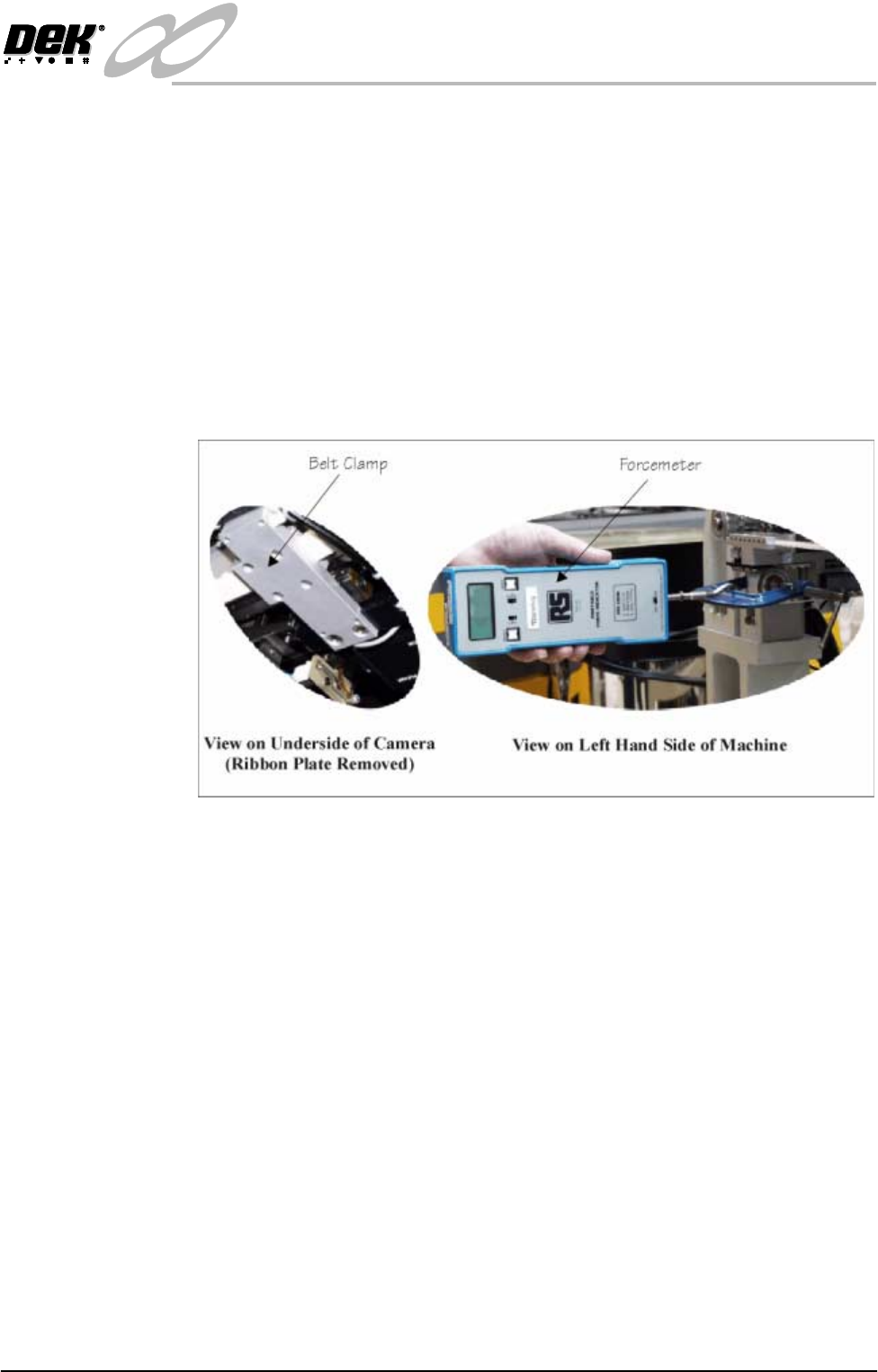
7. Engage the first two teeth of the replacement belt into the right hand side of
the belt clamp.
8. Route the belt anti-clockwise along the underside of the camera carriage,
around the X axis camera motor pulley, returning along the top of the camera
carriage, through the belt tensioner block to the belt clamp.
9. Engage the last two teeth of the replacement belt into the belt clamp. Tighten
the clamp screws sufficiently to allow belt movement. Align both ends of
the belt centrally in the clamp.
10.Manually centralize the camera assembly on the camera carriage.
11. Fit a small G clamp across the pulley and tensioner block. Hook a forcemeter
on the G clamp and apply a horizontal force of 15 kg to the belt. Maintaining
this force, tighten the tensioner securing screws.
12.Remove the forcemeter and G clamp.
13.Remove the belt clamp securing screws one at a time, apply a suitable
locking compound and fully tighten. Ensure an equal amount of thread is
protruding through the top side of the drag chain bracket.
14.Tighten the tension fixing grubscrew until it contacts the tensioner block.
Lock the grubscrew with the locknut.
15.Refit the ribbon plate and secure with the pan head screws.
16.Refit removed machine panels. Power up the machine and carry out the
following checks:
a. Home Camera Axes X and Y.
b. Camera Reference Position.
c. Calibrate Vision.
INFINITY
EX
CAMERA SYSTEM MODULE
REPLACEMENT PROCEDURES
17.38 Technical Reference Manual Chapter Issue 3 Jan 04
Left Hand Main Y Axis Timing Belt
1. Ensure the machine is powered down.
2. Raise the front and rear covers and remove the left hand side and rear panels.
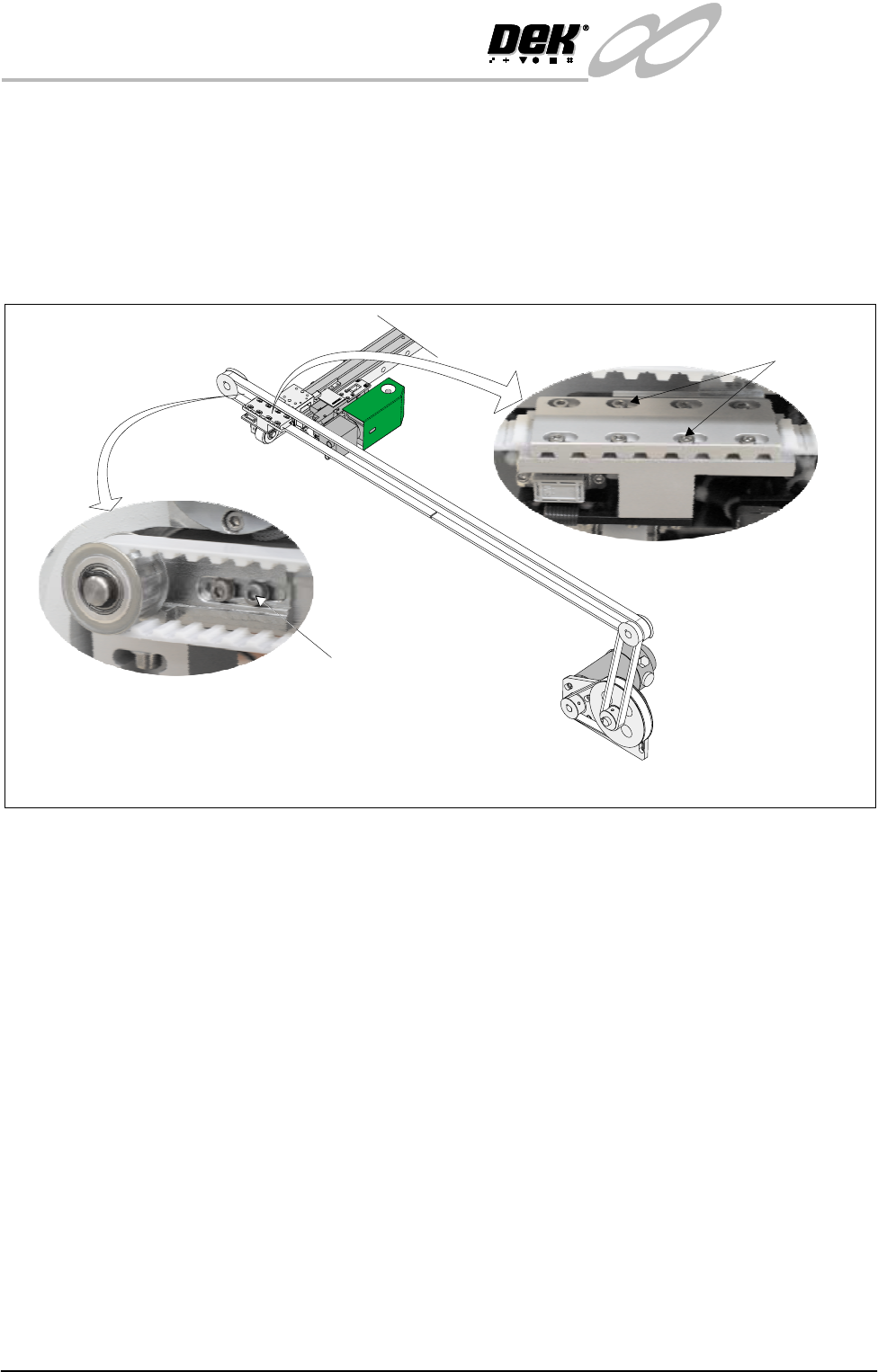
3. Loosen the two camera belt tensioner securing screws, slide the tensioner
block to release tension on the camera belt.
4. Unscrew the eight belt clamp securing screws and remove the top plate and
the old belt.
NOTE
Ensure the replacement belt is equal in length to the old belt. If not, shorten
as necessary.
5. Engage the first four teeth of the replacement belt into the right hand side of
the belt clamp and tighten the screws sufficiently to hold the belt.
6. Route the belt anti-clockwise around the front belt pulley returning along the
top, around the rear belt pulley to the left hand side of the belt clamp.
7. Engage the last four teeth of the replacement belt into the belt clamp. Tighten
the clamp screws, ensuring belt movement within the clamp.
8. Align the belt in the clamp towards the outside of the machine. Tighten the
clamp screws.
9. Position the camera carriage above the rising table front edge.
View on Belt Clamp
View on Belt Tensioner
View on Left Hand Camera Y Axis Belt
Securing Screws
(in 8 Positions)
Securing Screws
(in 2 Positions)
INFINITY
EX
CAMERA SYSTEM MODULE
REPLACEMENT PROCEDURES
Chapter Issue 3 Jan 04 Technical Reference Manual 17.39
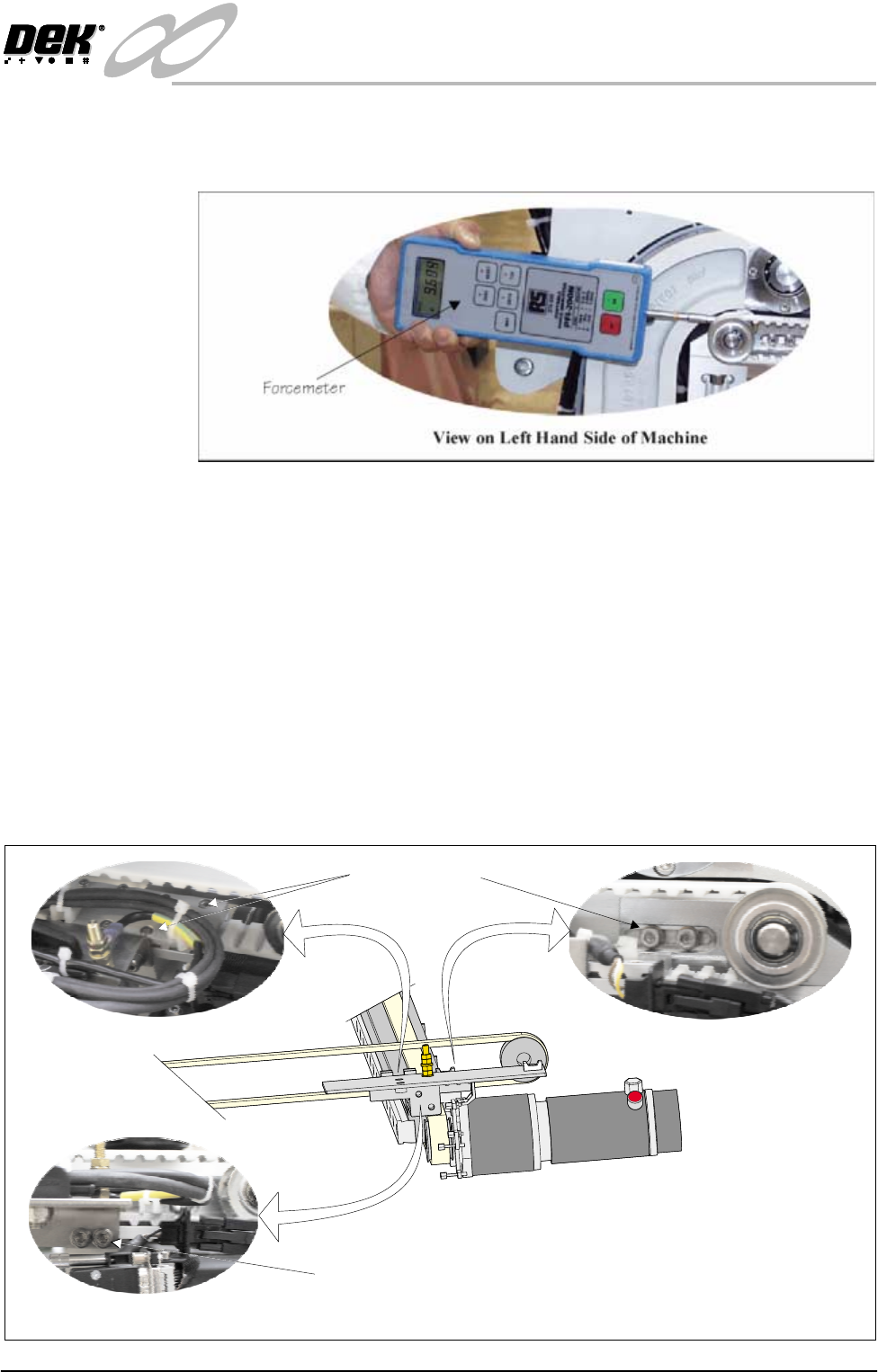
10.Engage a forcemeter with the spindle of the rear belt pulley. Apply a
horizontal force of 15kg to the belt. Maintaining this force tighten the
tensioner block securing screws.
11.Replace the removed panels and lower the covers.
12.Power up and initialize the machine. Carry out the following checks:
a. Camera Y Home Positioning.
b. Camera X Axis Parallelism.
Right Hand Main Y Axis Timing Belt
1. Ensure the machine is powered down.
2. Raise the front and rear printhead covers and remove the right hand side
panels.
3. Loosen the two camera belt tensioner securing screws, slide the tensioner
block to release the tension on the camera block.
View on Belt Clamp
View on Belt Tensioner
View on Right Hand Camera Y Axis
View on Drag Chain Bracket
Securing Screws
Securing Screws