Printer 600 Machine Controller.pdf - 第26页
0$&+,1( &21752//( 5 6(592'5,9 (&$5' 6.26 Technical Reference Manual Chapter Issue 4 May 03 SERVO DRIVE CARD Four tor que amplifier cards are used as servo dr ive ca rds, b y the machine controll …
0$&+,1(&21752//(5
08/7,029(
Chapter Issue 4 May 03 Technical Reference Manual 6.25
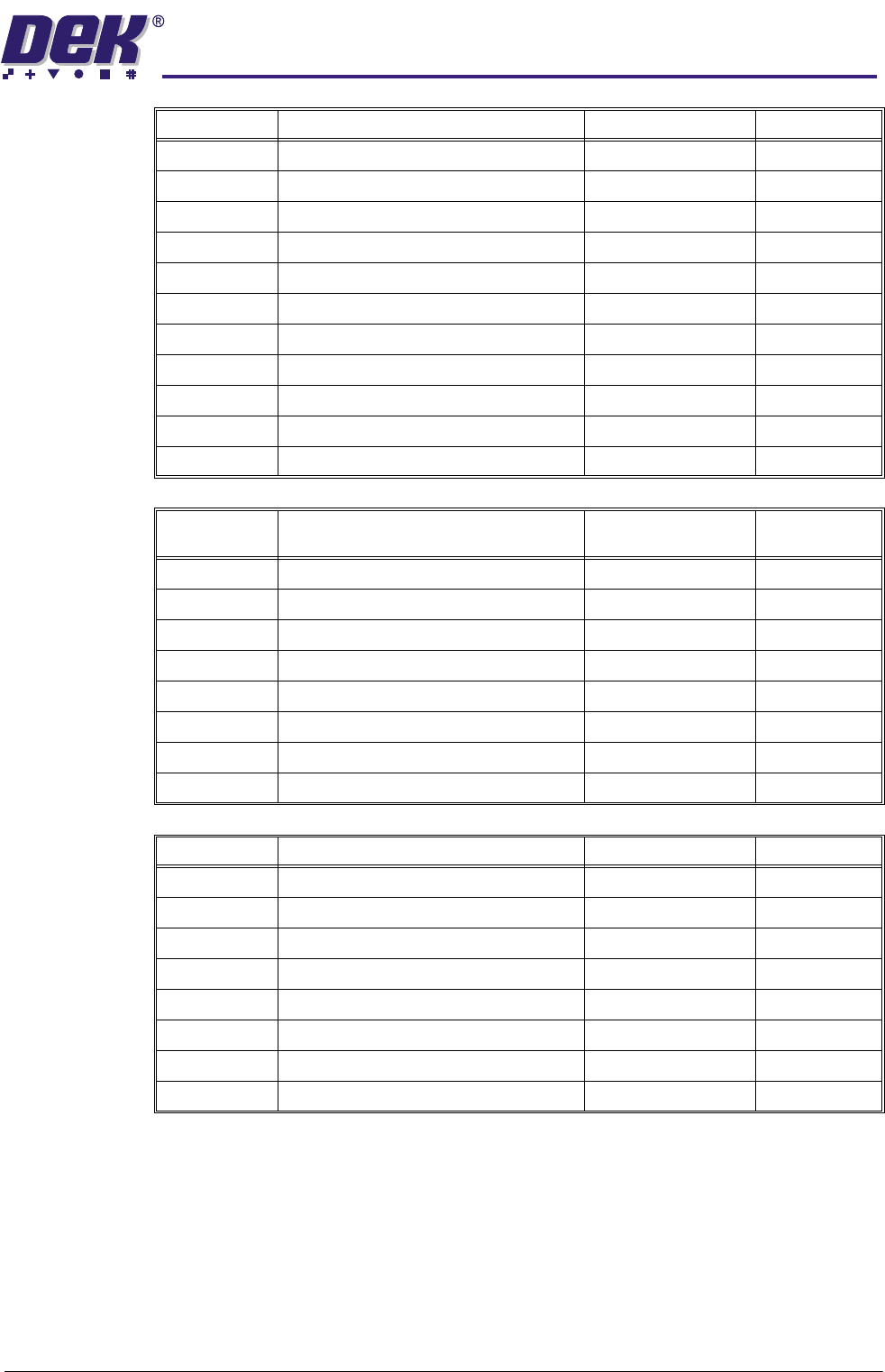
IN5 Switch - Paste Cartridge Vertical 9PL44 9SE14
IN6 Switch - ProFlow Cassette Low M18PL01 M18SE01
IN7 Link - ProFlow Cassette Fitted M18PL01
IN8 Config. Jumper - Bit 1 M19SK04
IN9 Config. Jumper - Bit 2 M19SK04
INA ProFlow Regulator Fitted M19SK04
INB SPARE M19SK04
INC SPARE M19SK04
IND Vacuum Tooling Sensor M19SK04
INE SPARE M19SK04
INF SPARE M19SK04
Source
Outputs
MultiMove X12 Function Destination Device
0 Solenoid - Table Brake 8PL09 8SOL02
1 Solenoid - External/Vacuum Filtration PCB B BSK8
2 Solenoid - Vacuum Tooling (Option) BPL9 8SOL24
3 Solenoid - ProFlow Paste Present 16SK02 16SOL03
4 SPARE Solenoid Bank 16SOL03
5 Lid Bolt Solenoid Bank 16SOL04
6 Solenoid - Paste Dispenser Solenoid Bank 16SOL05
7 Solenoid - Solvent Tank Pressure Solenoid Bank 16SOL06
Totem Ouputs MultiMove X12 Function Destination Device
0 Belt Motor #01+ (Front Rail) 8SK21 8M03
1 Belt Motor #01- (Front Rail) 8SK21 8M03
2 Belt Motor #04+ (Rear Rail) 8SK23 8M04
3 Belt Motor #04- (Rear Rail) 8SK23 8M03
4 Cartridge Tilt Motor+ 9PL48 9M9
5 Cartridge Tilt Motor- 9PL48 9M9
6 Solenoid - Solvent Valve 8PL76 8SOL25
7 Paper Feed Motor 8PL72 8M5
Signal Inputs MultiMove X12 Function Destination Device
0$&+,1(&21752//(5
6(592'5,9(&$5'
6.26 Technical Reference Manual Chapter Issue 4 May 03
SERVO DRIVE CARD
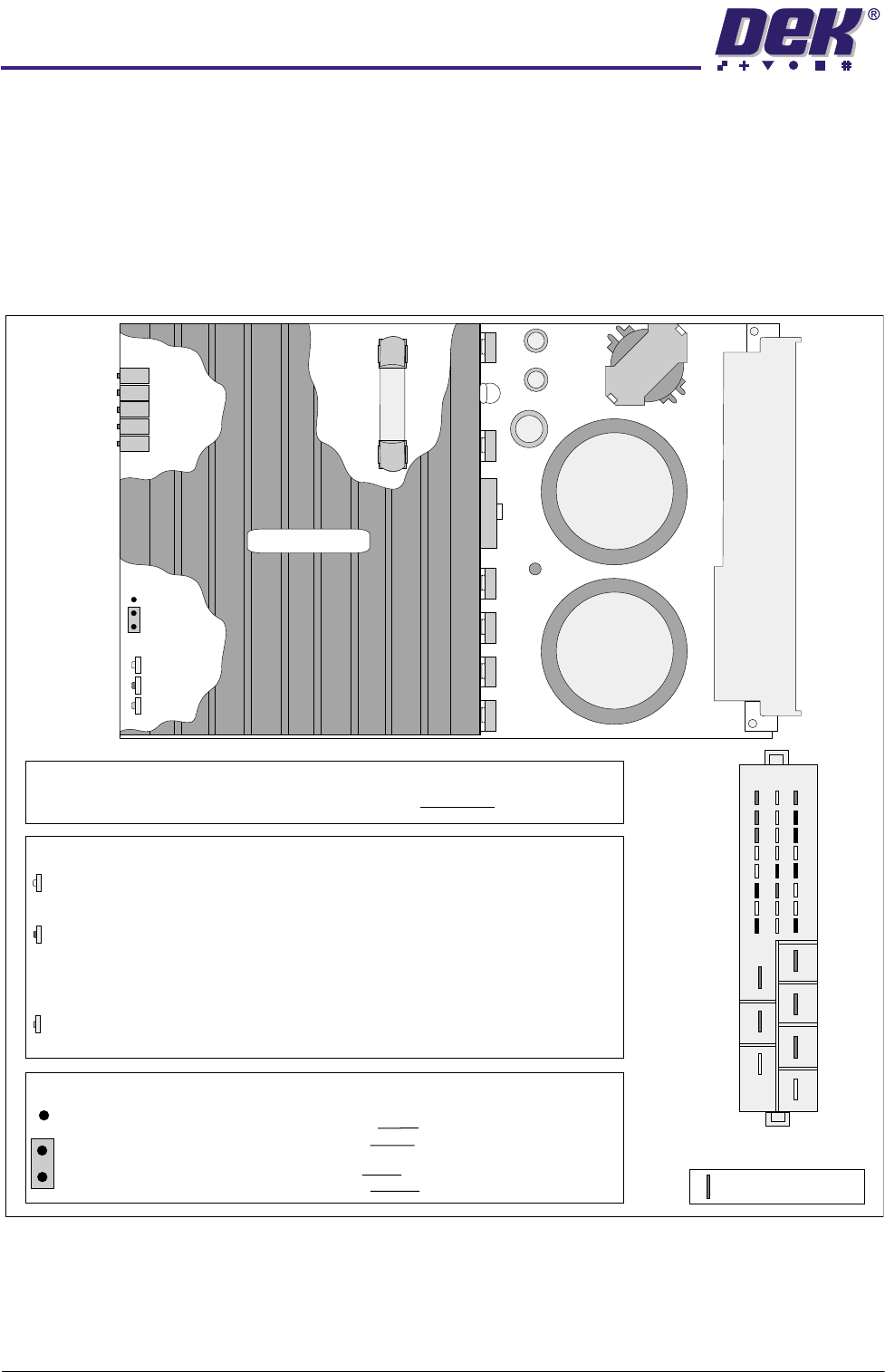
Four torque amplifier cards are used as servo drive cards, by the machine
controller, to drive the rising table, the camera X axis, the camera Y axis and
the print carriage axis motors. The axes for these motors are designated Axis
0 to Axis 3. The servo motors are connected to the servo/stepper backplane
and Axis 0 connects to SK7, Axis 1 to SK9, Axis 2 to SK8 and Axis 3 to SK10.
Two types of servo drive card may be fitted, as shown below and over the page.
Figure 6-19 Type 1 Servo Drive Card Layout (Part No. 114025)
LD 4
VR 5
VR 1
VR 2
VR 3
VR 4
JP 1
yellow
red
green
a
b
Damping
Offset
Gain
Disable
Error
Power
AUX Gain
TACHO Gain
LEDs
DISABLE -
ERROR -
POWER -
This LED illuminates when the NextMove card removes the Enable signal
from the I/P, ie it echoes the state of the Enable I/P on Pin 2z.
Over Temperature - The temperature of the heatsink has become excessive
due to an enclosure ventilation problem or if the card has been operating at
a high current for too long.
Over Current - The output current exceeds 25A - 30A.
Illuminates to indicate that the system power (40V ac) is applied to the card.
This is the only indication during normal operation.
Position a -
Position b -
JUMPER JP 1
A ground on the Enable is required to disable the card - an open
circuit or voltage on the enable input enables the card.
A ground on the Enable is required to enable the card - an open
circuit or voltage on the disable input disables the card.
Heat Sink
Edge
Connector
End View on
Edge Connector
30
26
22
20
24
28
32
2
4
6
8
10
12
14
16
db
z
POTENTIOMETERS
All potentiometers on the card are pre-set at the factory and MUST NOT be adjusted.
Indicates pins used
Fuse FS1
250V
20A
0$&+,1(&21752//(5
6(592'5,9(&$5'
Chapter Issue 4 May 03 Technical Reference Manual 6.27
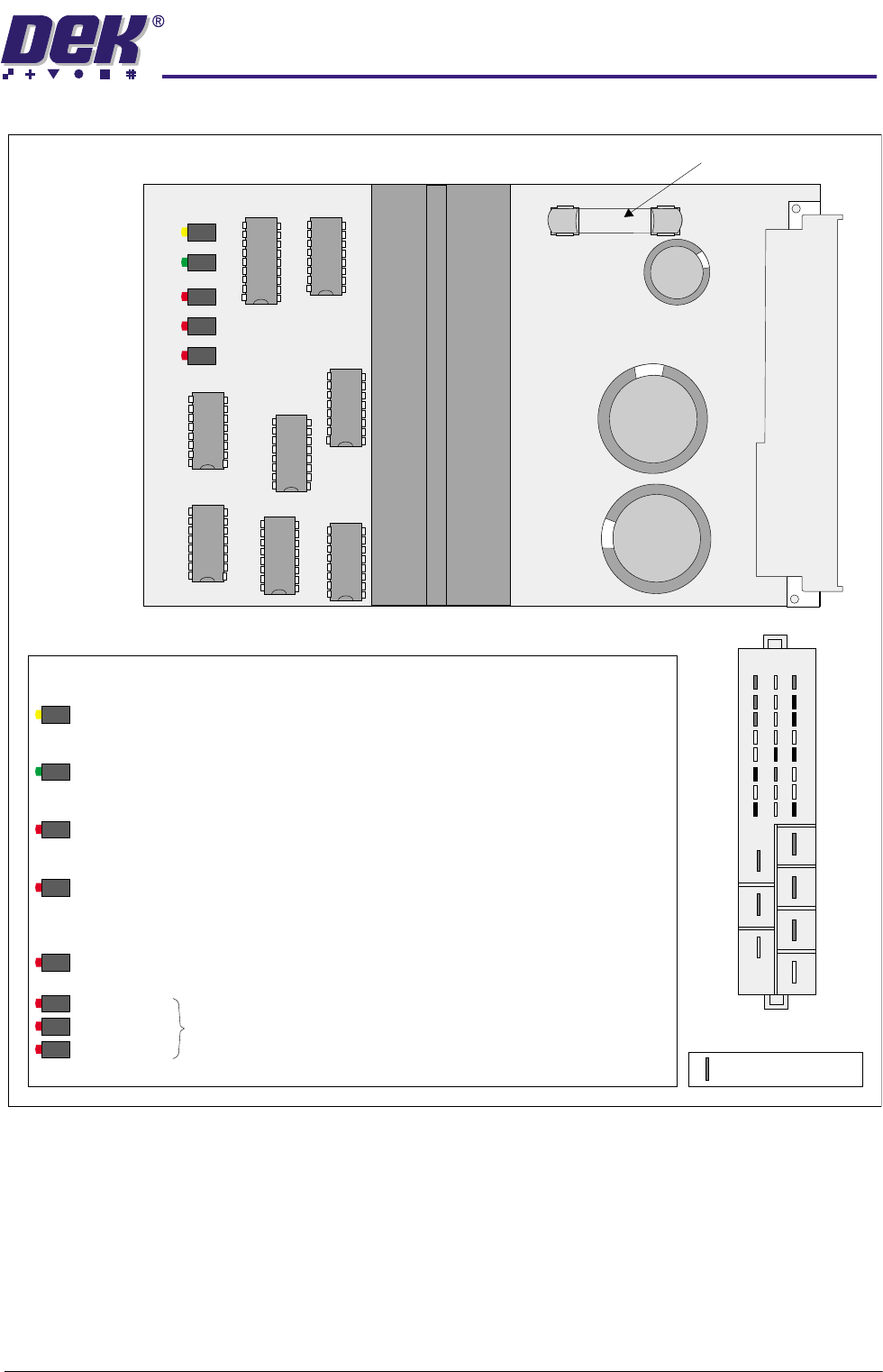
Figure 6-20 Type 2 Servo Drive Card Layout (Part No. 153073)
LEDs
End View on
Edge Connector
30
26
22
20
24
28
32
2
4
6
8
10
12
14
16
db
z
Indicates pins used
This LED illuminates when the cards dc supply rail, (nominal 60Vdc) has exceeded the
threshold of 91Vdc.
Bad Power -
This LED illuminates when the temperature of the heatsink has become excessive, (over 75 C)
due to an enclosure ventilation problem or if the card has been operating at a high current
for too long.
o
Over Temperature -
This LED illuminates when the output current exceeds 20A on any individual cycle.
Over Current -
Power On -
This LEd illuminates to indicate that the system power (40V ac) is applied to the card.
This is the only indication during normal operation.
Disable -
This LED illuminates when the NextMove card removes the Enable signal from the I/P, ie it
echoes the state of the Enable I/P on Pin 2z.
These three LED's flashing together indicates a catastrophic over current failure.
Bad Power
Over Temperature
Over Current
Fuse F1, 250V, 20A
Disable
Over Temp
Over Curr
PWR On
Bad PWR
F1
Edge
Connector