Printer 600 Machine Controller.pdf - 第27页
0$&+ ,1(&21752 //(5 6(592'5 ,9(&$5' Chapter Issue 4 May 03 Technical Reference Manual 6.27 Figure 6- 20 T ype 2 Servo Drive Card Layout ( Part No. 153 073) LEDs End View on Edge Connector 30 26 2…
0$&+,1(&21752//(5
6(592'5,9(&$5'
6.26 Technical Reference Manual Chapter Issue 4 May 03
SERVO DRIVE CARD
Four torque amplifier cards are used as servo drive cards, by the machine
controller, to drive the rising table, the camera X axis, the camera Y axis and
the print carriage axis motors. The axes for these motors are designated Axis
0 to Axis 3. The servo motors are connected to the servo/stepper backplane
and Axis 0 connects to SK7, Axis 1 to SK9, Axis 2 to SK8 and Axis 3 to SK10.
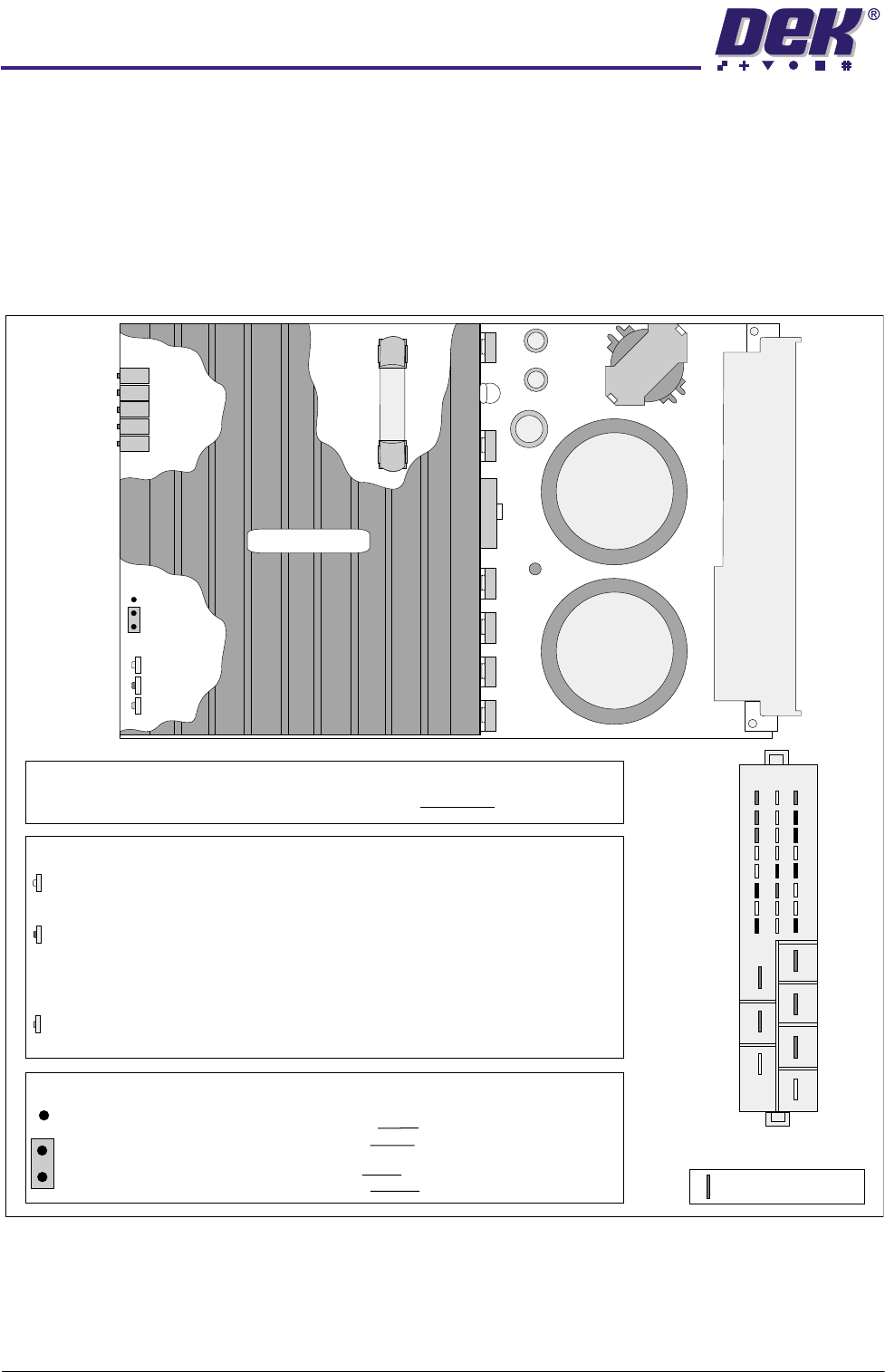
Two types of servo drive card may be fitted, as shown below and over the page.
Figure 6-19 Type 1 Servo Drive Card Layout (Part No. 114025)
LD 4
VR 5
VR 1
VR 2
VR 3
VR 4
JP 1
yellow
red
green
a
b
Damping
Offset
Gain
Disable
Error
Power
AUX Gain
TACHO Gain
LEDs
DISABLE -
ERROR -
POWER -
This LED illuminates when the NextMove card removes the Enable signal
from the I/P, ie it echoes the state of the Enable I/P on Pin 2z.
Over Temperature - The temperature of the heatsink has become excessive
due to an enclosure ventilation problem or if the card has been operating at
a high current for too long.
Over Current - The output current exceeds 25A - 30A.
Illuminates to indicate that the system power (40V ac) is applied to the card.
This is the only indication during normal operation.
Position a -
Position b -
JUMPER JP 1
A ground on the Enable is required to disable the card - an open
circuit or voltage on the enable input enables the card.
A ground on the Enable is required to enable the card - an open
circuit or voltage on the disable input disables the card.
Heat Sink
Edge
Connector
End View on
Edge Connector
30
26
22
20
24
28
32
2
4
6
8
10
12
14
16
db
z
POTENTIOMETERS
All potentiometers on the card are pre-set at the factory and MUST NOT be adjusted.
Indicates pins used
Fuse FS1
250V
20A
0$&+,1(&21752//(5
6(592'5,9(&$5'
Chapter Issue 4 May 03 Technical Reference Manual 6.27
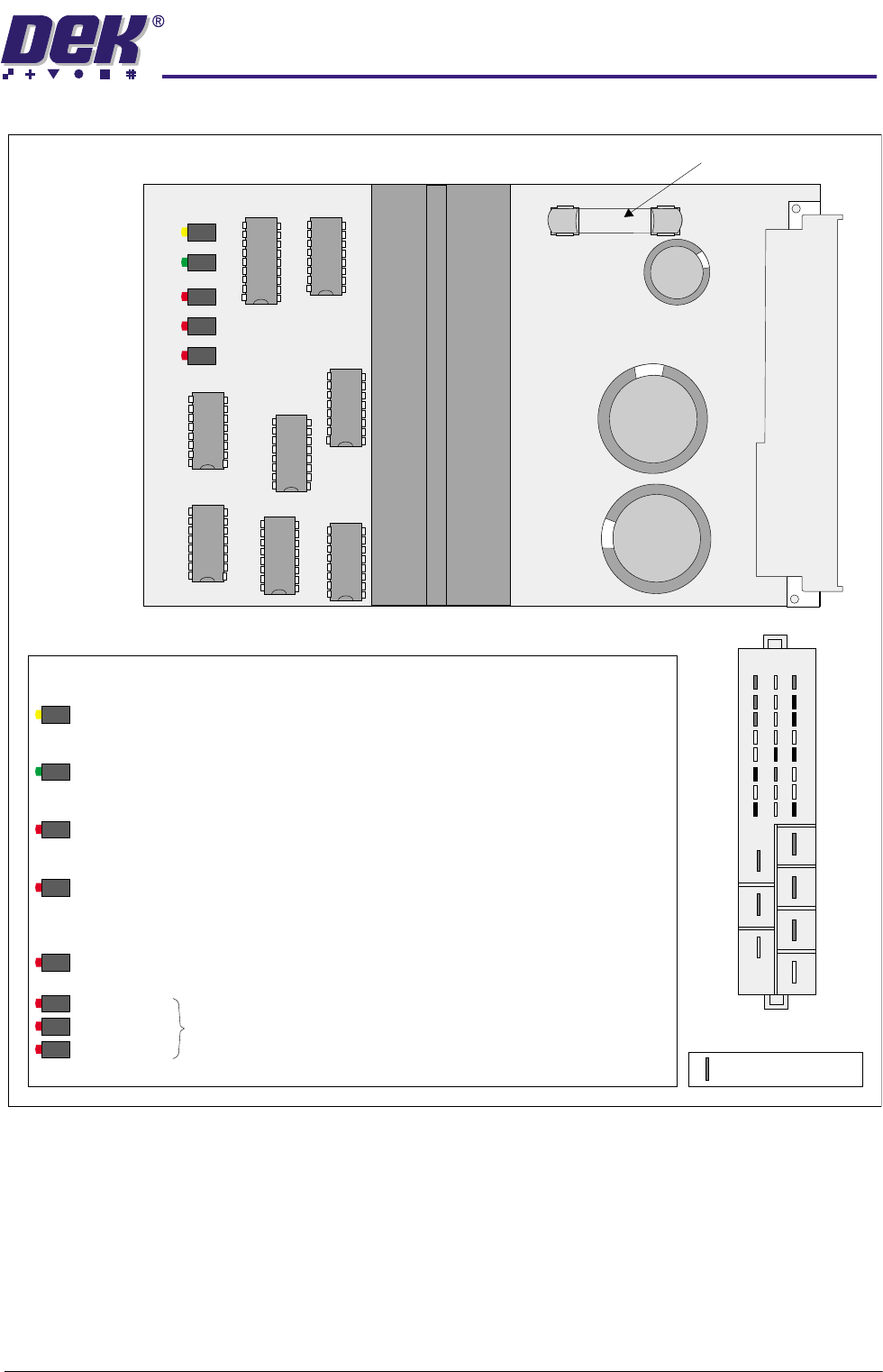
Figure 6-20 Type 2 Servo Drive Card Layout (Part No. 153073)
LEDs
End View on
Edge Connector
30
26
22
20
24
28
32
2
4
6
8
10
12
14
16
db
z
Indicates pins used
This LED illuminates when the cards dc supply rail, (nominal 60Vdc) has exceeded the
threshold of 91Vdc.
Bad Power -
This LED illuminates when the temperature of the heatsink has become excessive, (over 75 C)
due to an enclosure ventilation problem or if the card has been operating at a high current
for too long.
o
Over Temperature -
This LED illuminates when the output current exceeds 20A on any individual cycle.
Over Current -
Power On -
This LEd illuminates to indicate that the system power (40V ac) is applied to the card.
This is the only indication during normal operation.
Disable -
This LED illuminates when the NextMove card removes the Enable signal from the I/P, ie it
echoes the state of the Enable I/P on Pin 2z.
These three LED's flashing together indicates a catastrophic over current failure.
Bad Power
Over Temperature
Over Current
Fuse F1, 250V, 20A
Disable
Over Temp
Over Curr
PWR On
Bad PWR
F1
Edge
Connector
0$&+,1(&21752//(5
6(592'5,9(&$5'
6.28 Technical Reference Manual Chapter Issue 4 May 03
Servo Drive Card
Block Diagram
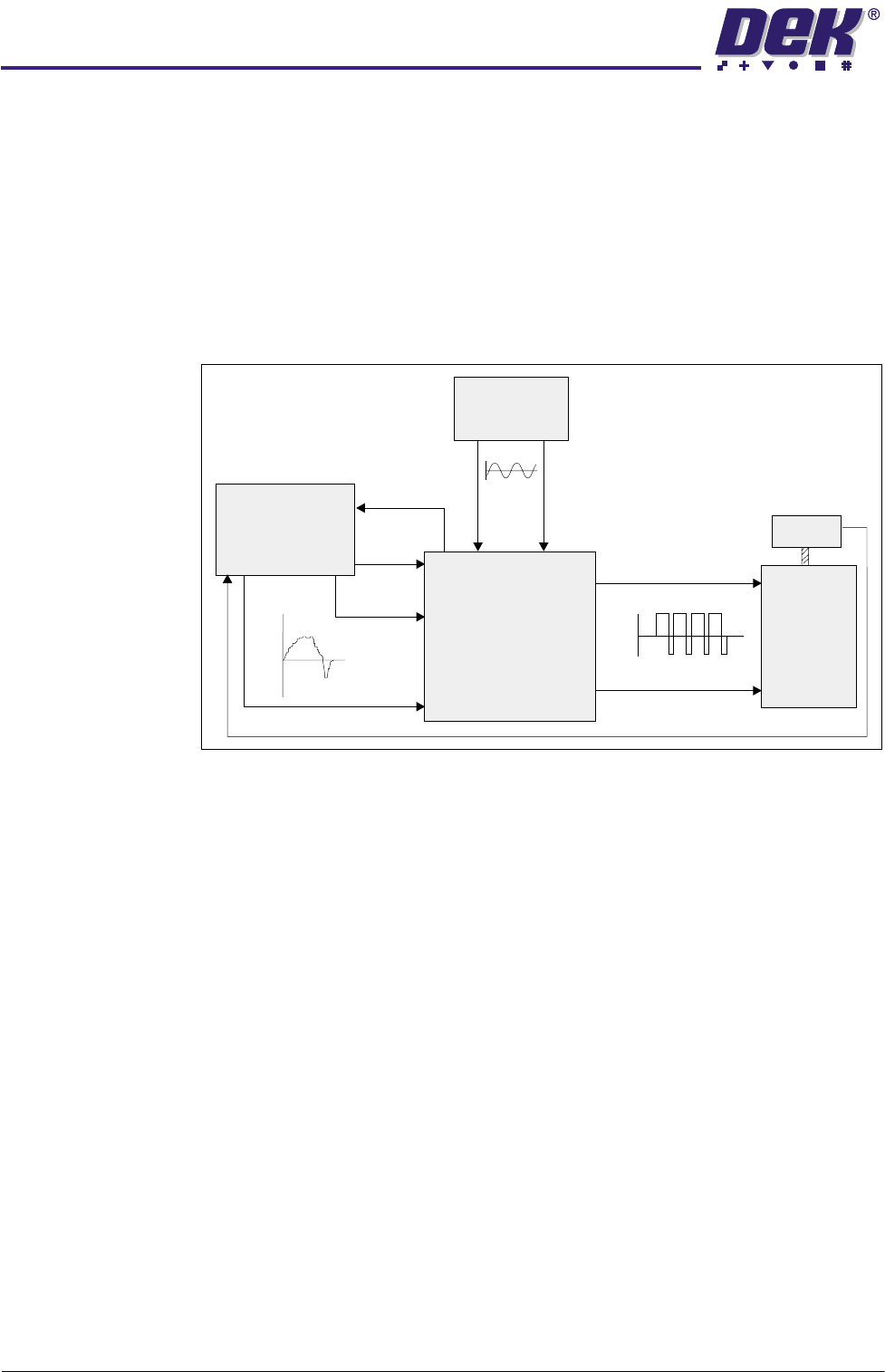
44Vac is applied to the servo amplifier from the mains isolating transformer.
This input is rectified on each card and is used to power the motor output stage.
The servo motors are voltage surge protected by a thermal trip device con-
nected to the system reset circuit in the power supply. The machine software
generates a profile of the correct servo demand voltage to achieve the speed
that the motor is required to rotate. Servo demand signals are applied directly
to the servo drive card from the NextMove card, the derived output is a 25kHz
PWM drive signal. An encoder that is directly attached to the motor feeds back
a series of pulses to the NextMove card to complete the servo loop. If the pulses
returned are in error, an error signal is generated
Figure 6-21 Servo Drive Schematic
NOTE
Each servo drive card has an enable input on pin 2z which must be pulled low
for the card to operate. If this input is disconnected or if there is a voltage on
the line, then the card is disabled
CAUTION
ANTI-STATIC HANDLING.
Standard precautions must be adhered to when
handling electronic cards and configuring and inserting into the enclo-
sures.
NextMove
Card
Mains
Transformer
+VE
Motor +VE
Encoder Out
Motor
Motor -VE
-VE
Demand
Output
to Motor
Error
44V ac
Enable
Servo Drive Card
+62V
25kHz PWM
-62V
+10V
-10V
Encoder