Productivity Lift.pdf - 第52页
3 Assembling and installing User Manual - Productivity Lift 3.3 Installation / Reinstallation of emergency conveyor Edition 02/2004 44

User Manual - Productivity Lift 3 Assembling and installing
Edition 02/2004 3.3 Installation / Reinstallation of emergency conveyor
43
3.3.2 Stop of emergency conveyor
To stop the emergency conveyor the procedure described above has to be made the other
way round:
1. By pushing the "stop" cursor the corresponding conveyor is put into stand-by mode.
2. Through "ALT" cursor the adjustment mode comes up.
3. Through the "Enter" cursor the menu comes up on the display which shows "PCB takeover"
comes up and you can chose the adjustment as used before the emergency conveyor (see
chapter 6.3).
4. Use the "enter" cursor. The menu "PCB transfer" comes up. Here it is the same procedure as
described in point 3 (see chapter 6.6).
5. Another use of the "enter" cursor brings up the menu "PCB pass-through". In this menu the
emergency conveyor can be switched off by choosing the adjustment "switched off" (see chap-
ter 6.7). This change can be taken over with the "enter" cursor.
6. The adjustment mode can be quit with the "stop" cursor.
The device can be started with the "start" cursor. After an initialising time the device is ready for
operation.
NOTE
Pay attention that the changes made in chapter 6.3 and 6.6 are set back to the adjustments as
before activated.
3 Assembling and installing User Manual - Productivity Lift
3.3 Installation / Reinstallation of emergency conveyor Edition 02/2004
44
User Manual - Productivity Lift Soko 00166631-01 / 12031477 4 Description of the Product
Software version V 43.140 Edition April 2006 4.1 Designated use of the device
45
4 Description of the Product
4.1 Designated use of the device
This version of the Productivity Lift (SPL) is designed for parallel supply of 3 pick and place ma-
chines in a production line. The SPL is equipped with a dual lane lift conveyor. Bare boards are
handed over to the next available pick and place machine. If a pick and place machine is currently
occupied, the boards are transferred to the next available pick and place machine on an underfloor
conveyor.
The SPL will always try to takeover and transport 2 of the same type of board, i.e. 2 bare boards
or 2 mounted boards. If this is not possible, the lift will only takeover and transfer on one lane.
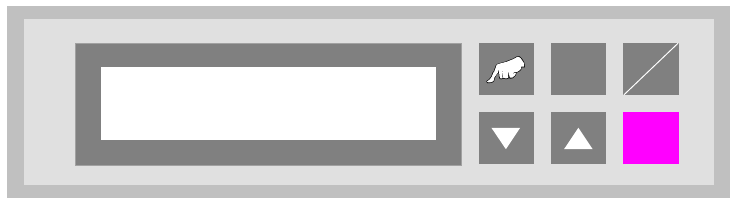
4.2 The function keys
Fig. 4 - 1 Control desk - Key arrangement
The keys of the CAN/P50 control desk are arranged as follows:
"Hand" : Calls up the test operation functions.
"V" and "ALT" : Call up the configuration menu.
"ALT" : Calls up the parameter menu.
"Start / Stop" : Starts the automatic operating mode and switches to the stand-by mode.
"W" : Cursor key to scroll downwards in the selection menus.
"V" : Cursor key to scroll upwards in the selection menus.
"Enter" : This is used to confirm modified settings and proceed to the next input menu
within the menus. Acknowledgement of alarm signals.
ALT
Enter
Start
Stop
Prod. Lift
V 43.140