X3_X4_Series machine.pdf - 第244页
4 Setting up and commissioning User manual SIPLACE X-Series 4.7 Adapting the SI PLACE HF c omponent trolley to the PCB transport height Software Version S R.601.xx 11/2005 US Edition 244 4.7.1 W arning instructions W ARN…
User manual SIPLACE X-Series 4 Setting up and commissioning
Software Version SR.601.xx 11/2005 US Edition 4.7 Adapting the SIPLACE HF component trolley to the PCB transport height
243
4.7 Adapting the SIPLACE HF component trolley to the
PCB transport height
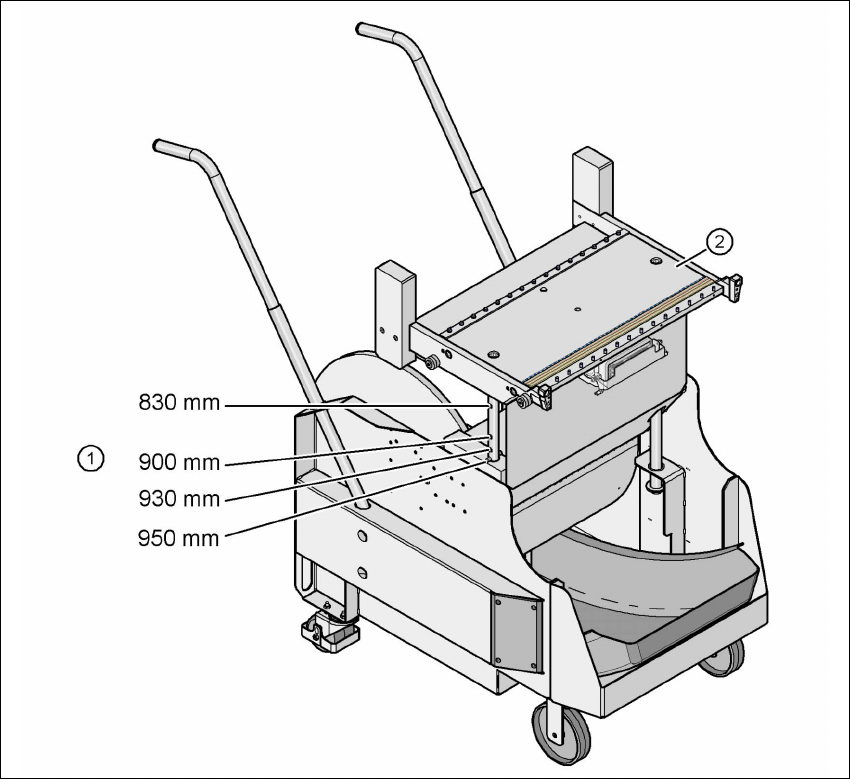
The component trolley for the S feeder modules can be set to the following PCB transport heights
with just a few simple actions:
830 mm ± 15 mm Standard height
900 mm ± 15 mm SMEMA height
930 mm ± 15 mm SMEMA height
950 mm ± 15 mm SMEMA height 4
4
Fig. 4.7 - 1 Component trolley (SIPLACE HF-series) with a PCB conveyor height of 950 mm
(1) Holes in the guide columns for the transport heights of 830 to 950 mm
(2) Component trolley table
4 Setting up and commissioning User manual SIPLACE X-Series
4.7 Adapting the SIPLACE HF component trolley to the PCB transport height Software Version SR.601.xx 11/2005 US Edition
244
4.7.1 Warning instructions
WARNING 4
Only Siemens engineers or qualified personnel are permitted to adjust the component trolley
height.
Æ Always follow the applicable accident prevention regulations.
Æ Remove all the feeder modules from the component table bed if you want to adjust the height
of the component feeder table.
4.7.2 Tools and equipment
You will need the following tools and equipment to adjust the height of the component trolley:
–Hammer
– Punch, 8 mm
– Eye-bolt with M12 thread for lifting the component trolley table,
DIN 580 M12-St, item no. 00048350-xx
– Lifting device for raising the component trolley table, carrying capacity at least 80 kg
4.7.3 Changing the component trolley height
WARNING 4
Remove all the feeder modules from the component trolley table bed.
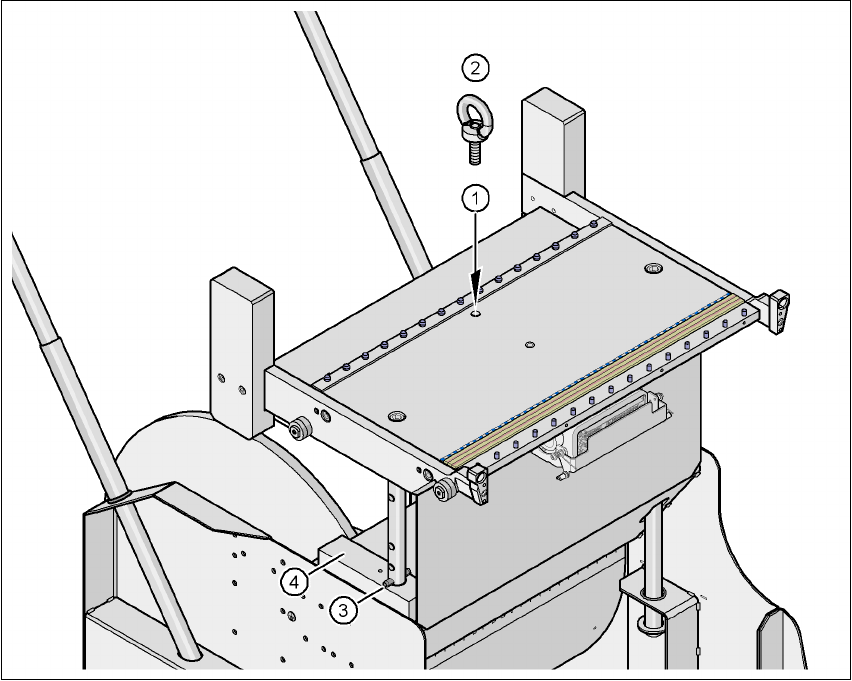
Æ Screw the eye-bolt into the M12 hole (item 1 in Fig. 4.7 - 2) in the component trolley table bed.
Æ Attach the hooks of the lifting device to the eye-bolt (item 2 in Fig. 4.7 - 2).
Æ Raise the component trolley bed slightly to expose the split pins (item 3 in Fig. 4.7 - 2).
Æ Use the punch to carefully tap out the split pins on both sides.
Æ Insert the spiral clamping pins into the holes for the required PCB conveyor height (see Fig.
4.7 - 1
).
Æ Lower the component trolley bed slowly until the split pins lie on the supporting blocks (item
4 in Fig. 4.7 - 2
).
Æ Unscrew the eye-bolt from the component trolley table.
User manual SIPLACE X-Series 4 Setting up and commissioning
Software Version SR.601.xx 11/2005 US Edition 4.7 Adapting the SIPLACE HF component trolley to the PCB transport height
245
4
Fig. 4.7 - 2 Positions of the eye-bolt on the SIPLACE HF component trolley
(1) M12 hole for eye-bolt
(2) Eye-bolt, DIN 580 M12-St
(3) Spiral clamping pin, DIN 7343, 8x40 - St, 2x
(4) Supporting block, 2x