X3_X4_Series machine.pdf - 第428页
7 Station extensions User manual SIPLACE X-S eries 7.9 Magnetic pin support Soft ware Version S R.601.xx 11/2005 US Edition 428 7.9 Magnetic pi n support Item no. 001 1968 0-xx Wide boar ds tend to de flect dur ing place…

User manual SIPLACE X-Series 7 Station extensions
Software Version SR.601.xx 11/2005 US Edition 7.8 Long board option
427
7.8 Long board option
Item no. 00119672-xx
The following PCB formats can be placed on X-series machines:
7
7
7
We can supply the "Long board" option as a retrofit kit for placing PCBs that are over 450 mm long.
If the "Long board" option is installed, then the following PCB formats can be processed:
7
7
7
The retrofit kit consists of the following parts:
– Complete mechanism: stopper, sensors, cables and assembly parts
– Optional CD for enabling the function on the SIPLACE Pro computer
– Retrofit instructions
PLEASE NOTE 7
The Long board option must be ordered 2x for the dual conveyor.
More detailed information can be found in the Long board retrofit instructions,
item no. 00193888-01.
Single conveyor 50 x 50 mm² to 450 x 508 mm²
Dual conveyor (standard width) 50 x 50 mm² to 450 x 216 mm²
Dual conveyor "Wide board" 50 x 50 mm² to 450 x 250 mm²
Dual conveyor in Single conveyor mode 50 x 50 mm² to 450 x 380 mm²
Dual conveyor in "Single conveyor", "Wide board" mode 50 x 50 mm² to 450 x 450 mm²
Single conveyor "Long board" 50 x 80 mm² to 610 x 508 mm²
Dual conveyor "Long board" 50 x 80 mm² to 610 x 216 mm²
Dual conveyor "Wide board", "Long board" 50 x 80 mm² to 610 x 250 mm²
Dual conveyor in "Single conveyor", "Long board" mode 50 x 80 mm² to 610 x 380 mm²
Dual conveyor in "Single conveyor", "Wide board",
"Long board" mode
50 x 80 mm² to 610 x 450 mm²
7 Station extensions User manual SIPLACE X-Series
7.9 Magnetic pin support Software Version SR.601.xx 11/2005 US Edition
428
7.9 Magnetic pin support
Item no. 00119680-xx
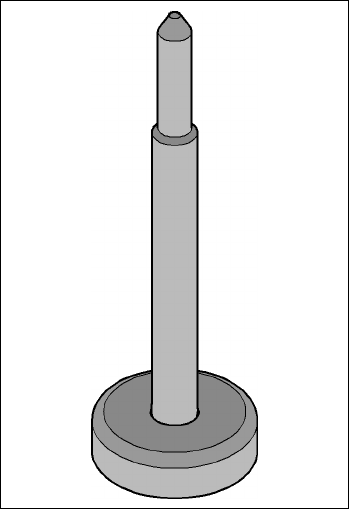
Wide boards tend to deflect during placement such that, under certain circumstances, the compo-
nents can no longer be placed with the desired accuracy. Highly curved PCBs also affect the
placement accuracy. This problem can be easily rectified by fitting magnetic pin supports on the
lifting table.
7
Fig. 7.9 - 1 Magnetic pin support
User manual SIPLACE X-Series 7 Station extensions
Software Version SR.601.xx 11/2005 US Edition 7.10 Feeder module cover flap (S feeder module)
429
7.10 Feeder module cover flap (S feeder module)
Item no. 00119610-xx Feeder module cover flap HF 2/4 for locations 2 or 4
Item no. 00119633-xx Feeder module cover flap HF 1/3 for locations 1 or 3
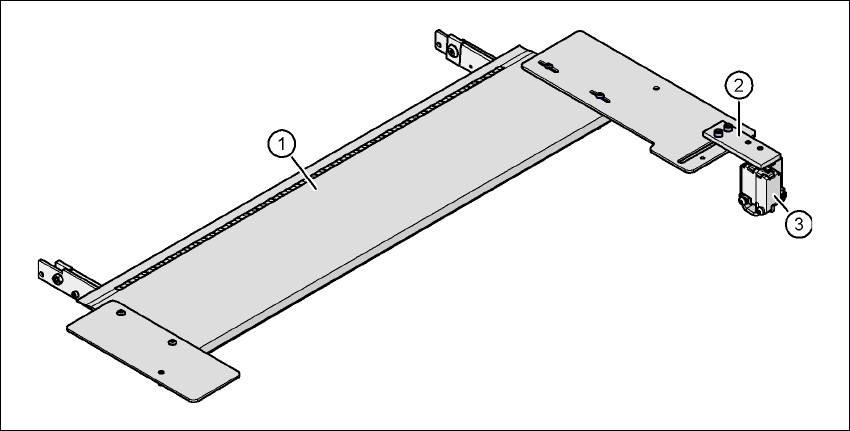
The feeder module cover flap is installed over the component feeder area. It is designed to prevent
a head crash with an upright feeder module retainer that has not been engaged correctly. The
feeder module cover flap can also prevent the front panel of feeder modules entering the place-
ment head traveling range due to incorrect operation.
7
Fig. 7.10 - 1 Feeder module cover flap for locations 1 and 3
(1) Feeder module cover flap
(2) Mechanical lock
(3) Switch in the emergency stop circuit
The switch for the feeder module cover flap is looped into the emergency stop circuit. The feeder
module cover flap must be locked mechanically, which causes the switch to close the open emer-
gency stop circuit.