SIPLACE OIS Version 13.1 Getting Started.pdf - 第14页
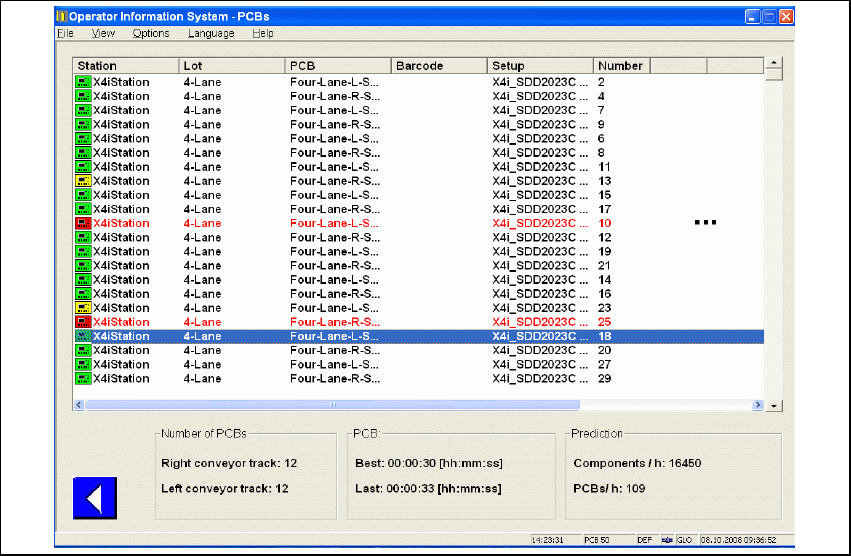
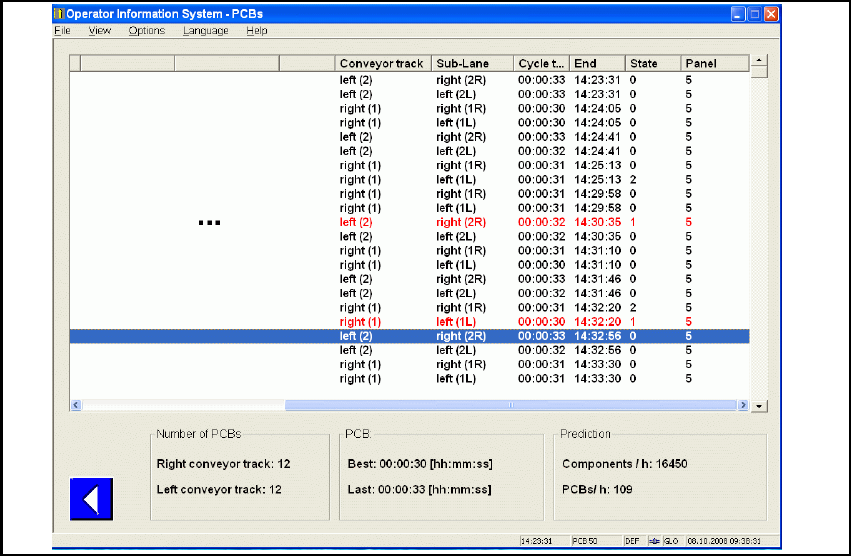
2 Overview: The user Interface Getting Started with SIPLACE OIS 05/2016 EN Edition Software Version 13.1 14 2 Fig. 2 - 8 "PCBs" dialog, part 2 All PCBs assembled in the observation period are shown in list form…
Getting Started with SIPLACE OIS 2 Overview: The user Interface
Software Version 13.1 05/2016 EN Edition
13
2.3.1 "PCBs" View
Click the PCBs button in the main view.
The following dialog appears: 2
2
Fig. 2 - 7 "PCBs" dialog, part 1
2 Overview: The user Interface Getting Started with SIPLACE OIS
05/2016 EN Edition Software Version 13.1
14
2
Fig. 2 - 8 "PCBs" dialog, part 2
All PCBs assembled in the observation period are shown in list form, together with the
corresponding performance figures. This representation immediately shows you how
modifications to the machine affect placement performance. 2
Description of columns: 2
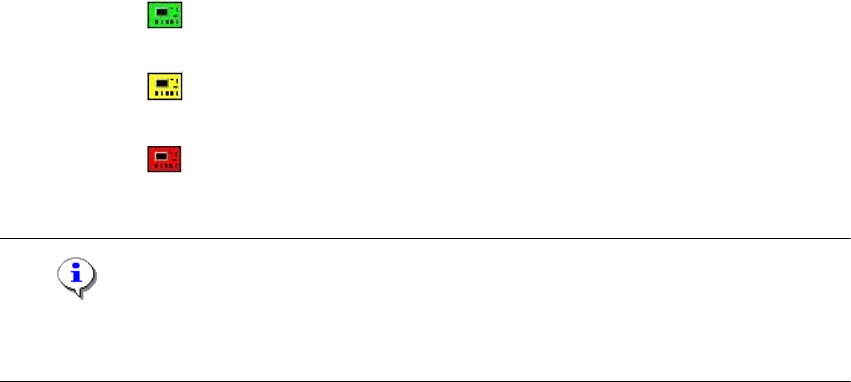
Station The station on which the PCB was assembled. The icon to the left of the station
depicts the processing status of the board (see "Icons" below). 2
Lot Name of the lot 2
PCB Name of the board 2
Barcode PCB barcode, if available 2
Setup Current set-up 2
Number PCB number. If no PCB Barcode is present, the station automatically assigns
this value. 2
Conveyor track Conveyor lane (right, left) 2
Sub-Lane Sub lane in "Quad Lane" conveyor mode. 2
Build time How long it took to assemble the specified PCB. 2
Getting Started with SIPLACE OIS 2 Overview: The user Interface
Software Version 13.1 05/2016 EN Edition
15
2
Note
PCBs that are not fully assembled are highlighted in red and are not included in subsequent
figures. PCBs that are fully assembled are highlighted in green. 2
End 2 Time of completion. 2
State 2 The status is interpreted as a bit array. 2
2 1st bit 2 True = Production of PCB was aborted.
False = PCB was produced. 2
2 2nd bit2 True = PCB was produced with auto recovery.
False = PCB was produced normally without auto recovery. 2
2 3rd bit 2 - 2
2 4th bit 2 True = PCB is in transport through mode.
False = PCB was produced. 2
Panel 2 Number of panels within the board. 2
Icons 2 PCB was produced. 2
PCB was produced with auto recovery. 2
Production of PCB was aborted. 2