SIPLACE OIS Version 13.1 Getting Started.pdf - 第41页
Getting Started with SIPLACE OIS Index Software Version 13.1 05/2016 EN Edition 41 Index Symbols "Availability" view 17, 19 "Hit lists" view 23 "PCBs" view 12, 13 "Reject rate" vie…
4 Tips and Tricks Getting Started with SIPLACE OIS
05/2016 EN Edition Software Version 13.1
40
Choose a topic and click the Display button.
The selected help topic is displayed.
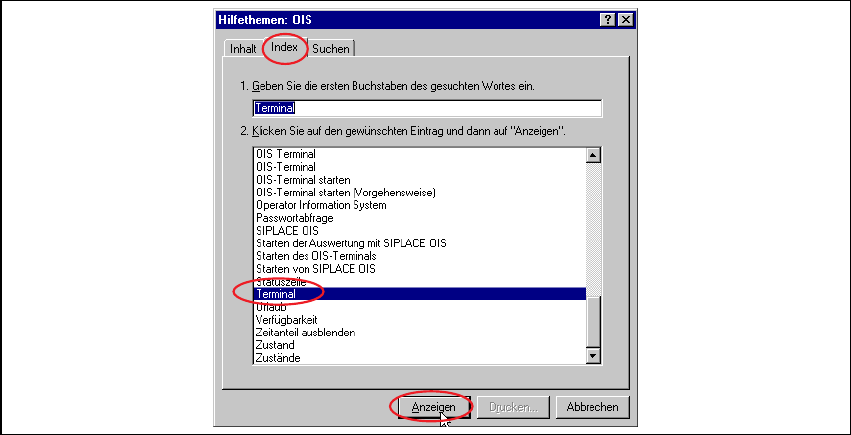
Click the Index tab.
The following dialog appears:
4
Fig. 4 - 2 OIS help topics - index
Enter a topic and click the Display button.
The selected help topic is displayed.
Getting Started with SIPLACE OIS Index
Software Version 13.1 05/2016 EN Edition
41
Index
Symbols
"Availability" view 17, 19
"Hit lists" view 23
"PCBs" view 12, 13
"Reject rate" view 20
A
Access level 37
access level 36
automatic start time 30
availability of machine 7
D
define access level 36
E
error lists 24
Excel format 32
explanation of symbols 5
exporting data 32
F
filter error list 25
H
Help index 40
Help topics 39
I
information block 7
L
line/station selection 11
load product 35
M
maintenance 35
menu bar 7, 8
most recent lot/cluster change 30
most recent PCBs 30, 31
most recent set-up change 30
N
normal operation 35
O
OIS terminal 34
online help system 39
P
PCB status 7
pick-up reliability 7
planned downtime 35
S
selection menu 7
separate observation period 30
setting up 35
sort options in tables 39
start time 30
starting SIPLACE OIS 6
status bar 7
T
text format 33
time slice (offline) 30
tips and tricks 39
U
unplanned downtime 35
user interface 7
V
values for monitoring 29
virtual keyboard 8
W
works holiday 35
Index Getting Started with SIPLACE OIS
05/2016 EN Edition Software Version 13.1
42