SIPLACE OIS Version 13.1 Getting Started.pdf - 第25页
Getting Started with SIPLACE OIS 2 Overview: The user Interface Software Version 13.1 05/2016 EN Edition 25 2 Fig. 2 - 14 Detailed view of error lists, part 2 Here you will find an overview of the errors that were evalua…
2 Overview: The user Interface Getting Started with SIPLACE OIS
05/2016 EN Edition Software Version 13.1
24
Description of fields: 2
Component with greatest number of errors
Shows the three components for which the most error
messages are displayed. 2
Component shape with greatest number of errors
Shows the three component shapes for which the most error
messages are displayed. 2
Feeder with greatest number of errors
Shows the three feeders for which the most error messages
are displayed. 2
Segment with greatest number of errors
Shows the three segments for which the most error
messages are displayed. 2
2.5.1.1 Error Lists
Click the Error lists button in the "Hit lists" dialog.
The following dialog appears: 2
2
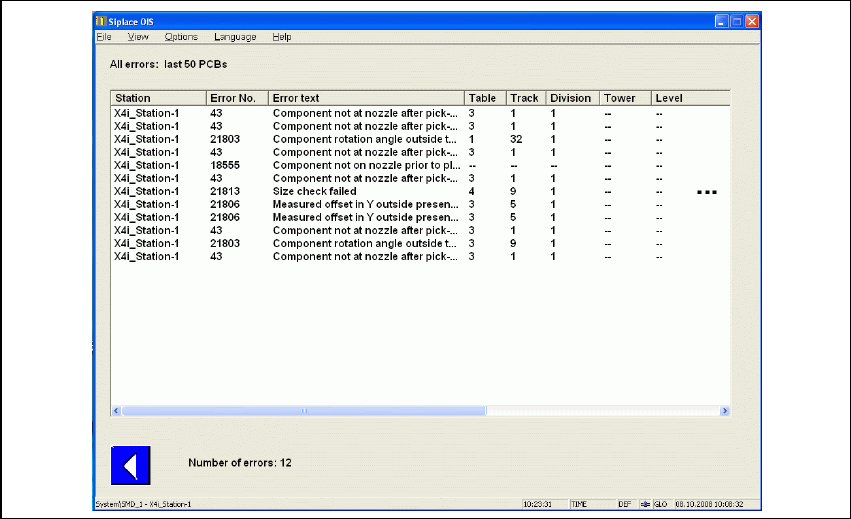
Fig. 2 - 13 Detailed view of error lists, part 1
Getting Started with SIPLACE OIS 2 Overview: The user Interface
Software Version 13.1 05/2016 EN Edition
25
2
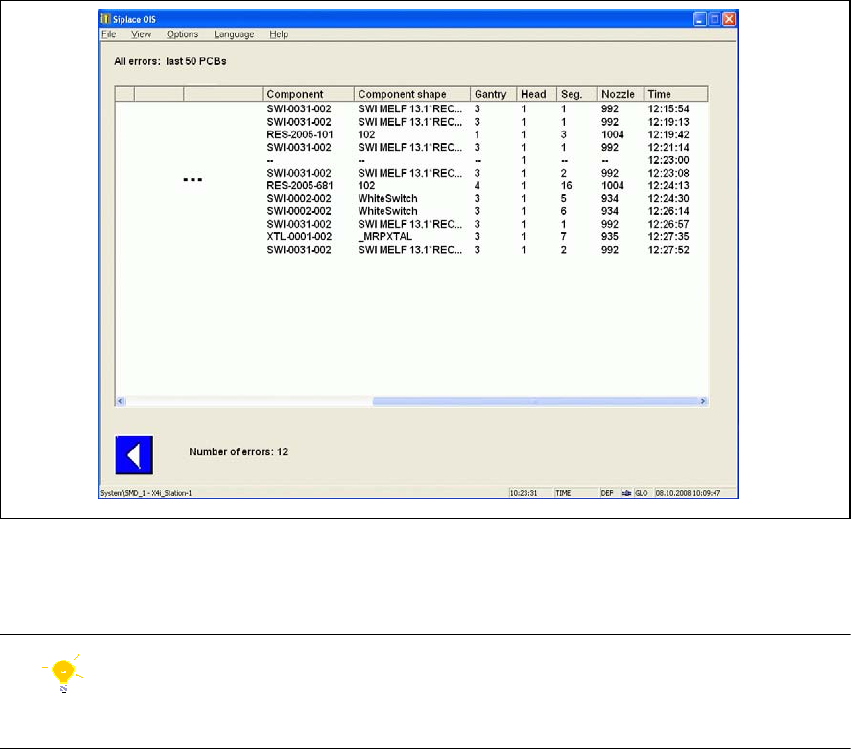
Fig. 2 - 14 Detailed view of error lists, part 2
Here you will find an overview of the errors that were evaluated by SIPLACE OIS. 2
Tip
You can filter the error list by clicking an appropriate error in the "Hit lists" view (see Fig. 2 - 12).2
Description of columns: 2
Error No. In addition to the error text, each error is identified by a unique number.
This is the same number that is displayed on the station. 2
Error text Description of the error. 2
Table Number of the table or location. 2
Track Number of the track on which the feeder is set up. 2
Division Number of the division. 2
Tower Only for matrix tray changer: Number of the tower containing the tray. 2
Level For wafflepack changers and multi tray changers only: number of the
level on which the wafflepack magazine is located. 2
Component Description of the component. 2
Component shape Description of the component shape. 2
2 Overview: The user Interface Getting Started with SIPLACE OIS
05/2016 EN Edition Software Version 13.1
26
Gantry Number of the gantry. 2
Head Number of the head. 2
Segment Number of the segment. 2
Nozzle Name of the nozzle on the specified segment. 2