SIPLACE OIS Version 13.1 Getting Started.pdf - 第36页
3 Practical Examples Getting Started with SIPLACE OIS 05/2016 EN Edition Software Version 13.1 36 3.4 Example 4: Defining the Access Level Click Access level... in the Options menu. The "Options" dialog app…

Getting Started with SIPLACE OIS 3 Practical Examples
Software Version 13.1 05/2016 EN Edition
35
Description of states: 3
Normal operation: Resets to the previously set operating state; the data is entered
automatically. 3
Works holiday: Operation is shut down. 3
Maintenance: The machine is being maintained. 3
Setting up: Feeding areas are being set up. 3
Planned downtime: Production halted, e.g. due to company meeting. 3
Unplanned downtime: Production halted, e.g. due to missing components. 3
Load product: Preparation for a new product to be produced on the line for the first time.3
Note:
Once actions have been completed, you must press the Normal operation button.
Reason: Otherwise, recording remains in the activated state. 3
3 Practical Examples Getting Started with SIPLACE OIS
05/2016 EN Edition Software Version 13.1
36
3.4 Example 4: Defining the Access Level
Click Access level... in the Options menu.
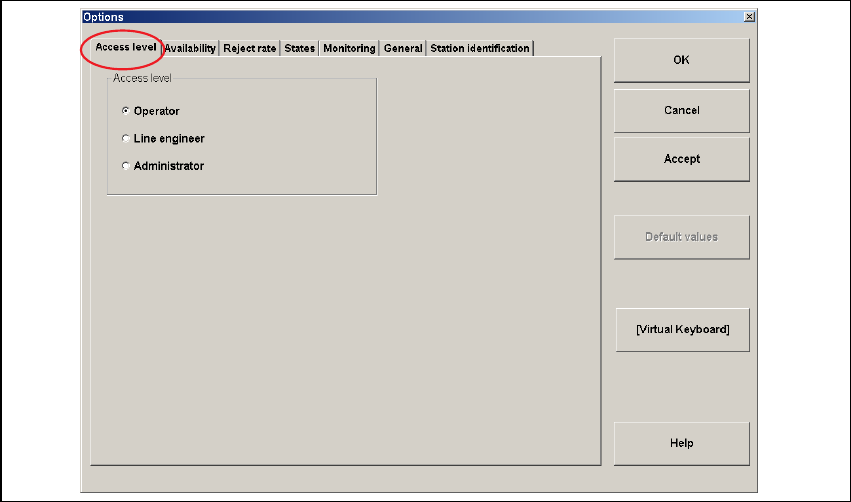
The "Options" dialog appears with the Access level tab activated:
3
Fig. 3 - 5 "Options" - Access level dialog
Description: 3
– Depending on your access authorization, you can log on as an Operator, Line engineer or
Administrator, see section 3.4.1 "Access levels" below. Contact your system administrator for
more information on your personal access authorization.
Action: 3
Click the appropriate dialog box Operator, Line engineer, Administrator.
Enter your password.
Click the OK button.
Getting Started with SIPLACE OIS 3 Practical Examples
Software Version 13.1 05/2016 EN Edition
37
3.4.1 Access Levels
Certain functions or menus can only be carried out/called by specially trained staff. The following
different access levels exist: 3
– Operator
– Line engineer
– Administrator
The "Engineer" and "Administrator" access levels are protected by passwords. 3
3
Operator 3
This access level consists of all members of staff that have been trained to use the OIS Client in
regular operation. They are able to carry out functions within the scope of the OIS Client display
functions. 3
Line engineer 3
Persons qualified for this access level are special trained technicians of the customer. Additionally
to the display functions, they are able to carry out some configuration settings. 3
Administrator 3
Persons qualified for this access level are authorized to perform all configuration settings in the
OIS Client. E.g., they are able to change threshold values and intervene in the OIS state machine
configuration. 3