TM5761.Badmark Transfer.pdf - 第10页
S M T S o f t w a r e E n g i n e e r i n g G r o u p I M O p e r a t i o n s Y A M A H A M O T O R C O . , L T D . MDOC-SOFT501 16 10/48 2.3.4. Detailed explanation of the badmark transfer mode In the badmark transfer ,…

SMT Software Engineering Group
IM Operations YAMAHA MOTOR CO., LTD.
MDOC-SOFT50116 9/48
2.3.3. Select badmark transfer mode
The selectable badmark transfer mode is decided, by the use conditions of the line of the
customer.
Use conditions
Option function
(Op003)
Auto Plan
Mode (Top
Machine)
Existence
of Board
ID
"Actualfirst
production"
or not ?
Existence of
other
machine
Selectable badmark transfer
mode
Exist BOARD ID Yes
None TAKE OVER
Exist NON (UNIQUE ID)
BOARD ID
Exist
No
None BOARD ID
Exist BOARD ID * recommend
NON (UNIQUE ID)
Yes
None BOARD ID * recommend
NON
NON (UNIQUE ID)
Exist NON (UNIQUE ID)
Exist
No
None NON * recommend
NON (UNIQUE ID)
Exist NON (UNIQUE ID)
KANBAN
None
None NON * recommend
NON (UNIQUE ID)
Exist BOARD ID * recommend
NON (UNIQUE ID)
Yes
None BOARD ID * recommend
NON
NON (UNIQUE ID)
Exist NON (UNIQUE ID)
Exist
No
None NON * recommend
NON (UNIQUE ID)
Exist NON (UNIQUE ID)
MANUAL
SELECT
None
None NON * recommend
NON (UNIQUE ID)
Use
TAKE
OVER
The machine other than top machine becomes this "Auto Plan Mode ".
Set the badmark transfer mode same as top machine.
Exist BOARD ID * recommend
NON (UNIQUE ID)
Yes
None BOARD ID * recommend
NON
NON (UNIQUE ID)
Exist NON (UNIQUE ID)
Exist
No
None NON * recommend
NON (UNIQUE ID)
Exist NON (UNIQUE ID)
Not Use
None
None NON * recommend
NON (UNIQUE ID)
SMT Software Engineering Group
IM Operations YAMAHA MOTOR CO., LTD.
MDOC-SOFT50116 10/48
2.3.4. Detailed explanation of the badmark transfer mode
In the badmark transfer, it is necessary to link the board succeeded from the upstream
machine to the badmark recognition result file.
Normally, it is enough to link the board to the badmark recognition result file at the board
carryin timing. However, when carrying in from the buffer conveyor, the board that has been
removed may not be linked to the badmark recognition result file. When operating with such
configuration, use the board ID. As the board ID is included in the badmark recognition
result file, the board can be strictly linked to the badmark recognition result file. This also
ensures the transferred data even in the configuration that carries in the board from the
buffer conveyor.
For details about settings, see section 4.1.2 Machine common setting.
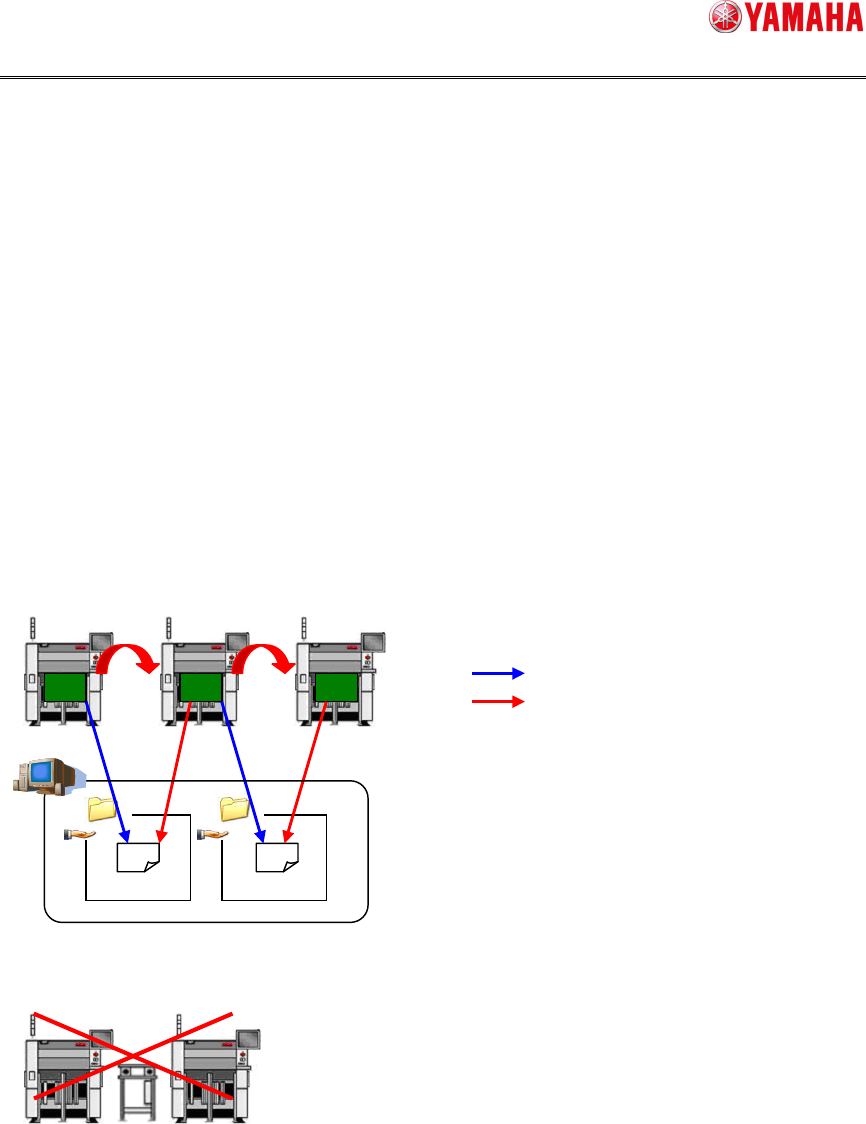
A) “NON”
The board ID is not used. The badmark recognized by the upstream machine is saved
into the shared folder on the network as the badmark recognition result file.
This operation cannot be performed in the configuration including other machine.
Write
Read
BadMark_Inf.csv BadMark_Inf.csv
SMT Software Engineering Group
IM Operations YAMAHA MOTOR CO., LTD.
MDOC-SOFT50116 11/48
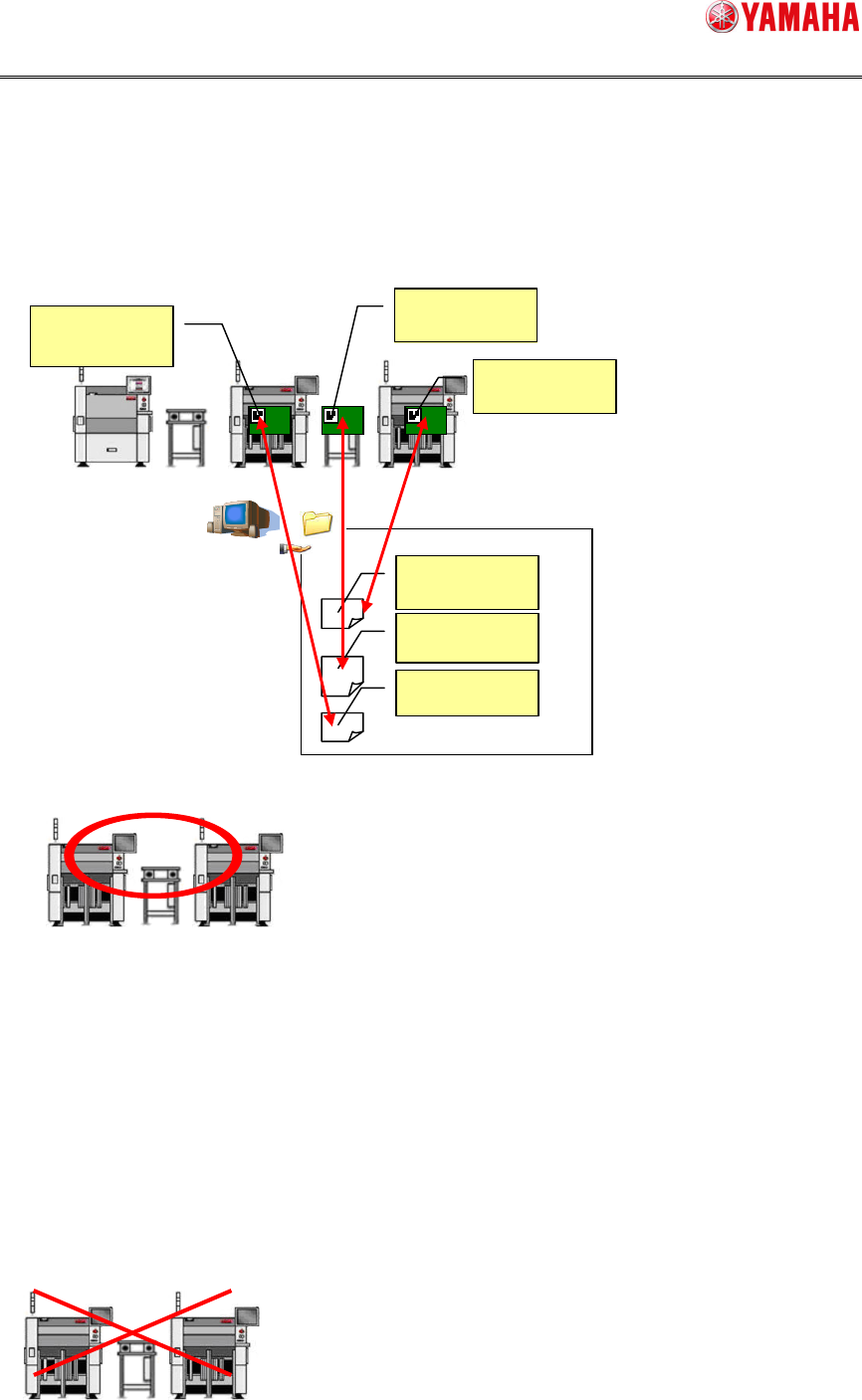
B) ”BOARD ID”
The operation is performed using the board ID. In this operation, the board ID is
included in the badmark recognition result file name. This identifies the board from the
badmark recognition result file.
(Caution) Do not use, when it is not "Actualfirst production".
This operation can be performed in the configuration including other machine.
C) ”TAKE OVER”
Bad mark transfer is performed in "Actualfirst production".
To use this function, an option function (Op003: Auto Program Change Over) is needed.
About "AutoPlanMode", it is necessary for top machine of the line to set it in "BOARD ID ".
And it is necessary for following machine to set it in "TAKE OVER".
(Caution) Do not use, when it is not "Actualfirst production".
This operation cannot be performed in the configuration including other machine.
YAMAHA01
YAMAHA02
YAMAHA03
YAMAHA01
YAMAHA02
YAMAHA03
BadMark_Inf_YAMAHA01.csv
BadMark_Inf_YAMAHA02.csv
BadMark_Inf_YAMAHA03.csv