TM5761.Badmark Transfer.pdf - 第7页
S M T S o f t w a r e E n g i n e e r i n g G r o u p I M O p e r a t i o n s Y A M A H A M O T O R C O . , L T D . MDOC-SOFT501 16 7/48 2.3. Use of the badmark tr ansfer About employment o f badmark transfer is explaine…
SMT Software Engineering Group
IM Operations YAMAHA MOTOR CO., LTD.
MDOC-SOFT50116 6/48
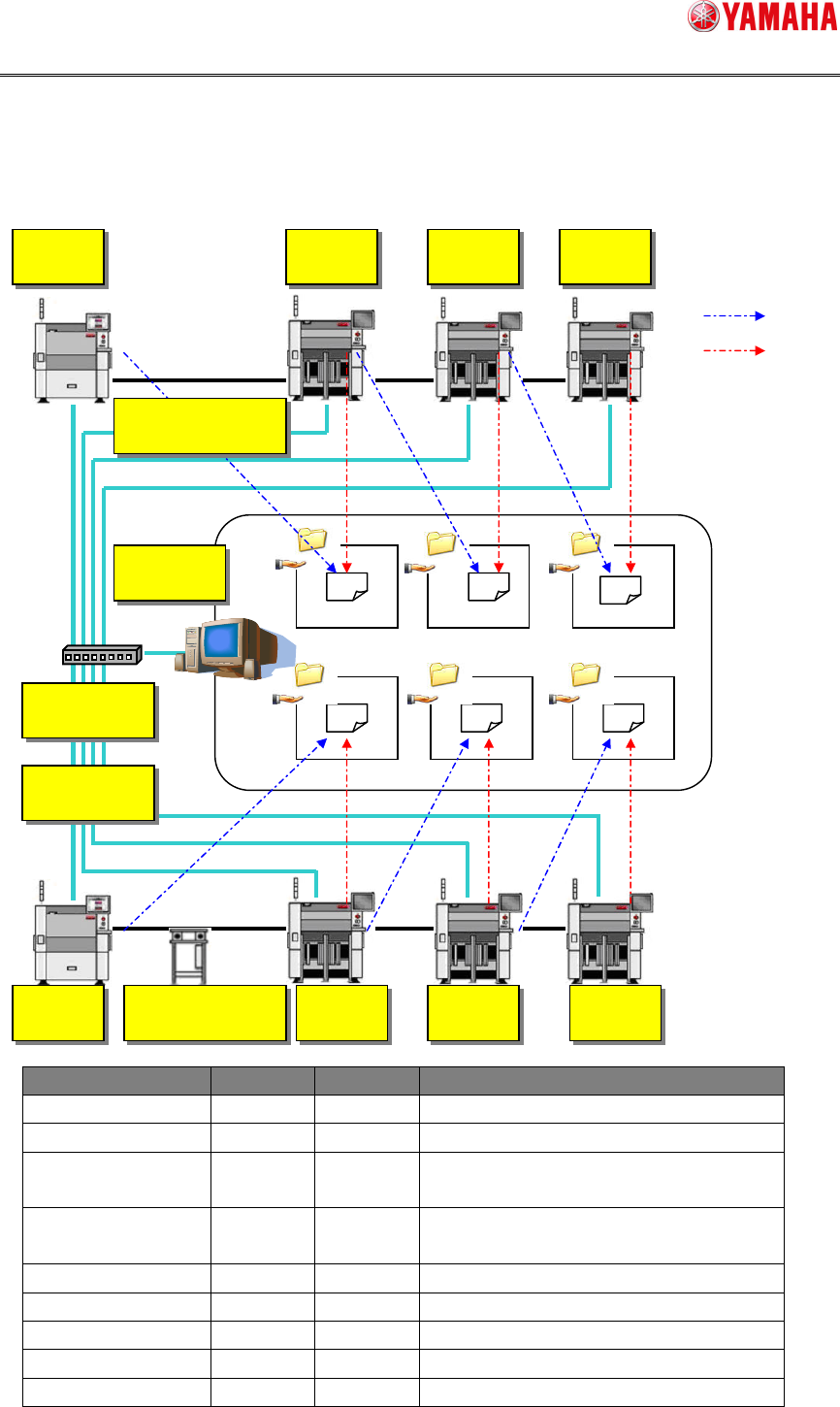
2.2. Basic configuration
The basic configuration of the badmark transfer is as follows.
Object Q’ty Remarks
Printer Arbitrary 0 or more
Mounter Essential 1 or more
Transfer signal cable Essential 1 or more The transfer signal is the SMEMA or
ADVANCED GATE.
Server PC Essential 1 There are no other restrictions when the file
is shared during machine operation.
LAN cable Essential 1 or more
Hub Essential 1 or more
Buffer conveyor Arbitrary 0 or more
Custom specification Arbitrary 0 or more Required when using “Actualfirst operation”.
Option Arbitrary 0 or more Required when using “TakeOver”.
Write
Read
Printer
Mounter
Mounter
Mounter
Printer
Buffer conveyor Mounter
Mounter
Mounter
Server PC
Hub
LAN cable
Transfer signal cable

SMT Software Engineering Group
IM Operations YAMAHA MOTOR CO., LTD.
MDOC-SOFT50116 7/48
2.3. Use of the badmark transfer
About employment of badmark transfer is explained.
2.3.1. Outline explanation of badmark transfer mode
The kind of the badmark transfer mode, and outline and condition of use, is explained.
For details about settings, see section “4.1.2 Machine common setting”.
(Caution) Unify the badmark transfer mode of each machine in the line.
Kind of the badmark
transfer mode
Outline explanation
NON The badmark transfer is performed without using "Actualfirst production".
(Caution)
This mode cannot be performed in the configuration including other machine.
BOARD ID The Badmark transfer is performed in "Actualfirst production".
2D code on the board is scanned by the camera of each machine (mounter and
printer). That specifies the badmark recognition result for the board, and production
is performed.
This mode can be performed in the configuration including other machine.
(Caution)
To use this function, a special function (Tok1265: PCB 2D CodeScan) is needed.
TAKE OVER The Badmark transfer is performed in "Actualfirst production".
The board ID is succeeded from upstream machine by "option function (Op003:
Auto Program Change Over)", and specifies the badmark recognition result for the
board ID. And production is performed.
(Caution)
This mode cannot be performed in the configuration including other machine.
(Caution)
To use this function, a option function (Op003: Auto Program Change Over) is
needed. In addition, about "Auto Plan Mode" it is necessary for machine of the
line top to set it in "BOARD ID".
It is necessary for subsequent downstream machine to set it in "TAKE OVER".
NON (UNIQUE ID) The badmark transfer is performed without using "Actualfirst production".
This mode can be performed in the configuration including other machine.
(Caution)
Do not use this mode in the use of "2.1.2 Special application examples".

SMT Software Engineering Group
IM Operations YAMAHA MOTOR CO., LTD.
MDOC-SOFT50116 8/48
2.3.2. Merit and demerit of each badmark transfer mode
The merit and demerit in each badmark transfer mode are indicated. Refer to the following,
when select badmark transmission mode.
Kind of the
badmark
transfer mode
Merit Demerit
< Safety >
The badmark recognition result is not managed for
each board. Therefore this mode cannot prevent false
incorrect mounting and non mounting when insert the
board halfway and remove the board halfway.
NON < System requirement >
"Board ID", “Actualfirst production",
“Special function” and "Option function"
are not necessary.
< Terms of use >
This mode cannot be performed in the configuration
including other machine.
< System requirement >
Preparations for "Board ID" and "Actualfirst
production" are necessary. In addition, the purchase of
"Special function" is necessary.
< Safety >
These modes continue keeping the
board and the consistency of the
badmark transfer result. Therefore, this
mode can prevent false incorrect
mounting non mounting when insert the
board halfway and remove the board
halfway.
< System requirement >
The additional purchase is necessary, when want to
use together "Option function (Op003: Auto Program
Change Over)"
BOARD ID
< Terms of use >
This mode can be performed in the
configuration including other machine.
< Added action >
Action of "Special function" (Tok1265: PCB 2D
CodeScan) is added.
< System requirement >
"Board ID", “Actualfirst production", “Special function”
and "Option function (Op003: Auto Program Change
Over)" are necessary.
< Safety >
This mode cannot keep the board and the consistency
of the badmark transfer result, when insert the board
halfway and remove the board halfway. Therefore false
incorrect mounting and nonmounting occur.
TAKE OVER < configuration construction >
The badmark recognition result is
managed for each board. Therefore it is
not necessary to divide the input and
output folder of the badmark recognition
result file into each machine.
< Terms of use >
This mode cannot be performed in the configuration
including other machine.
< System requirement >
"Board ID", “Actualfirst production",
“Special function" and "Option function"
are not necessary.
< Additional movement >
The calculation to identify badmark transfer result for
the boards and recognition action of badmark increase.
NON
(UNIQUE ID)
< Safety >
Even if Other machine is inserted
between machines, this mode can keep
board and the consistency of the
badmark transfer result. Therefore this
mode can prevent false incorrect
mounting and nonmounting.
< Safety >
Board the badmark of which has not been recognized
by the upstream machine should not be loaded halfway.
If such board is loaded, the data cannot become
consistent, causing incorrect mounting and
nonmounting to occur.