TM5761.Badmark Transfer.pdf - 第35页
S M T S o f t w a r e E n g i n e e r i n g G r o u p I M O p e r a t i o n s Y A M A H A M O T O R C O . , L T D . MDOC-SOFT501 16 35/48 ② . C hoose [Mark] fro m the individual data o f the printer . Ch eck the mark N…
SMT Software Engineering Group
IM Operations YAMAHA MOTOR CO., LTD.
MDOC-SOFT50116 34/48
8. Checking the mark data
Check the mark data of the registered badmark.
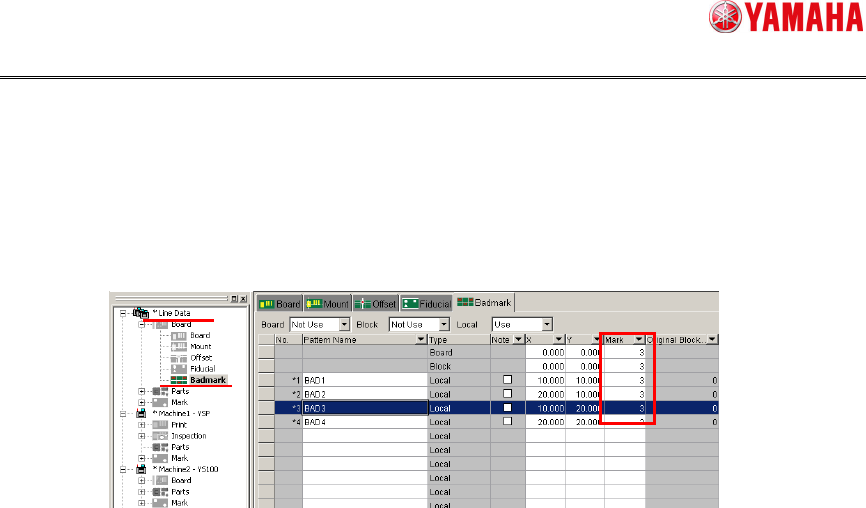
①. Check the mark No of the registered badmark.
Open the badmark from the line data. Check the mark No used for the registered
badmark.
SMT Software Engineering Group
IM Operations YAMAHA MOTOR CO., LTD.
MDOC-SOFT50116 35/48
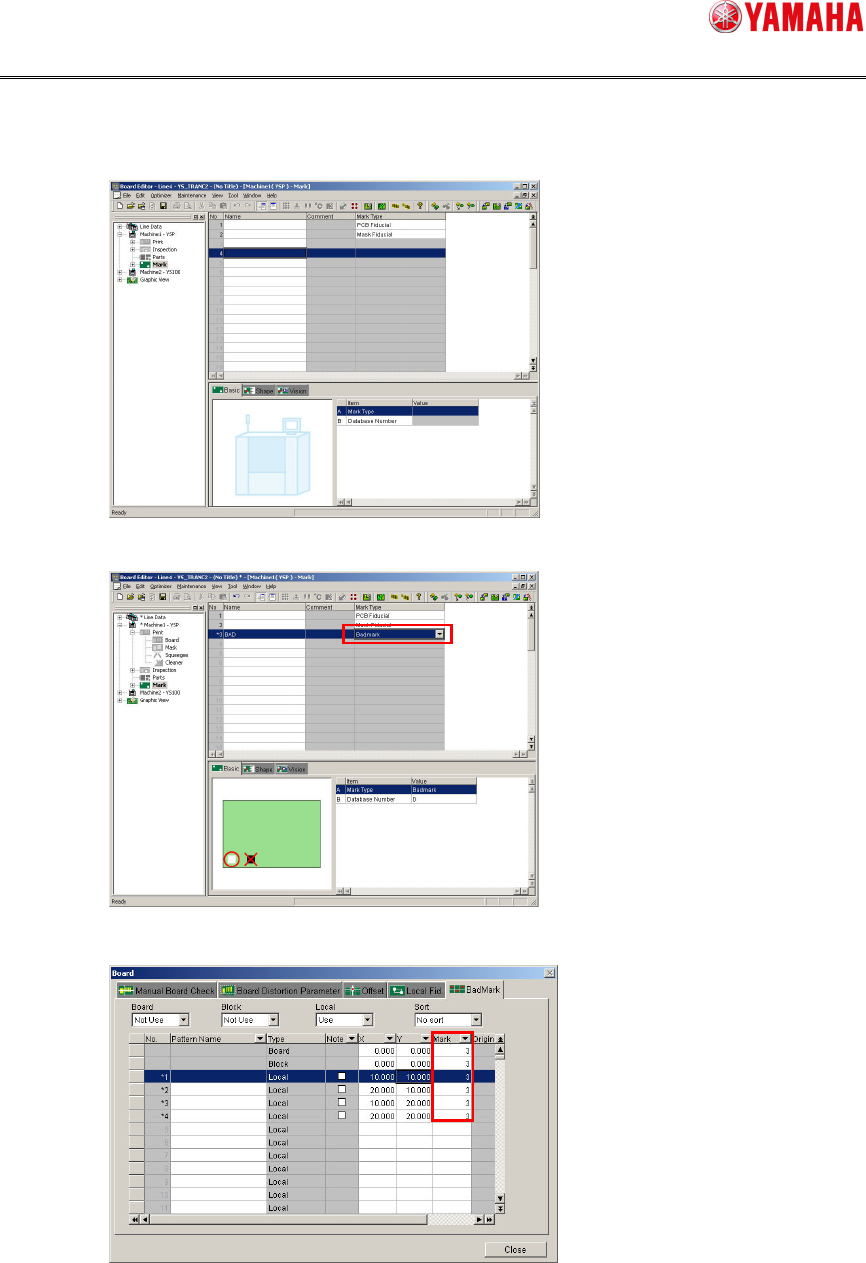
②. Choose [Mark] from the individual data of the printer.
Check the mark No from the screen.
When the mark No you have checked is other than the badmark, register the badmark.
Change the mark No of the badmark from the individual data of the printer.
③. Check with the actual machine.
With the actual machine, check the coordinates of the board data after the line data
import. Correct the origin position to correct errors by each machine.

SMT Software Engineering Group
IM Operations YAMAHA MOTOR CO., LTD.
MDOC-SOFT50116 36/48
5. Error messages
The following shows the error messages that are displayed by this function. Follow the
instructions stated in the error message to take corrective actions.
Error No. Contents
In the transfer data check of the badmark recognition results, the board name of the
transferred data differs from the board name currently being selected.
[Cause]
The board name currently being selected differs from the board name of the
transfer data.
[Action]
Correct the unmatched data and load the board from the upstream machine
again.
When the bpard name check is not needed, check off [Board Name Check].
Check the [Software setting][TakeOver Information] screen.
Ea12852
Program name
Board data
Transfer
data
In the transfer data check of the badmark recognition results, the board data differs from
the transfer data.
[Cause]
The number of badmark recognition result data to be used is different between
the board data and transfer data.
[Action]
Correct the unmatched data and load the board from the upstream machine
again.
Ea12853
Board Block Local
Board data
Transfer
data
In the transfer data check of the badmark recognition results, data other than that already
recognized is detected.
[Cause]
In the transfer data check of the badmark recognition results, data other than
that already recognized is detected. Data that all inspections are not completed
is not applicable to the processing.
Ea12854
[Action]
Correct the data and load the board from the upstream machine again.
It is failed to read the badmark recognition result file.
[Cause]
It is failed to read the badmark recognition result file.
Ea12855
[Action]
Check that the folder set in “Upload” can be read.
Check the setting contents of [Software setting][TakeOver Information].