TM5761.Badmark Transfer.pdf - 第3页
S M T S o f t w a r e E n g i n e e r i n g G r o u p I M O p e r a t i o n s Y A M A H A M O T O R C O . , L T D . MDOC-SOFT501 16 3/48 1 . T e r m s a n d d e f i n i t i o n s This section describes the terms used in …

SMT Software Engineering Group
IM Operations YAMAHA MOTOR CO., LTD.
MDOC-SOFT50116 2/48
Contents
Badmark Transfer ..........................................................................................................................1
1.
Terms and definitions .............................................................................................................3
2.
Overview ................................................................................................................................4
2.1.
About badmark transfer..................................................................................................4
2.1.1.
Effect .......................................................................................................................4
2.1.2.
Special application examples.................................................................................. 5
2.2.
Basic configuration .........................................................................................................6
2.3.
Use of the badmark transfer...........................................................................................7
2.3.1.
Outline explanation of badmark transfer mode.......................................................7
2.3.2.
Merit and demerit of each badmark transfer mode.................................................8
2.3.3.
Usable badmark transfer mode ..............................................................................9
2.3.4.
Detailed explanation of the badmark transfer mode............................................. 10
2.3.5.
Outline explanation of the badmark transfer mode...............................................14
2.3.6.
Detailed explanation of the “Recovery”.................................................................15
2.3.7.
Detailed explanation of the “Board name check”..................................................16
2.4.
Others ...........................................................................................................................17
2.4.1.
Machine common..................................................................................................17
2.4.2.
Board editor ..........................................................................................................19
3.
Cooperation functions ..........................................................................................................21
3.1.
Printer ........................................................................................................................... 21
3.1.1.
Print inspection skip..............................................................................................21
4.
Setting method of the badmark transfer...............................................................................22
4.1.
Machine setting ............................................................................................................22
4.1.1.
Board data setting .................................................................................................22
4.1.2.
Machine common setting ......................................................................................23
4.1.3.
Printer setting ........................................................................................................27
4.1.4.
Mounter setting ..................................................................................................... 30
4.2.
Offline software setting .................................................................................................31
4.2.1.
Board Explorer ......................................................................................................31
4.2.2.
Board editor ..........................................................................................................31
4.2.2.1.
Line data import .................................................................................................... 32
5.
Error messages.................................................................................................................... 36
5.1.
Corrective actions to be taken in case on an error.......................................................38
5.1.1.
Taking actions in case of an error .........................................................................38
6.
Interface ...............................................................................................................................40
6.1.
File format.....................................................................................................................40
6.1.1.
File naming rules...................................................................................................40
6.1.2.
Data format ...........................................................................................................41
6.1.3.
Sample data ..........................................................................................................42
6.2.
Transfer signal ..............................................................................................................44
6.2.1.
Data transfer timing............................................................................................... 44
6.2.2.
Setting procedures ................................................................................................46
7.
Restrictions........................................................................................................................... 47
8.
Reference documents .......................................................................................................... 48
SMT Software Engineering Group
IM Operations YAMAHA MOTOR CO., LTD.
MDOC-SOFT50116 3/48
1. Terms and definitions
This section describes the terms used in this document.
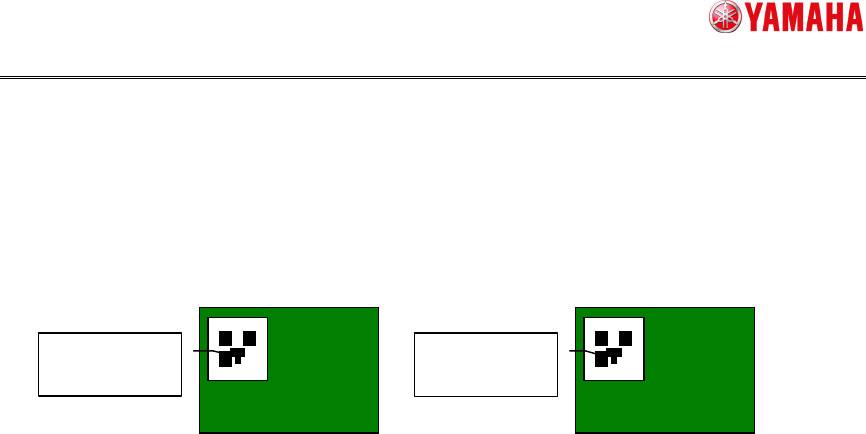
Board ID
An ID is assigned to each board. As a board ID created using the 2D code or barcode is
affixed to a board, the board ID can be read from the board.
Work instruction slip (KANBAN)
An ID is assigned in units of product types. As an ID created using the 2D code or
barcode is affixed to a work instruction slip, this simplifies the work.
*The input from a screen uses “SIGNBOARD”.
Actualfirst production
This actualfirst production is an operation based on the board ID affixed to the board.
When the following conditions are satisfied, the operation is applicable to the actualfirst
production.
Board ID that can clarify one board is assigned.
Board ID is affixed to the board.
Actualfirst
The 2D code affixed to the board is scanned to find the board ID from the board ID
(board).
To use this function, a custom specification function (Tok1265: PCB 2D CodeScan) is
needed.
*The input from a screen uses “BOARD ID”.
TakeOver
This takeover function is that the top machine scans the board ID or work instruction
slip (KANBAN) so that the downstream machine succeeds the board ID or work
instruction slip (KANBAN) from the upstream machine to perform the production.
To use this function, an option function (Op003: Auto Program Change Over) is needed.
Other machine
This other machine shows those that do not support the badmark transfer.
Buffer conveyor
Distribution conveyor
Inspection machine
The machine of the other company
Original block No
This original block No is a block No, at which the badmark generated from the block
distribution is arranged before the block distribution.
Board ID
“
YAMAHA01
”
Board ID
“
YAMAHA02
”
Board Board
SMT Software Engineering Group
IM Operations YAMAHA MOTOR CO., LTD.
MDOC-SOFT50116 4/48
2. Overview
2.1. About badmark transfer
The upstream machine transfers the recognition result data of the badmark on the board
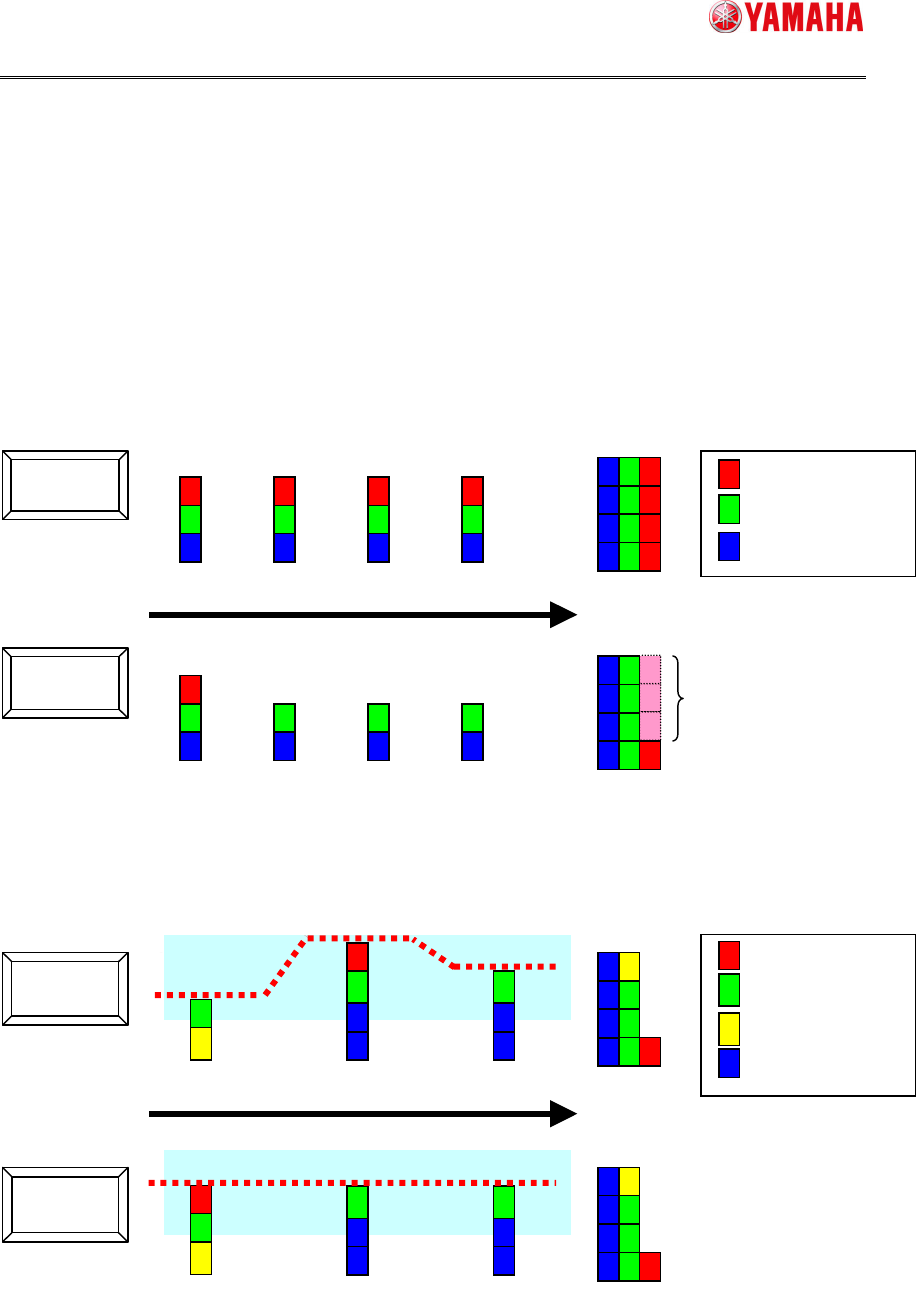
to the downstream machine.
2.1.1. Effect
As the badmark recognition result data transferred from the upstream machine applies to
the downstream machine, the cycle time is improved.
Furthermore, as the printer recognizes the badmark, the load within the line is decentralized.
Not Use
Use
Advantage
Not Use
Use
Flow direction
Flow direction
Badmark recognition
Fiducial recognition
Mounting
Bad mark recognition
Fiducial recognition
Printing
Mounting
Mounter Mounter Mounter Mounter
Mounter Mounter Mounter Mounter
Printer
Mounter
Mounter
Printer Mounter
Mounter