TM5761.Badmark Transfer.pdf - 第40页
S M T S o f t w a r e E n g i n e e r i n g G r o u p I M O p e r a t i o n s Y A M A H A M O T O R C O . , L T D . MDOC-SOFT501 16 40/48 6 . I n t e r f a c e 6.1. File format This section describes the specifications o…
SMT Software Engineering Group
IM Operations YAMAHA MOTOR CO., LTD.
MDOC-SOFT50116 39/48
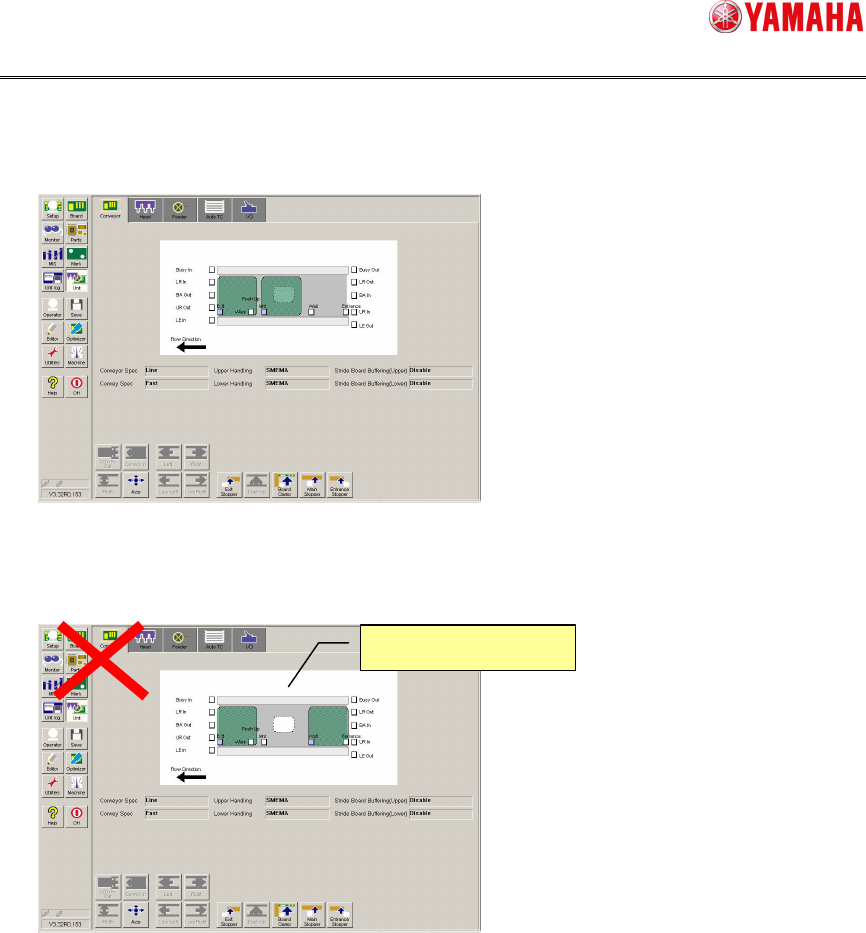
3. Restoring the state
Return the board to the state that is the same as error occurrence, when the board is
moved.
The operation cannot be restarted if the board stock state is different. To restart the
operation in the different board stock state, load the board from the upstream machine
again.
4. Restarting the automatic operation
Restart the automatic operation.
Different
board stock state
SMT Software Engineering Group
IM Operations YAMAHA MOTOR CO., LTD.
MDOC-SOFT50116 40/48
6. Interface
6.1. File format
This section describes the specifications of the bad mark recognition result file.
6.1.1. File naming rules
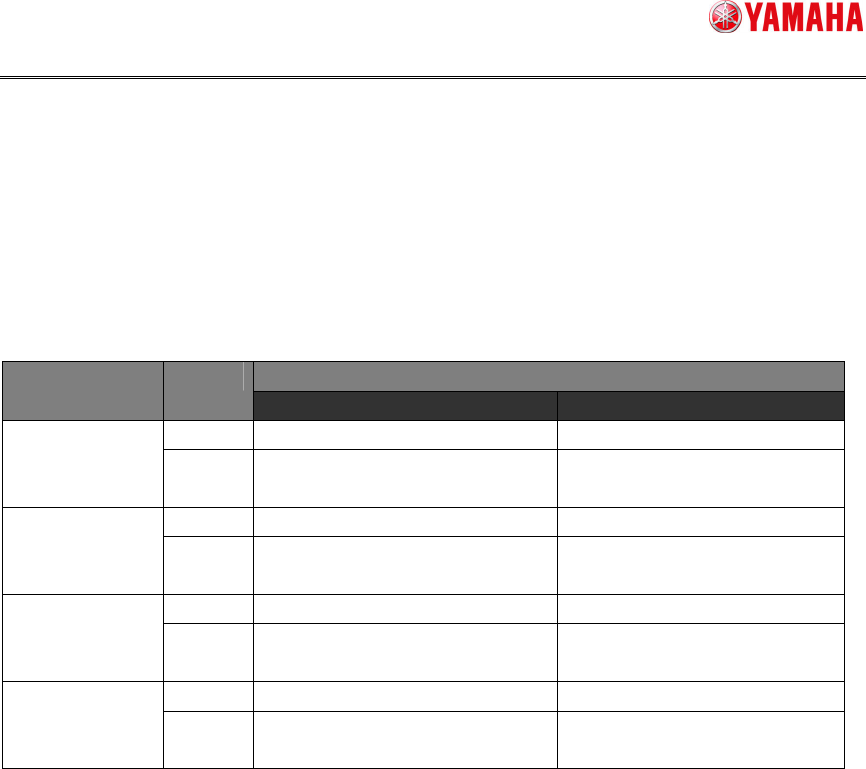
The following shows the badmark recognition result file naming rules.
File name Board ID Lane
Format Sample
Single BadMark_Inf.csv BadMark_Inf.csv
NON
Multi BadMark_Inf_Ln.csv
BadMark_Inf_L1.csv
BadMark_Inf_L2.csv
Single BadMark_Inf_XXXXXX.csv BadMark_Inf_SAMPLE.csv
BOARD ID
Multi BadMark_Inf_XXXXXX_Ln.csv
BadMark_Inf_SAMPLE_L1.csv
BadMark_Inf_SAMPLE_L2.csv
Single BadMark_Inf_XXXXXX.csv BadMark_Inf_SAMPLE.csv
TAKE OVER
Multi BadMark_Inf_XXXXXX_Ln.csv
BadMark_Inf_SAMPLE_L1.csv
BadMark_Inf_SAMPLE_L2.csv
Single BadMark_Inf_YYYYMMDDHHMMSS.csv BadMark_Inf_20121231115959.csv
NON (UNIQUE ID)
Multi BadMark_Inf_Ln_YYYYMMDDHHMMSS.csv
BadMark_Inf_L1_20121231115959.csv
BadMark_Inf_L2_20121231115959.csv
Ln … “n” shows a lane No.
XXXXXX … When there is a board ID, the barcode read result is put in “XXXXXX”.
YYYYMMDDHHMMSS …"Year, Month, Day, Hour, Minutes, Second" enters.

SMT Software Engineering Group
IM Operations YAMAHA MOTOR CO., LTD.
MDOC-SOFT50116 41/48
6.1.2. Data format
The following describes the data format of the badmark recognition result file.
The following shows the list of detailed contents by line.
Line No. Item name Detailed contents
1
Board name Set a board name that recognizes the badmark.
When the board name check is set enabled, this value is checked.
When using the board badmark, set the badmark recognition result.
Disabled.
Blank line
2
Board badmark
Enabled.
Set the board badmark recognition result.
Value Meaning
3 Enabled.
4 Disabled.
When using the block badmark, set the badmark recognition result.
The badmark recognition result of the block that has been skipped is not set.
Disabled.
Blank line
3
Block badmark
Enabled.
Set the block badmark recognition result.
Value Meaning
3 Detection
4 Nondetection
5 Cancel
When using the local badmark, set the badmark recognition result.
When the blocking is made, the badmark recognition result is enumerated in units of
blocks.
The badmark recognition result of the skipped block or local badmark is not set.
Disabled.
Blank line
4
Local badmark
Enabled.
Set the local badmark recognition result.
Value Meaning
3 Detection
4 Nondetection
5 Cancel
The badmark transfer is stopped, when a value other than the allowable values (3 to 5) is set
for the badmark recognition result.
NAME=Y001
3,
4,4,
3,3,3,3,
1st line: Board name
2nd line: Board badmark
3rd line: Block badmark
4th line: Local badmark