YSP10_Mainte_E.pdf - 第40页
2. The daily inspection and cleaning 2-2 Chapter 2 Daily maintenance items 2. The daily inspection and cleaning 2.1 Mask camera Adhered dust, etc., on the mask camera's protecti ve glass can cause recognition errors…
1. Daily inspection
2-1
Chapter 2 Daily maintenance items
1. Daily inspection
To prevent unwanted trouble, make sure to perform inspection before and after the daily operation.
►
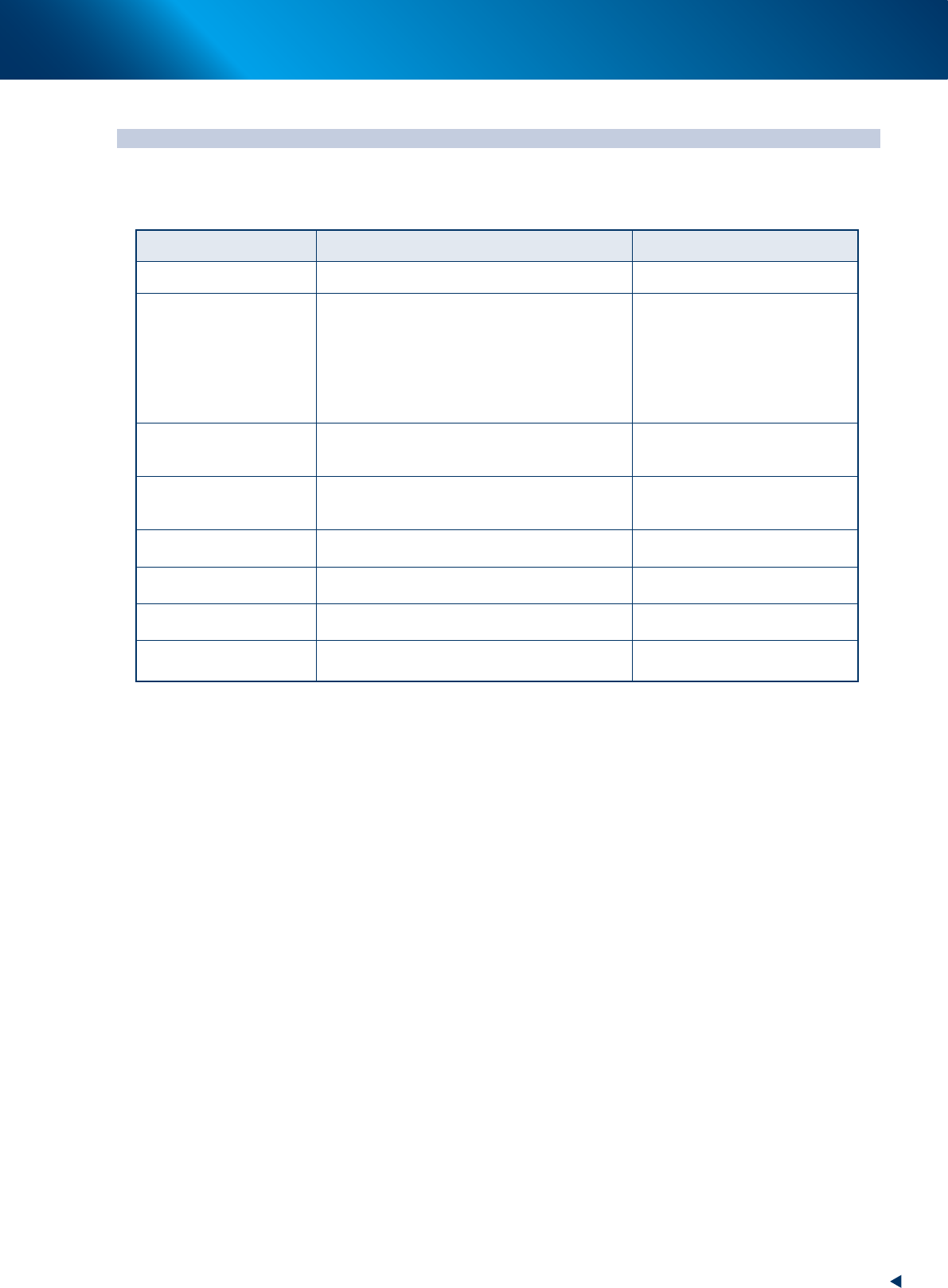
Daily inspection items
Inspection points Points to check and perform inspection Note
Air pressure
Air pressure gauge should display 0.40 to 0.41MPa. See Appendix
Temperature control unit
(option)
Make sure to discharge the drain tank. On the high humidity season, check
the drainage inside the tank once a
day.
When the drain tank becomes full,
the buzzer sounds to alarm high
water and stops automatically 10
minutes later.
Conveyor unit
No solder or other foreign matter
No dropping off the matrix pin
Check points: Conveyor rails, Edge
clamps, Board flaps, Board support
jigs (when used), Push-up plates etc.
Squeegee
Squeegee head
No wounds, cracks or wears on the scraper unit of
the squeegee.
No solder or other foreign matter
Mask clamp
No solder or other foreign matter on the clamp
surface.
Mask
No foreign matter or contamination on the mask.
No distortion or wound on the printing surface.
See the mask manufacturer's
instructions.
Solder
Stored according to the specified condition.
See the solder manufacturer's
instructions.
Operation display (Touch
screen)
No wounds or contamination on the display See "About touch screen" below for
more details.
█
About touch screen
Upon using the touch screen, be aware about the following items.
►
Avoid touching the screen with sharp or hard materials.
The screen surface is made of acrylic. Use dedicated pen for operation.
►
Do not use volatile liquid such as benzine, thinner or alcohol.
To clean the screen surface, wipe with soft cloth dipped into the water-diluted neutral detergent and
tightly squeezed.
►
Use an antistatic agent.
To prevent the static dust, use of antistatic is recommended .
2. The daily inspection and cleaning
2-2
Chapter 2 Daily maintenance items
2. The daily inspection and cleaning
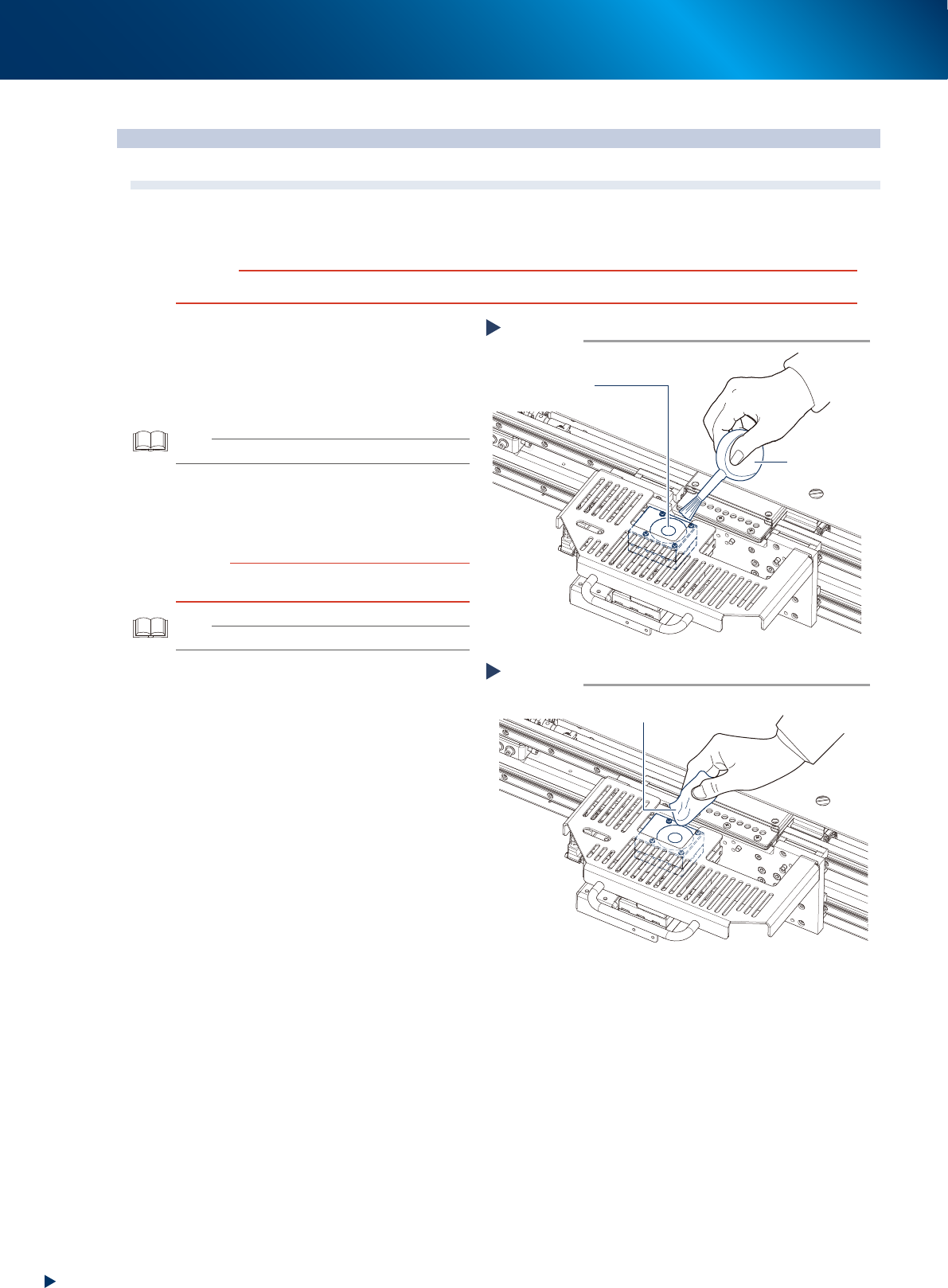
2.1 Mask camera
Adhered dust, etc., on the mask camera's protective glass can cause recognition errors. To prevent this, it is
recommended to inspect and clean in a periodic manner.
c
CAUTION
To ensure safety, make sure that the machine is in an emergency stop state, or that the power switch is turned off.
1
Check that the protective glass and
around it are free of dust and dirt.
2
Clean with the lens blower brush when
the dust is on the protective glass.
TIP
The lens blower brush is an optional parts.
3
When the protective glass is not clean,
wipe it softly using the lint-free cloth
with a few drops of lens cleaner.
c
CAUTION
Avoid using solvent or rubbing hard, so that the camera
protective glass can be damaged.
TIP
The wiper and lens cleaner are optional parts.
1
Clean with the lens blower brush.
Step 2
Protective glass
Lens blower brush
53201-KMJ-00
1
Wipe with lint-free cloth.
Step 3
Lint-free cloth
53202-KMJ-00
2. The daily inspection and cleaning
2-3
Chapter 2 Daily maintenance items
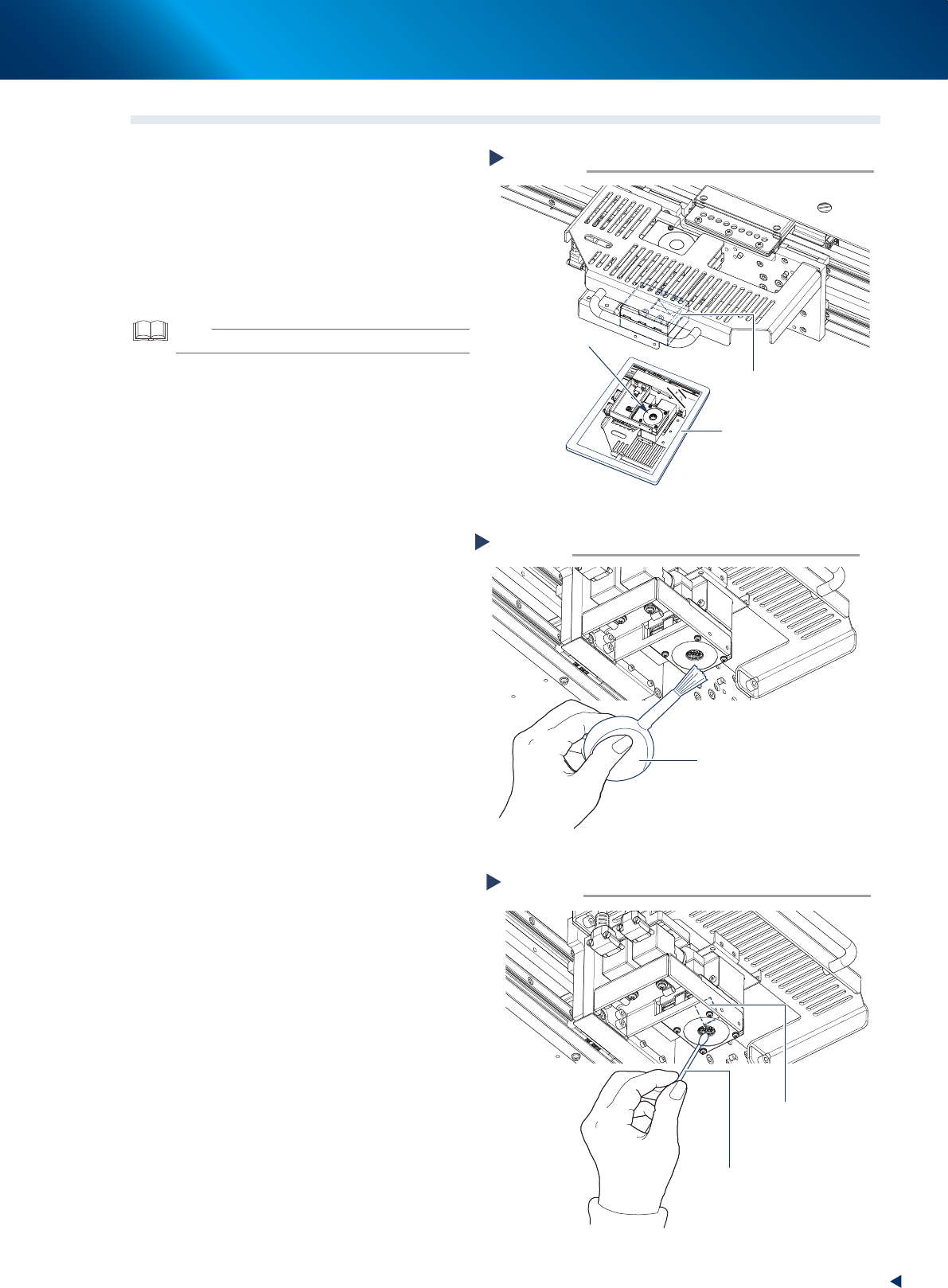
2.2 Board camera
1
Put a mirror under the board camera to
check that there are not the dust and
dirt on the camera lightings or the half
mirror unit.
2
Clean the dust using the lens blower
brush when the lighting unit is not
clean.
TIP
The lens blower brush is an optional part.
3
When the half mirror unit is not clean,
wipe it softly using the cotton swab
with a few drops of lens cleaner.
Check the board camera lighting.
Step 1
Board camera
Mirror
Check here.
53203-KMJ-00
Blow the dust with the lens blower brush.
Step 2
Lens blower brush
53204-KMJ-00
Clean the half mirror unit.
Step 3
Cotton swab
(with a few drops of lens cleaner)
Half mirror
53205-KMJ-00