YSP10_Mainte_E.pdf - 第54页
2. Monthly maintenance 3-7 Chapter 3 Periodic maintenance items 2.5 CX-axis, CY -axis and cleaning unit T his section describes the procedures of cleaning and lubrication for CX-axis and CY -axis of camera unit. Conduct …
2. Monthly maintenance
3-6
Chapter 3 Periodic maintenance items
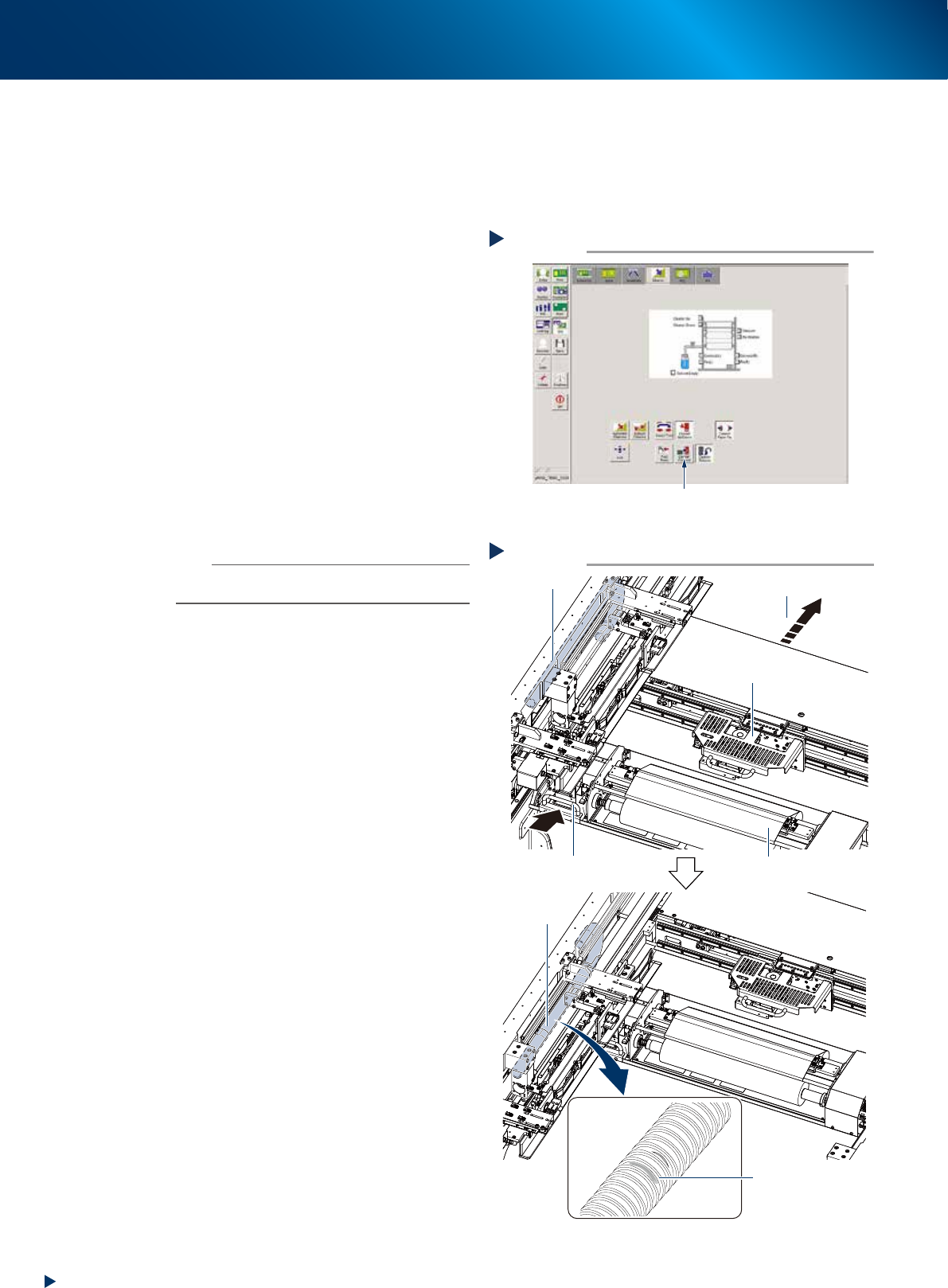
2.4.2 Visual inspection of blower hose
The blower hose deteriorated and cracked cannot perform normal mask vacuum and intervenes the solder
printing. YSP10 monitors the mask vacuum pressure upon actuating the cleaning unit, using the negative
pressure gauge of cleaning unit. But, separately from that, visual inspection is recommended approximately
once a month to prevent any trouble.
1
Prepare for work.
1. Press the [Cleaner Connect] button on [Unit]
- [Cleaner] screen and connect the cleaning
unit and camera unit.
e
2. Press the emergency stop button and open
machine safety cover and lower door, lift up
the maintenance door.
3. Move the squeegee unit to machine rear
side by grabbing its handle.
2
Check the blower hose condition
visually.
Check if there is any wound, crack or
deterioration and discoloring caused by
repeating motion, by grabbing the cleaning
unit handle and moving the cleaning unit and
camera unit to machine rear side.
n
NOTE
When any wound or crack on the blower hose is found,
replace it by referring Ch4 "2. Blower hose"
3
Return machine safety cover,
maintenance door and lower door to
their original position, then cancel the
emergency stop.
4
Return the cleaning unit to its original
position by pressing the [Cleaner
Connect] button on [Unit] - [Cleaner]
button again.
The cleaning unit moves to its original position
(front side of machine) and disconnects from
the camera unit.
Checking blower hose condition
Step 2
Camera unit
Cleaner
Check blower
hose condition
No crack or discoloring
on blower hose
Blower hose
Move to machine rear side
Handle
Checking blower hose condition
Step 2
Camera unit
Cleaner
Check blower
hose condition
No crack or discoloring
on blower hose
Blower hose
Move to machine rear side
Handle
533A2-KMJ-00
Connecting cleaner and camera unit
Step 1
Press the [Cleaner Connect] button.
54349-KMJ-00
2. Monthly maintenance
3-7
Chapter 3 Periodic maintenance items
2.5 CX-axis, CY-axis and cleaning unit
This section describes the procedures of cleaning and lubrication for CX-axis and CY-axis of camera unit.
Conduct same procedure for the cleaning unit at the same time because it is located on the CY-axis.
2.5.1 Cleaning and lubricating the CX-axis
The procedure to access to CX-axis varies between the standard type machine and the optional type
machine (installed "Automatic mask exchange unit" and/or "Universal mask holder").
This section describes each procedures of cleaning and lubricating CX-axis, for both "Standard type" and
"Optional type".
█
Standard type
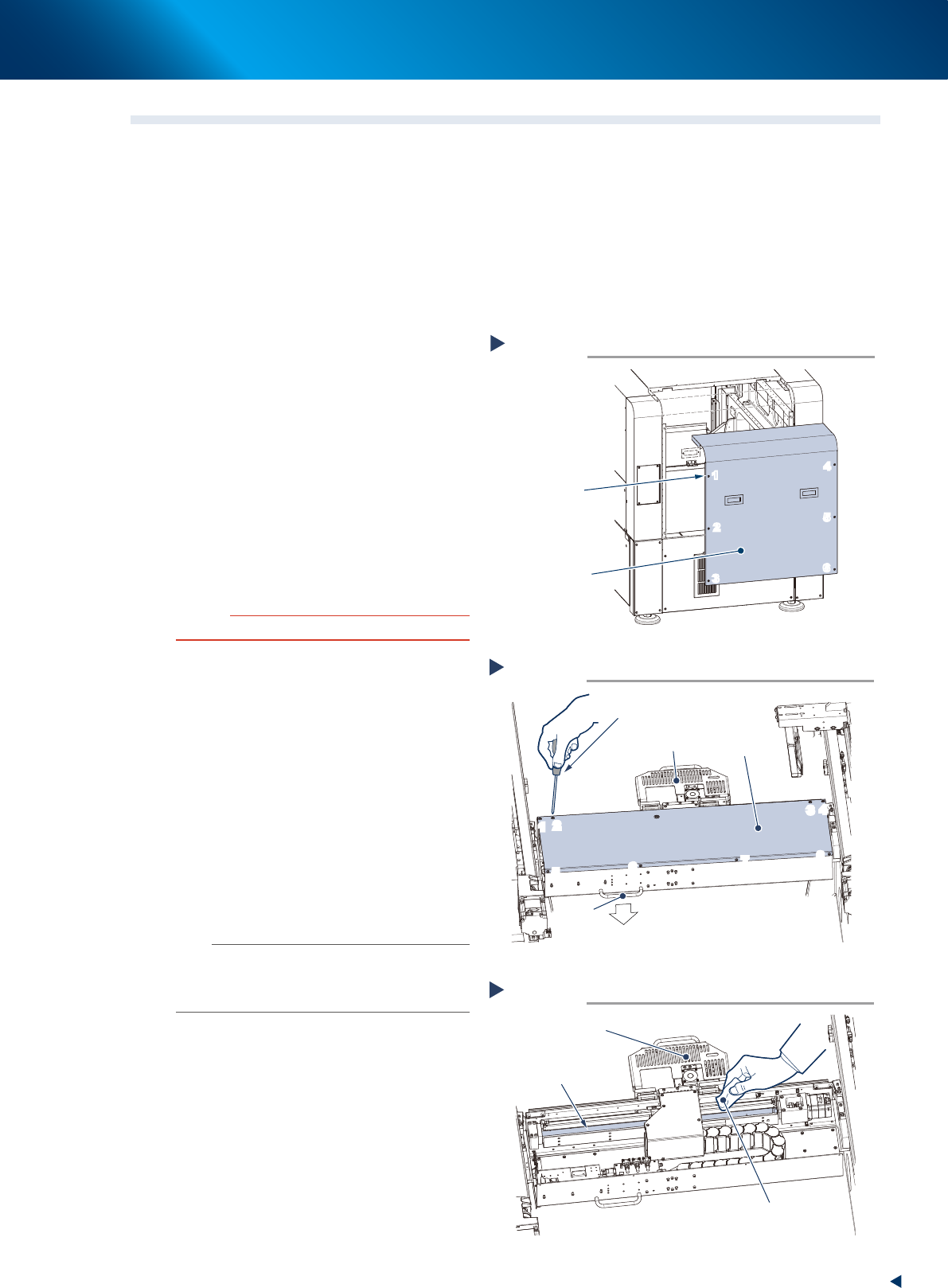
1
Evacuate the squeegee unit by the work
from front side.
e
1. Press the emergency stop button and open
machine safety cover.
2. Move squeegee unit to machine front side
grabbing its handle.
2
Detach machine rear cover by the work
from rear side.
1. Loosen 6 screws on the rear cover of
machine with a Phillips screwdriver. Then
remove the cover uplifting.
c
CAUTION
Be careful not to be injured by dropping down the cover.
2. Holding the handle, evacuate the squeegee
unit to convenient position (front side) for the
work from rear side.
3
Remove the CX-axis cover by the work
from rear side.
Loosen 8 screws mounting CX-axis
cover with a Phillips screwdriver, then
remove the cover.
4
Clean the CX-axis ball screw.
1. Wipe away the grease or soiling of CX-axis
ball screw with lint-free cloth.
2. Move the camera unit to the opposite side
to clean the rest part.
n
NOTE
Wipe off carefully the lead groove area of the ball screw
and the groove area of the guide as well. Be sure that the
cloth, etc., being used to clean the ball screw does not
produce lint, etc.
Detaching machine rear cover
Standard type
Step 2
6 screws
Machine rear cover
1
2
3
4
5
6
1
2
3
4
5
6
53387-KMJ-00
Detaching CX-axis cover
Step 2,3
Phillips screwdriver
CX-axis cover
Handle
Machine rear side
Camera unit
1
2
3
4
5
6
7
8
1
2
3
4
5
6
7
8
53311-KMJ-00
Cleaning CX-axis ball screw
Step 4
Lint-free cloth
Camera unit
CX-axis ball screw
53312-KMJ-00
2. Monthly maintenance
3-8
Chapter 3 Periodic maintenance items
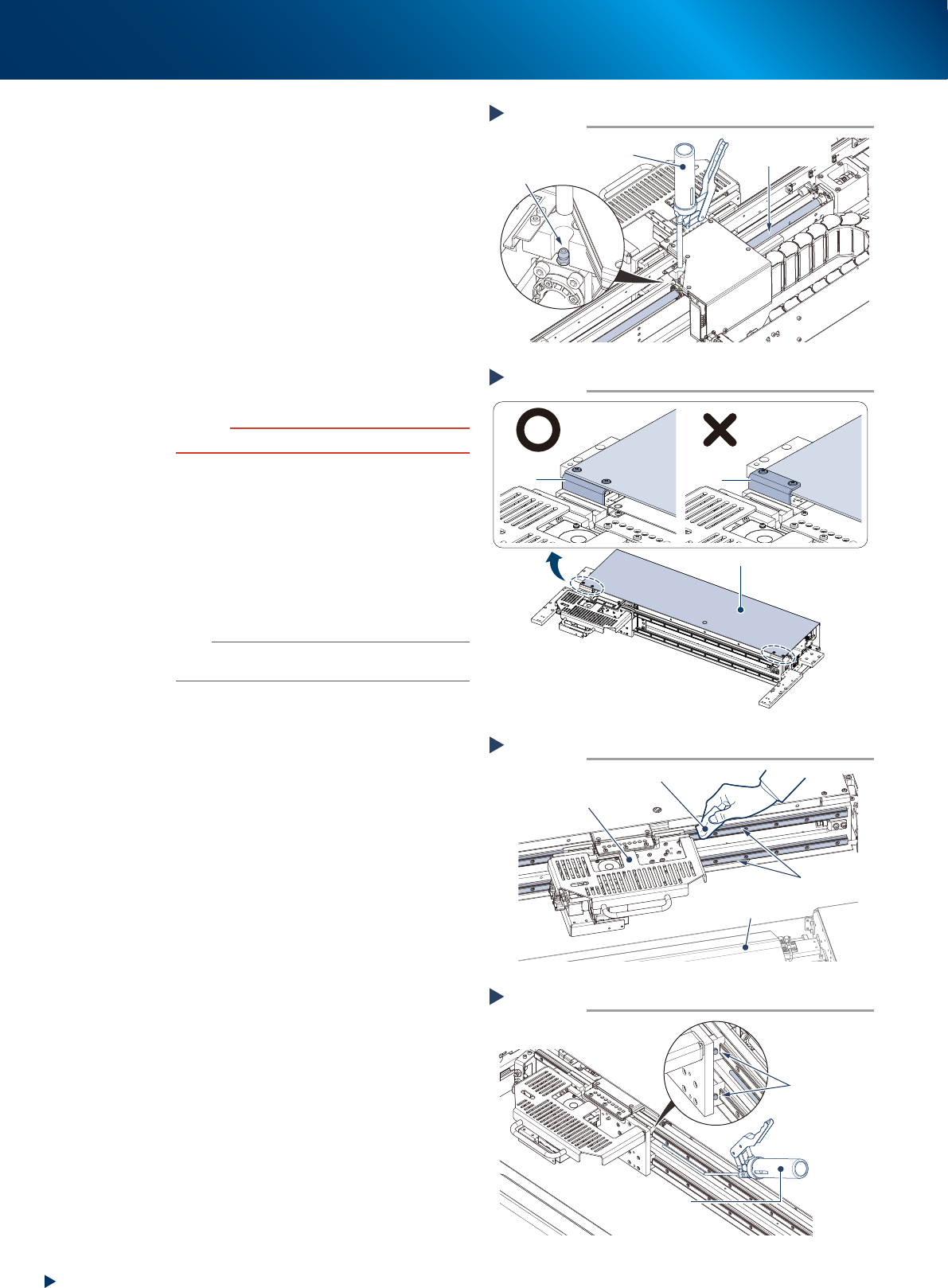
5
Inject the grease to the CX-axis ball
screw. Using a grease gun (standard
nozzle), inject the prescribed grease
(NSL) at the grease nipple of the ball
screw, until the grease begins to seep
out from the gap.
6
Wipe off the excess grease.
1. Move the camera unit left to right manually
to spread the grease.
2. Wipe off the excess grease from both ends
of the ball screw.
7
Reattach the cover.
1. Mount the CX-axis cover to its original
position with a Phillips screwdriver.
c
CAUTION
Mount CX-cover so that its front side covers bracket.
2. Mount the rear cover to its original position
with a Phillips screwdriver.
8
Clean the CX-axis guide by the work
from the front side.
1. Wipe the grease and soiling from the
CX-axis guide with lint-free cloth.
2. Move the camera unit to the opposite side,
then clean the rest part of the guide.
n
NOTE
Wipe off carefully the guide grooves. Additionally, make
sure that any dirt is not remained.
9
Inject the grease to the CX-axis guide.
Using a grease gun (bend type nozzle), inject
the prescribed grease (NSL) at the upper and
lower grease nipples of the guide.
There are 4 grease nipples on the both sides of
the camera unit.
0
Wipe off the excess grease.
1. Move the camera unit left to right manually
to spread the grease.
2. Wipe off the excess grease from the guide
block of the guide.
Lubricating CX-axis ball screw
Step 5
Grease gun
(standard type nozzle)
Grease nipple
CX-axis
Ball screw
53313-KMJ-00
Attaching CX-axis cover
Step 7
CX-axis coverCX-axis cover
CX-axis cover
Bracket
Bracket
53392-KMJ-00
Cleaning CX-axis guide
Step 8
Lint-free cloth
Camera unit
Cleaning unit
CX-axis guide
53314-KMJ-00
Lubricating CX-axis guide
Step 9
Grease gun
(bend type nozzle)
Grease nipple
53315-KMJ-00