YSP10_Mainte_E.pdf - 第42页
2. The daily inspection and cleaning 2-4 Chapter 2 Daily maintenance items 2.3 Squeegee Check alw a ys the squeegee unit status when it is attac hed to machine. 1 Check the squee gee unit. Before a ttac hing the squ eege…
2. The daily inspection and cleaning
2-3
Chapter 2 Daily maintenance items
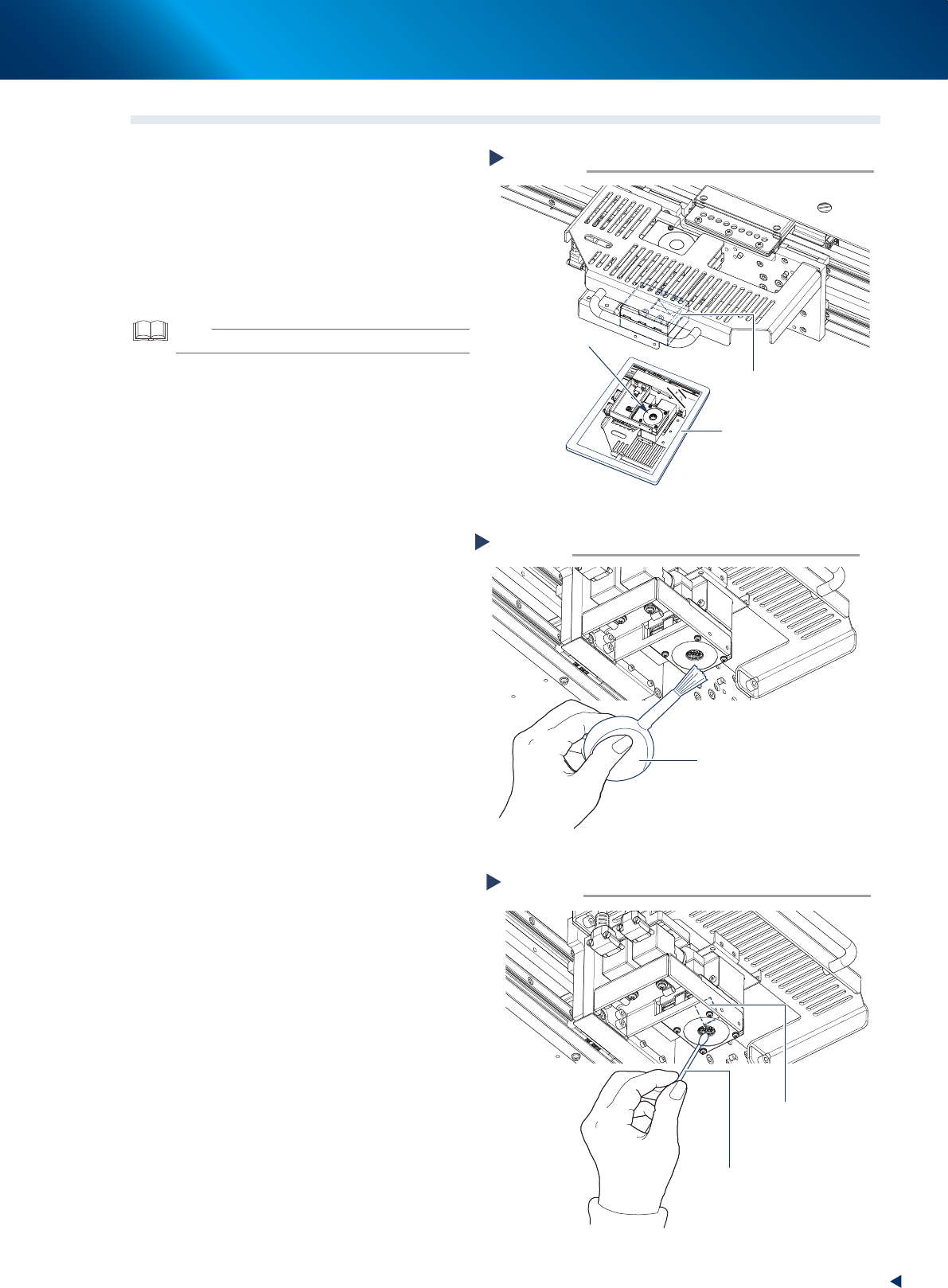
2.2 Board camera
1
Put a mirror under the board camera to
check that there are not the dust and
dirt on the camera lightings or the half
mirror unit.
2
Clean the dust using the lens blower
brush when the lighting unit is not
clean.
TIP
The lens blower brush is an optional part.
3
When the half mirror unit is not clean,
wipe it softly using the cotton swab
with a few drops of lens cleaner.
Check the board camera lighting.
Step 1
Board camera
Mirror
Check here.
53203-KMJ-00
Blow the dust with the lens blower brush.
Step 2
Lens blower brush
53204-KMJ-00
Clean the half mirror unit.
Step 3
Cotton swab
(with a few drops of lens cleaner)
Half mirror
53205-KMJ-00
2. The daily inspection and cleaning
2-4
Chapter 2 Daily maintenance items
2.3 Squeegee
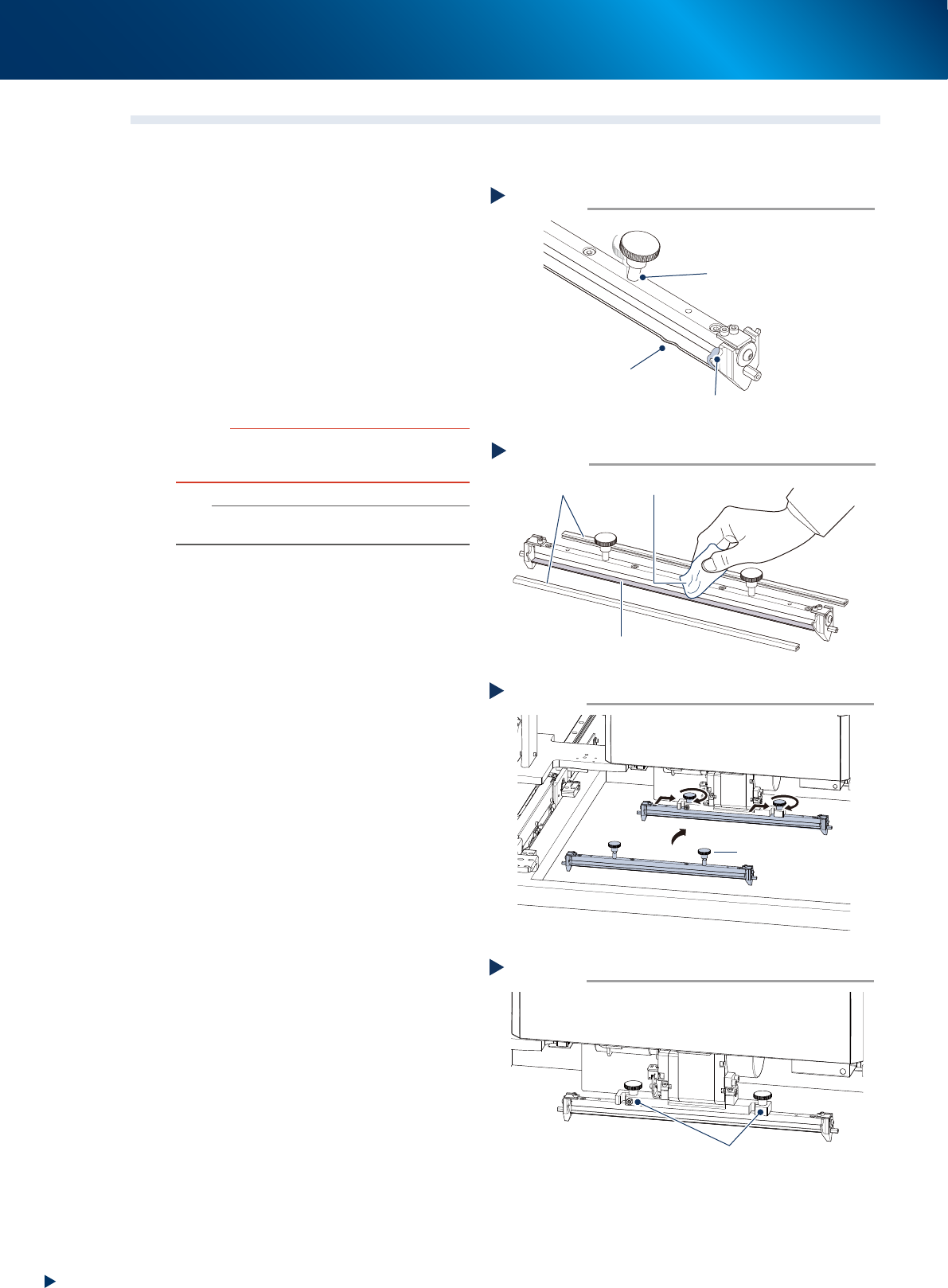
Check always the squeegee unit status when it is attached to machine.
1
Check the squeegee unit.
Before attaching the squeegee, check
the following three items.
1. No wounds, cracks or wears on the scraper
unit of squeegee.
2. No solder or other foreign matter.
3. The squeegee mounting knob is in correct
position and not loosen.
2
Clean the squeegee by using a lint-free
cloth when there are some adherence
of the solder etc.
c
CAUTION
Do not soak the urethane squeegee for long time in
alchohol etc., as it may cause the expansion of the scraper
unit.
n
NOTE
Upon storing the squeegee after cleaning, be sure to
attach the protective covers.
3
Attach the squeegee by tting in the
squeegee holder and tightening the
squeegee mounting knob by hand.
4
Check that the squeegee is mounted
rmly to its holder.
►
Wounds, cracks or wears
When the scraper unit has wounds, cracks or
wears, it needs to be replaced. See Ch.4 "1.
Scraper unit" for details of how to replace the
scraper unit.
Checking the squeegee status
Step 1
in correct position and not loosen
No adherence of solder or foreign object
No wounds, crack or wears
53206-KMJ-10
Cleaning squeegee
Step 2
Lint-free cloth
Protective cover
Scraper unit
53207-KMJ-00
Attaching squeegee
Step 3
Squeegee mounting knob
53214-KMJ-00
Check the squeegee mounting status
Step 4
The squeegee is not loosen on its holder
53215-KMJ-00
2. The daily inspection and cleaning
2-5
Chapter 2 Daily maintenance items
2.4 Cleaning unit
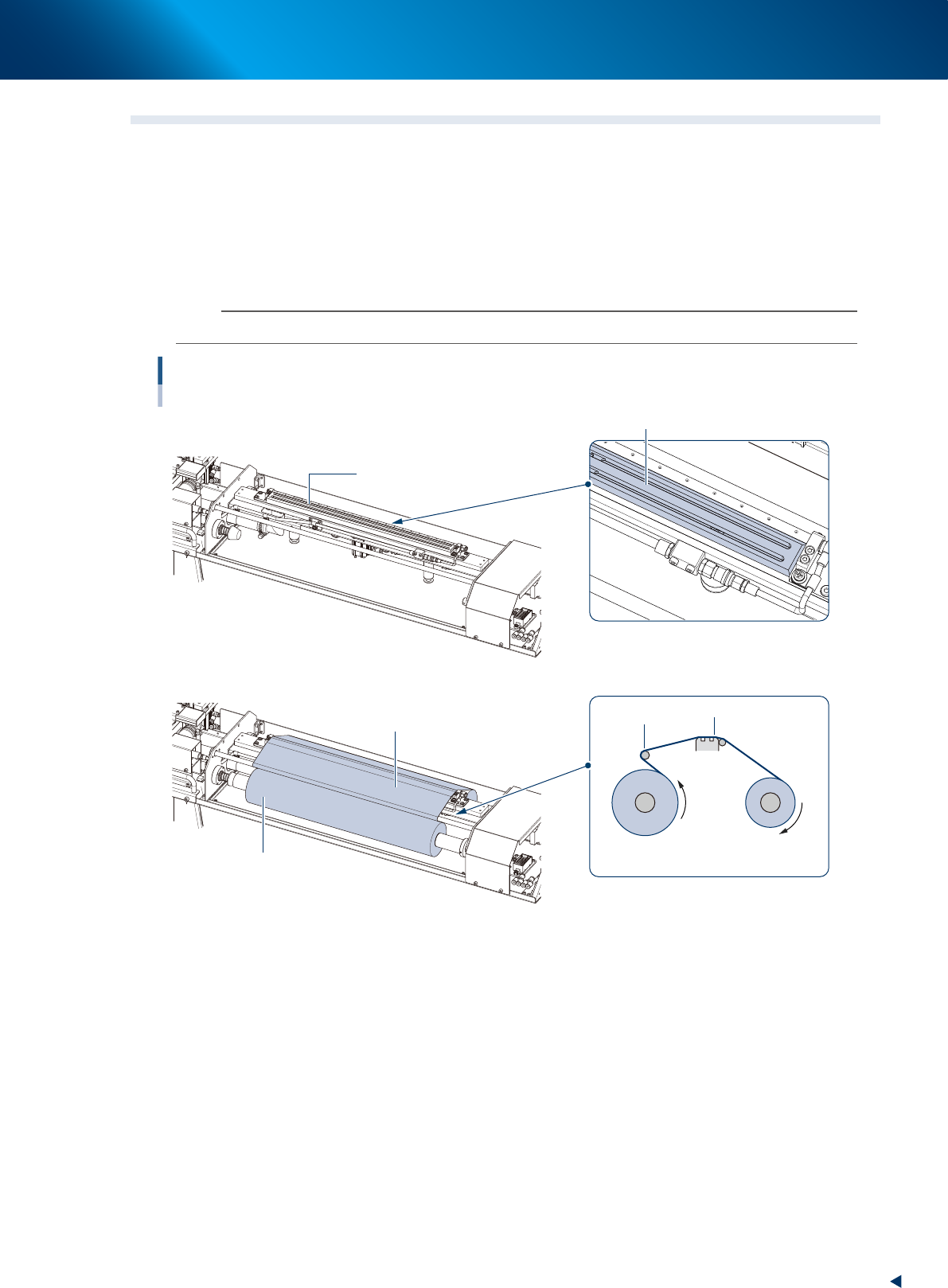
Check the condition of cleaning unit before starting operation. Check the following items visually.
►
Daily inspection items
• The cleaner head unit is not contaminated.
• The cleaning gauze is attached correctly. (See the image below)
• The cleaning gauze can be winded up without slack.
• The cleaning alcohol tank (at the left side of the machine front side) is filled enough.
n
NOTE
See attached "User's manual" for details of the cleaning gauze setting procedure.
Cleaning unit
Cleaner head and Cleaning gauze
The cleaning gauze is removed.
The cleaning gauze is attached.
Cleaner head
Cleaner head
Check the contamination and clean it.
Check if the cleaning gauze is attached correctly.
Side to be attached
Side to be attached
Side to be winded up
Guide
Without slack
53208-KMJ-00
►
Treatments
• When the cleaner head is not clean, wipe with lint-free cloth (with a few drops of alcohol when
needed).
• When the cleaner gauze is not attached correctly, remove it and reattach referring to the image
above.
• When the cleaner gauze cannot be winded correctly with slack, press the [Feed gauze] button on
[Unit] - [Cleaner] screen few times until the slack is eliminated.