YSP10_Mainte_E.pdf - 第72页
3. 3-month maintenance 3-25 Chapter 3 Periodic maintenance items 6 Align the grease nipple position of ball screws. 1. Pres s the [Uni ts] - [Axis Move] button a nd select [PU] t ab. 2. Press the [Blake ] button to relea…
3. 3-month maintenance
3-24
Chapter 3 Periodic maintenance items
3.2 PU-axis
This section describes the procedures of cleaning and lubricating for PU-axis.
3.2.1 Cleaning and lubricating the PU-axis
1
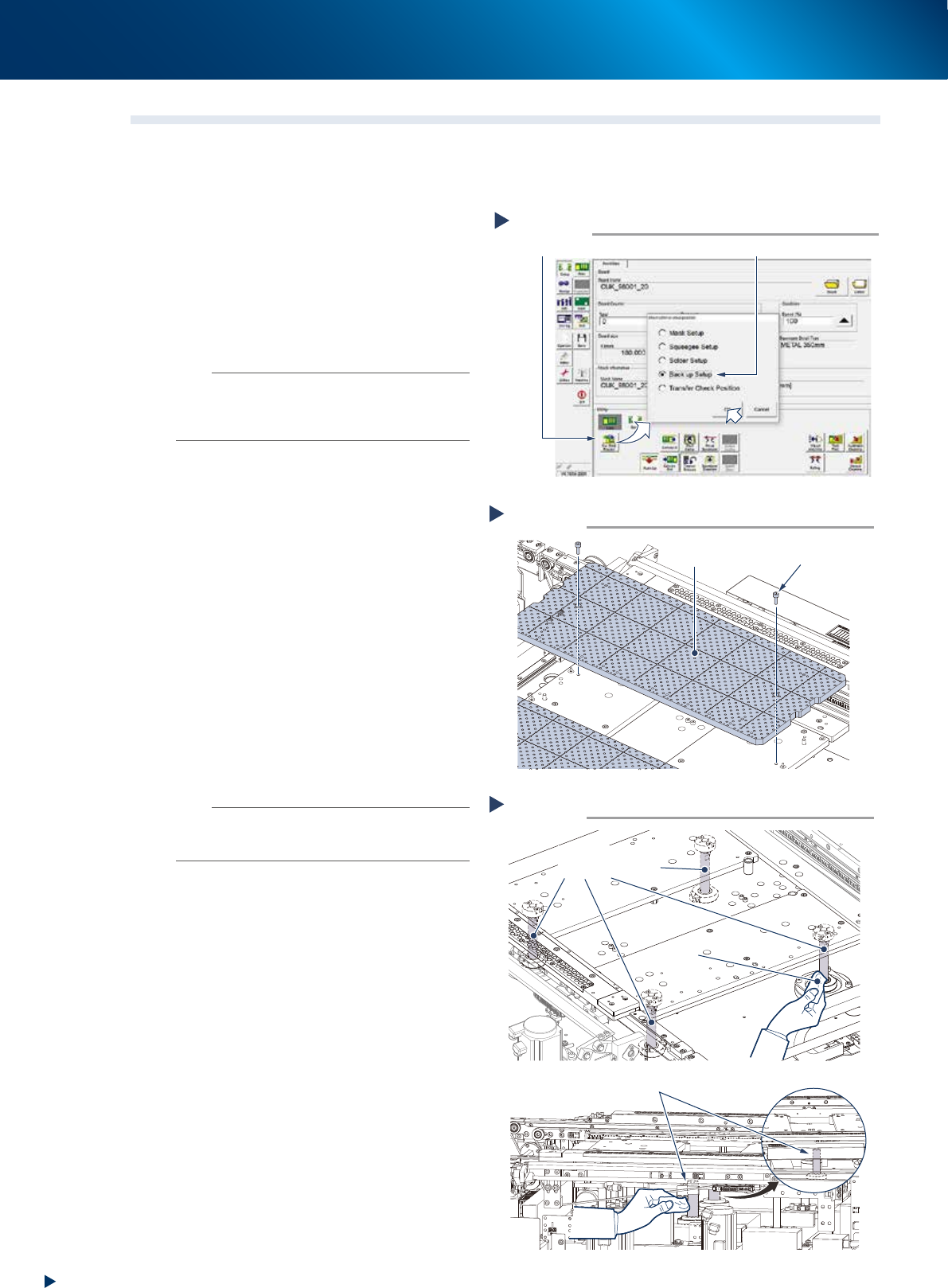
Raise the PU-axis.
1. Read any board data.
2. Press the [Change Setup & Move Pos.]
button on the [Setup] tab of the utility
screen.
3. Select "Backup Setup" and press the [OK]
button.
n
NOTE
Upon selecting "Backup Setup", the conveyor width is
changed maximum, then the pushup plate (PU-axis) raises.
Also, the squeegee unit and cleaning unit move to
machine rear side.
2
Remove the backup pins.
e
1. Press the emergency stop button to open the
safety cover and lower door, then pull up
the maintenance door.
2. Remove all the backup pins or the board
support jigs on the matrix plate.
3
Detach the matrix plate.
1. Loosen the mounting bolts (2 bolts per 1
plate) using a hexagon wrench (4mm).
2. Remove the matrix plates (2 pieces, front
and rear).
4
Clean around the PU-axis.
Wipe away the grease and soiling from the
PU-axis ball screws (4 positions) and the shaft
guides (2 positions) through the side of the
table with lint-free cloth.
n
NOTE
Carefully wipe the lead grooves and the guide grooves of
the ball screw. Additionally, make sure that any dirt is not
remained.
5
Lubricate the shaft guide by applying
the prescribed grease (NSL) on its
surface by hand.
Detaching matrix plate
Step 3
Matrix plate
Mounting bolt
53333-KMJ-10
Cleaning the PU-axis
Step 5
Lint-free cloth
A view from rear side
PU-axis shaft guide
PU-axis
ball screws
53334-KMJ-00
Raising PU-axis
Step 1
Select “Backup Setup”
[Sw. Prod. Position] button
54331-KMJ-00
3. 3-month maintenance
3-25
Chapter 3 Periodic maintenance items
6
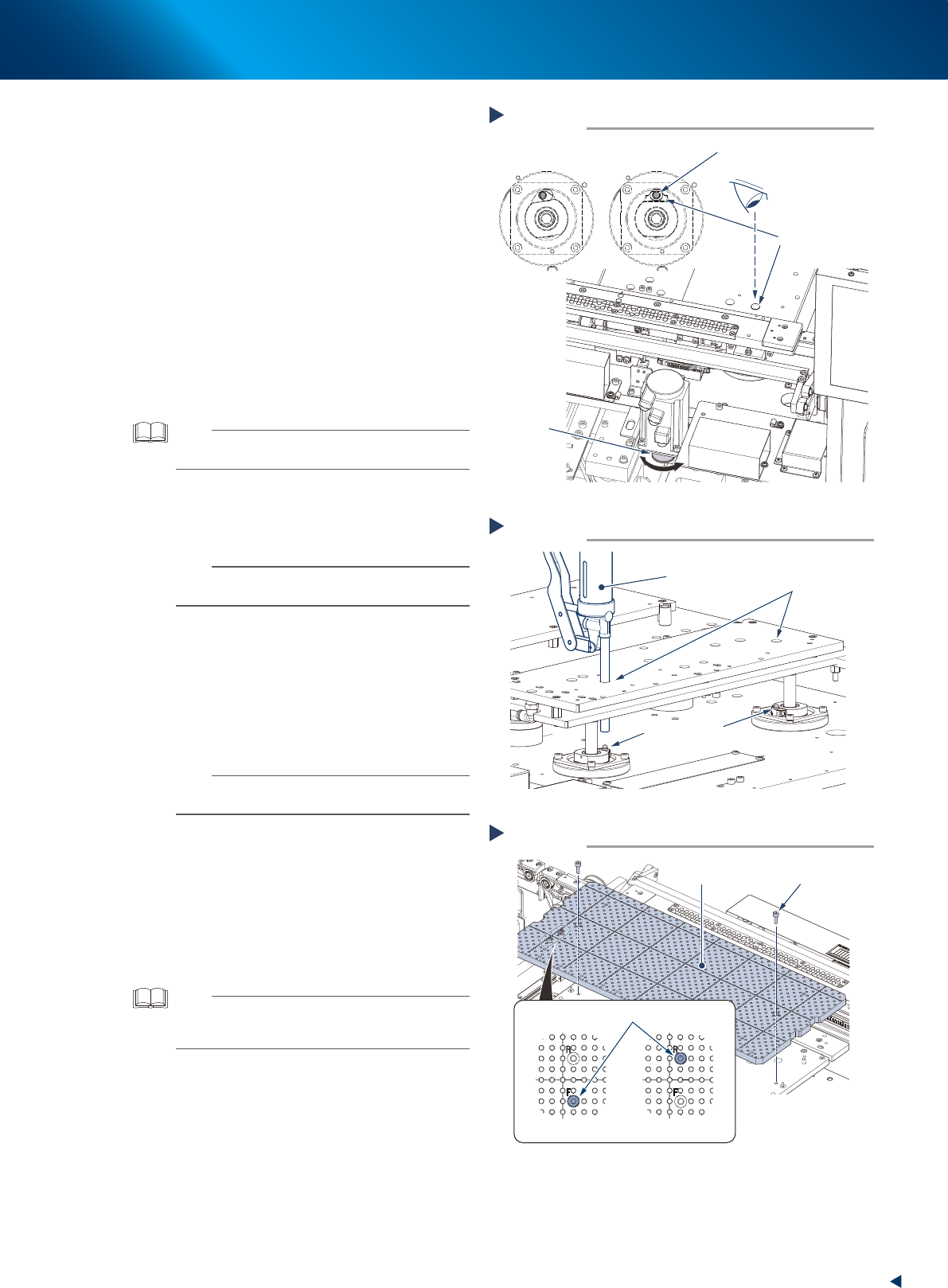
Align the grease nipple position of ball
screws.
1. Press the [Units] - [Axis Move] button and
select [PU] tab.
2. Press the [Blake] button to release the
PU-axis blake.
3. The PU-axis ball screw nut rotates as rotating
the pulley unit illustrated at right. Rotate the
pulley unit to align the grease gun insertion
holes and grease nipples.
7
Lubricate the ball screws.
Using a grease gun (standard, 10mm type),
inject the prescribed grease (NSL) from the
grease gun insertion holes to the grease nipples
of ball screws, until the grease seep out from
the gap between ball screw and ball nut.
TIP
When the grease gun cannot reach, rotate the pulley unit
more and lower the pushup plate.
8
Lubricate all the grease nipples.
Repeat the procedures of Step7 to inject grease
to the rest 3 nipples (a total of 4).
n
NOTE
When one grease nipple position is aligned, also the
other three nipples could be aligned.
9
Wipe away excess grease.
Use a lint-free cleaning cloth to wipe away
excess grease from the 4 PU-axis ball screws
through the side of the table.
0
Reattach the matrix plates (front/rear)
by tightening the mounting bolts.
n
NOTE
Matrix plates have a bolt at the position which is written
"F(FRONT)/R(REAR)" to prevent the misplacement.
q
Spread the grease.
1. Return the maintenance door to its original
position, and close the safety cover and the
lower door. Then cancel the emergency
stop.
2. Press the [Pushup] button on [Unit] -
[Conveyor] screen several times to move the
PU-axis up and down.
TIP
The entry screen of board thickness appears upon raising
PU-axis. Press the [OK] button as it is to raise PU-axis if the
displayed thickness is 1 to 2 mm.
Aligning the grease nipple positions
Step 6
Looking from above
Checking for the grease nipple position
Shifted Aligned
Pulley
Grease gun
insertion hole
Grease nipple
53335-KMJ-00
Lubricating PU-axis ball screws
Step 7
Grease gun
insertion hole
Grease gun
(standard type nozzle)
Grease nipples
53336-KMJ-00
Attaching matrix plate
Step 10
Matrix plate
Mounting bolt
Plate/front side
Plate/rear side
Misplacement prevention bolt
53386-KMJ-00
3. 3-month maintenance
3-26
Chapter 3 Periodic maintenance items
3.3 Z-axis
This section describes the procedure for cleaning and lubricating the Z-axis of YSP10 printing stage.
A stepstool may facilitate your work.
3.3.1 Cleaning and lubricating the Z-axis
1
e
Detach the machine rear cover.
Press the emergency stop button to ensure
safety work.
Standard type machine:
Remove 6 mounting screws on machine rear
cover using Phillips screwdriver and detach the
machine rear cover by lifting it up.
With automatic mask exchange unit:
Remove 4 mounting screws on machine center
rear cover and detach the machine rear cover.
c
CAUTION
Be careful not to be injured by dropping down the cover.
2
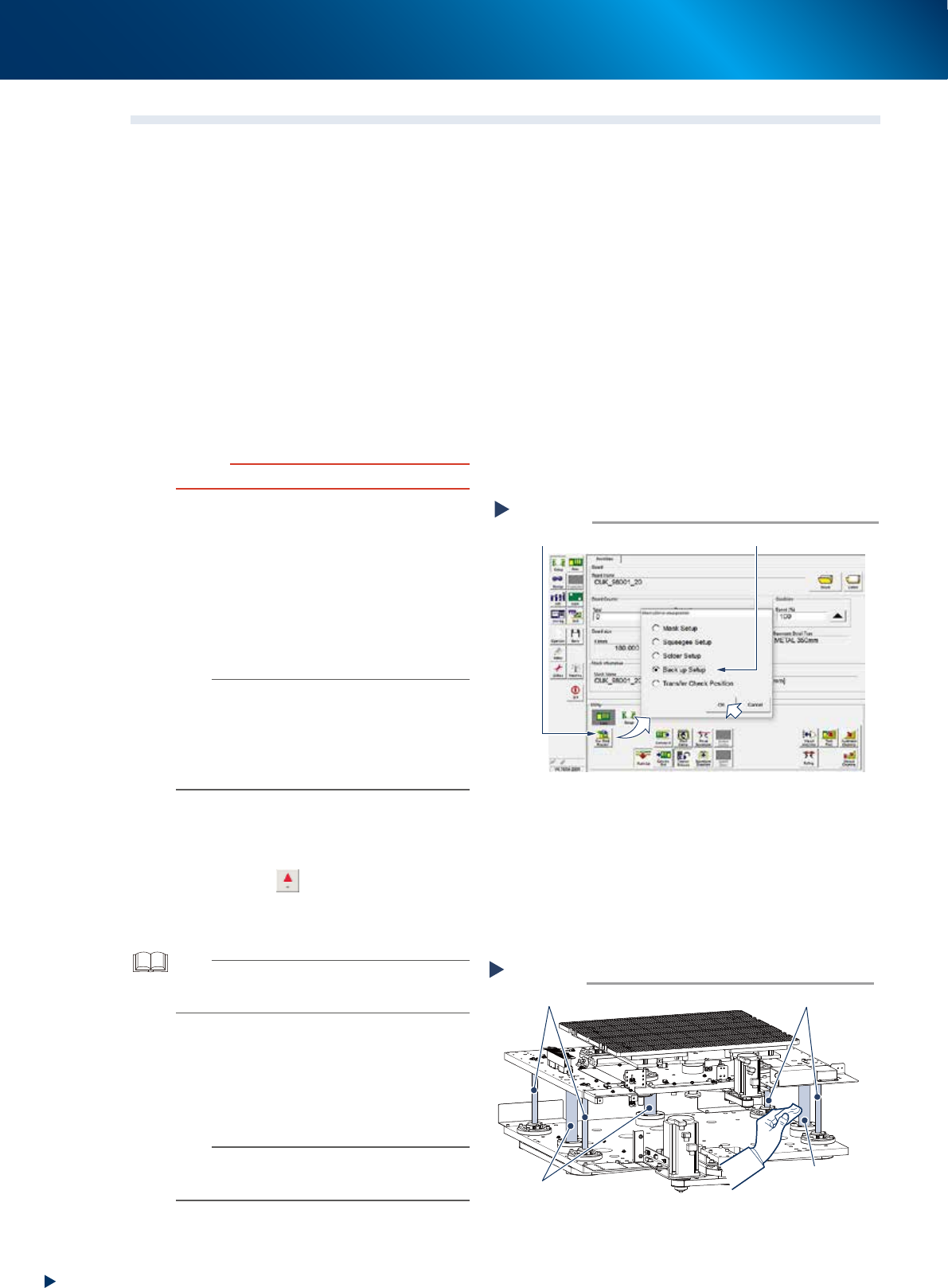
Change the conveyor width maximum.
1. Read any board data.
2. Press the [Sw. Prod. Position] button on the
[Setup] - [Setup] tab screen.
3. Select "Back up Setup" and press the [OK]
button.
4. Press the RESET button on operation panel
after "Back up Setup" is performed.
n
NOTE
• Upon selecting "Backup Setup", the conveyor width is
changed maximum, then the pushup plate (PU-axis)
raises. Also, the squeegee unit and cleaning unit move
to machine rear side.
• As pressing the RESET button, the cleaning unit moves
to machine front side and the camera unit to rear side,
and then, PU-axis lowers.
3
Raise the Z-axis.
1. Press the [Move Axes] button on [Unit]
- [Conveyor] screen and open "Y/Z" tab.
2. Press the [
] button of Z-axis, or enter a
value directly by using the [PTP] button, and
raise the Z-axis to its maximum to positive
direction.
TIP
Though it varies depending on machine character, the
maximum value which can be entered for Z-axis is to an
extent of 70 mm.
4
Clean around the Z-axis.
1. Press the emergency stop button and open
machine safety cover and lower door.
2. Clean the Z-axis ball screws (4) and shaft
guides (3) using a lint-free cloth.
n
NOTE
• Clean ball screws and shaft guides on far side of
machine by accessing from rear side.
• Carefully wipe the lead grooves of the ball screw.
Cleaning Z-axis
Step 4
Z-axis shaft guides
Z-axis shaft guide
Z-axis ball screws
Z-axis ball screws
53343-KMJ-10
Change the conveyor width maximum
Step 2
Select “Back up Setup”
[Sw. Prod. Position] button
54309-KMJ-00