00197454-01_AI_Portal_40mm_TwinVHF_SX12_de_en.pdf - 第137页
Appendix 4.1.3 Replacing the Head Adapter for the HCU and the HCU Excerpt s from the Service Manual Reconfiguration Kit Twin VHF with Gantry Re configuration Kit Twin VHF mit Portal 137 Converting the HCU If you have ord…
Appendix
Excerpts from the Service Manual 4.1.3 Replacing the Head Adapter for the HCU and the HCU
136 Reconfiguration Kit Twin VHF with Gantry Reconfiguration Kit Twin VHF mit Por
-
4.1.3
4.1.3 Replacing the Head Adapter for the HCU and the HCU
Replacing the Head Adapter for the HCU and the HCU
Parts, equipment and tools
You can replace either the base adapter alone, the HCU alone or the base adapter together with the
HCU.
The following spare parts/kits can be replaced:
▪ Module X basic adapter C&P [03071420-xx]
Consists of: 1x PCB/X basic adapter C&P [03045647-xx], 1x HCU assembly [03054884-xx]
▪ Head adapter TwinHead HCU/SX4 [03082096-xx]
Consists of: 1x module/X basic adapter TWIN [03062201-xx], 2x HCU assembly [03054884-xx]
▪ HCU assembly [03054884-xx]
▪ PCB/X base adapter C&P [03045647-xx]
▪ Module/X base adapter TWIN [03062201-xx]
Removal
► Switch off the machine, disconnect it from the power supply and secure it to prevent unauthorized
reactivation. Observe the instructions in section "1.2 Preparatory Work..." [ ➙ 76].
► You may need to dismantle the placement head for
better access. Read the relevant chapter in the ser
-
vice manual for your machine for more information, if
required.
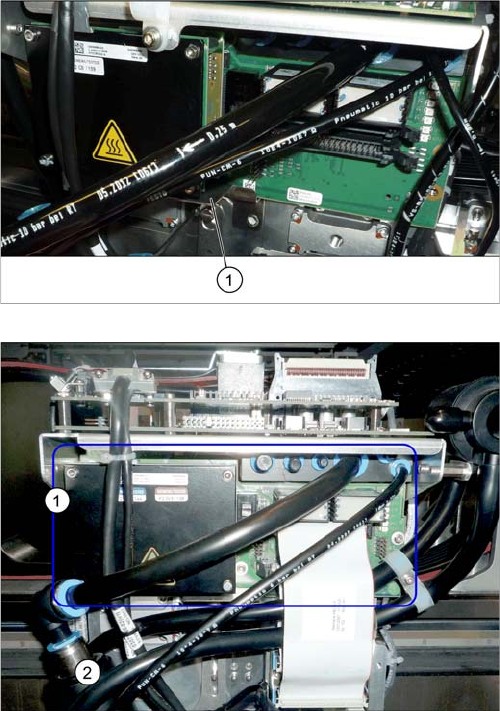
► Loosen the two screws fastening the protective
plate (1) (if present) and remove the protective plate.
Head adapter HCU (example of C&P20A version on an
SX4 shown )
► Unplug all electrical connections to the head
adapter (1). You may want to mark their positions, to
make clear assignment easier later on.
Appendix
4.1.3 Replacing the Head Adapter for the HCU and the HCU Excerpts from the Service Manual
Reconfiguration Kit Twin VHF with Gantry Reconfiguration Kit Twin VHF mit Portal 137
Converting the HCU
If you have ordered the base adapter without HCU(s) you will have to convert the HCU(s). Proceed as
follows:
► Repeat this procedure for the second HCU, if necessary (for Twin only).
Installation
► Follow the removal instructions in reverse order for installation. Also observe the following instruc
-
tions:
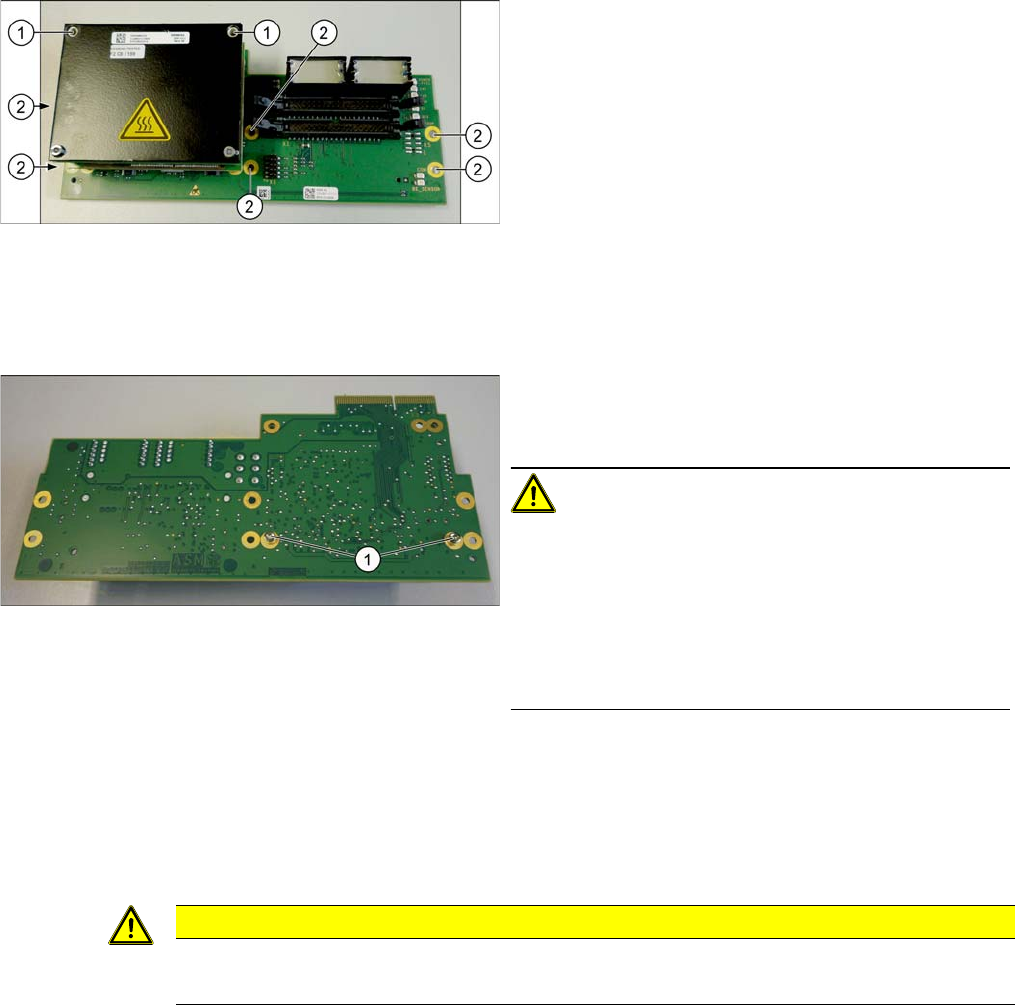
► Loosen the screws (2) fastening the board.
► In addition, the board is fastened with the topmost of
both HCU screws (1). You also need to loosen this.
► Carefully pull the board down and off.
Make sure that the head adapter board is connected
to the head interface via a press-fit connection from
below.
► Loosen the two screws fastening the HCU on the
back of the board and carefully pull the HCU off the
base adapter.
CAUTION!
Washers and pins
Make sure that you do not lose the washers. Make a note
of the number of washers used for each screw, as this
may well differ. These will need to be fitted back in again
as well.
Make sure that you do not damage the pins under the
HCU.
CAUTION
Installation instructions
► Check the firmware and perform a download, if needed (see Service Manual).
Appendix
Excerpts from the Service Manual 4.1.3 Replacing the Head Adapter for the HCU and the HCU
138 Reconfiguration Kit Twin VHF with Gantry Reconfiguration Kit Twin VHF mit Por
-