YSH20_Ope_E.pdf - 第102页
2-45 2 asic operation 4.2.5 Exchanging the expander unit and pallet clamp When changing the magazine size (dicing fr ame size) for the wafer tra y changer , the expander unit and pallet clamp must also be exchanged. Th…
2-44
2
asic operation
n
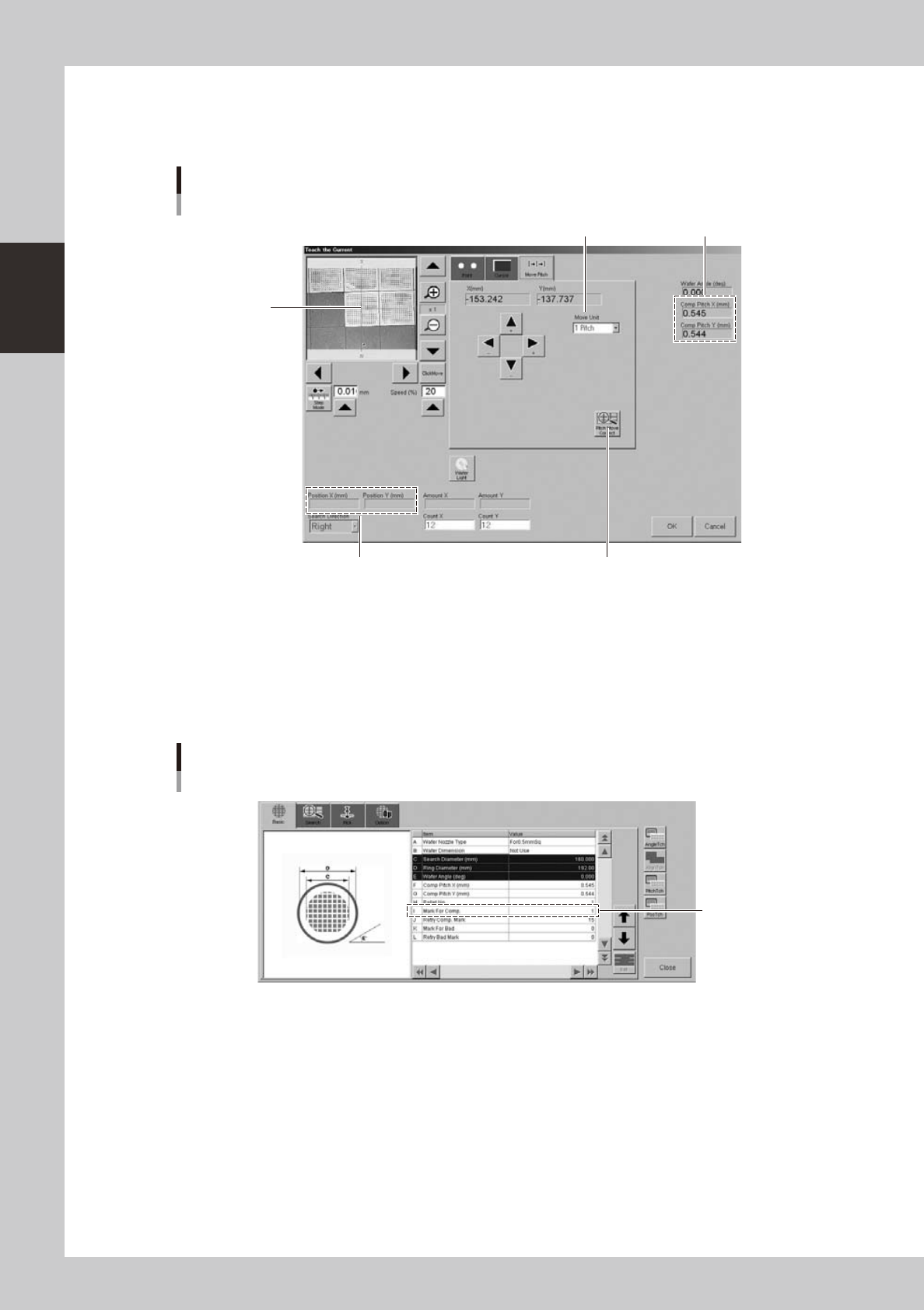
Pitch movement
The camera can be moved at a specified pitch each time an arrow key on the [Move Pitch] tab is pressed. The center of
component can be tracked by using pitch movement correction.
This button should be pressed.
Current position
Teach screen
Pitch movement
Currently set pitch
Move Unit (pitch to move)
Center of cross
hairs moves to
center of component
each time a pitch
movement is
performed.
24240-H0-00
"Move Unit" (pitch to move)
The default is "1 Pitch" but "2 Pitch" and "5 Pitch" can also be selected.
[Pitch Move Correct] button
When this button is pressed, the component position is recognized during pitch movement and is displayed in the center
of the screen. To enable pitch movement correction, a mark number must be set in the "I: Mark For Comp." parameter on
the [Basic] tab of the "Wafer Information" screen.
Set this parameter.
Wafer information
"Mark For Comp." parameter
24241-H0-00
2-45
2
asic operation
4.2.5 Exchanging the expander unit and pallet clamp
When changing the magazine size (dicing frame size) for the wafer tray changer, the expander unit and pallet
clamp must also be exchanged. The methods for exchanging them are described below.
c
machine. The machine may malfunction if the power is not turned off.
n
Expander unit
1
Turn off the power to the machine.
2
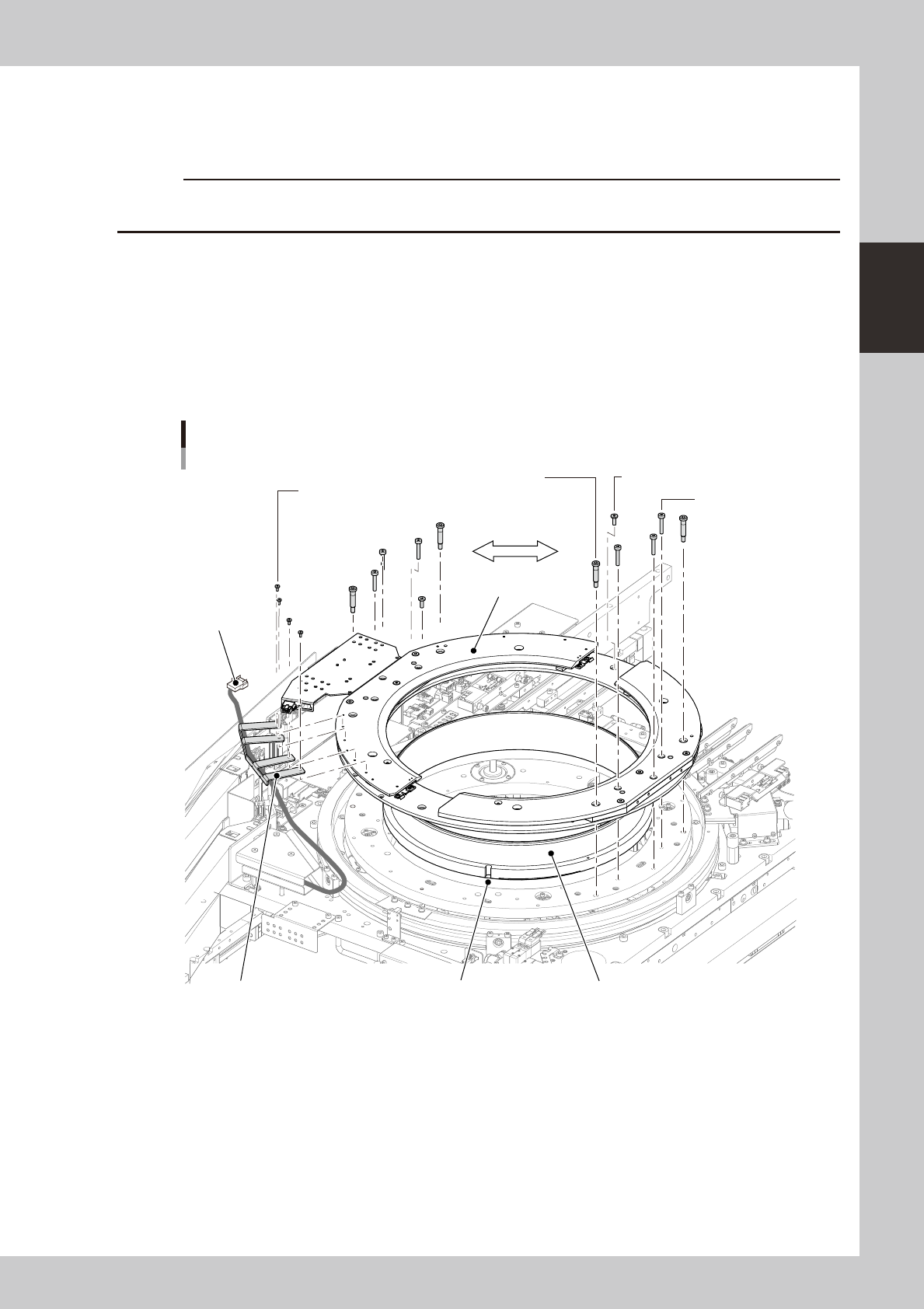
Disconnect the harness (connector).
1. Open the safety cover on the rear of the machine.
2. Unplug the connector (PLT STG) shown below.
3. Using a 1.5mm wrench, remove the bolts (4 bolts) that secure the harness bracket.
Exchanging the expander unit
Stud bolt
(4mm wrench.)
Mounting bolts are
symmetrically used.
Mounting bolt / 5-10 (3mm wrench)
Harness bracket mounting bolt
(1.5mm wrench.)
Connector
(PLT STG)
Mounting bolt / 5-25
(3mm wrench)
Attachment
Expand ringPositioning notchHarness bracket
23239-H0-00
3
Remove the bolts that secure the attachment.
1. Remove the stud bolts with the 4mm wrench (see the above figure).
2. Remove other mounting bolts with the 3mm wrench.

2-46
2
asic operation
4
Remove the attachment and expand ring.
The expand ring is not bolted, and so can be removed easily.
c
careful not to drop the expander unit on your foot during work since it is pretty heavy.
5
Arrange the expander unit to be used.
1. Align the expand ring with the positioning pin and fit it in place.
2. Place the attachment while aligning the mounting holes.
c
6
Secure the attachment.
1. Using the 4mmwrench, tighten the four stud bolts (two each on the right and left).
2. Using the 3mm wrench, tighten the remaining eight bolts (four each on the right and left).
7
Secure the harness bracket.
Using the 1.5mm wrench, fasten the harness bracket to the attachment.
8
Connect the connector.
Plug in the connector (PLT STG).