YSH20_Ope_E.pdf - 第104页
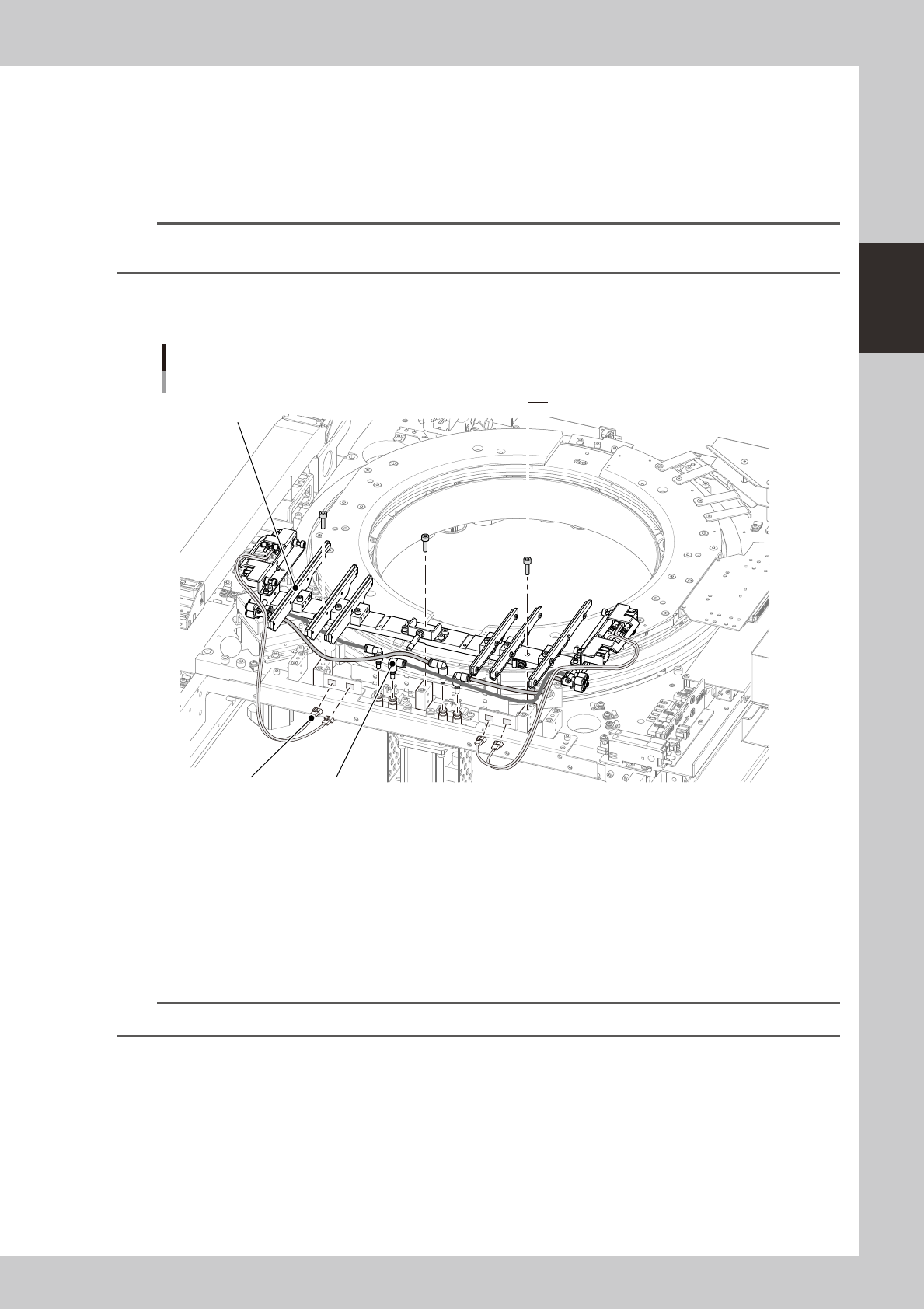
2-47 2 asic operation n Pallet clamp 1 T urn off the power to the machine. 2 Remo ve the wafer stor age unit. Follow the procedure for removing t he wafer storage unit. n NOTE The procedure for removing the wafer stora…

2-46
2
asic operation
4
Remove the attachment and expand ring.
The expand ring is not bolted, and so can be removed easily.
c
careful not to drop the expander unit on your foot during work since it is pretty heavy.
5
Arrange the expander unit to be used.
1. Align the expand ring with the positioning pin and fit it in place.
2. Place the attachment while aligning the mounting holes.
c
6
Secure the attachment.
1. Using the 4mmwrench, tighten the four stud bolts (two each on the right and left).
2. Using the 3mm wrench, tighten the remaining eight bolts (four each on the right and left).
7
Secure the harness bracket.
Using the 1.5mm wrench, fasten the harness bracket to the attachment.
8
Connect the connector.
Plug in the connector (PLT STG).
2-47
2
asic operation
n
Pallet clamp
1
Turn off the power to the machine.
2
Remove the wafer storage unit.
Follow the procedure for removing the wafer storage unit.
n
NOTE
The procedure for removing the wafer storage unit is described on the label located behind the door of the wafer
storage unit.
3
Remove the mounting bolts.
Using the 4mm wrench, remove the three bolts that secure the pallet clamp.
Exchanging the pallet clamp
Mounting bolt (3mm wrench)
PlugSensor connector
Pallet clamp
23240-H0-00
4
Unplug the connectors.
Unplug the sensor connectors for the right and left air cylinders.
5
Remove the air hoses.
Remove the orange and black air hoses along with the plug.
6
Exchange the pallet clamp.
Exchange the pallet clamp using the reverse procedure from steps 2 to 5.
n
NOTE
Plugging in the sensor connectors before tightening the mounting bolts makes it easier to install the pallet clamp.
2-48
2
asic operation
5. Settings on the machine side
After installing the tape feeders and the tray changer in the machine, you must make settings for the machine.
5.1 Setting the "Package" parameter.
Tape feeder :
Set the "Package", "Tape Type" and "Feed Pitch" parameters.
Wafer tray changer :
Set the "Package" and "Feeder Type" parameters.
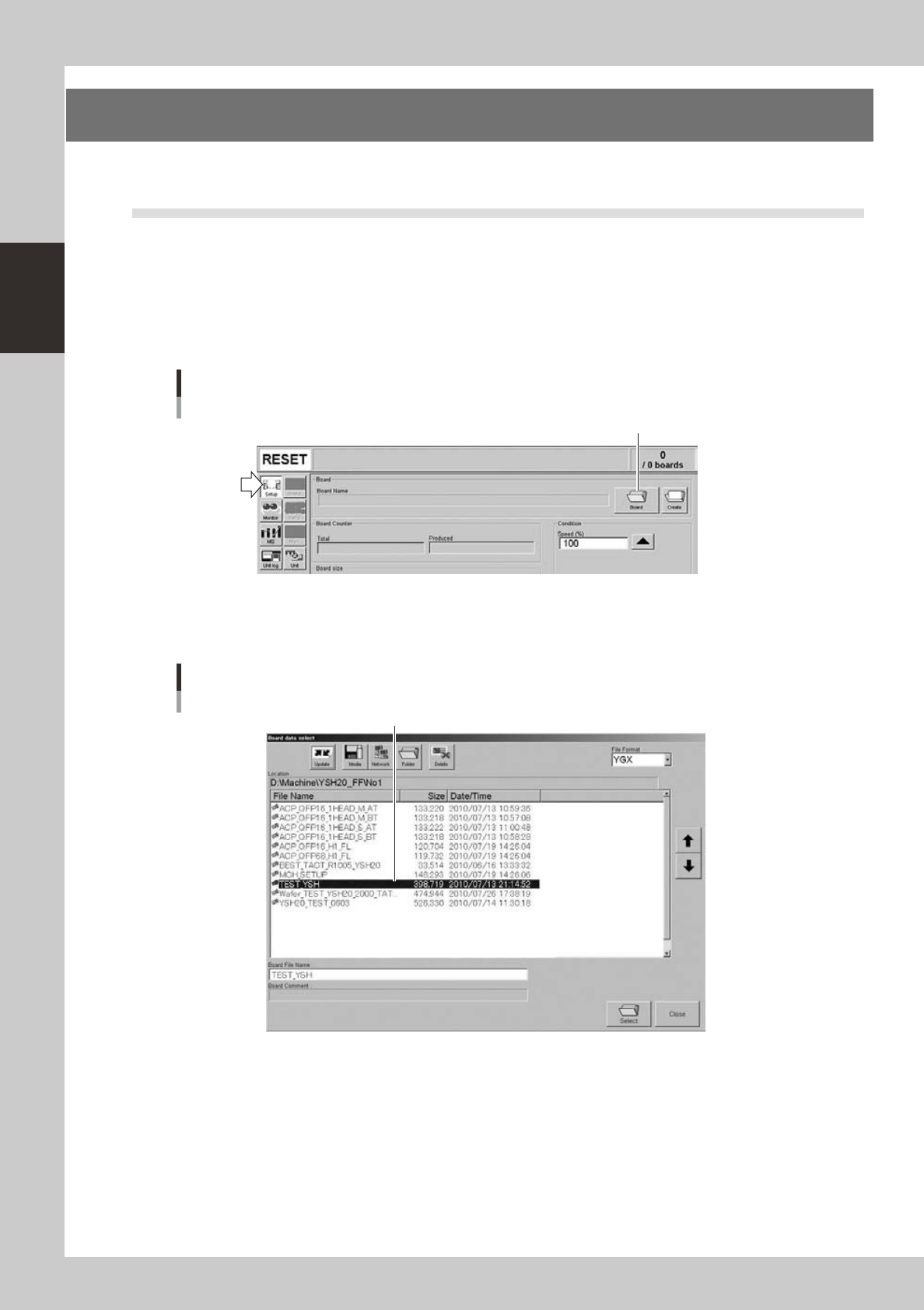
1
Open the "Board data select" screen.
On the Setup screen, press the [Board] to open the "Board data select" screen.
Setup screen
[Board] button
[Board] button
24223-H0-00
2
Select the board data.
Select the board data in the list and press the [Select] button.
"Board data select" screen
Select the board data.
24224-H0-00