YSH20_Ope_E.pdf - 第92页
2-35 2 asic operation 4.2 W afer tray changer n Precautions when handling pallets and magazines Observe the following points w hen handling pallets and magazines. • Store pallets and magazines in a clean environment wh…
2-34
2
asic operation
4.1.3 Installation on the machine
Observe the following instructions for installing a tape feeder on the machine.
e
1
Press the emergency stop button and then open the cover.
Press the emergency stop button on the machine to stop machine operation.
c
it.
2
Clean the surface of the feeder plate.
Parts or debris caught in the machine will tilt the feeder, interfering with stable pickup.
3
Place the tape reel in position of the reel holder.
Tape reels can be placed alternately in the upper and lower reel holders.
4
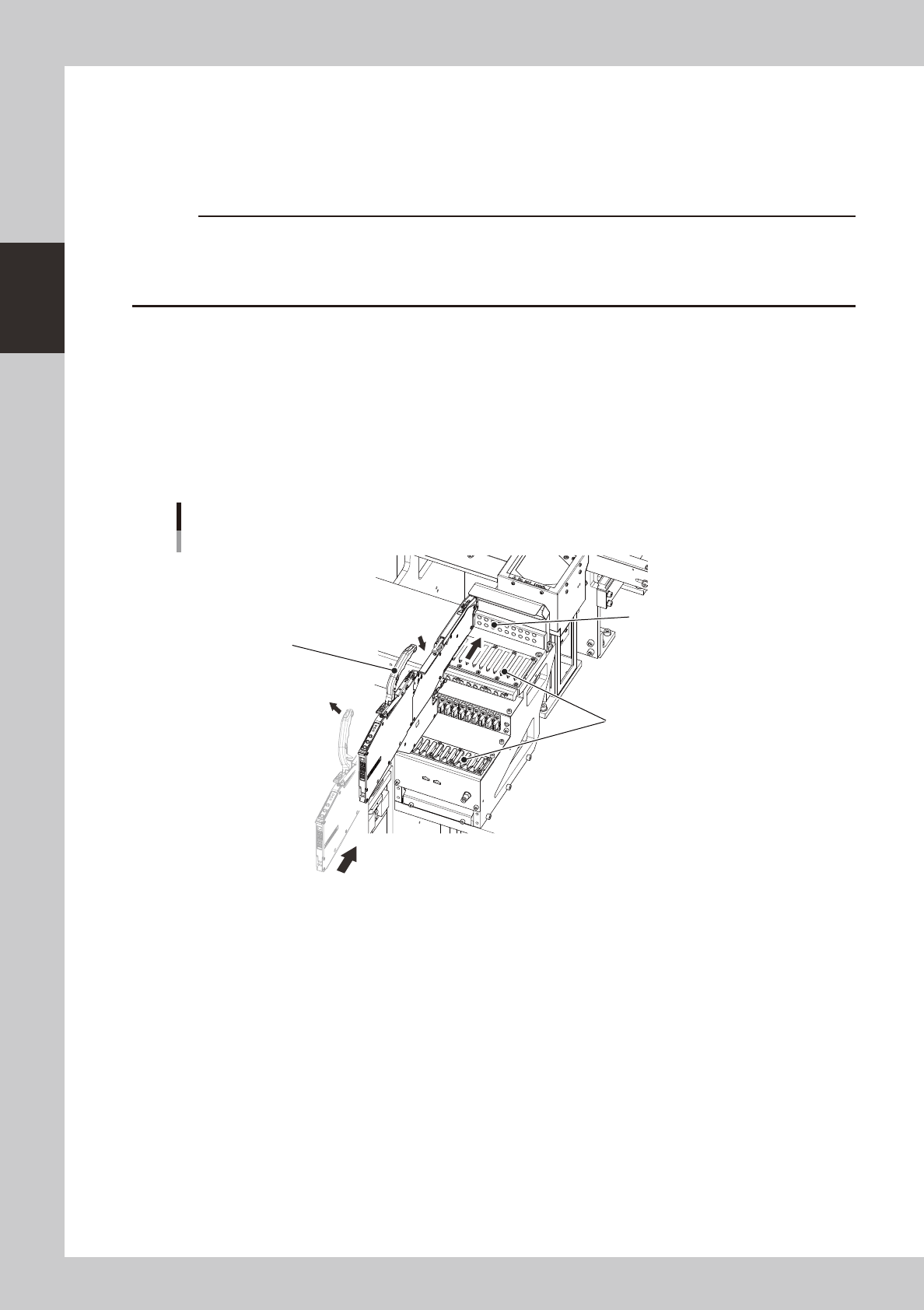
Set the feeder.
Raise the handle, align the target mark to the feeder installation position, and slide the feeder on the
rail to insert it to the location pin hole.
Installing a feeder
Handle
Locate pin hole
Rail
22226-H0-00
5
Check the following points to make sure that the feeder is properly installed.
• Top tape is no loose.
• Feeder is properly inserted all the way.
2-35
2
asic operation
4.2 Wafer tray changer
n
Precautions when handling pallets and magazines
Observe the following points when handling pallets and magazines.
• Store pallets and magazines in a clean environment where dust, grime and oil will not adhere.
• Take care not to drop pallets and magazines or apply excessive force or impacts. If a pallet or magazine is warped or
deformed by, for example, dropping, do not use it.
• Avoid hurting yourself on the edges of the pallets or magazines.
• When carrying a magazine, use the handles on the upper right/left of the magazine and do not let the magazine tilt.
• Carry the magazine with the stoppers closed (refer to section 4.2.2). If the stoppers are not closed, the pallets stored in
the magazine may slip out while being carried.
• When setting the magazine in the magazine rack, open the stoppers.
4.2.1 Setting a dicing frame (components) in the tray.
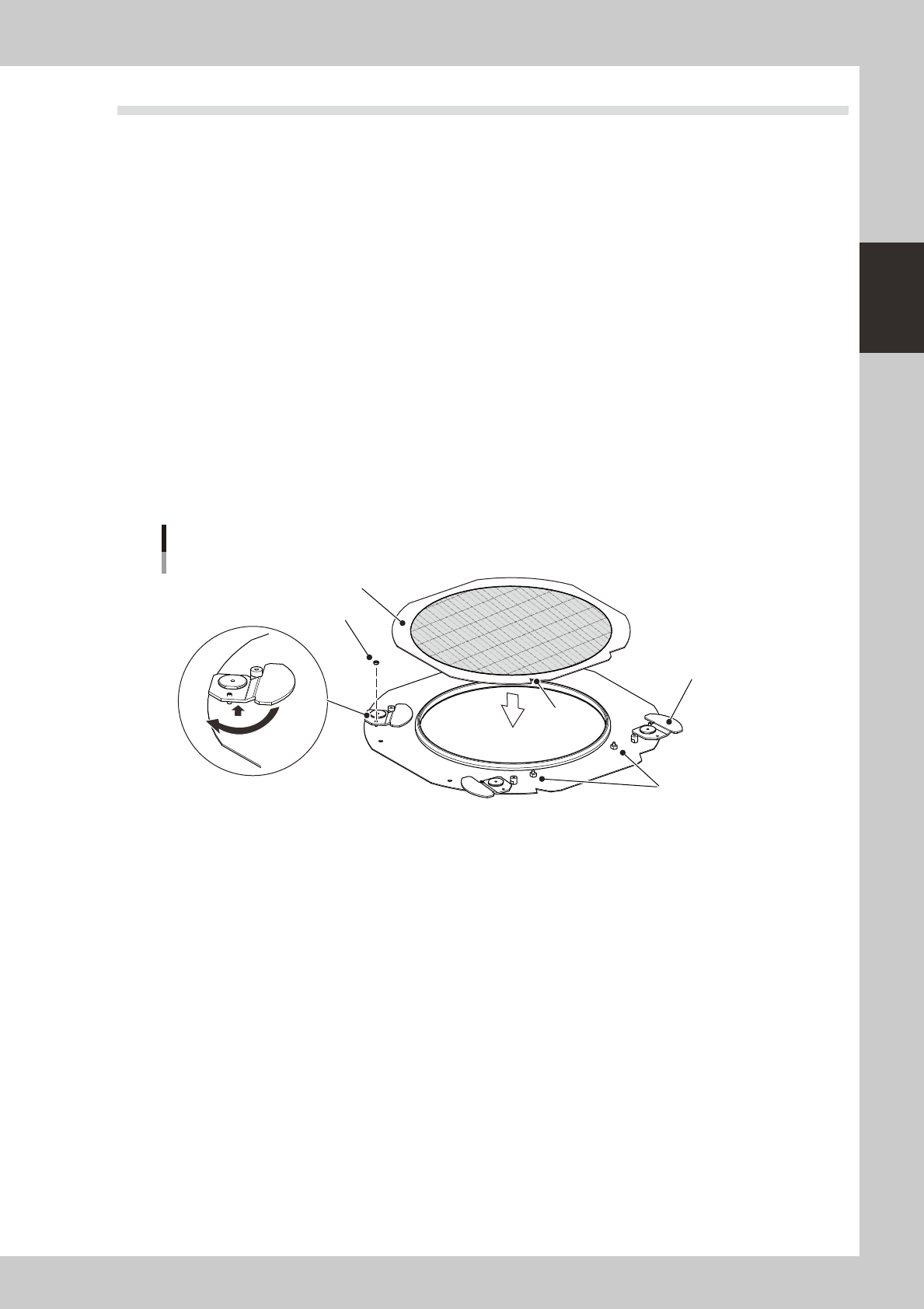
The following describes the method for setting a dicing frame on the wafer pallet.
1
Remove the mounting nuts of the ring holders.
Using a wrench, remove the mounting nuts of the four ring holders.
2
Turn the ring holders.
While raising each ring holder, turn it to a position where it does not touch the ring.
Setting the dicing frame on the wafer pallet
Dicing frame
Mounting nut
Ring holder
Notch
Locate pin
23229-H0-00
3
Set the dicing frame.
Place the dicing frame on the wafer pallet and turn it so that the notch and flat side contact against
the locate pins.
4
Secure the dicing frame.
When the dicing frame is set in position, return the ring holders to the original positions and secure them
with the nuts.
2-36
2
asic operation
4.2.2 Setting the components in the magazine
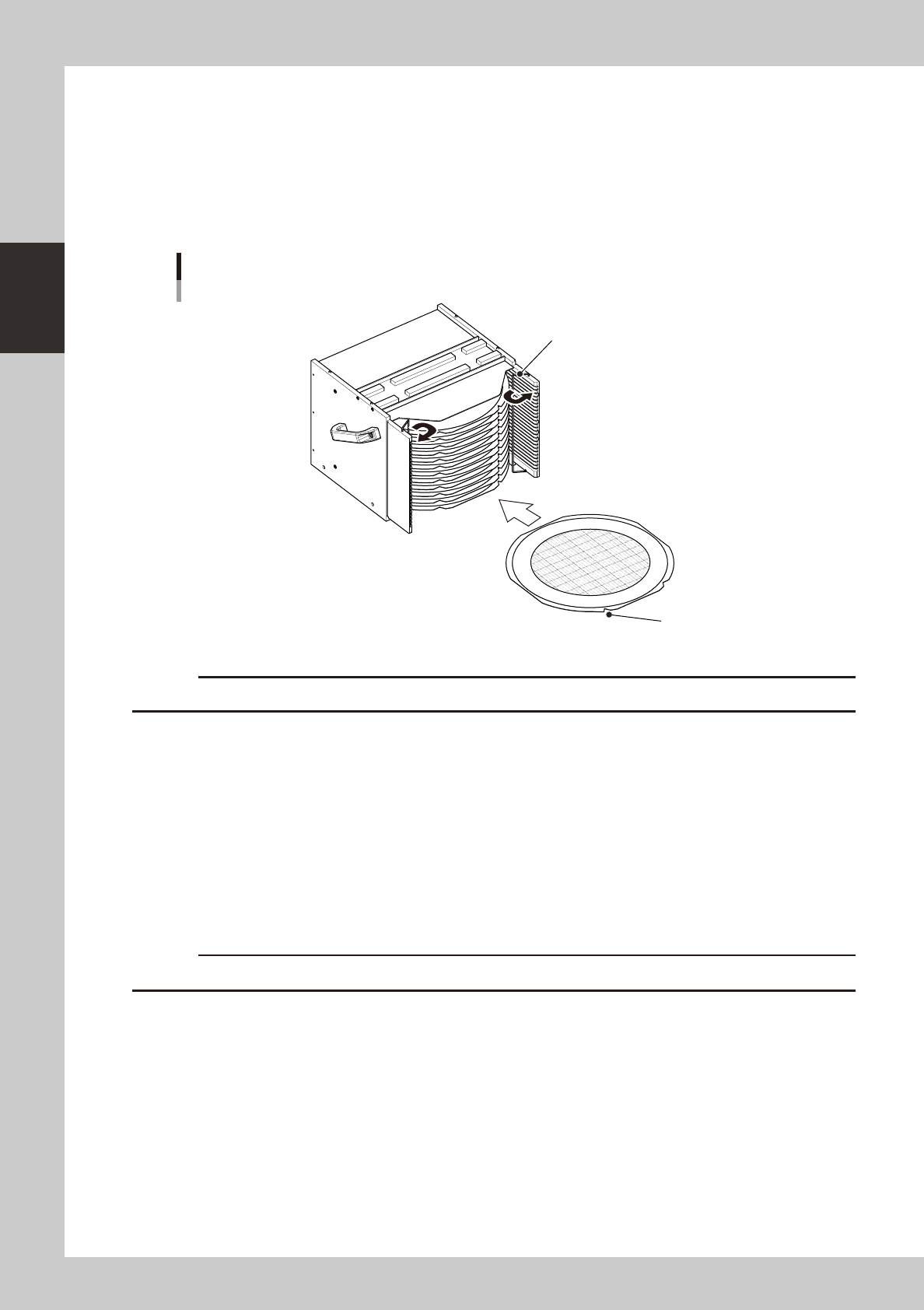
The following describes the method for setting a dicing frame or wafer pallet (hereafter called "wafer
component") into the magazine.
1
Place the magazine on a flat and level surface.
2
Open the stoppers.
Open the stoppers so that the wafer component can be easily inserted into the magazine.
Setting the component into the magazine
Stopper
Notch
23230-H0-00
c
A custom magazine is required when using wafer pallets.
3
Insert the wafer component into the magazine.
While keeping the wafer component level, insert it into the correct magazine shelf. The notch and flat
side should face outward as shown in the above figure. Insert the wafer component until it lightly
contacts the inner side.
4
Check the wafer component you inserted.
Make sure it is correctly inserted and is not tilted. Trouble will occur during component supply if inserted
in the wrong left or right shelf.
5
Close the stoppers.
This will prevent the wafer components stored in the magazine from slipping out while being carried.
c
Always open the stoppers when setting the magazine in the wafer tray changer.