00195813-07_IM_SSW_605.03_SP3_DE EN.pdf - 第20页
Installat ion Manual, Station Software Version 605.03 SP 3 12 /2012 E dition 20 of 46 5 Inst alling the S t ation S o ftw a r e NOTICE The operat ion s y stem must be ins talled on th e machine c ontroller and Vision c o…
Installation Manual, Station Software Version 605.03 SP3 12/2012 Edition
19 of 46
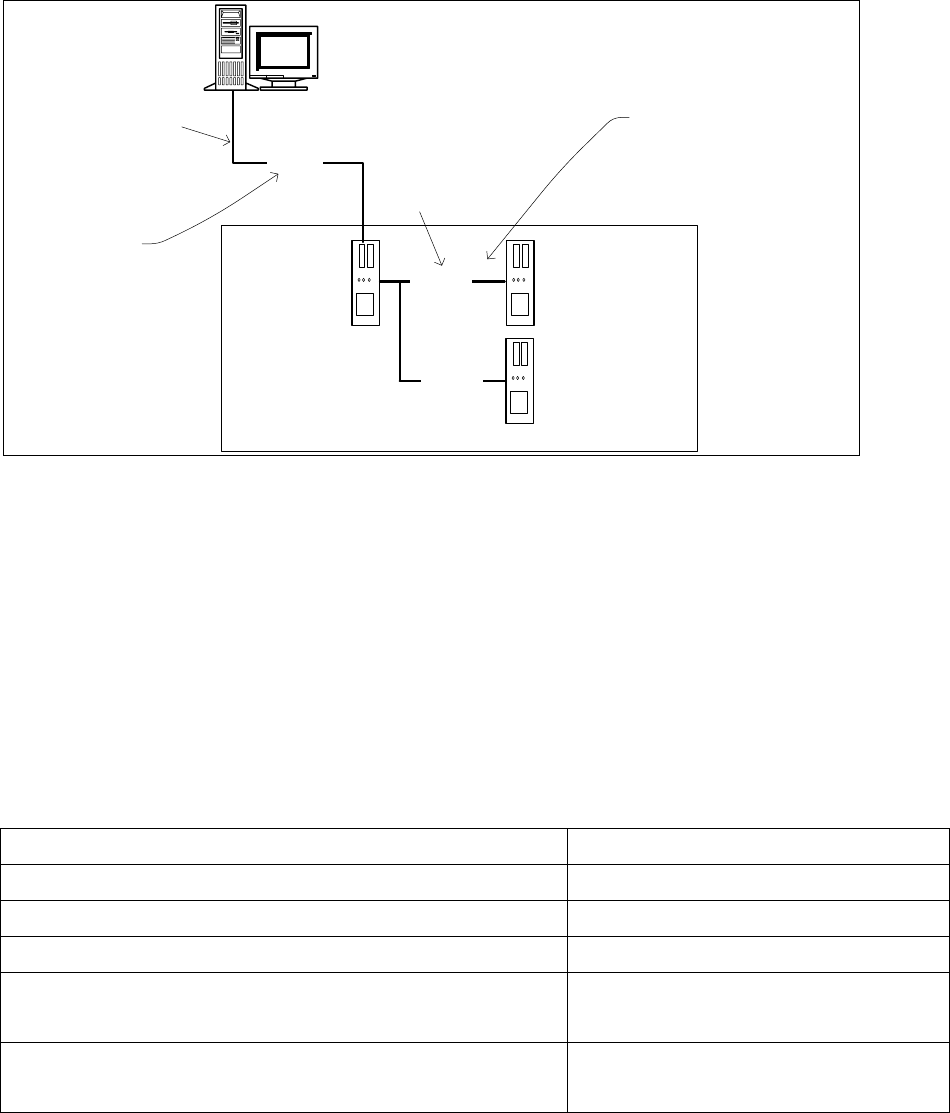
4.5 Network Configuration
Station computer
Machine controller
10Base-T
100Base-T
Private network between
station computer,
Vision computer (optional)
and machine controller
SIPLACE LAN
SIPLACE Pro
Twisted Pair TP
(100 MB)
Twisted Pair TP
(10 MB)
Vision computer
(optional)
100Base-T
Fig. 4-1: Network connections between the machine and SIPLACE Pro
A separate private network (100 Mbit) is set up between the station computer (and optionally the Vision
computer) and the machine controller via a subnet mask.
Fixed IP addresses for the station computer, Vision computer and machine controller can thus be assigned
for all SIPLACE machines. These IP addresses are not known outside the private network, for instance in
the SIPLACE LAN or customer LAN.
These IP addresses need not be further configured by the operator while the station software is being
installed.
IP address, station computer
192.168.255.249
IP address, machine controller
192.168.255.250
Vision computer IP Address
192.168.255.251
Subnet mask, station computer/machine controller
255.255.255.248
IP address range, SIPLACE LAN or
IP address range, customer LAN
172.22.xxx.xxx
is configured on-site
Subnet mask for SIPLACE-LAN or
subnet mask for customer LAN
255.255.0.0
is configured on-site
Table 4-13: Network configuration

Installation Manual, Station Software Version 605.03 SP3 12/2012 Edition
20 of 46
5 Installing the Station Software
NOTICE
The operation system must be installed on the machine controller and Vision computer
before installing the station software.
5.1 Installation Sequence
Back up the MA data
(SITEST)
BIOS update on the station computer
Create setup CD and perform automatic
BIOS update
Install Windows XP operating system
for the station computer
(including installation of the touch screen)
Install SIPLACE software
(station software incl. additional programs)
Finish the installation
BIOS settings on the station computer
Create setup CD and perform automatic
BIOS settings
See section 5.2.
See section 5.2.
See the separate installation manual for installing the "Windows
XP operating system" (item no. [00194575-xx], [00195327-xx]
or [00196737-xx] respectively)
For calibrating the touch screen, see sections 5.3.3.
See sections 5.3 and 5.4.
See section 5.5.
Installation Manual, Station Software Version 605.03 SP3 12/2012 Edition
21 of 46
5.2 Performing BIOS Update/Settings on the Machine Computer and
Vision Computer
The image files for the automatic BIOS update/BIOS settings and the corresponding installation instruction
(readme file) are available on the V1.0 BIOS CD that can be ordered via the service technician or
downloaded from the SIPLACE Download Center.
5.2.1 Machines in One-Computer Operation
On machines in one-computer operation the Multicore has to be reactivated in BIOS, as it is used by the
station software. If the activation is not performed, the machine might not work with full power.