00195813-07_IM_SSW_605.03_SP3_DE EN.pdf - 第21页
Installat ion Manual, Station Software Version 605.03 SP 3 12 /2012 E dition 21 of 46 5.2 Performing B IOS U p date/ S etti ngs on the M achine C omput er and Vi sion C omputer The im age files f or the autom atic BIOS u…

Installation Manual, Station Software Version 605.03 SP3 12/2012 Edition
20 of 46
5 Installing the Station Software
NOTICE
The operation system must be installed on the machine controller and Vision computer
before installing the station software.
5.1 Installation Sequence
Back up the MA data
(SITEST)
BIOS update on the station computer
Create setup CD and perform automatic
BIOS update
Install Windows XP operating system
for the station computer
(including installation of the touch screen)
Install SIPLACE software
(station software incl. additional programs)
Finish the installation
BIOS settings on the station computer
Create setup CD and perform automatic
BIOS settings
See section 5.2.
See section 5.2.
See the separate installation manual for installing the "Windows
XP operating system" (item no. [00194575-xx], [00195327-xx]
or [00196737-xx] respectively)
For calibrating the touch screen, see sections 5.3.3.
See sections 5.3 and 5.4.
See section 5.5.
Installation Manual, Station Software Version 605.03 SP3 12/2012 Edition
21 of 46
5.2 Performing BIOS Update/Settings on the Machine Computer and
Vision Computer
The image files for the automatic BIOS update/BIOS settings and the corresponding installation instruction
(readme file) are available on the V1.0 BIOS CD that can be ordered via the service technician or
downloaded from the SIPLACE Download Center.
5.2.1 Machines in One-Computer Operation
On machines in one-computer operation the Multicore has to be reactivated in BIOS, as it is used by the
station software. If the activation is not performed, the machine might not work with full power.
Installation Manual, Station Software Version 605.03 SP3 12/2012 Edition
22 of 46
5.3 Preparations for Installing the Software
5.3.1 Requirements
Requirements for installing the SIPLACE software and the optional Vision computer software:
• Installation of the Windows XP Professional operating system including Service Pack 2 on the
station computer and the Vision computer (if present)
(see Installation Manual "Windows XP Operating System", item no. [00194575-xx]).
• Installation of the Windows XP Embedded operating system on the machine controller
(see Installation Manual "Windows XP Embedded Operating System for the Machine Controller",
item no. [00195327-xx]).
• Installation of the Windows XP Embedded operating system for machines in one-computer
operation with 627C/827C (see Installation Manual "Windows XP Embedded Operating System
SP2", item no. [00196737-xx]).
The default Windows display settings must be changed and the touchscreen must be calibrated. You
must be logged on as the Administrator in order to be able to carry out this work.
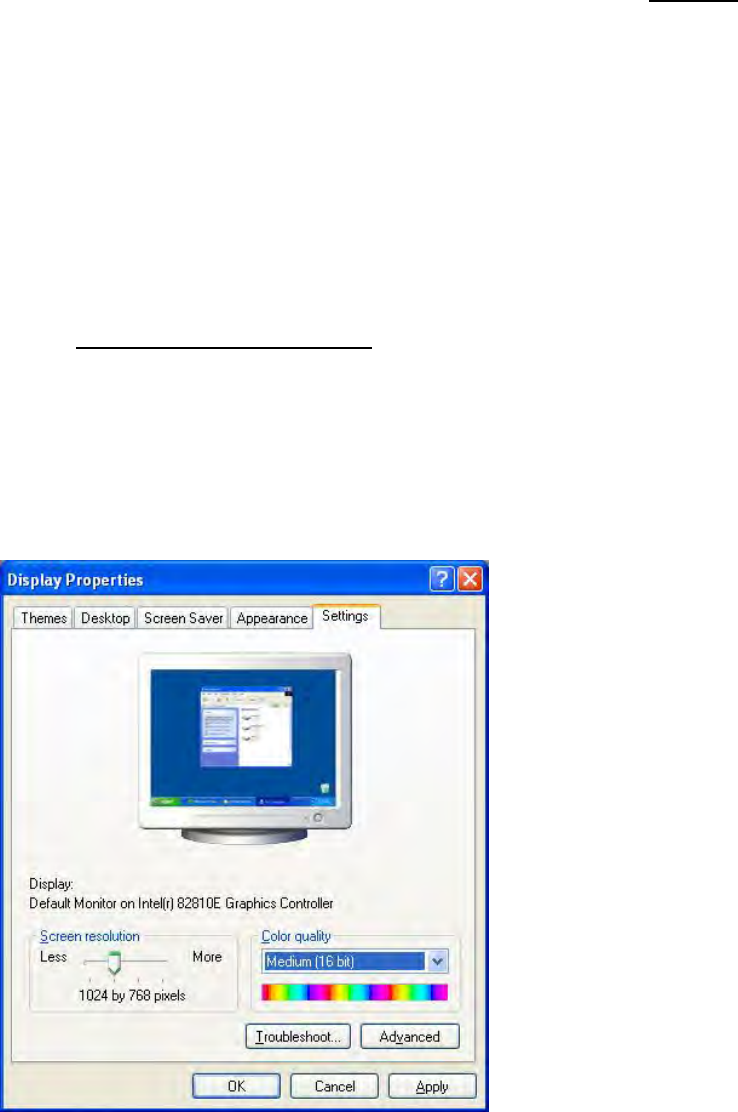
5.3.2 Changing the Display Settings
→ Choose Start Settings Control Panel Display.
→ Click the Settings tab.
→ Set the "Screen resolution" slider to "1024 by 768 pixels".
Fig. 5-1: Screen settings
→ Confirm the settings by clicking OK.