00196805-02_VD_EDM_1_10_de_en.pdf - 第27页
EDM V1.10 / Version Description Ausgabe 07/2011 Edition 4.9 EDM Tool The EDM Tool is a utility that is always installed with the other EDM components. The tasks of the EDM Tool are as follows: ● It monitors the status of…
EDM V1.10 / Version Description Ausgabe 07/2011 Edition
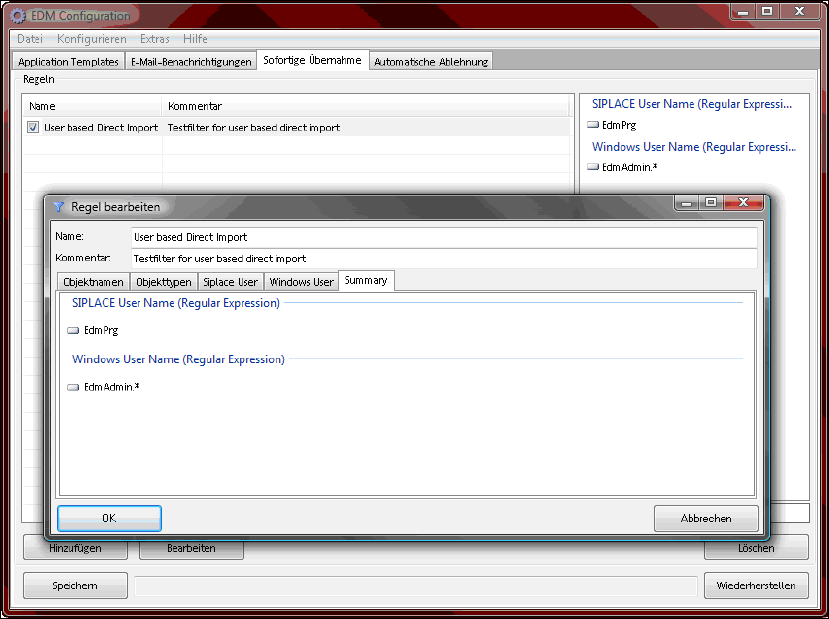
All selected filter attributes are displayed on a summary page in the EDM Configuration.
Figure 4-25:Summary page of a user-based direct import filter
Further information can be found in the EDM Installation Manual, item no. 00196806-xx.
4.8.1.2 Updated default filters
New sets of filter rules have been added to the default filters to support the following SIPLACE Pro
features that modify SIPLACE data on the EDM Line Server:
– Random Setup (mandatory)
– LED Pairing (mandatory)
Optionally, new filter rules are also available for LES.
These filters are disabled by default, as they may filter user interactions that should be transferred
to the EDM Master Server.
They also might filter changes made by the user at the EDM Line Server (e.g. changing the feeder
offset on a table). This can be avoided by using user-based filters and either enabling the SIPLACE
Pro security and working as a non-service user, or by starting SIPLACE Pro as another Windows
user as the user of the Line Control Server.
26
EDM V1.10 / Version Description Ausgabe 07/2011 Edition
4.9 EDM Tool
The EDM Tool is a utility that is always installed with the other EDM components. The tasks of the
EDM Tool are as follows:
● It monitors the status of the EDM Service and checks the integrity of the EDM configuration
files.
● It also allows the line engineer to enter comments for new notifications when installed on the
Line Server.
● It displays the confirmation dialog box in push mode.
● The tool may also be used to enter the comment on a different workstation from the Line
Server if installed on another workstation.
27
EDM V1.10 / Version Description Ausgabe 07/2011 Edition
5 Operation under Windows Vista® and Windows 7®
These more recent operating systems have resulted in a number of minor changes for EDM.
5.1 Separation of installation files and variable data in the file system
Starting with the Windows Vista® operating system, Microsoft introduced separate subfolders for
"fixed" program files and data liable to change. As of Version 1.7, EDM takes account of this
change and creates the two subfolders logs and templateStorage in the
%ProgramData%\Siemens SIPLACE\SIPLACE EDM\ folder.
5.2 Restarting the EDM service
The EDM Tool provides a Restart EDM Service command. The user access control (UAC) facility
introduced in Windows Vista requests restricted administrators to grant enhanced permissions
before the service is restarted by the operating system. A regular user has the option of logging in
as an administrator temporarily to restart the EDM service.
28