00196805-02_VD_EDM_1_10_de_en.pdf - 第30页
EDM V1.10 / Version Description Ausgabe 07/2011 Edition – If you change a lead group of a component shape, the cha nges are not displayed correctly in the Difference Editor: – If you change only one individual attribute,…
EDM V1.10 / Version Description Ausgabe 07/2011 Edition
6 Restrictions
The following restrictions apply to EDM:
● Always avoid changing data on the Line Server during a data transfer from the Master Server.
For technical reasons, such changes cannot be logged. As a result your data may become
inconsistent.
● When a component shape changes, it is possible that two change notifications are placed in
the Clearing Pool, one for the component shape and one for the corresponding Vision data
object. These duplicate notifications are usually handled by the filter configuration. The
complexity of the various relationships means that the default settings may not be fully
sufficient.
● Angle values can be displayed in radians at some places in the Clearing Pool.
● Sometimes, the SIPLACE Pro notification system displays superfluous comment windows. If
this error occurs repeatedly, the filter configuration should be adjusted.
● When transferring data from the Master Server to the Line Server to an empty database, you
have to import the system fiducials 250-252 manually using the LCU import or EDM. If the
system fiducials are not imported before the download is performed, the download will fail.
● A license is required on the Line Server. This license must be entered in the SIPLACE License
Manager before installing EDM. If the license is missing, the EDM Service will not start and the
EDM Tool will display an error message.
● Ensure that no objects are open in SIPLACE Pro Desk before you import changes in the
Clearing Pool. The reason is a known issue in SIPLACE Pro concerning updating objects that
are part of another object. If you do not follow this recommendation, it may appear that
changes are not received in the SIPLACE Pro Desk of the EDM Master because the Desk does
not show the changes. You may receive error messages if you change the object in question
on the Desk. You must therefore always close all objects in SIPLACE Pro Desk prior to the
import. A workaround is to restart SIPLACE Pro Desk.
● Extended Difference Editor:
–
The Extended Difference Editor does not show any of the changes made when evaluating
station Vision data. If a component shape was changed only by teaching new station Vision
data, all other fields remain empty. Only the check box for accepting changes to Vision data
will be shown. Vision data will nevertheless be imported if the corresponding check box is
checked
(Clearing Pool - Difference Editor -Component / Component Shape / Fiducial).
If fiducial data is changed in the EDM Client (MC number, type) and if the check box for
fiducial types is checked under the Difference Editor in the Clearing Pool, it is not possible
to import the new data. The import works without the Difference Editor.
– If you assign a new feeder to a component or to a component shape, the feeder with all its
individual attributes is marked correctly as changed (red) in the Difference Editor. The
button to accept one attribute
is already enabled, but the use of the button has
no effect. To accept the feeder with all its individual attributes, first click the feeder name
and then the
button.
Alternatively you can click the
button to accept all.
– The component barcode filter is only visible in the Difference Editor if you double-click the
icon next to the barcode name (do not double-click the barcode name itself!). The
differences between the both components are only visible in this way.
29

EDM V1.10 / Version Description Ausgabe 07/2011 Edition
– If you change a lead group of a component shape, the changes are not displayed correctly
in the Difference Editor:
– If you change only one individual attribute, the whole lead group is marked as changed
(red) - not only this individual property.
– The Difference Editor cannot detect the correlation between the original lead group and
the changed lead group. The original lead group is marked in red and does not find a
counterpart in the changed lead group (right column). The changed lead group is listed
as a new group. This group does not find a counterpart in the original lead group (left
column) either.
– To correct this bug, you must click the
button to accept all changes. Do
not use the
button to accept only one of the lead groups. In this case, an
additional invalid lead group exists in the component shape.
– For technical reasons, it is not possible to merge fiducial MC and component shape LCU
numbers with the Extended Difference Editor.
● Deleting any of the following objects on the EDM Line Server will result in no notification being
sent to the Clearing Pool:
– Feeder inventory: Feeder
– Board: Fiducials and Inkspots
– Placement List: Precedence
– Table: Feeder
– Job: Recipe
– Production Schedule: Recipe
– Restriction: Restriction
– Station: Deleting Station Vision Data
● The Do not transfer optimization results option only describes the head steps generated by
the optimizer or the feasibility test at the Line Control GUI. If this option is activated, the
optimized setup will still be transferred. If, on the other hand, this option is not activated, ALL
data, including the optimized setup and head step data, will be transferred.
30
EDM V1.10 / Version Description Ausgabe 07/2011 Edition
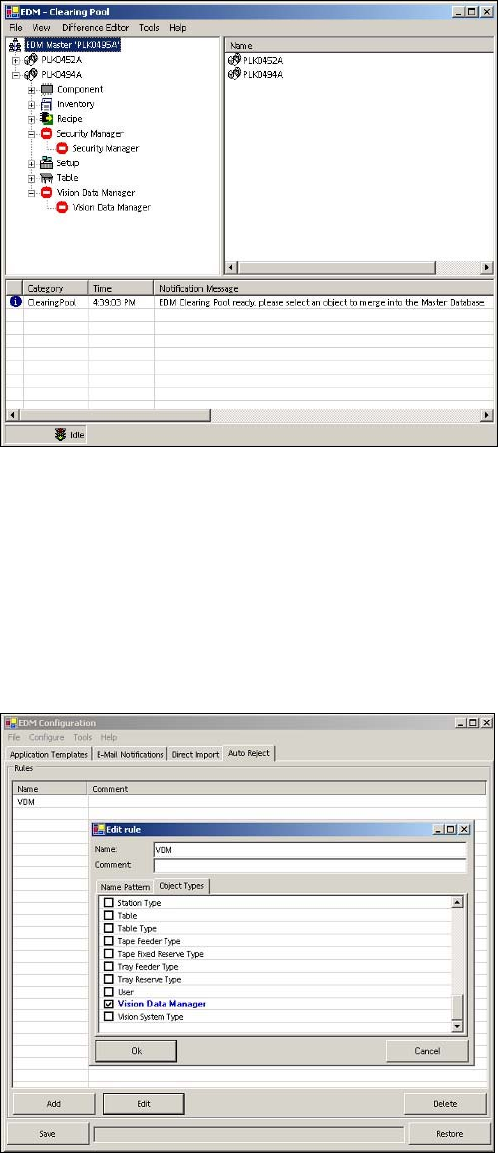
● Undoing changed Vision data:
If you change an object's Vision data on an EDM Client and confirm this with OK but then undo
this change, the message No object data is displayed in the Clearing Pool on the master.
Figure 6-1: Clearing Pool on the master
Workaround:
► Create a filter in the EDM Configuration (Start – Programs –SIPLACE – SIPLACE EDM –
EDM Configuration) by choosing the Auto Reject tab and Vision Data Manager.
► Confirm this change with OK and save it.
► If the filter has already been created, it is sufficient to activate it by checking the check box.
► Finally, you have to start the EDM Service.
Figure 6-2: Creating a filter
31