00196805-02_VD_EDM_1_10_de_en.pdf - 第4页
6 Restrictions 29 7 Installation instructions 33 8 Troubleshooting 34 9 Corrected errors 35 4
EDM V1.10 / Version Description Ausgabe 07/2011 Edition
3
Content
1 General 5
1.1 Brief description...................................................................................................5
2 Scope of delivery 6
2.1 Software components..........................................................................................6
2.2 Languages...........................................................................................................6
3 Requirements 7
4 Description of the software components 8
4.1 EDM Master Service............................................................................................8
4.2 EDM Client...........................................................................................................8
4.2.1 Getting data from the master (pull mode)............................................................8
4.2.1.1 Comment dialog box..........................................................................................10
4.2.1.2 Restoring data with pending changes in the Clearing Pool ...............................11
4.2.2 Transferring the change notices to the EDM Master .........................................12
4.2.3 Configuring "Auto Reject" and "Direct Import" at the EDM Client......................13
4.3 EDM Data Transfer Manager (push mode)........................................................14
4.3.1 Creating a data package....................................................................................14
4.3.1.1 Selecting an application template......................................................................14
4.3.1.2 Selecting the line(s)...........................................................................................15
4.3.1.3 Selecting the objects to be transferred..............................................................15
4.3.1.4 Entering a comment...........................................................................................15
4.3.1.5 Sending the data package.................................................................................16
4.3.1.6 Checking the data packages .............................................................................17
4.3.2 Receiving data on the EDM Line Server............................................................17
4.3.2.1 Accepting the push data packages....................................................................17
4.3.2.2 Importing the objects .........................................................................................18
4.3.3 Automatic push in the Clearing Pool..................................................................19
4.4 EDM Clearing Pool ............................................................................................19
4.4.1 New features......................................................................................................19
4.4.1.1 Handling changed line Vision data.....................................................................19
4.4.1.2 Selecting multiple objects..................................................................................21
4.4.1.3 Filtering notifications..........................................................................................23
4.4.1.4 Additional grouping options ...............................................................................24
4.5 EDM notifications...............................................................................................24
4.6 EDM configuration .............................................................................................24
4.7 EDM Line Service..............................................................................................25
4.8 EDM filter configuration......................................................................................25
4.8.1 New features......................................................................................................25
4.8.1.1 EDM notification filtering on user.......................................................................25
4.8.1.2 Updated default filters........................................................................................26
4.9 EDM Tool...........................................................................................................27
5 Operation under Windows Vista® and Windows 7® 28
5.1 Separation of installation files and variable data in the file system....................28
5.2 Restarting the EDM service...............................................................................28
EDM V1.10 / Version Description Ausgabe 07/2011 Edition
1 General
This document describes the SIPLACE
®
EDM V1.10.
The software supports the following versions of SIPLACE Pro:
● SIPLACE Pro 9.3
1.1 Brief description
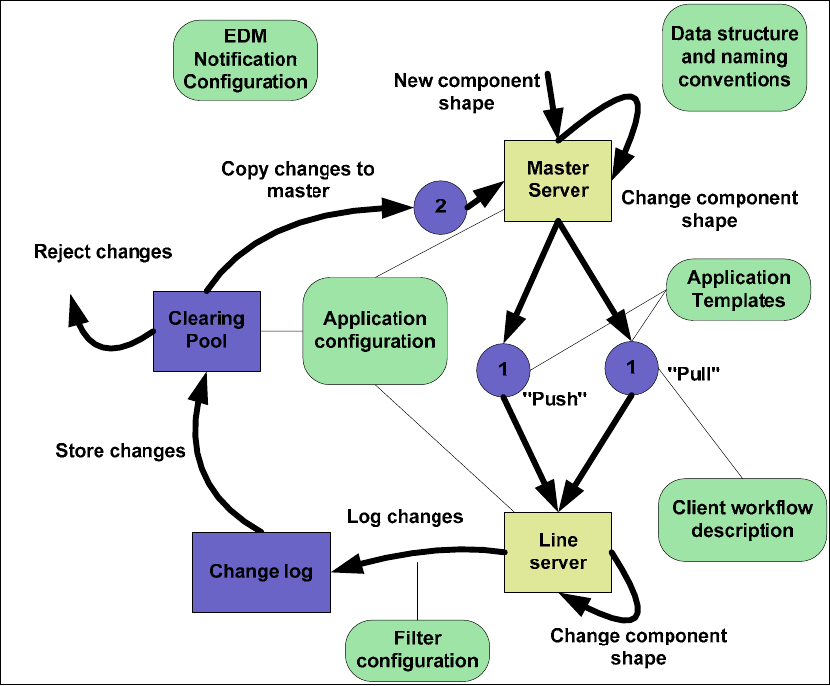
SIPLACE EDM allows for effective and efficient remote storage of data for SIPLACE Pro.
Production data can be distributed to each production line from a central server. Changes to the
data on the lines can be documented, commented, and then sent back to the central server. The
changes made locally can then be assessed by job preparation and reintegrated into the central
database. This completes the cycle.
SIPLACE EDM consists of the following components:
Figure 1-1: General data change process
5